Build your entire WooCommerce attribute and term library — in minutes, not hours
Before a single product goes live on your WooCommerce store, you need attributes. Size. Color. Material. RAM. Storage. Style. Weight. Every variation a customer can filter or choose from starts as an attribute and a set of terms — and WooCommerce makes you create them one at a time, by hand, through a slow admin screen.
Bulk Attribute Creator eliminates that bottleneck entirely. Create dozens of attributes and hundreds of terms in a single operation — either by typing them directly or uploading a CSV. What used to take half a day takes under five minutes.
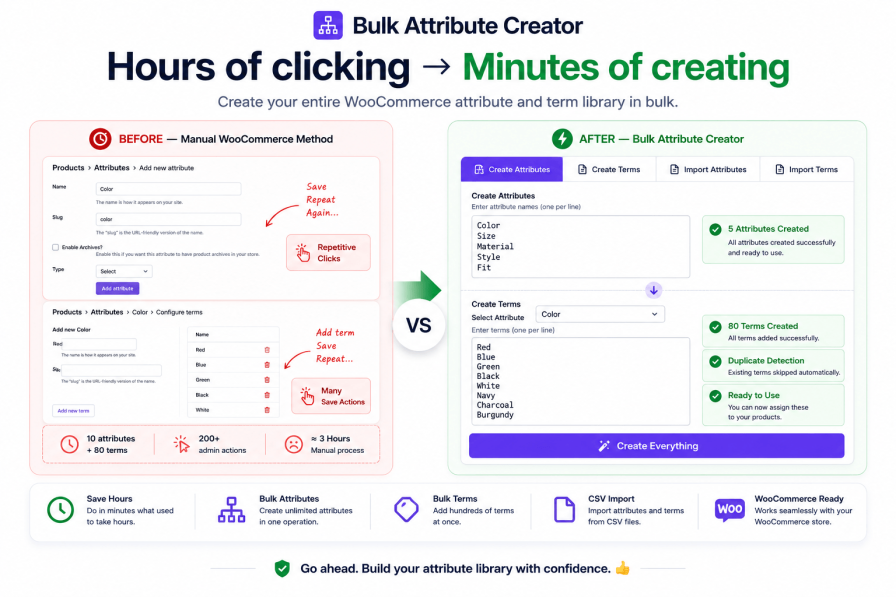
The hidden cost of setting up attributes manually
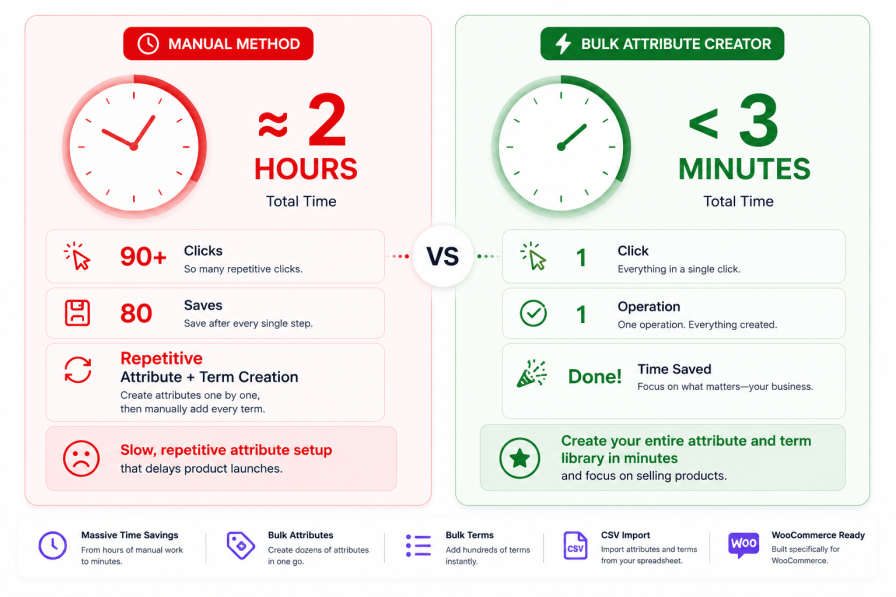
Most store owners only realise how painful attribute setup is once they’re an hour in and still on the third attribute. The numbers tell the real story:
Creating one attribute manually takes 2–3 minutes — navigate to Products > Attributes, fill the name, set the slug, save, then add each term one by one.
Adding terms to an existing attribute takes another 1–2 minutes per term — navigate to the attribute, add the term name, slug, save, repeat.
A typical fashion or electronics store needs 8–15 attributes with 6–20 terms each — that’s easily 80–200 individual admin actions.
That’s 2–4 hours of pure data entry before you’ve assigned a single attribute to a product.
With Bulk Attribute Creator, those same 10 attributes and 80 terms take under 3 minutes.
Two powerful ways to build your attribute library — your choice
Bulk Attribute Creator gives you complete flexibility in how you work. Type everything directly into the admin — or prepare your data in a spreadsheet and import it in one go. Either way, what previously took hours now takes minutes.
Manual entry — type attribute names and term values line by line, configure settings, create everything in one click
CSV import — upload a spreadsheet of attributes and terms with smart batch processing, no server timeouts, no data loss
Manual entry — create your entire attribute library in one sitting
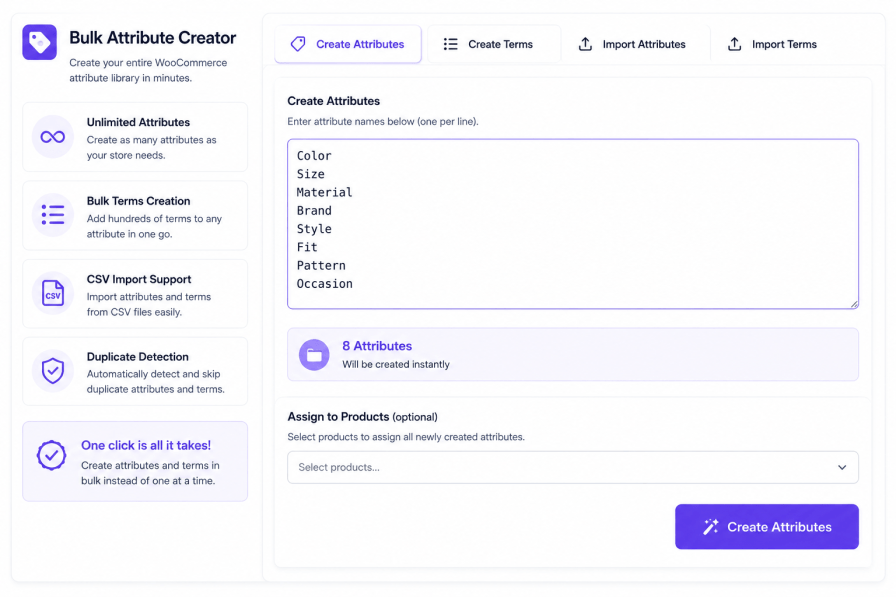
Step 1: Create your attributes
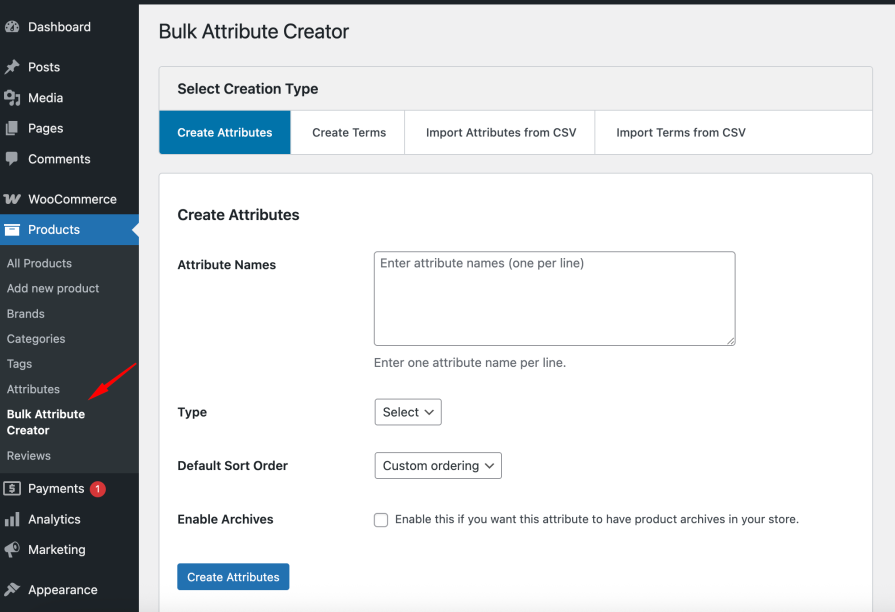
Bulk Attribute Creator — Create Attributes Tab
Navigate to Products > Bulk Attribute Creator, switch to the Create Attributes tab, and type all your attribute names — one per line. Hit create and they’re all registered instantly, with slugs generated automatically.
Add as many attributes as you need in one operation
Slugs auto-generated from names — or define your own
Choose attribute type (select, text, etc.) before creating
Set whether attributes are visible on the product page and used for variations
Detailed success/error report after creation — you know exactly what was created
Real example — what you type:
Color
Size
Material
Style
Fit
→ 5 fully configured product attributes created in one click.
Step 2: Bulk-add terms to any attribute
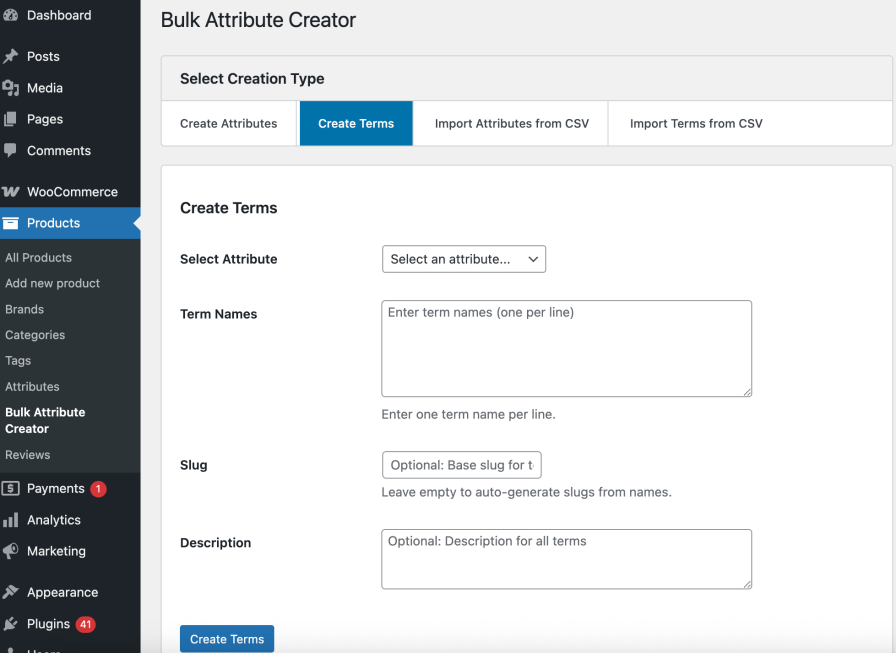
Bulk Attribute Creator — Create Terms Tab
Switch to the Create Terms tab, select which attribute you want to populate, and type all your terms at once. Every term is created in seconds — no clicking “Add new term” eighty times.
Select the target attribute from a dropdown
Enter all terms at once — one per line
Add optional descriptions and slugs per term
Duplicate detection — existing terms are skipped, not duplicated
Handles 10 terms or 200 terms with equal ease
Real example — what you type for a Color attribute:
Red
Blue
Green
Black
White
Navy
Charcoal
Ivory
Burgundy
Olive
→ 10 color terms added to the Color attribute in one click.
CSV import — bring hundreds of attributes and terms in from a spreadsheet
Import attributes from CSV
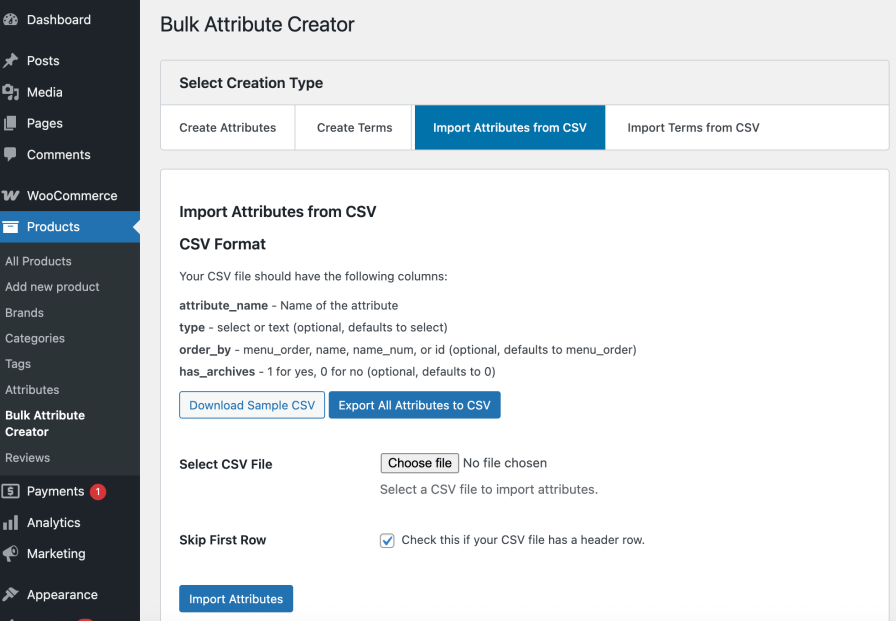
Bulk Attribute Creator — Import Attributes from CSV Tab
Already have your attribute structure in Excel or Google Sheets? Download the sample CSV template, fill in your attribute names and settings, upload, and everything is created automatically — with smart batch processing that handles large files without hitting server timeouts.
Download a pre-formatted sample CSV template to get started immediately
Fill in Excel or Google Sheets — no specialist tools needed
Smart batch processing — large imports run in safe chunks, never timing out
Full results report after import — created, skipped, and any errors clearly shown
Ideal for platform migrations — export attributes from Shopify or another platform, reformat, import
Import terms from CSV
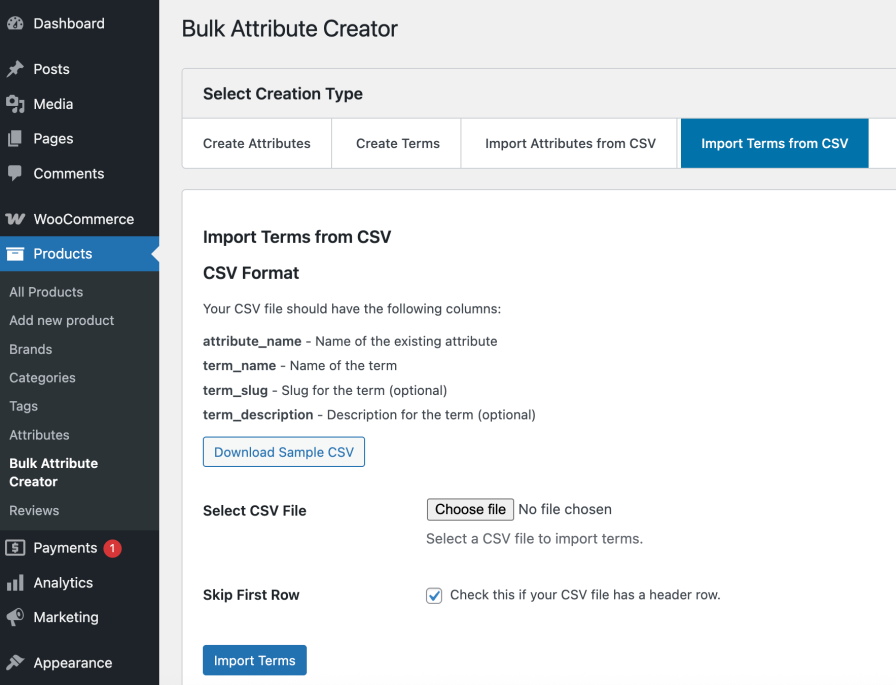
Bulk Attribute Creator — Import Terms from CSV Tab
Have hundreds of terms across multiple attributes? Import them all from a single CSV — each row maps to an attribute and its terms. The batch processor handles the heavy lifting without breaking a sweat.
Map terms to their parent attribute in one CSV column
Supports optional descriptions and custom slugs per term
Batch-processed safely — no PHP memory limit errors on large imports
Perfect for agencies reusing attribute templates across multiple client stores
Bulk Attribute Creator for every store type — real examples
Here’s how store owners across different niches use Bulk Attribute Creator at launch:
A fashion store launching with Size (XS–3XL), Color (15 shades), Material (Cotton, Polyester, Linen, Wool), Fit (Slim, Regular, Relaxed), and Style (Casual, Formal, Sport) — 5 attributes, 50+ terms, done in under 4 minutes via manual entry
An electronics retailer setting up RAM (4GB–128GB), Storage (64GB–2TB), Screen Size (11″–27″), Brand (20 brands), and Connectivity (WiFi, Bluetooth, 5G, USB-C) — imported from a pre-built CSV template in two minutes
A jewelry store defining Metal Type (Gold, Silver, Platinum, Rose Gold), Gem Type (Diamond, Ruby, Sapphire, Emerald, Opal), Carat Weight (0.25–5.0ct), and Chain Length (14″–24″) — entire attribute library created before the first product listing
A WooCommerce agency managing 12 client stores — uses a master CSV template for common attributes (Color, Size, Material) that gets imported into each new store build in under a minute
A home furnishings store with attributes for Room (Living Room, Bedroom, Kitchen, Office), Material (Wood, Metal, Glass, Fabric), Color Family, and Dimensions — built with manual entry during initial store setup
A Shopify migrator exporting their variant options from Shopify, reformatting to the CSV template, and importing 200+ terms across 8 attributes into WooCommerce — without re-typing a single value
Everything included — full feature list
Bulk Attribute Creation
Create multiple attributes in a single operation — no limit
Import attributes from CSV with all settings preserved
Import terms mapped to their parent attribute from a single CSV
Pre-formatted sample templates included for both attributes and terms
Smart batch processing — large files handled in safe chunks
No server timeout errors — processing continues even for 500+ row imports
Comprehensive results report after every import
Technical & Platform
Works with the standard WooCommerce pa_* attribute taxonomy
Permission-based access — only users with correct capabilities can create attributes
Translation-ready — fully internationalised with .pot file included
Compatible with all major WooCommerce themes and page builders
Lightweight — zero impact on frontend store performance
Comprehensive error validation — clear messages on exactly what failed and why
Who is Bulk Attribute Creator for?
New store owners setting up their WooCommerce product catalog for the first time — get your entire attribute library done before you start listing products
Agencies and developers building WooCommerce stores for clients — import a template CSV and have attributes done in the first five minutes of every new build
Platform migrants moving from Shopify, Magento, BigCommerce, or a custom platform — export your variant options, reformat, import, done
Catalog managers launching new product lines or seasonal collections — add a new attribute set without the usual afternoon of clicking
Wholesale and B2B stores with complex product specifications across dozens of attributes — CSV import handles the scale without breaking
How it works — start to finish in under 5 minutes
Manual entry workflow
Go to Products > Bulk Attribute Creator in your WP Admin.
On the Create Attributes tab — type all your attribute names (one per line), configure type and visibility, click Create Attributes.
On the Create Terms tab — select an attribute, type all its terms (one per line), click Create Terms. Repeat for each attribute.
View the detailed results report — everything created is confirmed, any errors are explained clearly.
CSV import workflow
Download the sample CSV template from the Import tab.
Fill in your attributes or terms in Excel or Google Sheets.
Upload the completed CSV file.
The extension processes your data in smart batches — no timeouts, no data loss.
Review the comprehensive import results — created, skipped, and any errors clearly reported.
Stop spending hours on attribute setup. Be done before lunch.
Every attribute and term you create manually through the WooCommerce admin is time that could be spent building your store, finding products, or marketing to customers. The average store owner loses 3–4 hours to attribute setup on launch day — hours they never get back.
Bulk Attribute Creator gives you that time back — and at $29/year, it pays for itself the first time you use it.
Create hundreds of attributes and terms in a single operation
Two flexible methods — manual entry and CSV import — for any workflow
Smart batch processing — no timeouts, no data loss on large imports
Works with all WooCommerce product types — simple, variable, and beyond
Duplicate detection built-in — safe to run on existing stores
30-day money-back guarantee — zero risk to try
Spend Less Time Managing Attributes
Every minute spent manually creating attributes and terms is time not spent selling products. Bulk Attribute Creator helps you generate, import, and manage your entire WooCommerce attribute library in bulk, reducing setup time from hours to minutes while keeping your catalog structured and scalable.
Need another reason to choose us? Bulk Category Creator is developed by Kartechify, a trusted WooCommerce extension developer known for delivering reliable solutions backed by dedicated customer support.
We and our partners process your personal data (such as browsing data, IP Addresses, cookie information, and other unique identifiers) based on your consent and/or our legitimate interest to optimize our website, marketing activities, and your user experience.