Product Icon

Currency Per Product for WooCommerce

Manually updating the prices based on the exchange rates is a tedious task. Currency Per Product for WooCommerce plugin is designed to automatically switch the product price currencies to your customer’s local currency value.
Choose a billing option
$59
Save 20%
$118 $94.40

Product comparison

Subscription includes

  • Product updates and improvements
  • Customer support
  • 30-day money-back guarantee

Key Features

  • Sell in multiple currencies and remove purchase hesitation by displaying product prices in the buyer’s local currency.
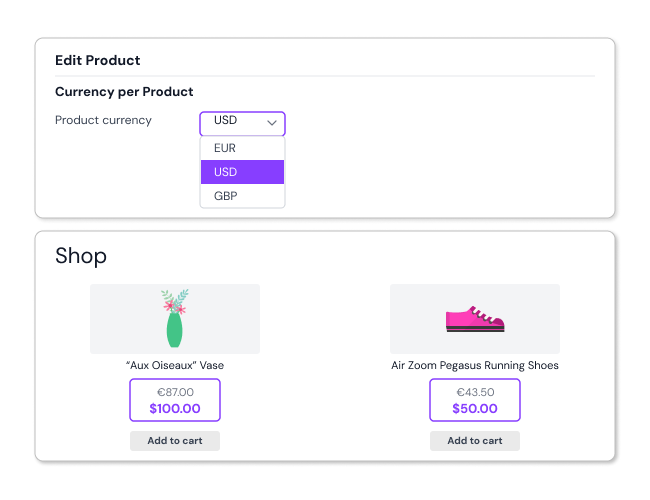
     Example: A French customer sees a handbag priced in EUR, while a US customer sees the same product in USD—no need for manual conversions or a separate WooCommerce currency switcher.
  • Show the original store currency along with the converted price to avoid cart abandonment.
     Example: A UK customer shopping for a £50 jacket sees the total price clearly converted into your store’s base currency (e.g., $62 USD) at checkout, preventing confusion about final costs.
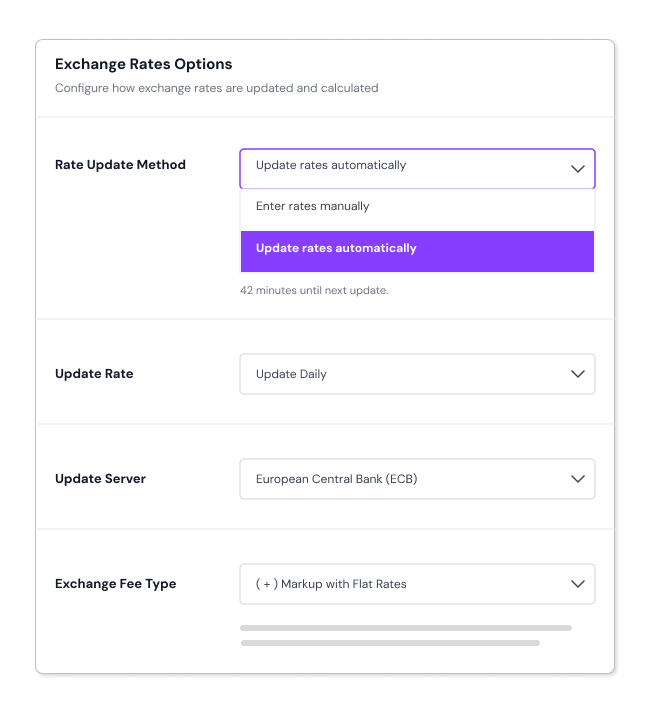
  • Set exchange rates manually or let them update automatically to ensure accurate, fair pricing across multiple currencies.
    Example: If today’s exchange rate makes €100 equal to $110, your store updates the USD price dynamically instead of requiring a manual change, just like a WooCommerce multi-currency plugin.
  • Let customers choose their preferred currency using a simple switcher widget.
    Example: A shopper in India selects INR from the widget, prices across products, cart, and checkout update instantly, creating a clear and convenient shopping experience.
  • Automatically show prices in local currency based on customer location.
    Example: A visitor from France sees prices in EUR the moment they land on your store; no manual setup or extra steps needed.
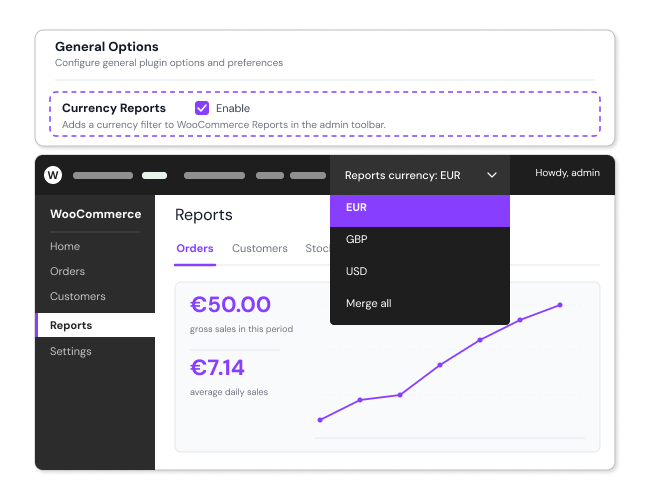
  • Track which currencies drive the most sales and adjust pricing strategies accordingly.
    Example: Your reports show that 70% of your Australian customers prefer paying in AUD—helping you optimize WooCommerce product pricing for better conversions.
  • Improve shopping experience by allowing customers to filter and sort products based on their preferred currency.
    Example: A shopper in Canada searching for running shoes filters results to only show options priced under 150 CAD, making their purchase decision easier without needing a separate currency converter.
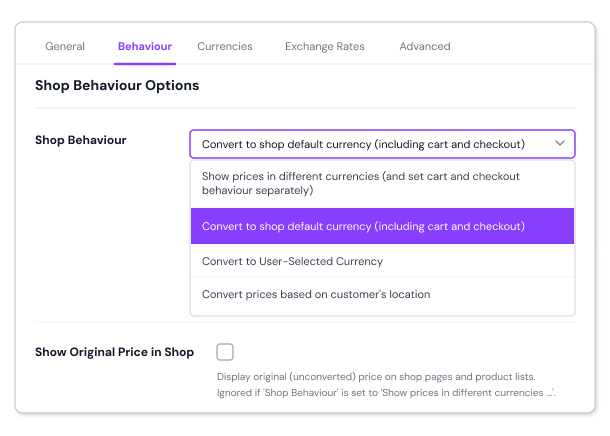
  • Decide whether to show dual prices, restrict mixed-currency carts, or keep products in the store’s base currency.
     Example: A customer adds a $200 camera (priced in USD) to their cart, but when they try to add a €50 tripod, they’re prompted to choose a single currency for checkout, ensuring smooth transactions.
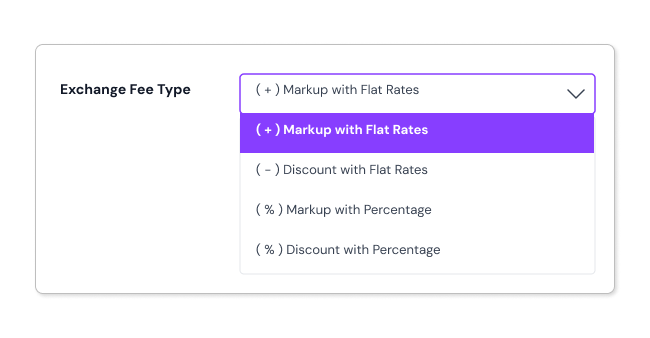
  • Apply extra fees or discounts based on exchange rates without manual calculations.
     Example: A customer from Germany sees a special 5% discount on their order because they’re paying in EUR, making the purchase more attractive while maintaining accurate exchange rate pricing.
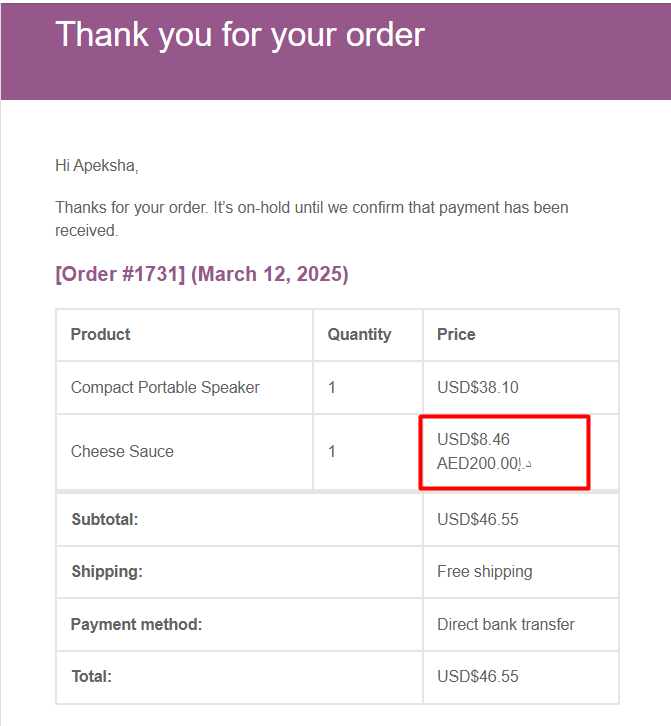
  • Display both the original price and the converted currency in customer emails to reduce confusion.
     Example: A customer who purchased a $200 product in CAD receives an order confirmation email showing both the CAD price and its USD equivalent, making it easy to track spending.
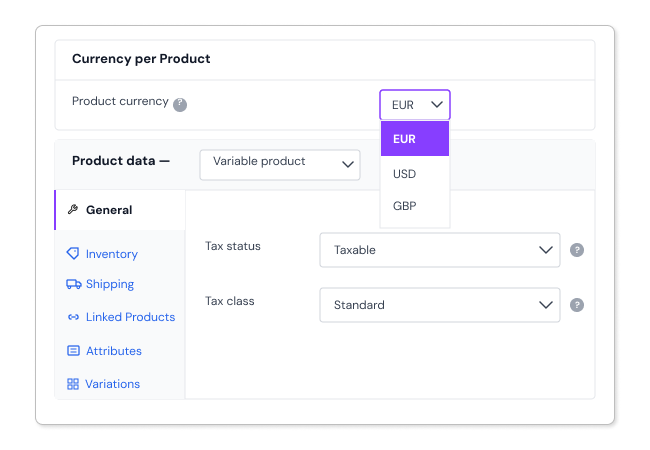
  • Support variable, simple, grouped, and subscription-based products with WooCommerce multi-currency pricing.
     Example: A digital marketing agency sells an online course in USD, while its consulting services are priced in GBP, offering the right currency for different customer segments.
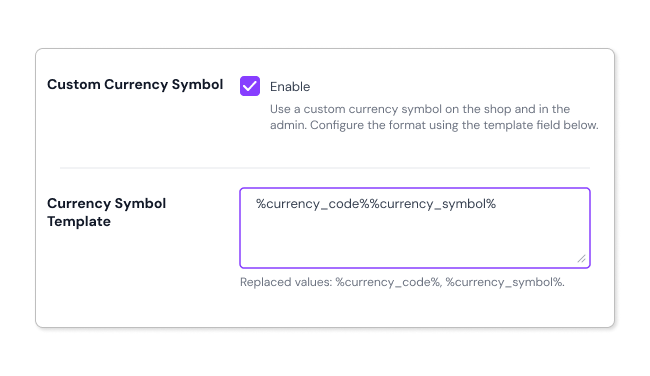
  • Easily customize how currencies appear on both the front-end and back-end using shortcodes.
    Example: Add a custom currency symbol next to product prices, such as showing ₹ instead of INR, making it more user-friendly for Indian customers without needing a separate WooCommerce currency plugin.
  • Let customers view product prices in different currencies directly from the shop page.
     Example: A traveler in Germany sees all prices in EUR by default but can switch to USD with a simple dropdown selection, just like a currency switcher plugin but without unnecessary complexity.
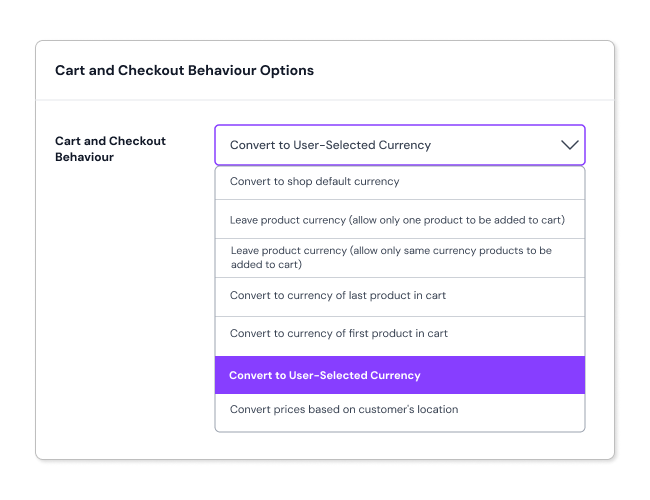
  • Ensure smooth transactions by preventing mixed-currency checkouts that could create confusion.
    Example: A shopper tries to add a smartphone priced in JPY and a charger in USD, but the store prompts them to choose a single currency before proceeding, preventing checkout issues.
  • Enable sorting and filtering by local currency, making price comparisons easier.
    Example: A customer looking for a laptop under $1,000 sees all options converted into their local currency (e.g., 900 EUR), allowing quick comparisons without the need for an external price converter.

Multi-Currency Pricing for Global Sales


Show the original store currency along with the converted price to avoid cart abandonment.

Set exchange rates manually or let them update automatically to ensure accurate, fair pricing across multiple currencies.

Track which currencies drive the most sales and adjust pricing strategies accordingly

Allow customers to filter and sort products based on their preferred currency

Decide whether to show dual prices, restrict mixed-currency carts, or keep products in the store’s base currency

Apply extra fees or discounts based on exchange rates without manual calculations


Display both the original price and the converted currency in customer emails to reduce confusion

Support variable, simple, grouped, and subscription-based products with WooCommerce multi-currency pricing

Easily customize how currencies appear on both the front-end and back-end using shortcodes
Ensure smooth transactions by preventing mixed-currency checkouts that could create confusion


Show Woo product prices in your customer’s local currency using the currency switcher/ multi-currency per product 

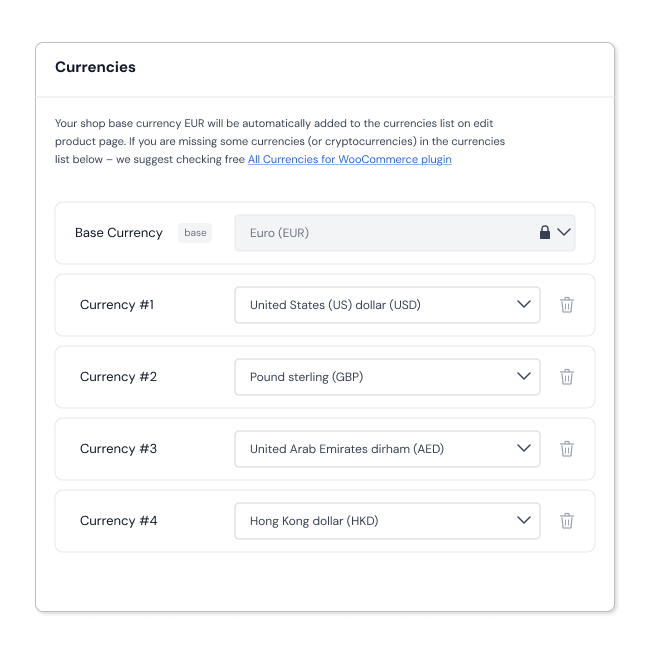
Currency Per Product for WooCommerce plugin lets you switch the prices of currencies according to your local and global customers’ country. You can easily set up automatic exchange rates or show a custom currency symbol to reduce your work. Converted prices can be shown on Shop, Cart, and Checkout Page to keep your customer thoroughly informed.
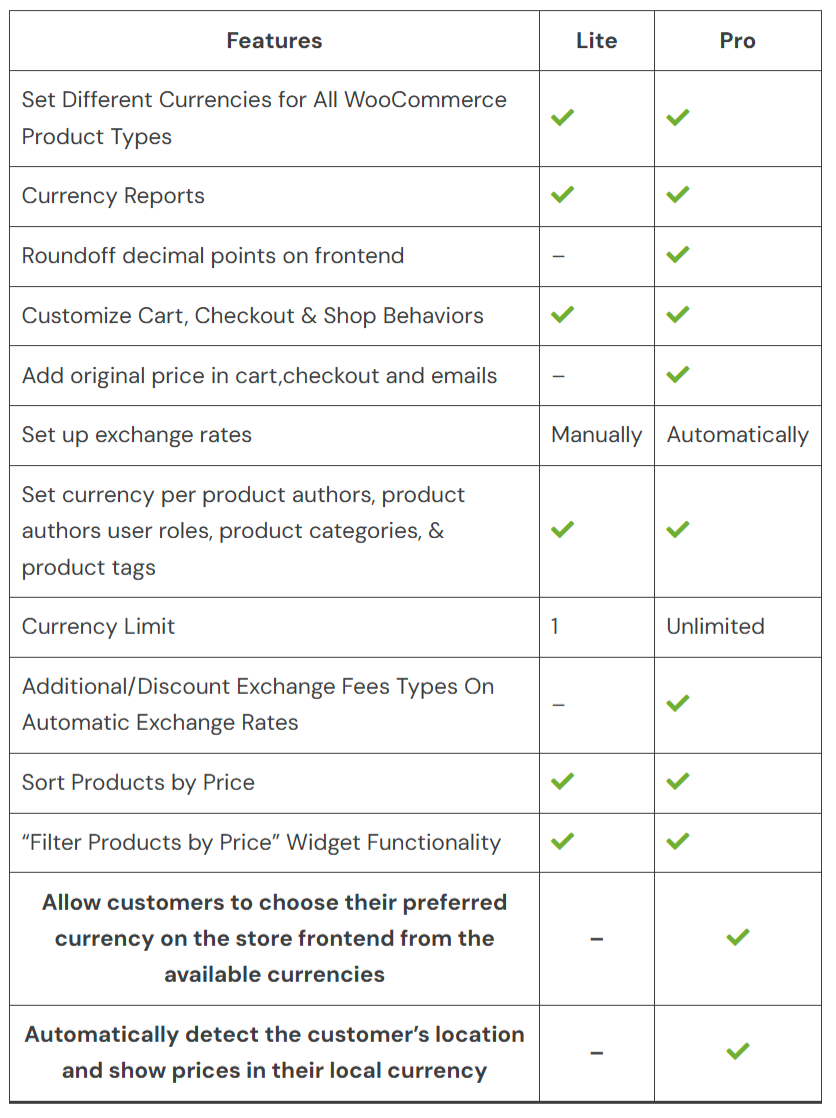
 

Currency Per Product for WooCommerce Free Vs Premium – Full Feature Comparison


Frequently asked questions

Can I assign different currencies per WooCommerce product or variation using this plugin?

Yes. You can assign different currencies to individual products and even to each variation of a product.

Will product prices in different currencies be visible on the WooCommerce Shop, Cart, and Checkout pages?

Yes. You can control how prices appear on the WooCommerce Shop, Cart, and Checkout pages, including displaying them in different currencies based on your settings.

Can I show both the converted price and the original WooCommerce store currency price to customers?

Yes. You can choose to display the original price alongside the converted price on Shop, Cart, Checkout pages, and in order emails. This works when the relevant settings for original price display are enabled.

Can I round off converted WooCommerce prices to cleaner values (e.g., $9.99 or $100)?

Yes. The plugin rounds converted prices to the nearest whole number on the frontend (e.g., $18.88 becomes $18.90).

What currency will be used at WooCommerce Checkout?

You can control how currency is applied at WooCommerce Checkout using the Cart and Checkout behaviour settings. Depending on your configuration, customers can be charged in your store’s base currency or in the user-selected currency.

Can customers always pay in my WooCommerce store's base currency (e.g., EUR), even if they see WooCommerce prices in their local currency?

Yes. You can configure the Cart and Checkout to charge customers in your store’s base currency, even if WooCommerce product prices are displayed in a different currency on the Shop page.

Can customers manually switch currencies in a WooCommerce store using Currency Per Product?

Yes. You can add the Currency Switcher (CPP) widget to any widget area on your WooCommerce store (sidebar, footer, or header), allowing customers to manually select their preferred currency. This can also be used at the Checkout page.

Does Currency Per Product automatically detect a customer’s location and show WooCommerce prices in their local currency?

Yes. The plugin supports geolocation-based currency display. It automatically detects a customer’s location via their IP address and displays prices in the appropriate local currency.

Can I restrict WooCommerce currency settings based on user roles, product categories, or payment gateways?

Yes. The Plugin allows you to configure currency behaviour based on user roles, product categories, product tags, and even specific payment gateways, giving you complete control over how currencies are displayed and applied.

Does Currency Per Product support automatic exchange rate updates in WooCommerce?

Yes. The plugin supports automatic daily exchange rate updates, so you don’t need to manually update rates. You can also set rates manually if preferred. The plugin also allows you to configure which exchange rate sources servers are used.

Can customers sort and filter WooCommerce products by converted currency prices?

Yes. Both sorting and filtering by converted prices are supported on the WooCommerce Shop page. Customers can sort products from high to low or low to high based on their local currency prices. The Price Filter widget also works with converted prices.

I have another question.

Please fill out this pre-sales form.

Customer reviews

We are accepting reviews for this product, and will display them when we get a few more.

Extension information

  • PHP version required: 7.4
  • Tested with WordPress: 6.9.0
  • Tested with WooCommerce: 10.4.2
  • Requires at least WordPress: 4.4
  • Requires at least WooCommerce: 5.0

Countries

  • Worldwide

Related Products

Price $79 annually
Rated 3.4 out of 5 stars
Price $279 annually
Rated 3.2 out of 5 stars
Price $59 annually
Rated 3.1 out of 5 stars
Price $109 annually
Rated 2.8 out of 5 stars
Price $109 annually
Rated 2 out of 5 stars
Price $49 annually
Rated 4.1 out of 5 stars
Price $109 annually
Rated 2.3 out of 5 stars
Price $109 annually
Rated 2.6 out of 5 stars
Price $109 annually
Rated 2 out of 5 stars
Use of your personal data
We and our partners process your personal data (such as browsing data, IP Addresses, cookie information, and other unique identifiers) based on your consent and/or our legitimate interest to optimize our website, marketing activities, and your user experience.