Product Icon

Custom Product Tabs Manager for WooCommerce

Add extra product tabs to display additional information about product like warranty, use cases, videos and more. Edit and manage your default product tabs.
Choose a billing option
$69
Save 20%
$138 $110.40

Subscription includes

  • Product updates and improvements
  • Customer support
  • 30-day money-back guarantee

WooCommerce Custom Product Tabs Manager enables you to add additional custom tabs to your product pages. Organize important information about your products’ features, warranty, policy, uses cases, videos, size charts, and other details in multiple professional-looking tabs.

Create unlimited tabs and assign each tab to specific products, categories, customers, and user roles. With the editor functionality, you can add videos, text, FAQs, and any other type of content in custom tabs.

Customize tabs sorting order and choose to enable/disable default WooCommerce tabs. Below is the detailed feature list of product tabs managers,
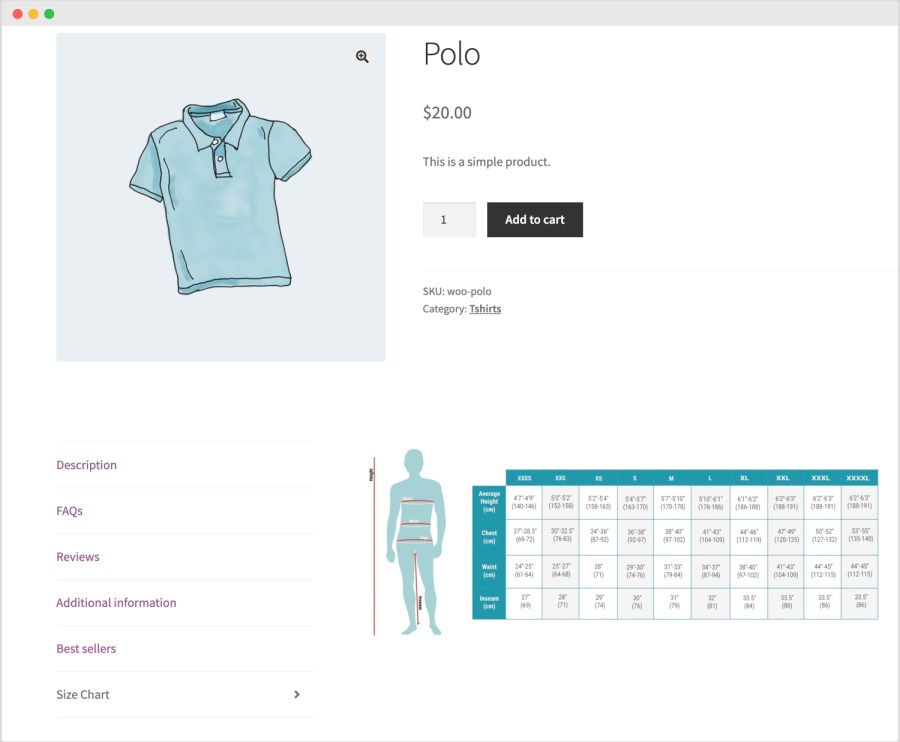
Features of WooCommerce Product Tabs:

  • Create unlimited extra product tabs
  • Add tabs from product level or using global rules
  • Assign tabs to specific products, categories, product-tags
  • Add any type of content in tabs using editor
  • Ability to add contact7 form in tags to let customer send inquiries
  • Restrict tab display by individual customers and user roles
  • Customize tab background image, text color, and icon
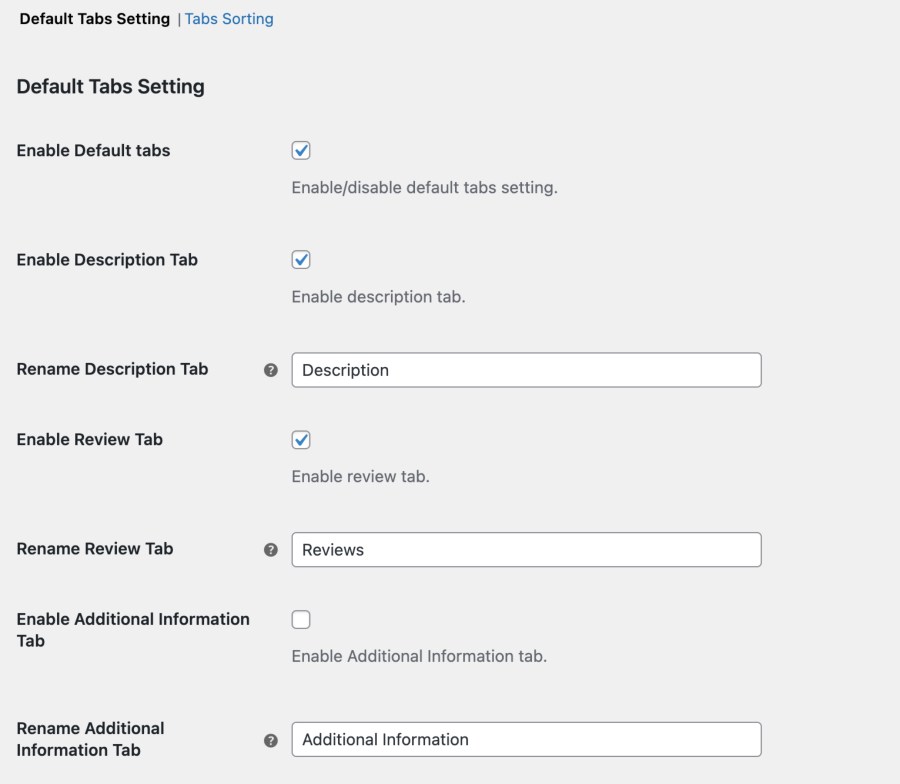
  • Option to disable default tabs and customize their text
  • Sort custom and default tabs as per your requirements

Add tabs using global rules:

Using the Global rules, you can create multiple tabs and attach them to specific products, categories, user roles and individual customers.
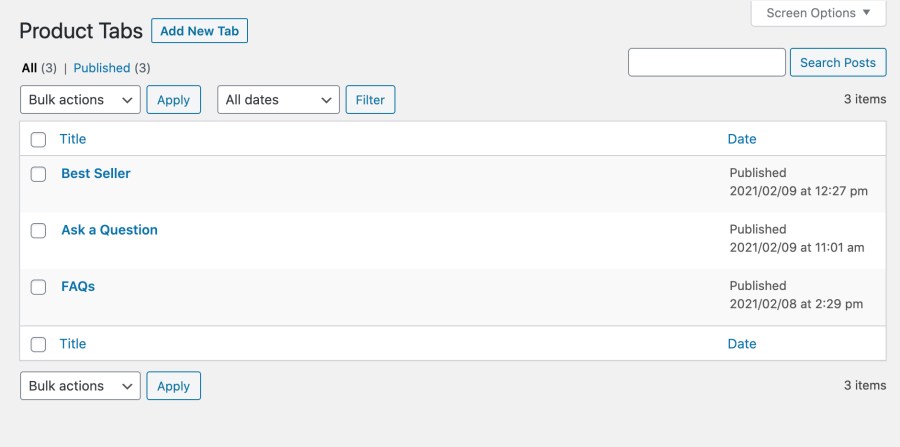
While creating a global tab you can customize the following settings:
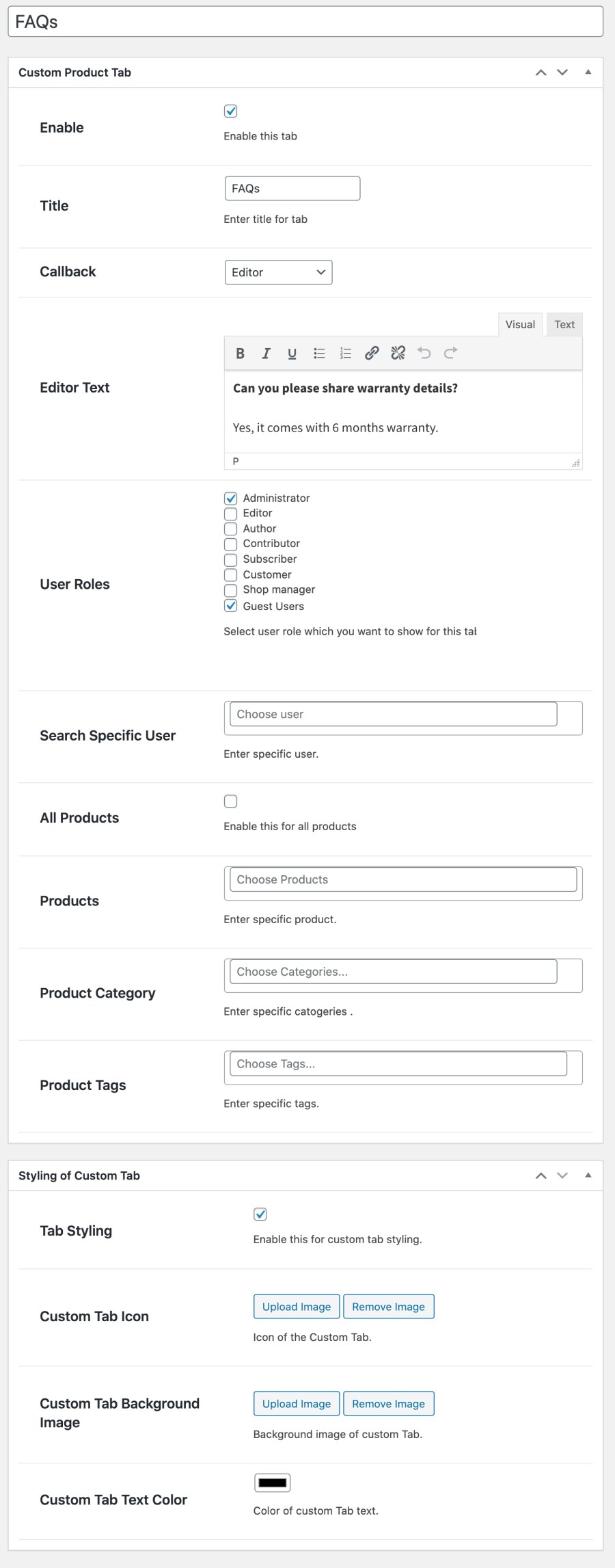
  • Enable tab and add its title
  • Select tab type (editor/contact7form)
  • Add any type of content using editor like images, videos, text and more
  • Assign tab to specific user roles
  • Assign tab to specific customers
  • Display tab on all products or specific
    • Products
    • Product categories
    • Product tags
  • Customize a tab style by adding
    • A tab icon
    • A background image
    • A text color

Add tabs from product level:

Instead of adding tabs from Global rules, you can add tabs directly from product edit sheet as well. These tabs will display only on the selected product page. You can add multiple tabs and customize following options,
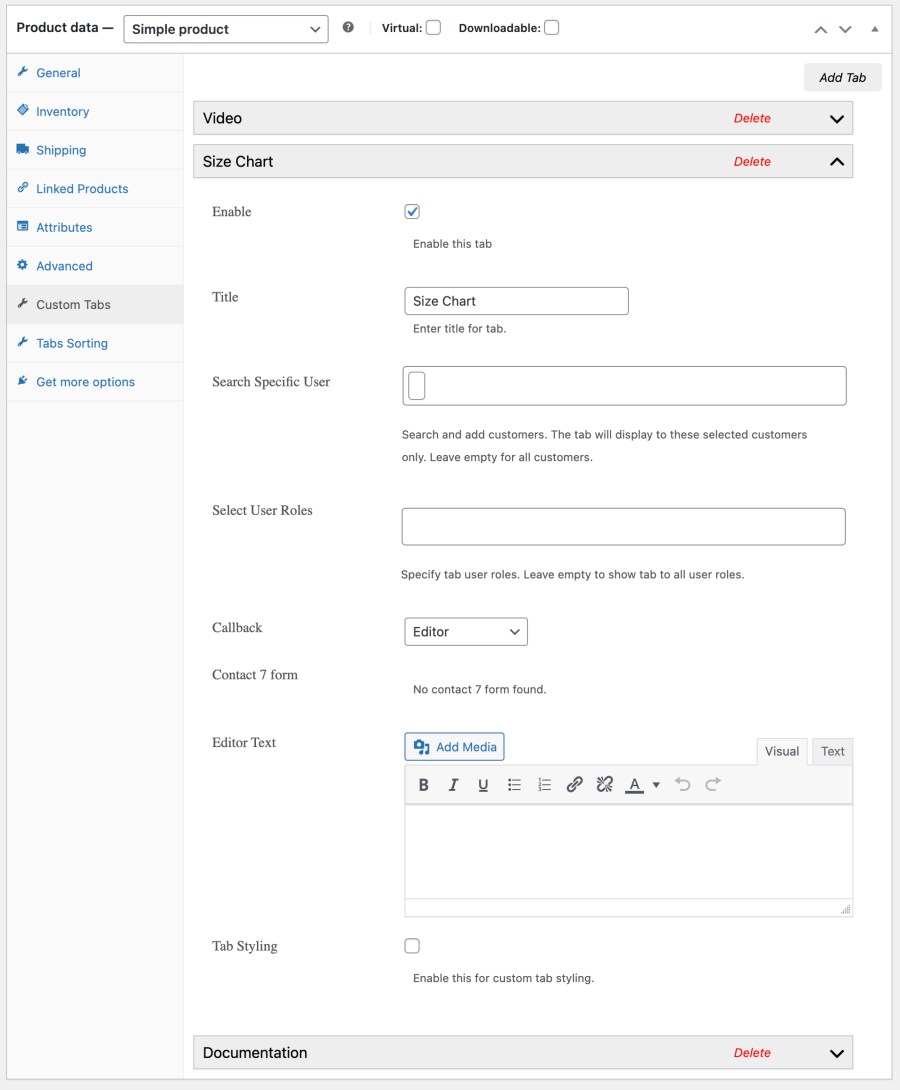
  • Add unlimited tabs
  • Select tab type (editor/contact7form)
  • Add any type of content using editor like images, videos, text and more
  • Assign tab to specific user roles and customers
  • Customize a tab icon, background and text color
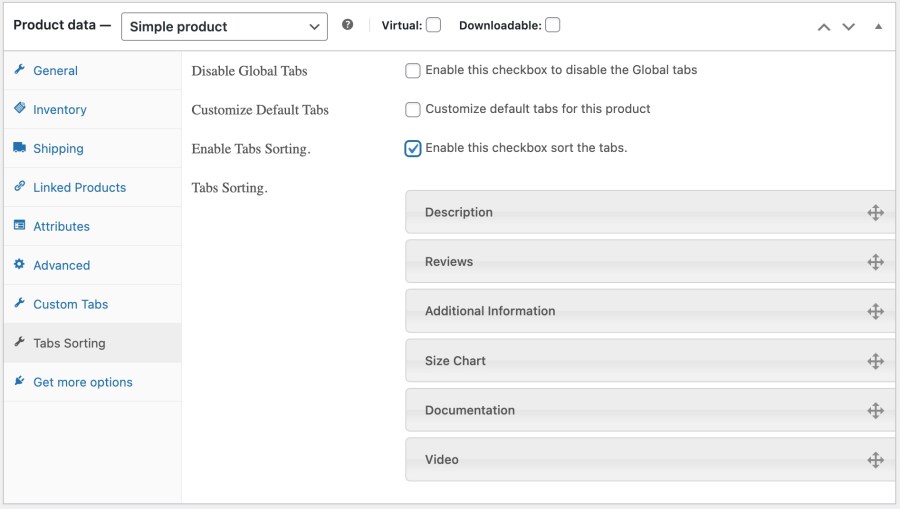
  • Disable default tabs for selected product
  • Customize sorting order for selected product

Manage default product tabs

WooCommerce comes with 3 standard default tabs which includes Description, Reviews & Additional Information. From extension general settings, you can enable/disable WooCommerce default tabs for entire store and customize their labels. You can choose to enable/disable default tabs on product level as well.
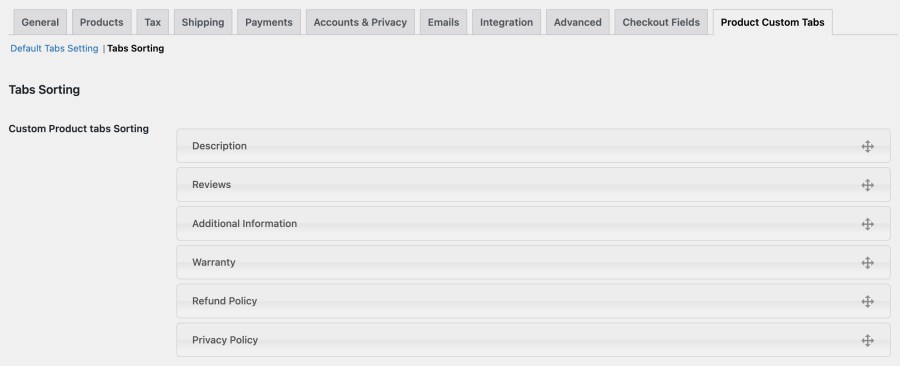
Tabs sorting

Using Global sorting you can drag and drop to sort default and custom product tabs under WooCommerce > Custom Product Tab > Tab Sorting.
You can also customize tabs sorting from product level which overrides the global sorting.
Requirements

Minimum PHP version: 5.2


Customer reviews

Average rating 3.7
8 reviews
5 stars, 57% of reviews
4 stars, 14% of reviews
3 stars, 0% of reviews
2 stars, 0% of reviews
1 star, 29% of reviews
8 reviews
  • vodkamevodka
    Rated 5 out of 5
    Support
    Jul 15, 2024
    Support
    Both the plugin and the support have been a great addition to our website https://cocosbotanica.com. The plugins flexibility and setup are simple to use. The support team are responsive and quick to resolve any issues.
  • glenn48ec7e8ee0
    Rated 5 out of 5
    Support
    Jul 9, 2024
    Support
    Addify support is excellent! I reached out to their support about a technical issue with rendering content and within a day they had a patch ready for me. It was quite refreshing. I didn't need to plead my case several times. It was just a very straightforward and excellent!
  • Scott
    Rated 1 out of 5
    Functionality
    Jul 9, 2024
    Functionality
    I wanted to add a tab that linked to a PDF to provide guidance for customers. They're design specifications. The TinyMCE editor does not work correctly. When I had finally manually added the link to the PDF teh plugin rewrote the link and added /product/ before the /wp-content/ part of the URL killing the link. There was not way for me to correct, every method was rewritten to the incorrect URL. This is a clunky plugin and I don't have time to contact support for an issue that just simply shouldn't exist.
  • admintrampaboards
    Rated 5 out of 5
    Feb 12, 2024
    I fully recommend this plugin
    I've tried several different Tabs plugins, this one is the best one for my website. I found it had more options and worked better with Woo Commerce than the other plugins. When I have had a plugin conflict, their support team have been fast, friendly and fixed within no time.
  • Alex
    Rated 1 out of 5
    Mar 16, 2023
    AVOID THIS PLUGIN PRODUCT AT ALL COSTS!
    This product has quarterly function failure requiring the purchase to contact their support for a fix that turns out to be temporary. Additionally, their product causes issues for other vendor plugins. So far, it has taken over a week to get any support resolved and they have yet to be able to figure out the two issues we are facing. Do yourself a favor and look for another product. It is not worth the headache. WooCommerce would do well to disassociate itself from this vendor's product line.

Extension information

  • WordPress version required: 4.6
  • WooCommerce version required: 3.1.0
  • PHP version required: 7.4
  • Tested with WordPress: 6.*.*
  • Tested with WooCommerce: 10.*.*
  • Requires at least WordPress: 6.5
  • Requires at least WooCommerce: 4.0

Countries

  • Worldwide

Related products

Price $279 annually
Rated 3.2 out of 5 stars
Price $79 annually
Rated 3.4 out of 5 stars
Price $59 annually
Rated 3.1 out of 5 stars
Price $109 annually
Rated 2.8 out of 5 stars
Price $49 annually
Rated 4.1 out of 5 stars
Price $109 annually
Rated 2 out of 5 stars
Price $109 annually
Rated 2.3 out of 5 stars
Price $109 annually
Rated 2.6 out of 5 stars
Price $109 annually
Rated 2 out of 5 stars




