Product Icon

Delivery and Pickup Scheduler for WooCommerce

Allow users to select a date & time of delivery/pickup for orders & products. You can also display an estimated date for orders & products.
Choose a billing option
$99
Save 20%
$198 $158.40

Subscription includes

  • Product updates and improvements
  • Customer support
  • 30-day money-back guarantee

Offer Your Customers Delivery Options

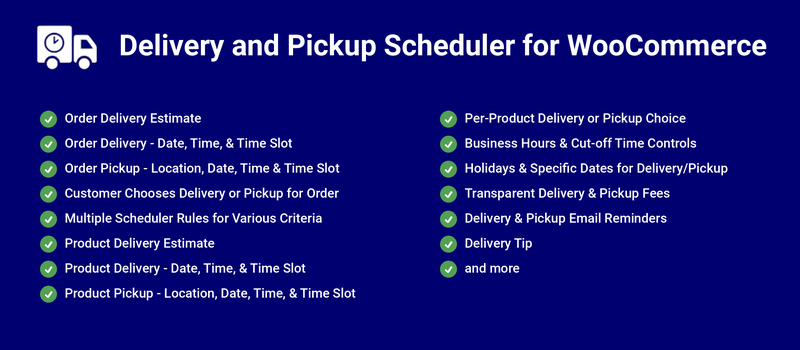
Delivery and Pickup Scheduler for WooCommerce can help you offer the following prominent features to your WooCommerce Shop,

  • Order Delivery Estimate
  • Order Delivery Date Picker
  • Order Delivery Date and Time Picker
  • Order Delivery Date and Time Slot Picker
  • Pickup Locations for Order and Product
  • Order Local Pickup Location and Date Picker
  • Order Local Pickup Location, Date and Time Picker
  • Order Local Pickup Location, Date and Time Slot Picker
  • Delivery or Local Pickup selection by the Customer for their Order
  • Email notification for the respective Pickup Locations to notify about the Order Pickup
  • Product Delivery Estimate
  • Product Delivery Date Picker
  • Product Delivery Date and Time Picker
  • Product Delivery Date and Time Slot Picker
  • Product Local Pickup Location and Date Picker
  • Product Local Pickup Location, Date and Time Slot Picker
  • Delivery or Local Pickup selection by the Customer for the Product
  • Fee calculation for the Same Day and Next Day Delivery and Local Pickup
  • Delivery or Pickup can be restricted for specific dates using Holiday option
  • Delivery or Pickup can be done in a Specific Dates even if it is a Holiday or Non-Deliverable/Pickup Day
  • Tax calculation for the Delivery/Pickup Fee
  • Tipping for Order

Benefits

Increase Site Revenue

Earn additional revenue for your site by charging fees for faster delivery/pickup.

Increase Customer Convenience

Based on the configuration, notify customers of their delivery/pickup dates or let them select the delivery/pickup date for their orders as well as for the products.

How Does it Work?

Order Delivery

The Order Delivery date can be displayed based on the Processing Time, Cut-Off time and Business Days & Time configuration.
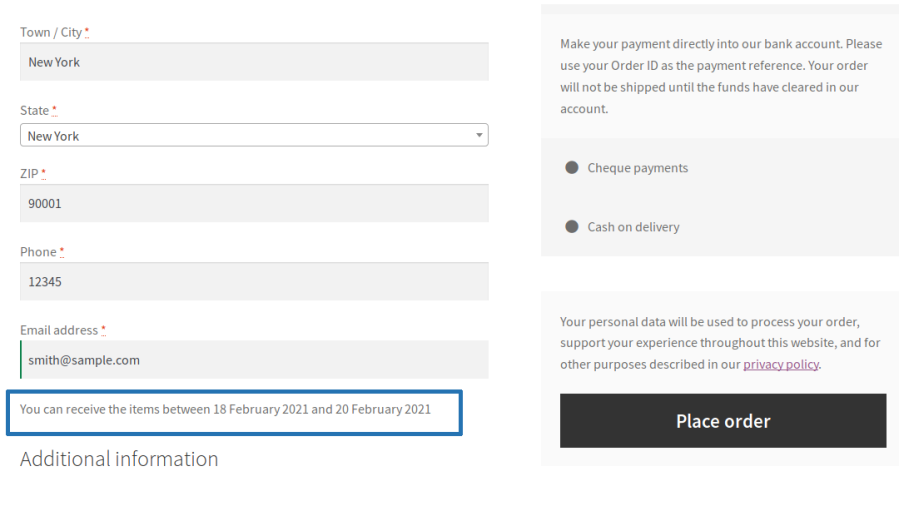
Order Delivery Estimate

  • The user adds products to the cart and goes to the checkout page.
  • The estimated delivery date duration info for the order will be displayed on the checkout page.
Order delivery estimate on checkout page

Order Delivery Date Picker

  • The user adds products to the cart and goes to the checkout page.
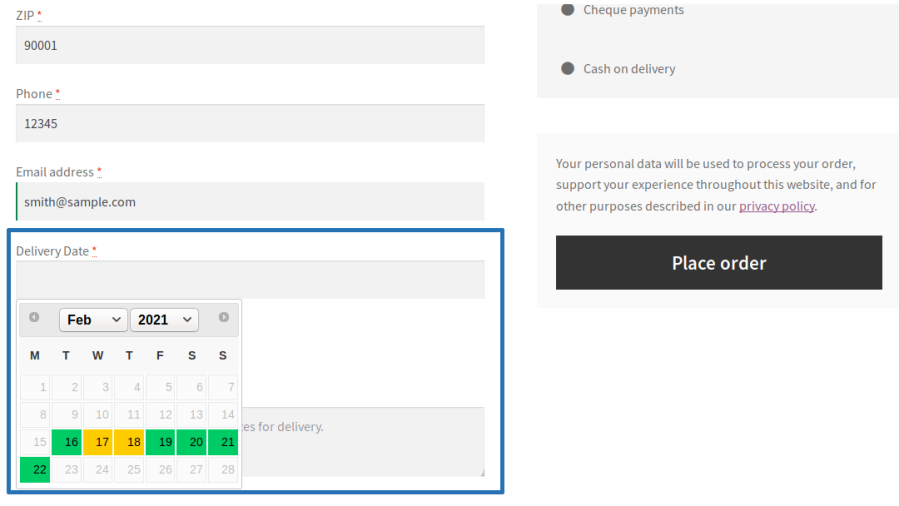
  • On the checkout page, the user can select their preferred date for the order delivery from the available dates.
Order delivery date picker on checkout page

Order Delivery Date and Time Picker

  • The user adds few products to the cart and proceeds to the checkout page.
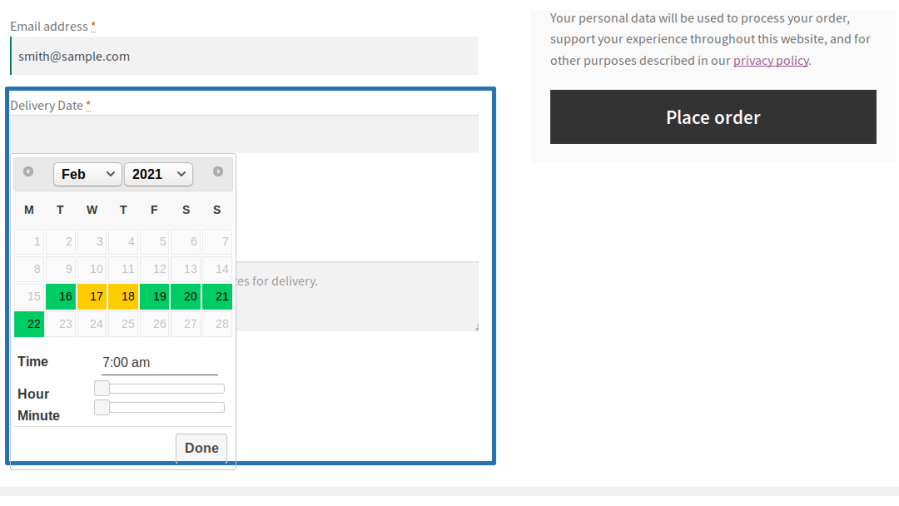
  • On the checkout page, the user can select their preferred date and time for the order delivery from the available dates and time duration.
Order delivery and time picker on checkout page

Order Delivery Date and Time Slot Picker

  • The user adds products to the cart and proceeds to the checkout page.
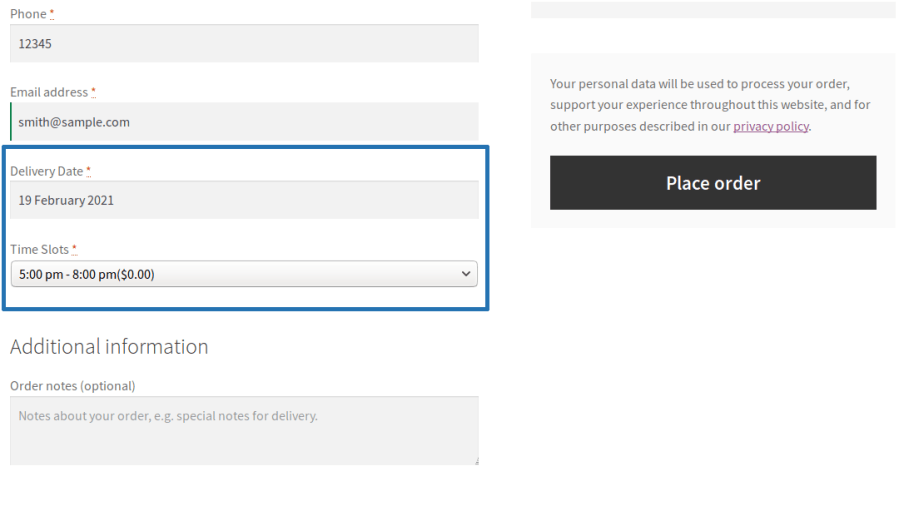
  • On the checkout page, the user can select their preferred date and time slot for the order delivery from the available dates and time slots.


Order delivery and time slots picker on checkout page

Order Pickup

The Order Pickup date can be displayed based on the Processing Time, Cut-Off time and Business Days & Time configuration.
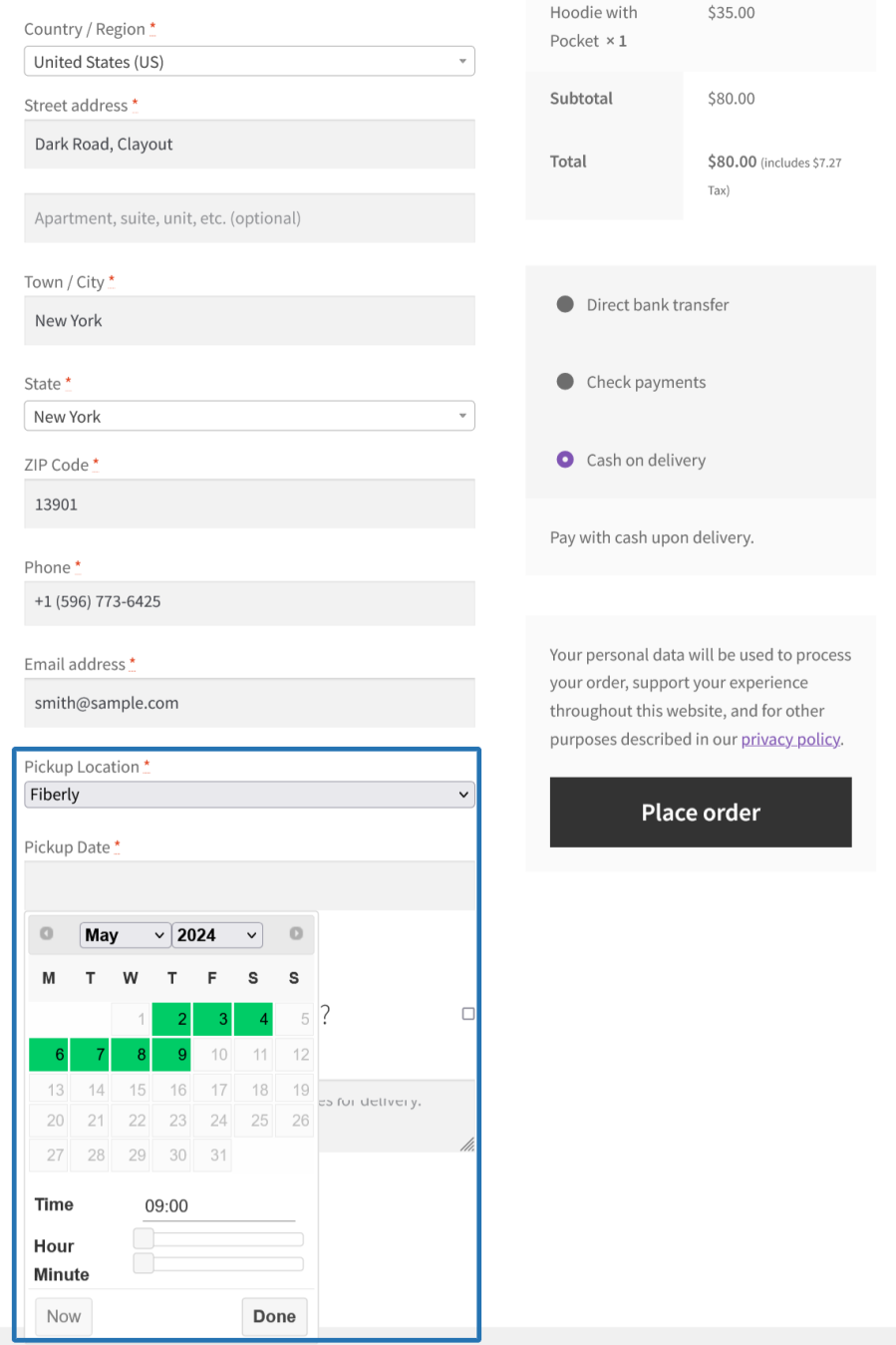
Order Pickup Location and Date Picker

  • The user adds products to the cart and proceeds to the checkout page.
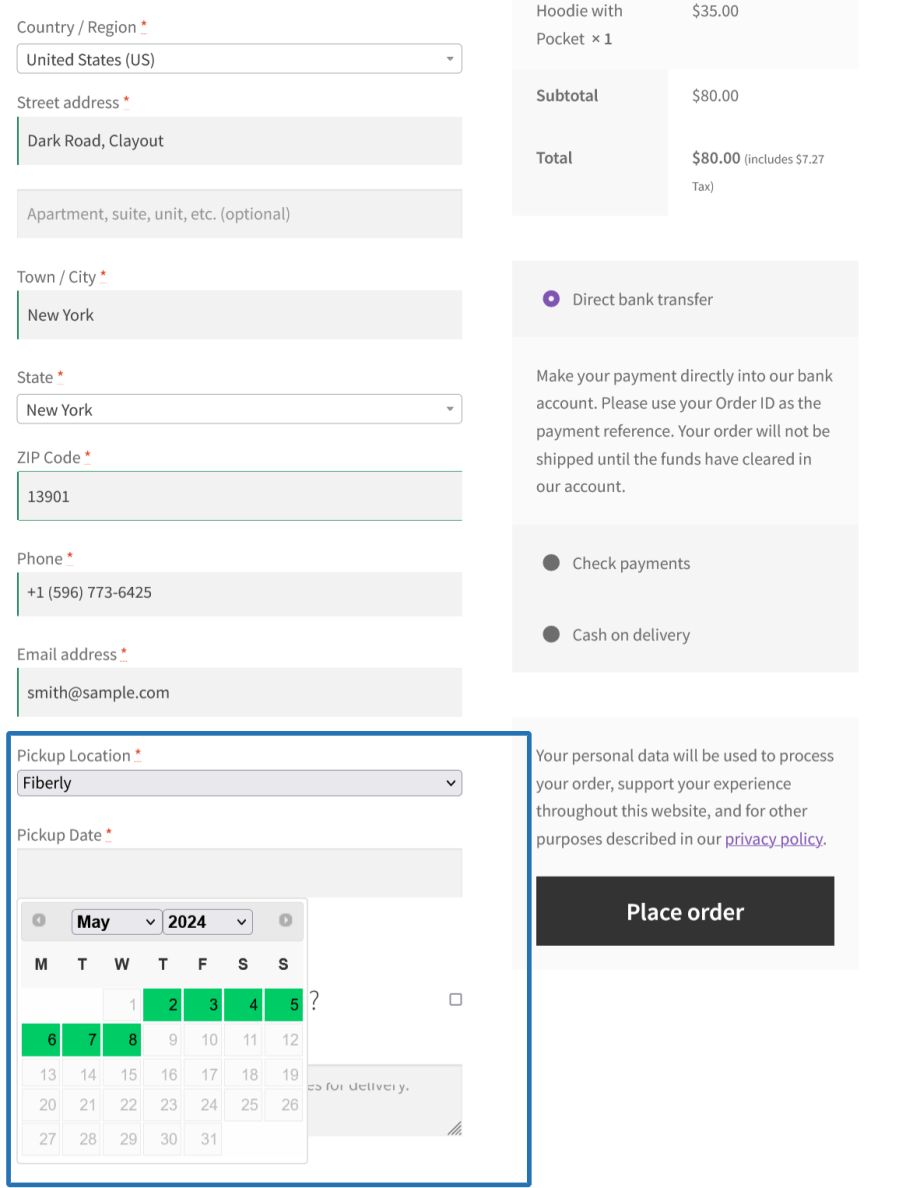
  • On the checkout page, the user can select their preferred pickup location, date for the order pickup from the available location and dates.
Order pickup location, date selector on checkout page

Order Pickup Location, Date and Time Picker

  • The user adds products to the cart and proceeds to the checkout page.
  • On the checkout page, the user can select their preferred pickup location, date and time for the order pickup from the available locations, dates and time duration.
Order pickup location, date & time selector on checkout page

Order Pickup Location, Date and Time Slots Picker

  • The user adds products to the cart and proceeds to the checkout page.
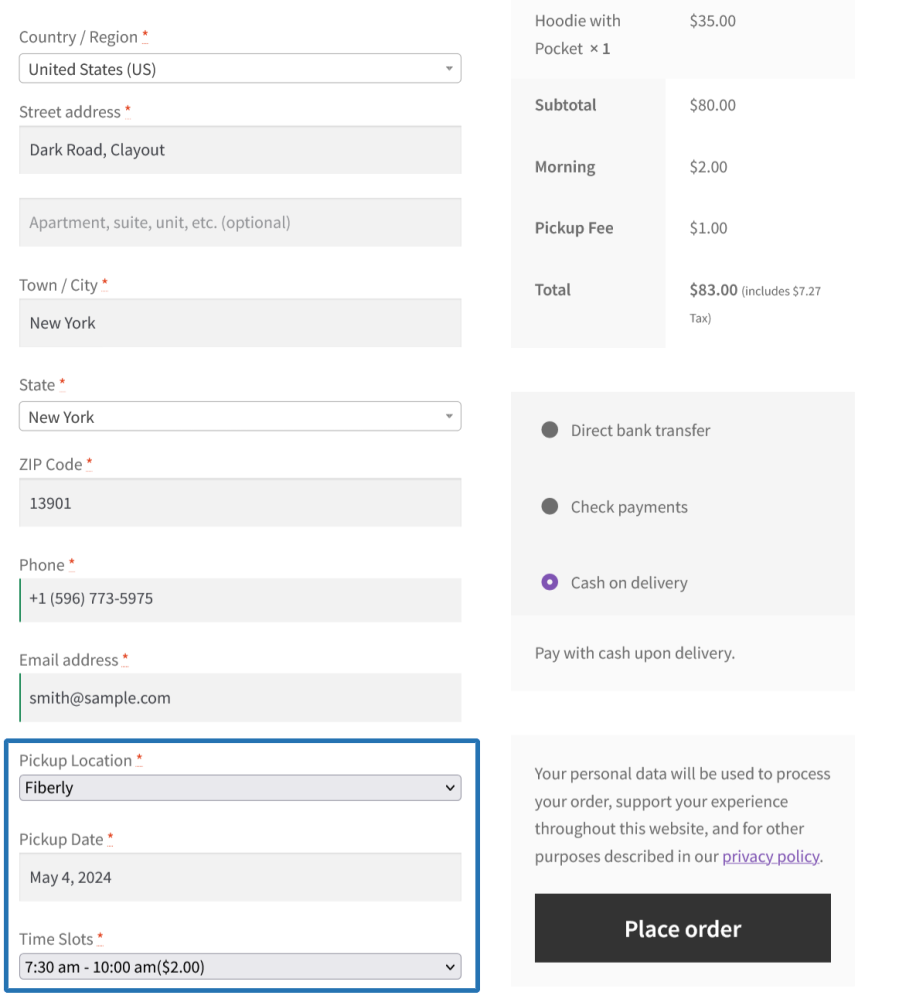
  • On the checkout page, the user can select their preferred pickup location, date and time slot for the order pickup from the available locations, dates and time slots.
Order pickup location, date & time slot selector on checkout page

Delivery or Pickup Mode Selection by Customer for their order

Customers can choose either Delivery or Pickup for the order based on their preference during the purchase. Based on the type selected, they need to proceed with the respective steps to select the Delivery Date, Time/Time Slots or Pickup Location, Date, Time/Time Slots before completing the purchase.
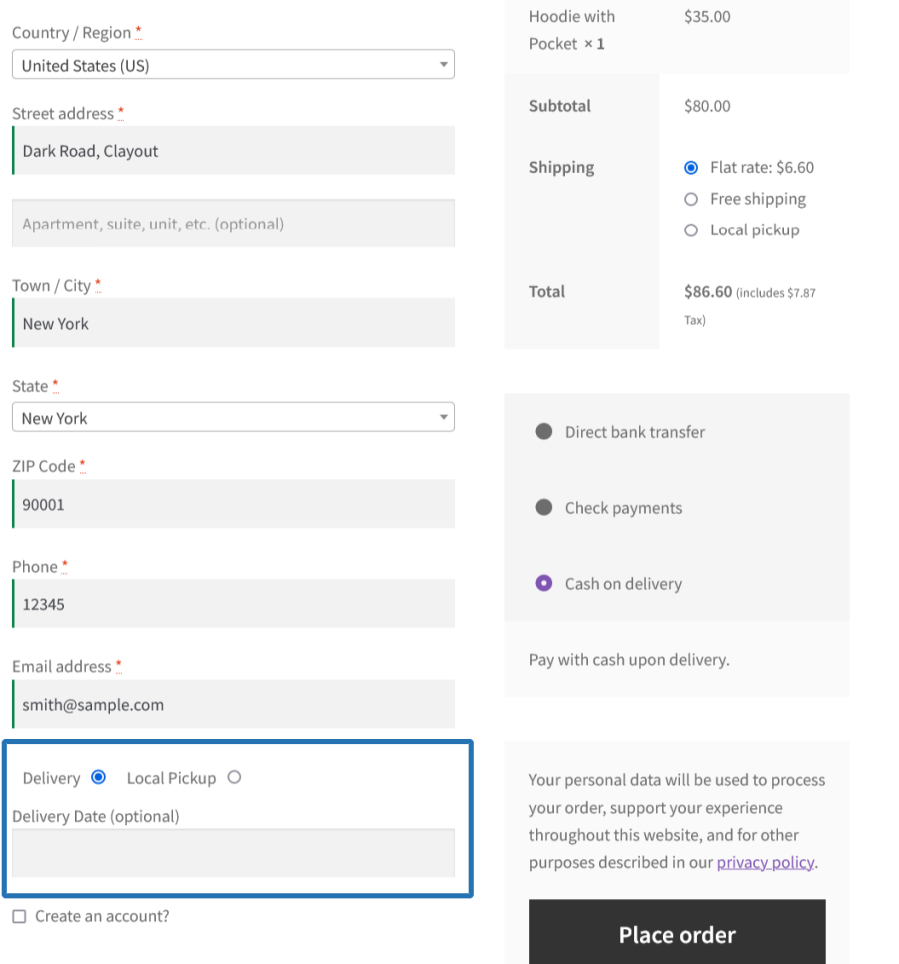
User chooses delivery/local pickup on the checkout page

Product Delivery

The Product Delivery date can be displayed based on the Processing Time, Cut-Off time and Business Days & Time configuration under the respective product configuration.
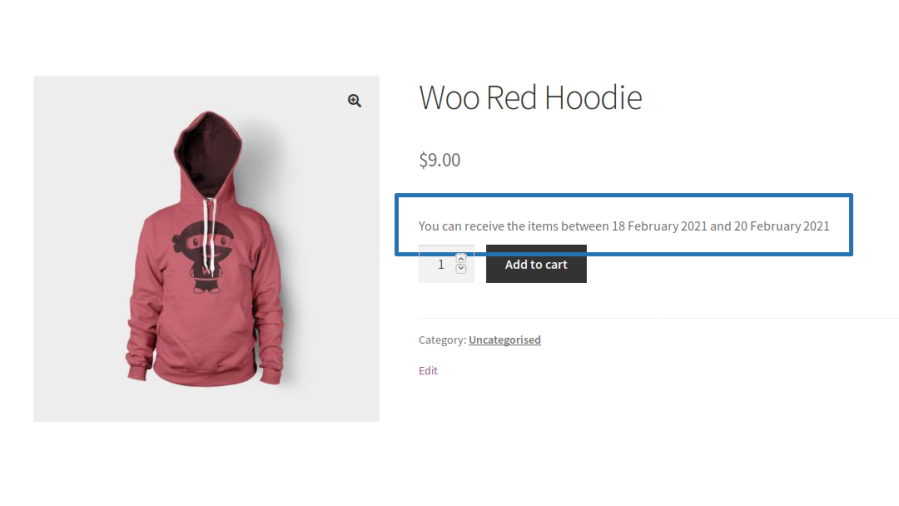
Product Delivery Estimate

  • On the single product page, the estimated delivery info of the product will be displayed to the user.
  • When a user adds a product to their cart the product’s estimated delivery date duration will be displayed below its title.
Delivery estimate displayed on product page

Product Delivery Date Picker

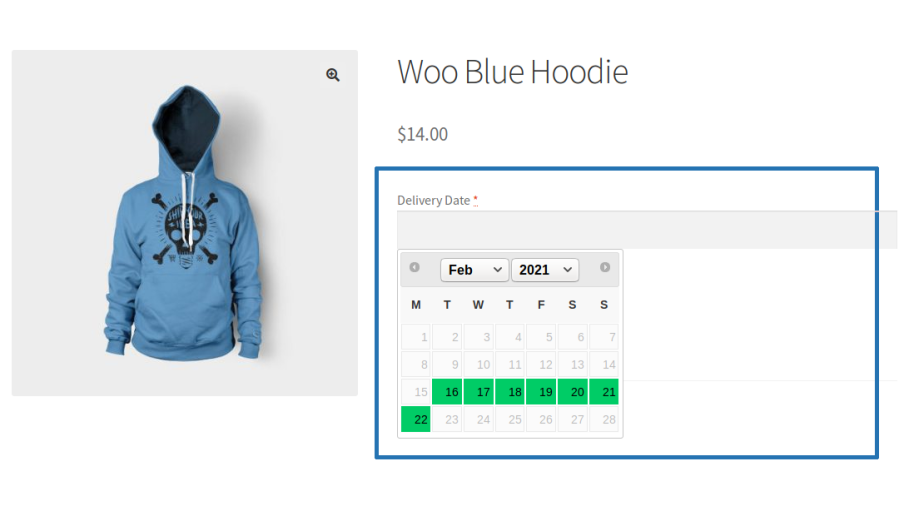
  • On a single product page, the delivery date calendar will be displayed for user’s selection.
  • The user can select their preferred delivery date for the product before adding it to the purchase.
Delivery date picker on product page

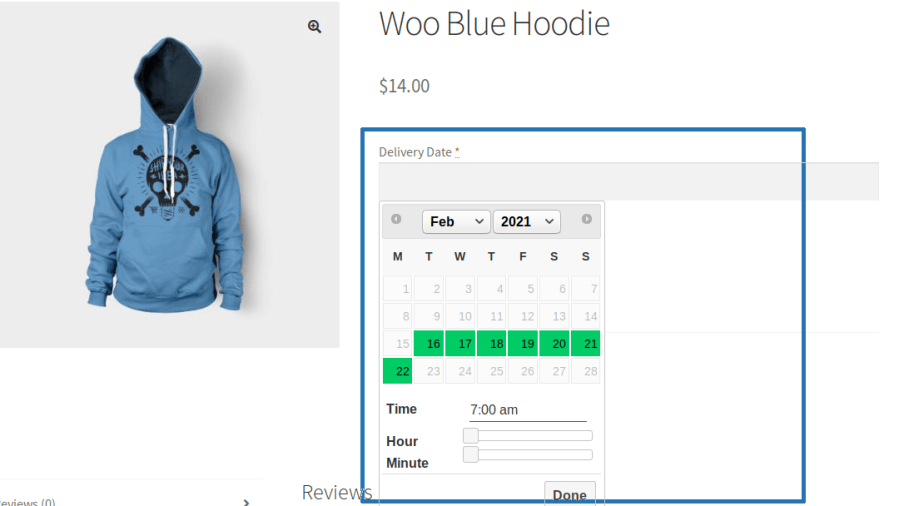
Product Delivery Date and Time Picker

  • On the single product page, the delivery date calendar will be displayed for user’s selection.
  • The user can select their preferred delivery date along with the time for the product before adding it to the purchase.
Delivery date picker & time selector on product page

Product Delivery Date and Time Slot Picker

  • On the single product page, the delivery date calendar will be displayed for user selection.
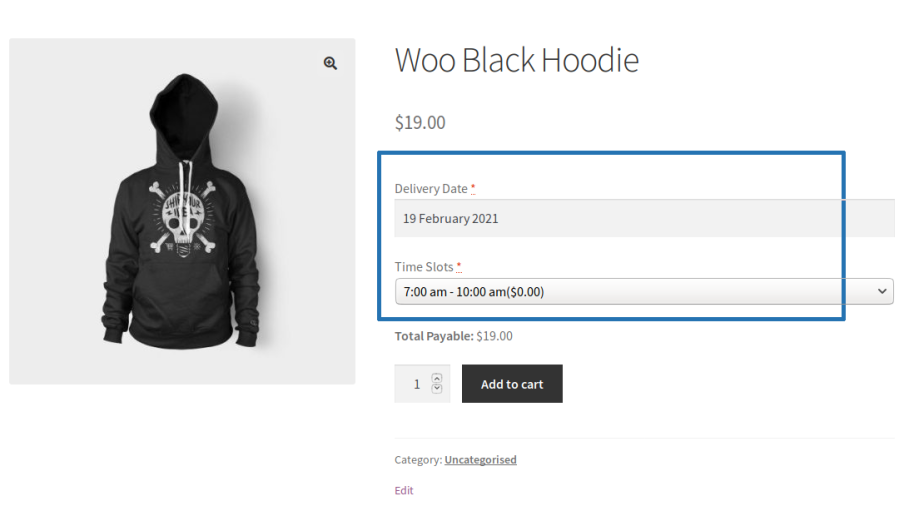
  • The user can select their preferred delivery date along with the time slot for the product before adding it to the purchase.
Delivery date picker & time slot selector on product page

Product Pickup

The Product Pickup date can be displayed based on the Processing Time, Cut-Off time and Business Days & Time configuration under the respective product configuration.
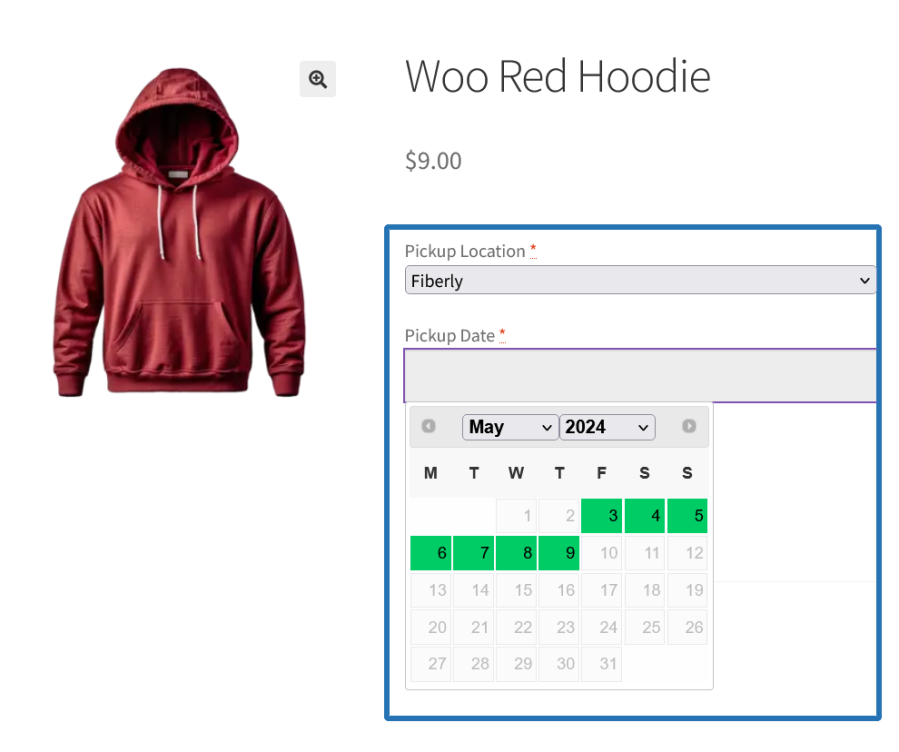
Product Pickup Location and Date Picker

  • On the single product page, the pickup location and date picker will be displayed for user’s selection.
  • The user can select their preferred location along with the date for picking up the product before adding it to the purchase.
Product pickup location & date selector on product page

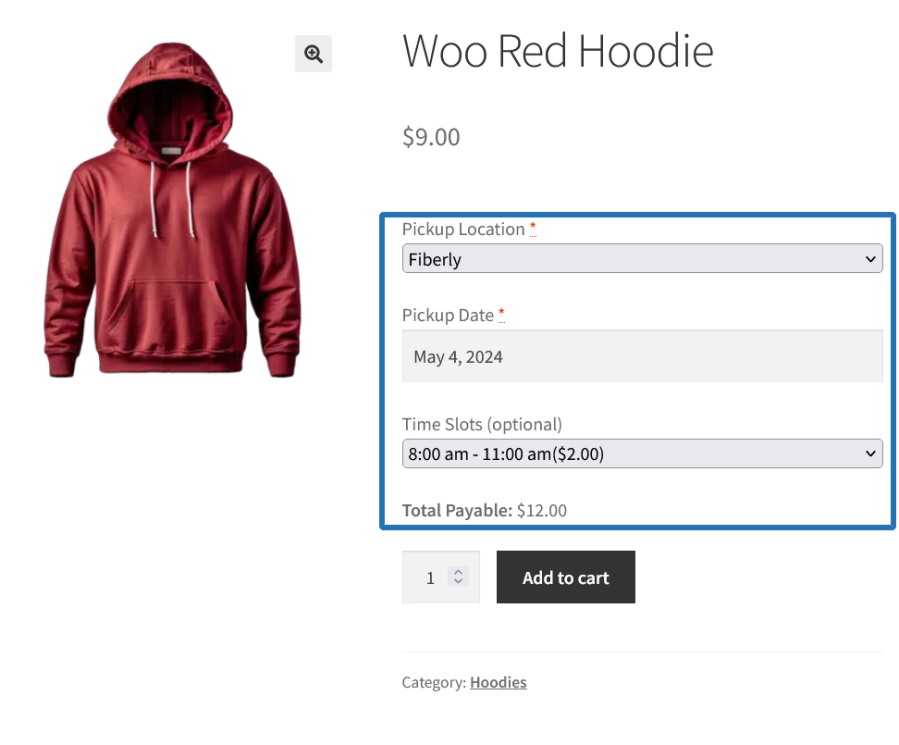
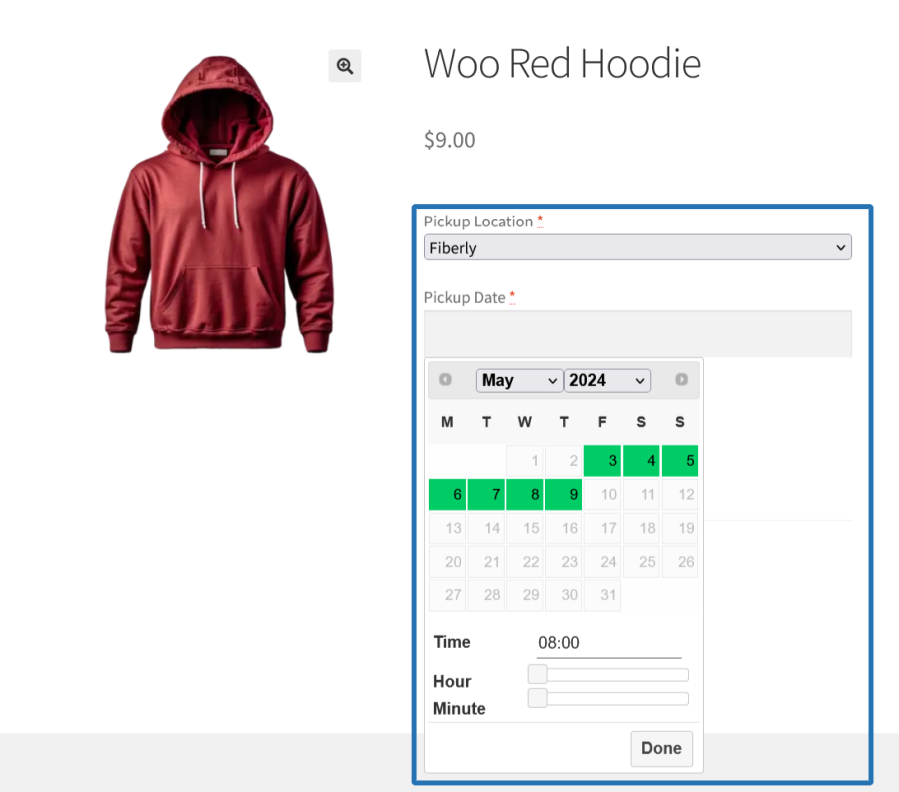
Product Pickup Location, Date and Time Picker

  • On the single product page, the pickup location and date picker will be displayed for user’s selection.
  • The user can select their preferred location along with the date and time for picking up the product before adding it to the purchase.
Product pickup location, date & time selector on product page

Product Pickup Location, Date and Time Slot Picker

  • On the single product page, the pickup location and date picker will be displayed for user’s selection.
  • The user can select their preferred location along with the date and time slot for picking up the product before adding it to the purchase.
Product pickup location, date & time slot selector on product page

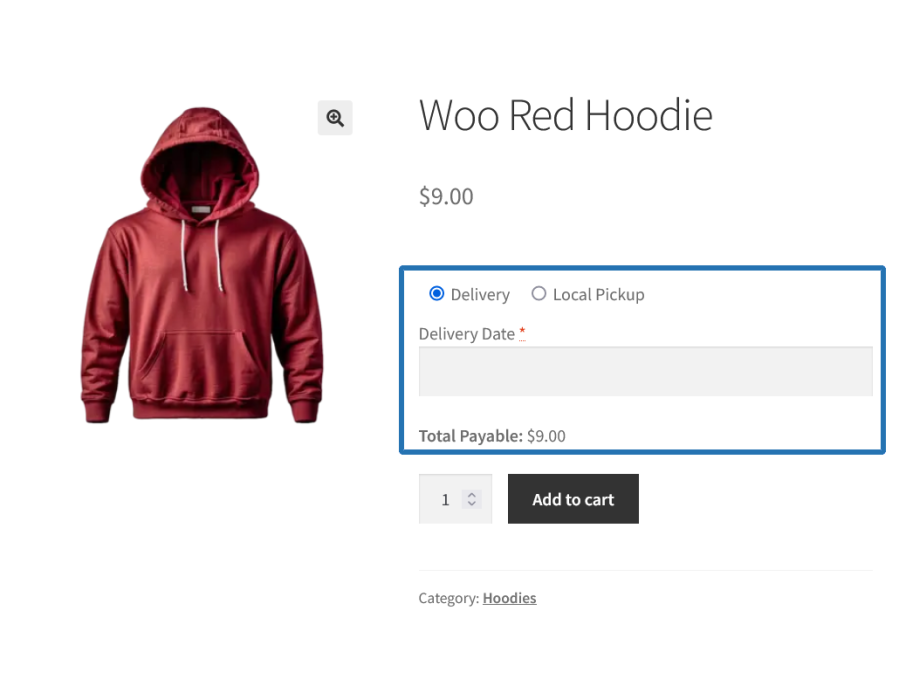
Delivery or Pickup Mode Selection by Customer for the product

  • Customers can choose either Delivery or Pickup for the product based on their preference during the purchase. Based on the type selected, they need to proceed with the respective steps to select the Delivery Date, Time/Time Slots or Pickup Location, Date, Time/Time Slots before adding it to the purchase.
User chooses delivery/local pickup on the product page

Other Useful Features Offered

Holiday for Delivery/Local Pickup

The Delivery or Local Pickup can be skipped for specific available dates using the Holiday configuration.

Specific Days Delivery/Local Pickup

The Delivery or Local Pickup can be done in a specific date even if it is a Holiday or Unavailable day using the Specific Date Delivery/Local Pickup configuration.

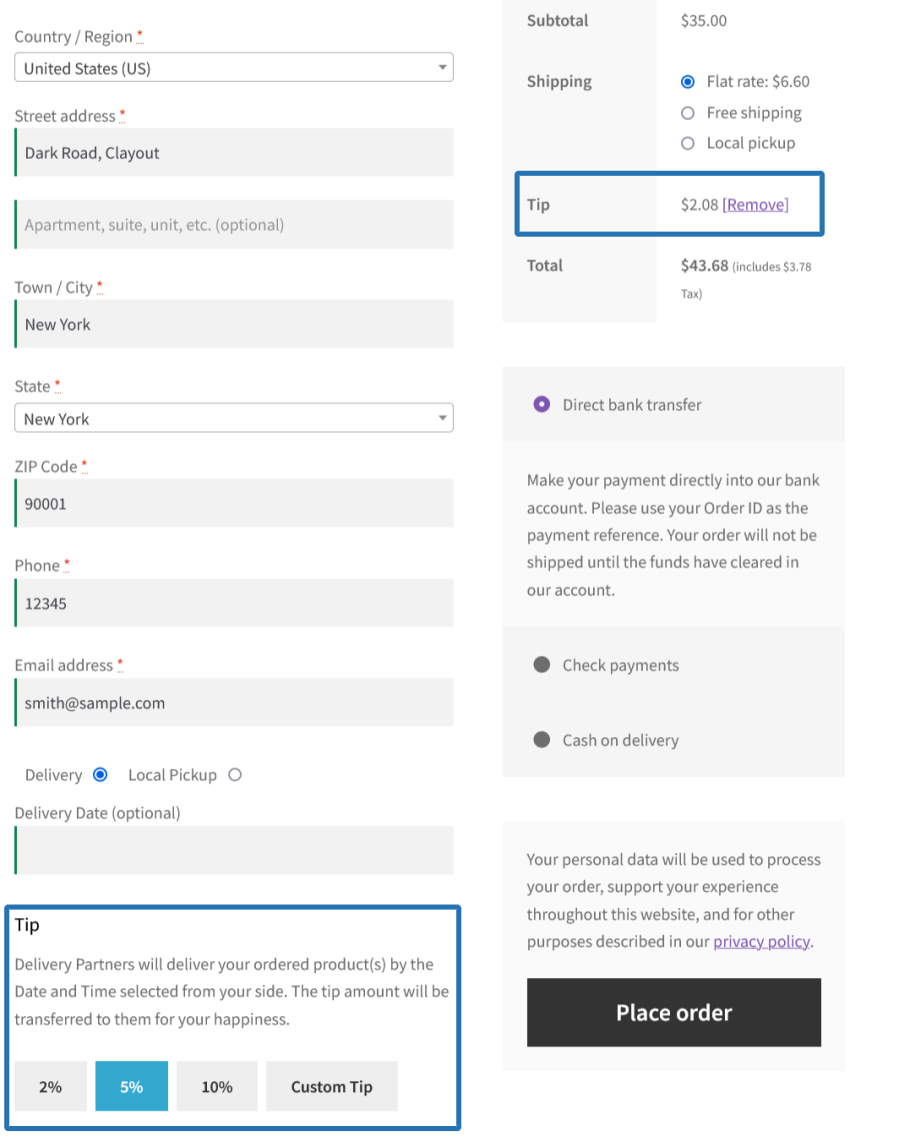
Order Tipping

Allow customers to add tip for their order for allowing them to choose their preferred Order Delivery/Pickup date and time during the Order placement.
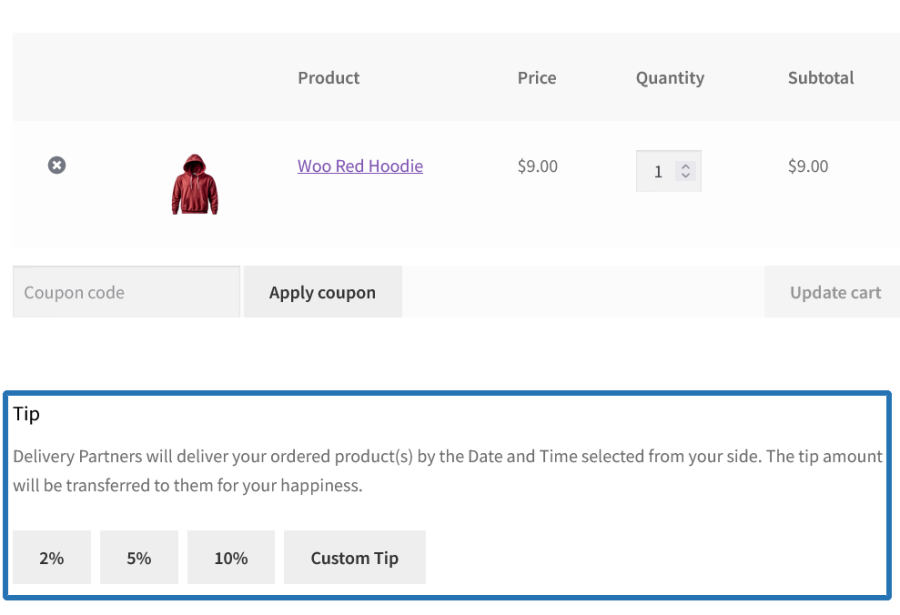
Tip Selection on Cart Page
Tip Selection on Checkout Page
Tip Added on Checkout Page

Restrictions

  • Maximum Deliveries/Pickups per day can be restricted
  • Delivery/Pickup can be restricted for specific weekdays
  • Maximum Deliveries/Pickups per Time Slot can be restricted
  • Time slots can be restricted for specific days
  • Business days can be restricted for specific weekdays
  • Number of days for Delivery/Pickup availability display in the calendar can be restricted
  • Pickup Locations for Order can be restricted for specific Products/Categories/Product Types

Calendar for Delivery/Pickup of the Order/Product for Site Admin

A calendar to display the following info,

  • Order Delivery
  • Order Local Pickup
  • Product Delivery
  • Product Pickup
  • Tip

Extensive Features List

Multiple Delivery and Pickup Options

  • Allow customers to schedule delivery or local pickup dates.
  • Supports both order-level and product-level scheduling.
  • Let customers select:
    • Schedule Delivery with Date only
    • Schedule Pickup with Date only
    • Schedule Delivery with Date and Time
    • Schedule Pickup with Date and Time
    • Schedule Delivery with Date and Time Slots
    • Schedule Pickup with Date and Time Slots
    • Display Estimated Delivery Date for the product as well as Order Delivery.
  • Provide an As Soon As Possible option for faster fulfillment.

Flexible Scheduling Modes

  • Configure scheduling at:
    • Order Level (entire order)
    • Product Level (individual products)
  • Allow customers to choose delivery and pickup preferences during product schedule or order schedule.

Time Slot Management

  • Create and manage custom delivery time slots.
  • Create and manage custom pickup time slots.
  • Configure slot-based scheduling.
  • Limit the number of bookings per time slot.
  • Automatically mark fully booked slots as unavailable.

Multiple Pickup Locations

  • Create and manage multiple pickup locations.
  • Allow customers to select their preferred pickup location.
  • Configure location-specific:
    • Processing hours
    • Scheduler configurations [Applicable weekdays, order limit, fee configuration & more]
    • Pickup restrictions
    • Resources [Time Slots, Holidays, Specific Dates]
  • Display pickup location information during checkout.

Business Days & Operating Hours

  • Define the amount of time required to prepare an order before it can be delivered or picked up using Processing Time management.
  • Processing time for preparing deliveries/pickups.
  • Enable or disable any day of the week based on your operational schedule.
  • Set opening and closing times for each business day to match warehouse or production hours.
  • Prevents customers from selecting unavailable dates.
  • Configure business days of the week for deliveries and pickups.
    • Delivery services
    • Pickup services
    • Product level delivery/pickup

Delivery & Pickup Fees

  • Apply fees for delivery/pickup schedule.
  • Configure same-day delivery/pickup surcharges.
  • Configure next-day delivery/pickup surcharges.
  • Configure specific date delivery/pickup surcharges.
  • Automatically hide fees when their value is zero.

Advanced Scheduler Rules

  • Create custom scheduling rules based on:
    • Products
    • Product categories
    • Customer conditions
    • Cart conditions
    • Shipping methods
    • Pickup locations
  • Configure rule-based delivery and pickup availability.
  • Apply different delivery/pickup logic using flexible rule criteria.

Holiday & Special Day Management

  • Block delivery or pickup services on selected dates or date ranges.
  • The blocked dates become non-selectable for the delivery/pickup.
  • Configure a start date and end date to block an entire period (e.g., Festive season, company vacation).
  • Set holidays to repeat automatically on a regular schedule (e.g., every year on December 25th).
  • Estimated delivery dates automatically exclude holidays and shift to the next available date.
  • Specific Dates allow merchants to enable delivery or pickup on particular dates regardless of standard weekday restrictions.
  • The specific dates can also include special pricing and order limits.
  • Apply a custom fee for deliveries or pickups scheduled on special dates such as:
    • Mother’s Day
    • Valentine’s Day
    • Festival periods
    • Peak-demand days

Product-Level Scheduling

  • Configure unique delivery schedules for individual products.
  • Configure unique pickup schedules for individual products.
  • Assign product-specific:
    • Time slots
    • Availability for scheduling delivery/pickup
    • Pickup locations
    • Holiday restrictions
    • Specific Date restrictions
  • Display product-level delivery estimates.

Order Tip Functionality

  • Allow customers to add tips during checkout.
  • Enable tip collection on:
    • Checkout Page
    • Cart Page
  • Support predefined and configurable tip amounts.
  • Customize the display and positioning of tip fields.
  • Fully compatible with both shortcode-based and block-based checkout experiences.

Checkout Experience & Display Controls

  • Display delivery and pickup scheduling fields directly during checkout.
  • Customize field labels and placeholder text.
  • Configure field positions.
  • Provide a streamlined customer delivery/pickup selection experience.
  • Support both traditional WooCommerce checkout and modern block-based checkout.

Calendar & Schedule Management

  • View all scheduled deliveries and pickups from a centralized calendar.
  • Manage scheduled deliveries and pickups through dedicated admin screens.
  • Track delivery and pickup schedules efficiently.

Order Management Integration

  • Display delivery/pickup information within order details.

Notifications & Communication

  • Send automated notifications for scheduled deliveries/pickups.
  • Notify customers about the upcoming deliveries/pickups.
  • Send reminder notifications for deliveries or pickups due on the current date.
  • Support customizable customer and admin notifications.

Reporting & Administration

  • Manage:
    • Deliveries
    • Pickups
    • Pickup Locations
    • Time Slots
    • Holidays
    • Specific Dates
    • Scheduler Rules
    • Tips
  • Use centralized admin management screens with dedicated list views.
  • Offer transparent delivery and pickup availability before order placement.

Requirements

Minimum PHP version: 5.6


Customer reviews

Average rating 4.8
12 reviews
5 stars, 83% of reviews
4 stars, 17% of reviews
3 stars, 0% of reviews
2 stars, 0% of reviews
1 star, 0% of reviews
12 reviews
  • So Cloudy
    Rated 4 out of 5
    Support
    Feb 13, 2026
    Support
  • cgsinvestmentsllc
    Rated 5 out of 5
    Support
    Nov 19, 2025
    Support
    The support team is great, I found an issue in the current version - a very minor display issue - and reported it through their support link. Within 24 hours, they had a beta version of a fix for me to try and it resolved the issue. Other than support, the plugin itself looks to be very feature-rich and can handle large number of scenarios of delivery & pickup needs. It didn't take too long to figure out how to use it and their documentation is very comprehensive.
  • info48d8a47a972
    Rated 5 out of 5
    Support
    Oct 30, 2025
    Support
    Great support. Even added a completely new function after I requested it within a week. Plug-in does what it says.
  • Joel Arena
    Rated 5 out of 5
    Support
    May 20, 2025
    Support
    Très bonne extension. Support rapide et compétent.
  • inspiringa6102a89ec
    Rated 5 out of 5
    Support
    May 4, 2025
    Support
    The Flintop team handled my support requests with care and attention to detail. They took my feedback and made changes to their extension to make it work for my webshop and I couldn't be happier with their timely support.

Extension information

  • PHP version required: 7.4.0
  • Tested with WordPress: 7.0
  • Tested with WooCommerce: 10.7.0
  • Requires at least WordPress: 6.2
  • Requires at least WooCommerce: 8.2.0

Compatibility

  • High performance order storage (HPOS)

Countries

  • Worldwide

Languages

English (United States)

Related Products

Price $109 annually
Rated 4.6 out of 5 stars
Price $79 annually
Rated 3.4 out of 5 stars
Price $279 annually
Rated 3.2 out of 5 stars
Price $59 annually
Rated 3.1 out of 5 stars
Price $109 annually
Rated 2.8 out of 5 stars
Price $49 annually
Rated 4.1 out of 5 stars
Price $109 annually
Rated 2 out of 5 stars
Price $109 annually
Rated 2.3 out of 5 stars
Price $109 annually
Rated 2.6 out of 5 stars
Use of your personal data
We and our partners process your personal data (such as browsing data, IP Addresses, cookie information, and other unique identifiers) based on your consent and/or our legitimate interest to optimize our website, marketing activities, and your user experience.