
Product Icon

WooCommerce Bookings

Allow customers to book appointments, make reservations, or rent equipment without leaving your site.
Choose a billing option
$249
Save 20%
$498 $398.40

Subscription includes

  • Product updates and improvements
  • Customer support
  • 30-day money-back guarantee

Let your customers book reservations, appointments or rentals on their own — no phone calls required. Save yourself time and fill up your calendar by letting your site do the work for you.

Let customers book classes, schedule appointments, or reserve items

Whatever options you want to offer to your customers, Bookings makes it possible:

  • Define set options, like fixed time slots for a class, appointment or guided tour
  • Let customers choose the times that work best by giving them the flexibility to book whatever range they need, like checking into a hotel

With either option, you can also block time off as un-bookable, leaving you time to take care of your other priorities and create buffers between bookings, to make sure the schedule works for you.

Get as specific as you want with your time slots—the extension allows for bookings in days, hours, even minutes.

Book one-on-one appointments or multi-person events

You can set the minimum and maximum number of participants: limit a booking to one-at-a-time for appointments or let multiple people reserve a class or tour.

Offer special pricing for groups, days, or individuals

Offer discounts for groups or people booking multiple slots, show lower prices for early birds, higher prices on weekends, or special prices for kids. Bookings lets you customize pricing any way you want.

Show availability in the customer’s time zone

If your services are online or if you’re shipping something to the customer, display your availability in the customer’s time zone so they book the time they really need. Whether bookings come from New York, New Mexico or New Zealand, they’ll be within the hours you set, so no surprise appointments!

It’s perfect for virtual classes, online appointments, or rentals that need to be delivered to the customer.
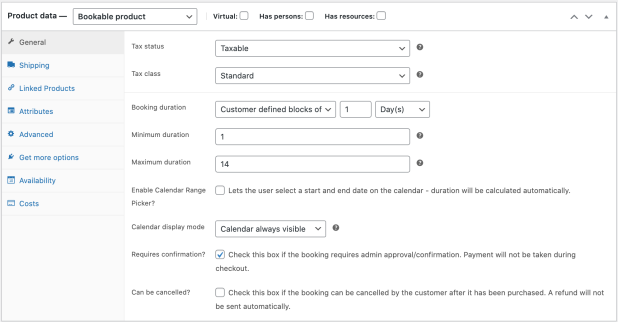
Require confirmation, offer free cancellations — it’s all up to you

Set up confirmations, allowing you time to review before making the booking official. Automatically send out reminders leading up to a booking to reduce no-shows, and set whether bookings can be cancelled.

Send reminders and reduce no-shows

Remind clients about their appointments with handy notification emails when a reservation is made, confirmed, and a day before the booking date.

If you’d like to do more, you can send a special reminder right from your site.

Never get double-booked

Avoid double bookings by assigning the needed resources to a particular booking. For example, if your 2:00 bride books a fitting and a stylist until 3:30, that stylist won’t appear available for the bride scheduling a fitting at 3:00. You’ll never have to worry about offering the same resource to two customers at the same time.

Manage your calendar your way — including syncing with Google Calendar

Use the calendar view to see how your day or month is shaping up. Update existing bookings or availability, or filter to view specific services or resources.

Still have customers calling in to make bookings the old-fashioned way? Add them manually from the calendar while you’re on the phone.

Manage bookings on your store, and see it reflected on your Google Calendar in 60 seconds or less.

Give your bookings a boost

For a fully-customized experience, consider these add-ons other WooCommerce customers use with Bookings.

  • Take a deposit for a reservation with Deposits.
  • Use AutomateWoo to help improve your customer’s experience, decrease cancellations, or even upsell customers after they make bookings with automated booking confirmation or completion emails.
  • Sell more bookings by presenting a calendar or schedule of available slots in a page or post with Bookings Availability.
  • Try our free Accommodation Bookings add-on, if you have a hotel or B&B
  • Allow service providers to submit and manage offerings themselves using Product Vendors.
  • Offer add-ons for services, such as an oil treatment with a massage, or limited edition merchandise with a group booking for a baseball field, using Product Add-Ons.

Customer reviews

Average rating 2.7
60 reviews
5 stars, 20% of reviews
4 stars, 15% of reviews
3 stars, 15% of reviews
2 stars, 12% of reviews
1 star, 38% of reviews
60 reviews
  • Jairo
    Rated 3 out of 5
    Functionality
    Feb 23, 2026
    Functionality
    Even though it’s the official bookings plugin, it has significant shortcomings. One of the most critical issues is that it only synchronizes with a single calendar. Professionals using this plugin who manage one or more apartments on Booking_com cannot properly sync availability. The Booking_com extranet generates a separate calendar for each apartment, but the WooCommerce Bookings plugin only supports one calendar. As a result, you cannot independently synchronize reservations made through the Booking_com portal with those made on the business’s official website. Please build realistic plugins that actually serve real businesses. At least in Europe, Booking_com is used by the vast majority...
    • thisissandipmondal
      Feb 23, 2026
      Hi there, Thank you for taking the time to share your feedback. I understand the built-in Google Calendar integration does sync to a single calendar by default. However, I wanted to share a solution that may help address the exact challenge you've described. WooCommerce Bookings can be integrated with Zapier to sync individual booking products to individual Google Calendars. This means if you have multiple apartments, you can set up separate calendars for each one and have bookings sync independently, which would allow proper two-way sync between your WooCommerce site and platforms like Booking.com (via their respective calendar feeds). Here's our documentation that walks through this setup:...
  • jonathan2138
    Rated 1 out of 5
    Functionality
    Aug 26, 2025
    Functionality
    the calendar never work for me, it got stuck in an infinite loop loosing a lot of money due to the inability to make bookings
  • seanmomsen
    Rated 3 out of 5
    Functionality
    Jun 11, 2025
    Functionality
    1. Api not working propperly. 2. Plugin produces the following error in the WP debug log: Function _load_textdomain_just_in_time was called incorrectly Im not going to fix it as the next update of this plugin will just break it again. 3. Also why would you save the booking data into the wp_post and wp_metadata tables in the database. It's a mess trying to find bookings inbetween page and posts? Create a uniue bookings table so its easy to export, delete, manage and archive historic data. Our website does over 100 000 bookings a year. We need to purge it to keep the frontend to load quickly.
  • belperroud
    Rated 1 out of 5
    Support
    Jun 5, 2025
    Support
    Please make some important update... For a plugin of this price it's really disappointing... There are still two issues that are for me really hard to deal with; 1. bug with email notification and WPML 2. API that isn't working at all...
  • flexitim
    Rated 2 out of 5
    Ease of use
    Jun 3, 2025
    Ease of use
    Bookings plugin is confusing for users
    Okay. I have been working with the bookings plugin for 12 months now and it is so complicated. I have found glitches within the system and although according to the documentation, it can work, however, it's far too complicated for normal users. I have a good understanding of it and it still baffles me at times. I have vendors who join my site and leave because they find creating bookings too complicated. This is having a direct hit on my bottom line and reputation. Why is woocommerce not paying attention to the reviews and trying to make it easier. Far too expensive a plugin when compared to others on the market. Ye need to wake up guys!

Extension information

  • PHP version required: 7.4
  • Tested with WordPress: 6.9
  • Tested with WooCommerce: 10.5
  • Requires at least WordPress: 6.6
  • Requires at least WooCommerce: 9.8

Compatibility

  • Cart & checkout blocks
  • High performance order storage (HPOS)

Countries

  • Worldwide

Bookings-compatible themes

Pizzeria

Vegan Food Shop

Related Products

Price $199 annually
Rated 4 out of 5 stars
Price $279 annually
Rated 3.2 out of 5 stars
Price $49 annually
Rated 2.7 out of 5 stars
Price $119 annually
Rated 3.5 out of 5 stars
Price $219 annually
Rated 1.9 out of 5 stars
Free download
Price $119 annually
Rated 2.9 out of 5 stars
Price $149 annually
Rated 4.8 out of 5 stars
Price $59 annually
Rated 1.9 out of 5 stars
