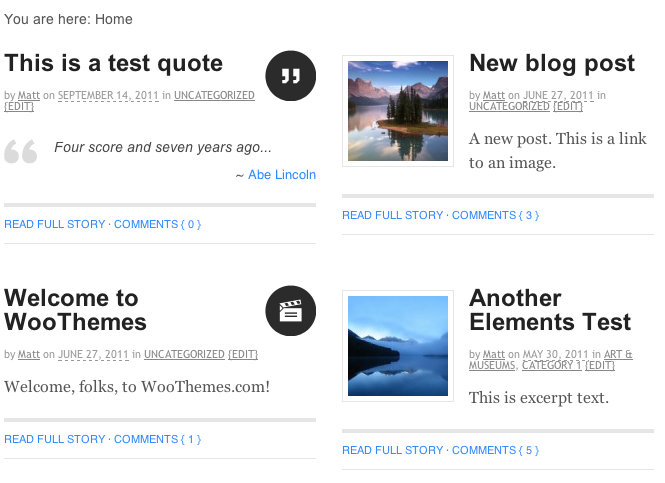
While Canvas comes bundled with a “Magazine” page template, consisting of a featured posts slider and a “Magazine”-style grid, there may be a time when only the grid is required… or a custom implementation of the grid, for that matter. In this tutorial, we’ll discuss a short code snippet that can be added to your “functions.php” file to transform the default WordPress category archive into a “Magazine”-style grid.
This modification is divided into four parts in your “functions.php” file; a CSS class on the <body> HTML tag, a CSS class on each post & a second CSS class on every second post, a “.fix” DIV tag after every second post and forcing the category archive to include the “content-magazine-grid.php” content template file into the Canvas content templating system.
The finished code
Before we start, lets take a look at the finished code.
// Add "magazine" CSS class to <body> tag on category archive.
add_filter( 'body_class', 'woo_custom_add_magazine_bodyclass', 12 );
function woo_custom_add_magazine_bodyclass ( $classes ) {
	if ( is_category() ) {
		$classes[] = 'magazine';
	}
	return $classes;
} // End woo_custom_add_magazine_bodyclass()

// Add "block" CSS class to each post.
add_filter( 'post_class', 'woo_custom_add_block_postclass', 12 );

function woo_custom_add_block_postclass ( $classes) {
	global $wp_query;

	$current_count = $wp_query->current_post + 1;

	if ( is_category() ) {
		$classes[] = 'block';

		if ( $current_count % 2 == 0 ) {
			$classes[] = 'last';
		} // End IF Statement
	}

	return $classes;
} // End woo_custom_add_block_postclass()

// Add the "fix" DIV tag after every second post.
add_action( 'woo_post_after', 'woo_custom_add_magazine_blockfix', 12 );

function woo_custom_add_magazine_blockfix () {
	global $wp_query;

	$current_count = $wp_query->current_post + 1;

	if ( is_category() && ( $current_count % 2 == 0 ) ) {
?>
<div class="fix"></div><!--/.fix-->
<?php
	} // End IF Statement
} // End woo_custom_add_magazine_blockfix()

// Make sure the "content-magazine-grid.php" file is used instead of the default "content-*.php" file.
add_filter( 'woo_template_parts', 'woo_custom_category_archive_templatepart_magazine', 12 );

function woo_custom_category_archive_templatepart_magazine ( $templates ) {
	if ( is_category() ) {
		$index_to_replace = count( $templates ) - 2;

		$templates[$index_to_replace] = 'content-magazine-grid.php'; // Preserve the default Canvas content templating system.

		// $templates = array( 'content-magazine-grid.php' ); // Override the content templating system entirely.
	}
	return $templates;
} // End woo_custom_category_archive_templatepart_magazine()
What the code does
The above code does the following:
- Add the “magazine” CSS class to the <body> HTML tag.
- Add the “block” CSS class to each post, and the “last” CSS class to every second post.
- After every second post, add a “.fix” DIV tag.
- Force the category archive to include the “content-magazine-grid.php” content template file instead of “content-post-full.php” or “content-post.php”, or simply override all content template options.
In addition to the end result of a “Magazine”-style grid on your category archive, this is an example of how Canvas can make use of a selection of smaller filters and actions to achieve a greater result, rather than making extensive modifications to the core theme template files, or using an extensive and difficult to decipher code snippet. Through 4 short code snippets, we’ve recreated the “Magazine”-style grid and can add/remove pieces at any stage to modify the end result.
The final result looks something like this:


About