
Product Icon

Nested Category Layout for WooCommerce

Display products grouped by sub-category on the shop and catalog pages.
Choose a billing option
$79
Save 20%
$158 $126.40

Subscription includes

  • Product updates and improvements
  • Customer support
  • 30-day money-back guarantee

  • Increase customer satisfaction and sales with an intuitive layout that separates products by subcategory
  • Select which category pages to alter, and which to render as normal
  • Easily configure the number of products per subcategory to display on the shop and catalog pages
  • Known compatibility with WooCommerce Themes and the Genesis Framework
  • Flexible, overrideable architecture allows customization and support for additional themes and frameworks

Show Your Shop Catalog by Category and Subcategory

The WooCommerce Nested Category Layout extension allows you to show products organized by category and sub-category on the shop and catalog pages. By breaking products up by subcategory, this plugin provides an intuitive and attractive catalog layout that your customers will appreciate. Here are before and after shots of the shop page using Nested Category Layout:
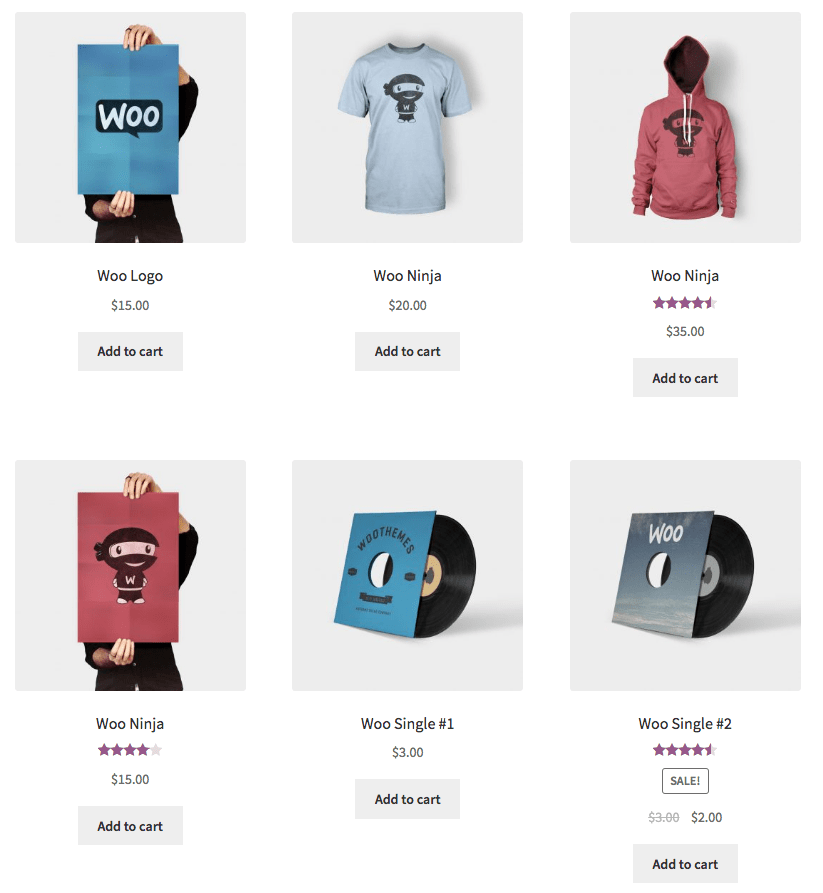
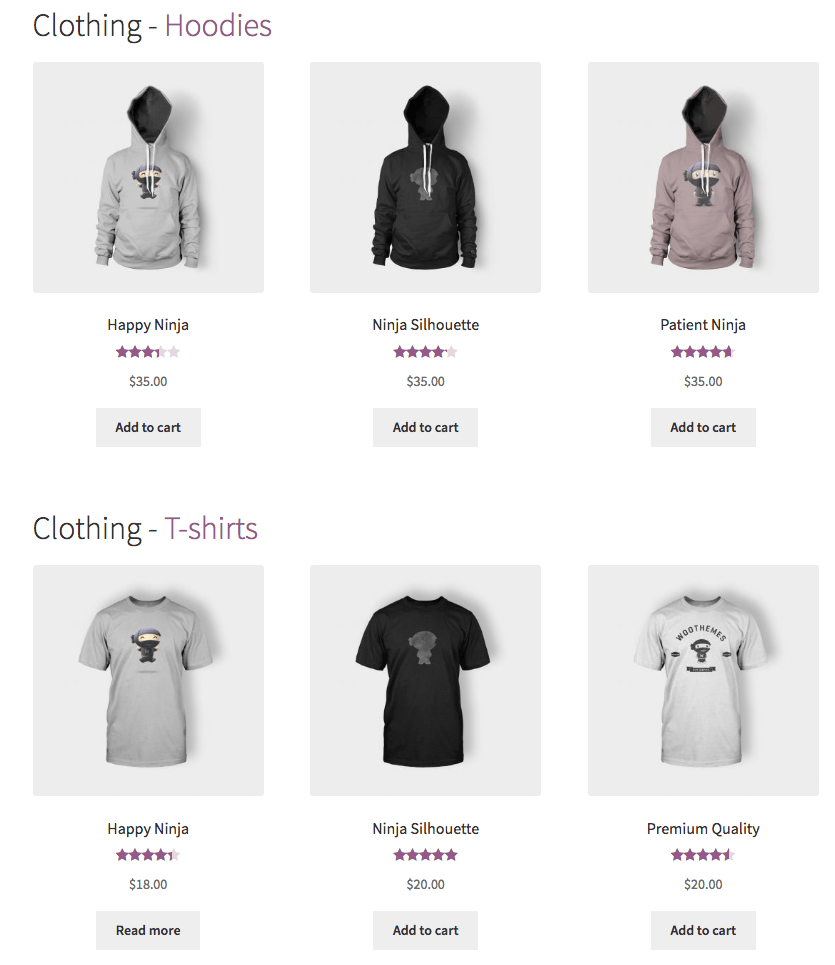
WooCommerce Nested Category Layout Before
Before
WooCommerce Nested Category Layout After
After

WooCommerce typically allows you to show subcategories on shop and category pages (or subcategories and products, but this can look messy). While this is a handy option, it requires that customers click on categories, then subcategories to simply browse products and looks like this:
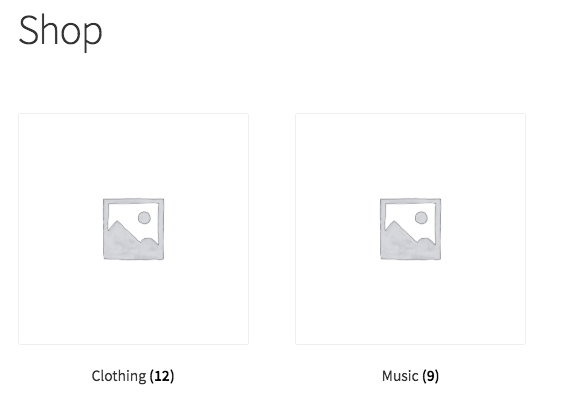
WooCommerce shop category layout
Default WooCommerce Category View

However, the more barriers you put in the way of finding a product or purchasing, the more likely customers are to leave your site, so we’ve sought to fix that with this plugin. Nested Category Layout cleans this process up and makes it simpler for the user. Instead of requiring customers to click through categories, then subcategories to get to products, it simply creates list on the shop and/or category pages organized by category / subcategory, then allows customers to click a category / subcategory title if they want to see more products.

You can select which categories to nest and which to display normally and determine whether to show this layout on shop pages and category pages, or just on category pages. Want to see this in action? You can check out the Demo Shop that has the plugin running to get a feel for how the shop and catalog pages are changed.

Flexible Display

Don’t have a category for a product? No problem – Nested Category Layout will show these products at the top of the page, then show your categories and subcategories. If a product is in both the parent category and a subcategory, it will be displayed with the appropriate subcategory. If a product is only in a parent category, then it will be displayed in the parent category before subcategories are shown (like this):
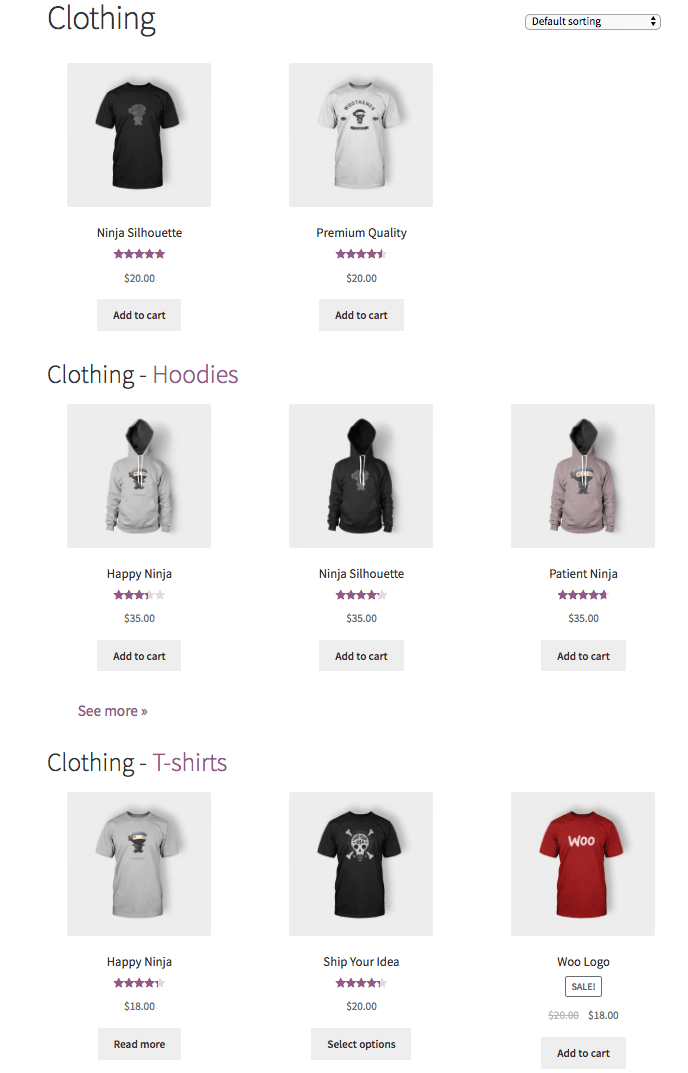
WooCommerce Nested Category Page

How to Get Started

  1. Purchase and download the extension 🙂
  2. Upload and install into your WooCommerce store
  3. Go to WooCommerce > Settings > Products and configure your options
  4. Organize products into categories and subcategories
  5. That’s it! Sit back and enjoy a flexible, intuitive catalog display!

Need any more reason to buy? When you purchase a SkyVerge-developed extension, you’re getting the highest quality extensions for your WooCommerce store. Gain peace of mind by knowing that when you purchase our products, your store’s performance is as important to us as it is to you.


Customer reviews

Average rating 4.3
4 reviews
5 stars, 75% of reviews
4 stars, 0% of reviews
3 stars, 0% of reviews
2 stars, 25% of reviews
1 star, 0% of reviews
4 reviews
  • Gal Baras
    Rated 2 out of 5
    Support
    Aug 15, 2025
    Support
    Worst support in history for a paid plugin
    Support for this plugin is absolutely horrible, despite it being paid annually. It also hasn't had an update in a very long time.
    • SkyVerge
      Oct 3, 2025
      We're sorry to hear you had trouble getting support and updates. Thank you for sharing your candid experience. We strive for timely updates and responsive support, and we recognize that we fell short in your case. Your comments have been shared with our team to ensure better communication going forward. We appreciate your patience and hope to improve your experience moving forward. - S.M.
  • lorage
    Rated 5 out of 5
    Support
    Nov 21, 2024
    Support
    I have been using this plugin for a long time; when I tried to update it I had some difficulties. The support helped me - for several days - until the problem was solved. Well done!
    • SkyVerge
      Dec 26, 2024
      Hello, thank you for sharing your experience with us! It's wonderful to hear that you had such a positive experience. - S.M.
  • regardingcomic
    Rated 5 out of 5
    Sep 23, 2022
    I LOVE THIS
    I am so freaking disorganized. Honestly. This nesting category plug in has been a savior to me. I have 3 main categories of artwork and this helps to break it down so customers can specifically browse ...
  • Hannah
    Rated 5 out of 5
    Nov 5, 2020
    I strongly dislike the way the categories and subcategories display in WooCommerce, so I consider this plugin is a must for a great looking shop. I use the Divi theme for nearly every website I create, and discovered that something wasn't working as expected when developing a new site in late 2020. I had it set to display 6 items in each subcategory, but it was only showing anywhere from 1-3 products and the shop looked terrible. Though both sets of support teams came close to giving up on a solution for this troublesome and very unsightly issue, SkyVerge pressed on through until they found a solution - a simple code snippet that forced whatever was interfering with the proper display to do...

Extension information

  • PHP version required: 7.4
  • Tested with WordPress: 6.8.3
  • Tested with WooCommerce: 10.2.2
  • Requires at least WordPress: 5.6
  • Requires at least WooCommerce: 3.9.4

Countries

  • Worldwide

Languages

English (United States)

Related Products

Price $279 annually
Rated 3.2 out of 5 stars
Price $199 annually
Rated 4 out of 5 stars
Price $119 annually
Rated 3.5 out of 5 stars
Price $109 annually
Rated 4.6 out of 5 stars
Price $79 annually
Rated 3.4 out of 5 stars
Price $59 annually
Rated 3.1 out of 5 stars
Price $49 annually
Rated 4.1 out of 5 stars
Price $109 annually
Rated 2.8 out of 5 stars
Price $109 annually
Rated 2 out of 5 stars

