Product Icon

Tab Manager for WooCommerce

Gives you complete control over your product page tabs, create local and global tabs using a visual drag-and-drop interface, and more.
Choose a billing option
$99
Save 20%
$198 $158.40

Subscription includes

  • Product updates and improvements
  • Customer support
  • 30-day money-back guarantee

Showcase product information by adding custom tabs

Completely Customize Product Tabs with WooCommerce Tab Manager

As a WooCommerce store owner, we know you love your products. In fact, you love them so much you probably want to tell your customers everything about them, from dimensions to shipping and manufacturing details. We get it! But you probably want a really polished way to do it on your product pages, right? Tab Manager helps you create professional, informative product pages using easy-to-manage product tabs.

Tab Manager gives you complete control over your product page tabs, allowing you to easily create new tabs for products, share tabs among multiple products, reorder tabs using a visual drag-and-drop interface, and more. No more messing with filters, template files, or modifying your theme; you’ll be able to create custom tabs from the convenience of the WordPress dashboard. Even most 3rd party tabs added by other plugins will be detected, allowing you to hide or order them alongside your own tabs.
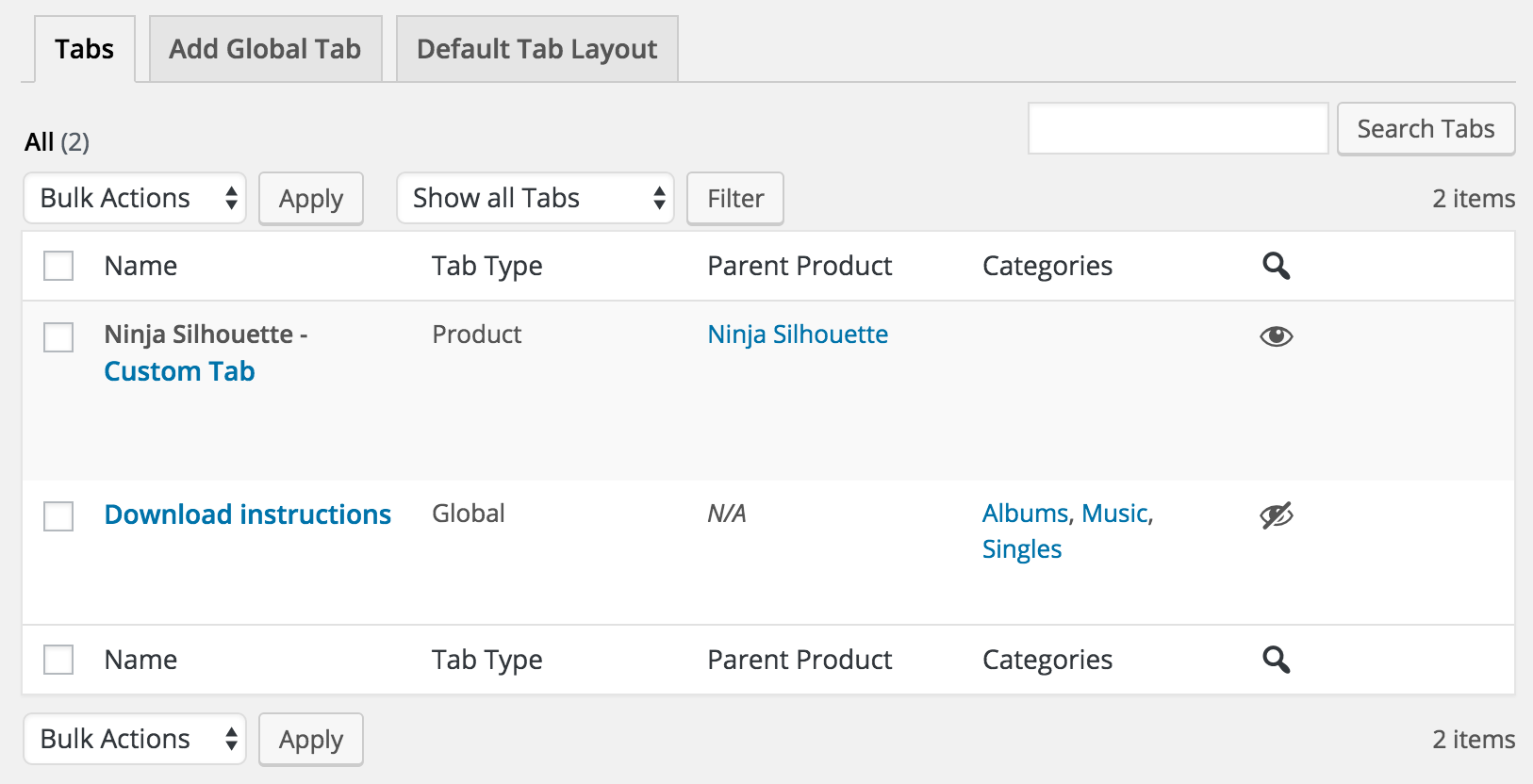
WooCommerce Tab Manager - Tab List

What Can Tab Manger Do?

  • Core tabs – re-order, remove, or rename the core Description, Additional Information, and Reviews tabs
  • 3rd Party tabs – most tabs added by 3rd party plugins will be automatically detected, and will be sortable
  • Global tabs – create tabs that can be added to more than one product, allowing for easy content sharing and saving you time!
  • Global tabs can also be restricted to display only on certain product categories NEW
  • Product level tabs – create tabs that are customized to a specific product.
  • Create a default tab layout (re-order as you wish!) that can be applied to all products
  • Override the default layout on a per-product basis to customize tabs for a single product.
  • Add any number of custom product tabs and order them
  • Include tab content in site search results NEW
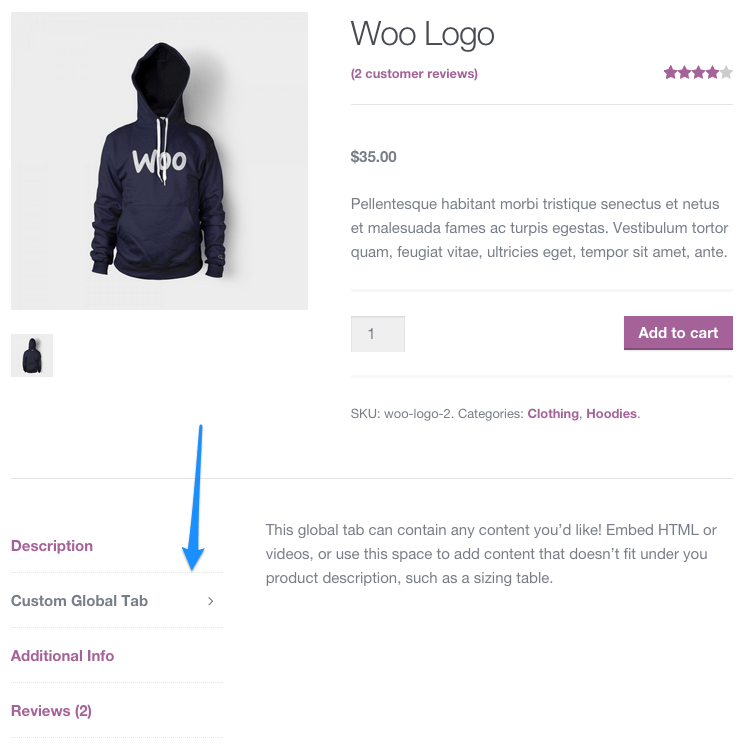
WooCommerce Tab Manager frontend
Example of a custom tab

Default Tab Layout

Manage the default tabs for all products in your store (which can be overridden on a per-product basis)! You can re-order tabs, rename them, remove core tabs, and add your own global tabs.
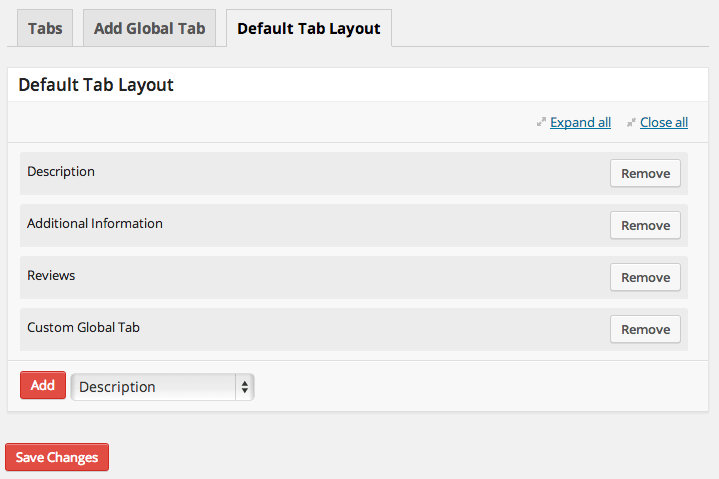
WooCommerce Tab Manager Default Tab Layout
Default Tab Layout

Per-Category Global Tabs – NEW

Need to add global tabs, but only for certain product categories? You can determine which global tabs should show up on which categories, even if the global tab is part of your default layout.
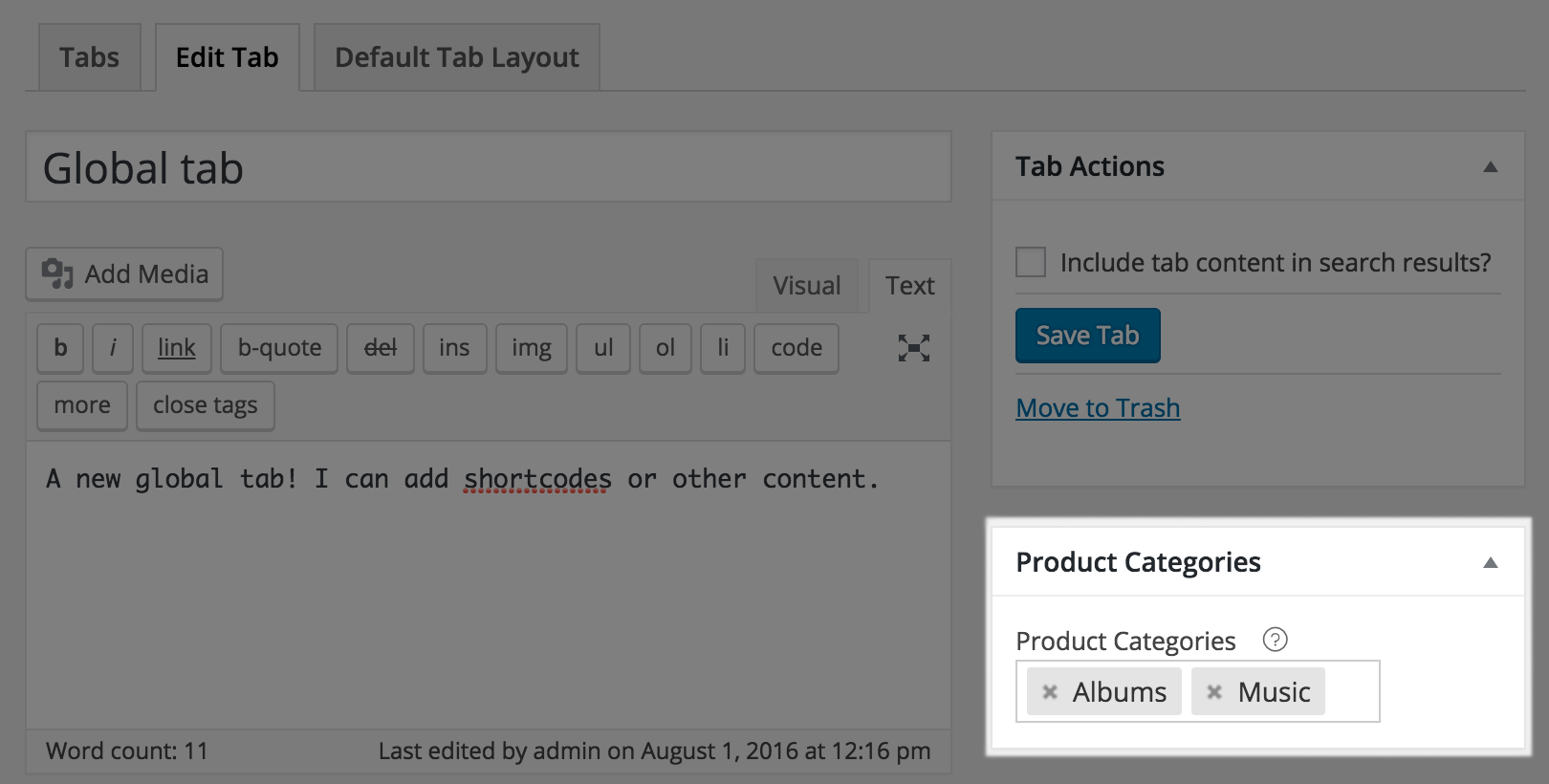
WooCommerce Tab Manager: Global tab categories

Or, just leave your category selector blank to let global tabs show for any product.

Overriding Product Layout

If a product needs a unique tab layout, or a customized tab, you can override the default tab layout. This lets you re-order tabs for the product, remove tabs from the default layout, add global tabs, or add a customized tab for this product.
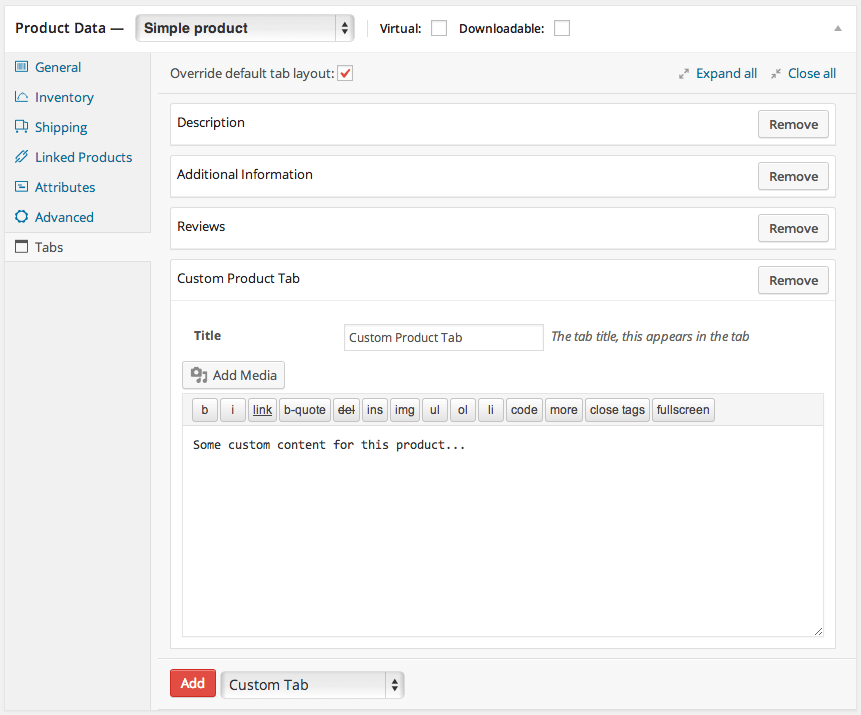
WooCommerce Tab Manager Add Custom Product Tabs
Add Custom Tabs Under Product Data

Keep Tab Content in Your Search Results

Any product-specific tabs you add will mostly likely contain content. If a customer searches for a keyword in that content, the product will show up as a search result. You can also make global tabs searchable, which is helpful if a global tab is only used on certain products.
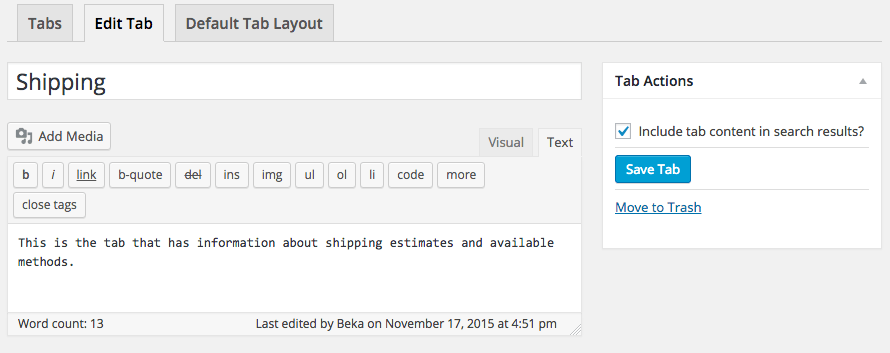
WooCommerce Tab Manager make tab searchable

This is even compatible with the popular, free Relevanssi plugin to keep tab content in your search index.

Embed Forms & Information in Tabs

You can use separate tabs to display embedded information, such as videos, images, and more. Shortcodes will be expanded in tab content so you can embed information from other popular plugins like Gravity Forms for pre-sales forms, embed YouTube product explainer videos, or use other shortcodes to modify content display.

How to Get Started (in 5 minutes or less)

  1. Buy this extension 🙂
  2. Download and install into your WooCommerce store
  3. Start adding tabs under Product Data, or add global tabs under WooCommerce > Tab Manager
  4. That’s it! Sit back and enjoy superbly managed tabs!

Need any more reason to buy? When you purchase a SkyVerge-developed extension, you’re getting the highest quality extensions for your WooCommerce store. Gain peace of mind by knowing that when you purchase our products, your store’s performance is as important to us as it is to you.


Customer reviews

Average rating 3.4
16 reviews
5 stars, 56% of reviews
4 stars, 0% of reviews
3 stars, 6% of reviews
2 stars, 6% of reviews
1 star, 31% of reviews
16 reviews
  • Matt Flewitt
    Rated 1 out of 5
    Functionality
    Feb 8, 2026
    Functionality
    This should be built into woocommerce and we only pay for it because woocommerce product reviews stops working without it, which then removes all the ratings and photos left by reviewers, I resent having to pay for this plugin and wish we’d picked a different product review plugin so we didn’t have to also pay for this.
    • SkyVerge
      Mar 11, 2025
      Hey there. Tab Manager should work with WooCommerce Reviews, and they should remain without the plugin active. If you haven’t already, can you please reach out to our support team so we can look into this? - S.M.
  • rixonjay
    Rated 1 out of 5
    Functionality
    Jan 22, 2026
    Functionality
    Warning: This Plugin Breaks WordPress Search function. This issue isn’t limited to one site or one type of theme. If you have this plugin installed, your customers will not be able to search product names or codes for WooCommerce products. We have lost sales due to this issue that SkyVerge have spent weeks denying, they blamed everything else for the search not working. Even though when we first reported the problem they confirmed they could see the issue on a test site at their end. We did everything that SkyVerge asked us to do, videos, screen grabs etc. and they just kept stringing us along. They then released an update and the fist line of the fixes is the issue with the search not worki...
    • SkyVerge
      Feb 25, 2026
      We’re very sorry for the frustration this caused. The search issue you referenced was identified and addressed in a subsequent update.

      As part of our investigation, we carefully ruled out theme and plugin conflicts to ensure we addressed the correct root cause and avoided introducing broader issues. While that process can take time, it’s an important step to ensure a stable and lasting fix.

      We understand how impactful this was and appreciate your persistence while we worked toward a resolution. - S.M.
  • Lucky
    Rated 1 out of 5
    Functionality
    Jan 6, 2026
    Functionality
    Warning: This Plugin Breaks WordPress Search This issue isn’t limited to my site; if you have this plugin installed, your customers likely can’t search for WooCommerce products, even if you’re using a separate search plugin. That means lost sales. The developer acknowledged the problem when I opened a support ticket, but the fix may take up to 30 days. In the meantime, they still continue to happy sell the plugin. Take your money elsewhere.
    • SkyVerge
      Feb 25, 2026
      We understand how serious search issues can be, and we’re truly sorry for the disruption this caused. Once this was reported, our team quickly identified the root cause and implemented a fix to restore stability across environments.

      We take issues that affect sales seriously. If you’re still experiencing problems, please reach out to support so we can confirm everything is resolved on your site. We appreciate you bringing this to our attention. - S.M.
  • Tom
    Rated 1 out of 5
    Functionality
    Nov 16, 2025
    Functionality
    I am using TT5 block theme and than this: WooCommerce Tab Manager is not yet compatible with the Checkout block. We recommend following this guide to revert to the [woocommerce_checkout] shortcode. and this: WooCommerce Tab Manager is not yet compatible with the Cart block. We recommend following this guide to revert to the [woocommerce_cart] shortcode. this is incredible :(
    • SkyVerge
      Dec 26, 2025
      Thanks for your feedback. At the moment, WooCommerce Tab Manager isn’t compatible with the Cart and Checkout blocks, which is why the shortcode-based checkout is recommended as a workaround. We know block compatibility is important and appreciate you sharing this experience. Please feel free to reach out to our support team if you’d like to discuss options for your setup. - S.M.
  • jm
    Rated 2 out of 5
    Support
    Oct 6, 2025
    Support
    Great concept, but outdated and poor support – needs urgent update I originally loved the idea behind WooCommerce Tab Manager – it's a straightforward way to customize product tabs without hacking code, and it works fine on the frontend for basic setups. However, after the WordPress 6.7 update (late 2024), the plugin hasn't been touched since August 2024, leaving it incompatible with modern WP standards. I'm now flooded with PHP notices in debug logs: "Notice: Function _load_textdomain_just_in_time was called incorrectly. Translation loading for the woocommerce-tab-manager domain was triggered too early." This doesn't break the site, but when debugging any WooCommerce issue, the logs are use...
    • SkyVerge
      Dec 26, 2024
      Thank you for taking the time to leave a review! We're delighted to hear the kind words about our support team! - S.M.

Extension information

  • PHP version required: 7.4
  • Tested with WordPress: 6.9
  • Tested with WooCommerce: 10.4.3
  • Requires at least WordPress: 5.6
  • Requires at least WooCommerce: 3.9.4

Works with

Countries

  • Worldwide

Languages

English (United States), French (France), Italian

Related Products

Price $119 annually
Rated 3.5 out of 5 stars
Price $49 annually
Rated 2.7 out of 5 stars
Price $109 annually
Rated 4.6 out of 5 stars
Price $29 annually
Rated 3.5 out of 5 stars
Price $149 annually
Rated 4.8 out of 5 stars
Price $199 annually
Rated 4 out of 5 stars
Price $279 annually
Rated 3.2 out of 5 stars
Price $79 annually
Rated 4.2 out of 5 stars
Price $79 annually
Rated 4 out of 5 stars