
Active installs
200+
Product comparison
Subscription includes
Support
Turn any page of your store into a place where shoppers browse, preview and buy. All-In-One Product Slider Carousel shows your featured, best-selling, on-sale, new or hand-picked WooCommerce products in a responsive slider carousel. Customers can open a Quick View popup, watch a product video, or see a live sale countdown without leaving the page.
Add a slider with the native Gutenberg block, Elementor widget or Divi module, or paste a shortcode anywhere. No coding needed.
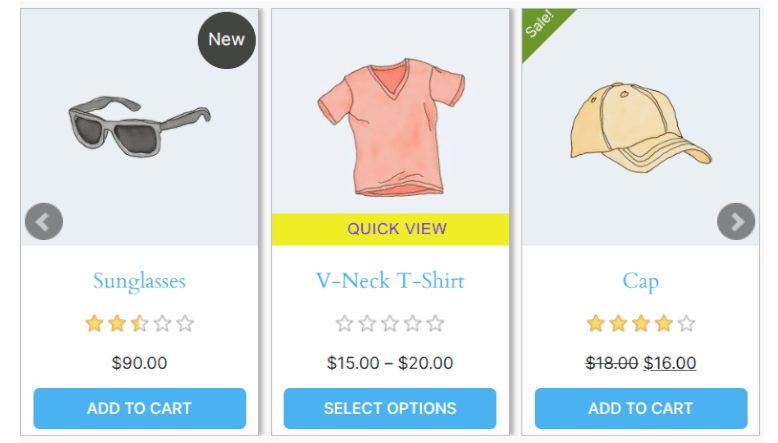
Shoppers preview a product and add it to the cart in a popup, without navigating away from the page they’re on.
Create urgency on discounted products with a live countdown on each product card.
Show products in motion, right on the product card.
Every product card click is tracked automatically, across all your sliders.
| Feature | All-In-One Product Slider Carousel | Basic product slider |
|---|---|---|
| Featured, sale, best seller, new, category and hand-picked sliders | Included | Usually included |
| Quick View popup with variable product add to cart | Included | Usually needs another plugin |
| Sale countdown timer on product cards | Included | Usually needs another plugin |
| Product video lightbox | Included | Usually needs another plugin |
| Product click analytics | Included | Usually not available |
| Native Elementor widget and Divi module | Included | Often shortcode only |
| Horizontal, vertical and ticker layouts | Included | Often horizontal only |
It displays your WooCommerce products in responsive sliders and carousels: featured, on-sale, best-selling, top-rated, new, category or hand-picked products. Each slider can also include a Quick View popup, a sale countdown timer and product videos, and every product click is tracked in a built-in analytics report.
Yes. Create a slider, choose Best Sellers as the slider type, and add it to your homepage with the Gutenberg block, Elementor widget, Divi module or shortcode. The slider updates automatically as your sales change.
Yes. It includes a native Elementor widget and a native Divi Builder module. Search for "Product Slider Carousel" in the widget panel or module library and select your slider. A Gutenberg block is included too.
Yes. Customers can pick size, colour and other attributes inside the Quick View popup and add the product to the cart without visiting the product page.
Yes. You can insert sliders directly using the Gutenberg editor by selecting the Product Slider block.
Set a sale end date on a product (Product → General → Sale price → Schedule → "To" date). The countdown appears on that product's card automatically. For products without an end date, you can set a fallback date in the slider settings.
Yes. Add a YouTube, Vimeo or MP4 link in Product → Advanced. A play button appears on the product card, and clicking it opens the video in a full-screen lightbox.
Set a sale end date on any product (Product → General → Sale price dates → To). The countdown appears automatically. For products without an end date, set a global fallback date in the slider settings.
Yes. Go to All In One Product Slider → Analytics in your WordPress admin to see the top clicked products per slider, filterable by 7, 30, 90 or 365 days.
Yes. You can create unlimited sliders and place as many as you like on a single page.
Yes. Sliders are fully responsive and support touch and swipe on phones and tablets.
Yes. Each slider has an option to exclude out-of-stock products.
The slider can show a wishlist button that works with YITH WooCommerce Wishlist and TI WooCommerce Wishlist.
Yes. It's compatible with WooCommerce High-Performance Order Storage (HPOS), works on multisite installs, and is translation ready.
No. Sliders come with sensible defaults, and you can adjust layout, colours and what's shown on each card from the settings screen. Custom CSS per slider is available if you want finer control.
Categories
Extension information
Quality Checks
Countries







