
Product Icon

Anti Fraud Protection for WooCommerce

Prevent fake orders by detecting card testing, velocity attacks, proxy/VPN abuse, and applying custom fraud rules.
Choose a billing option
$89
Save 20%
$178 $142.40

Subscription includes

  • Product updates and improvements
  • Customer support
  • 30-day money-back guarantee

Stop fake orders, card testing, and carding attacks before they cost you money. Flag risky orders automatically, block known fraudsters at checkout, and let trusted customers through without friction.

  • Stop Card Testing Attacks – Detect repeated payment attempts and help prevent fraudsters from testing stolen cards on your WooCommerce store
  • Block Fake & Fraudulent Orders – Automatically identify and block suspicious orders before they result in losses or chargebacks
  • Block Orders by Country – Create rules to block or flag orders from specific countries and high-risk regions
  • Block VPN & Proxy Orders – Detect VPN and proxy users to prevent suspicious or anonymous orders
  • Stop Fraud Bots – Protect your checkout from automated bots, fake orders, and malicious checkout attempts
  • Google reCAPTCHA Protection – Add Google reCAPTCHA to your checkout to prevent automated submissions and bot activity
  • Smart Fraud Risk Score – Assign custom weights to fraud indicators and calculate an accurate risk score for every order
  • Custom Fraud Rules – Build rules based on customer roles, products, categories, guest checkout, order quantity, and customer history
  • Blacklist Fraudsters – Block suspicious customers using customizable blacklist rules and prevent repeat fraud attempts
  • Fraud Analytics & Chargeback Prevention – Monitor fraud activity and identify high-risk orders early to reduce fraudulent transactions and chargebacks

Every WooCommerce store is a target for fraud

Fake orders, stolen card numbers, and automated bot attacks do not just cost you a sale. They cost you chargeback fees, payment processor penalties, wasted inventory, and hours spent cleaning up your order list. Card testing attacks alone can flood a store with dozens of fraudulent transactions in minutes, often testing stolen card numbers in small batches before a fraudster tries a larger purchase elsewhere.

Most store owners find out they were targeted only after the chargebacks start arriving. Anti-Fraud Protection for WooCommerce is built to catch the warning signs before that happens, so you can review, block, or allow orders based on rules that fit your actual business, not a generic template.

Built for the fraud patterns that actually hit WooCommerce stores

Anti-Fraud Protection for WooCommerce combines fraud risk scoring, blacklisting, whitelisting, and reCAPTCHA protection into a single extension, so you do not need to stitch together multiple tools to secure your checkout.

Checkout blocking rules and Google reCAPTCHA help prevent suspicious card testing attempts before payment is processed. The risk scoring feature evaluates the order after it has been created and can help identify potentially fraudulent orders based on the configured risk factors.

Know which orders need a second look

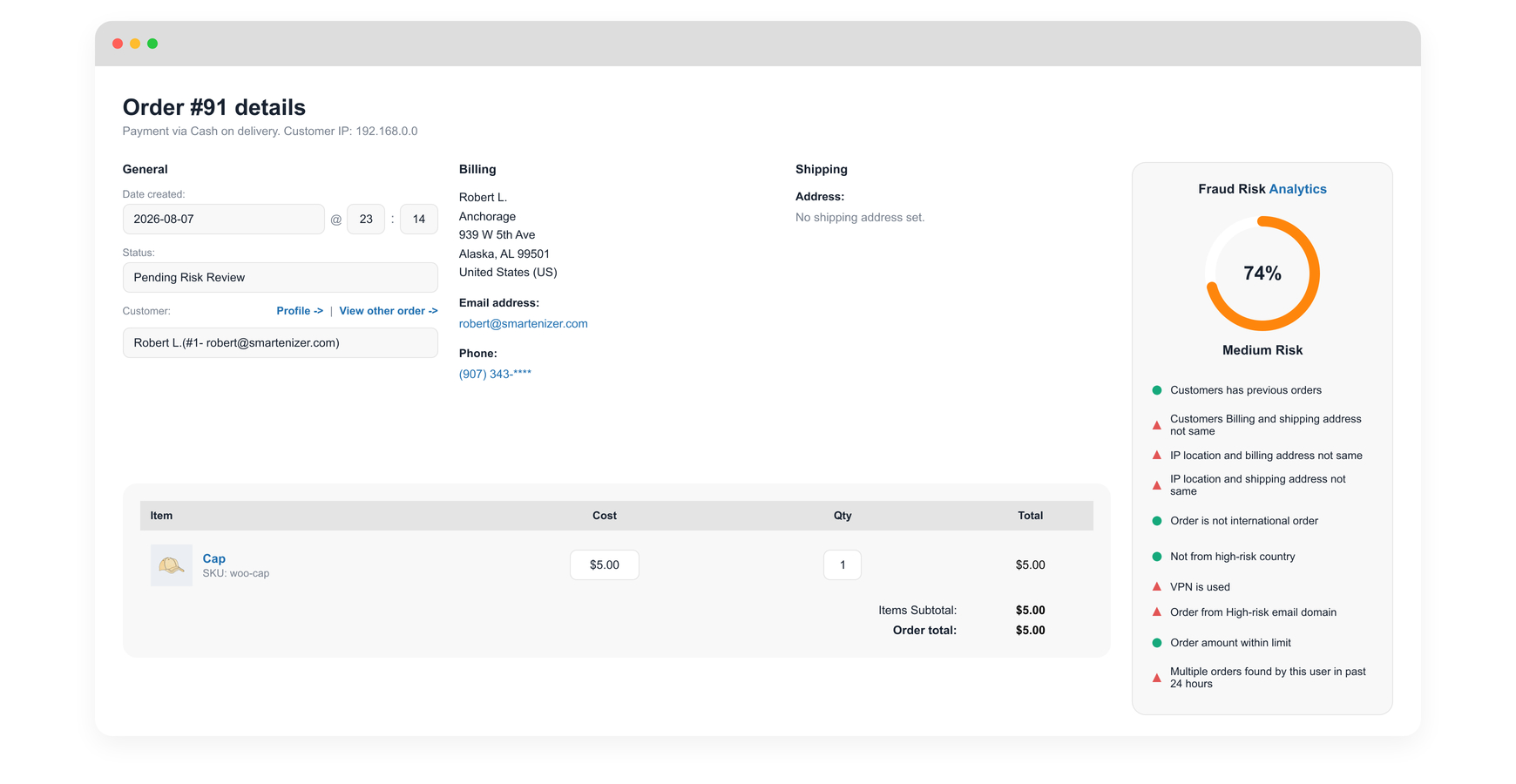
Every order that comes through your store is evaluated against a set of fraud checks and given a Fraud Risk Score from 0 to 100 percent. You decide which checks matter most to your store by assigning each one a weight from 0 to 10, so the score reflects your business, not someone else’s assumptions.
  • Flag orders placed from outside your store’s primary country
  • Flag orders from countries you consider high-risk
  • Choose whether country checks use the billing address, shipping address, or IP address
  • Flag orders from suspicious or disposable email domains
  • Flag unusually high order amounts
  • Flag customers placing too many orders in a short time window, a common sign of velocity attacks
anti fraud protection fraud risk analytics
Stop fraud orders in your woocommerce store

Orders are automatically grouped into low, medium, and high risk, using percentage ranges you define. When an order crosses your high-risk threshold, its status changes automatically to Pending Risk Review, so it surfaces for manual review instead of slipping through unnoticed.

Block known fraudsters before they reach checkout

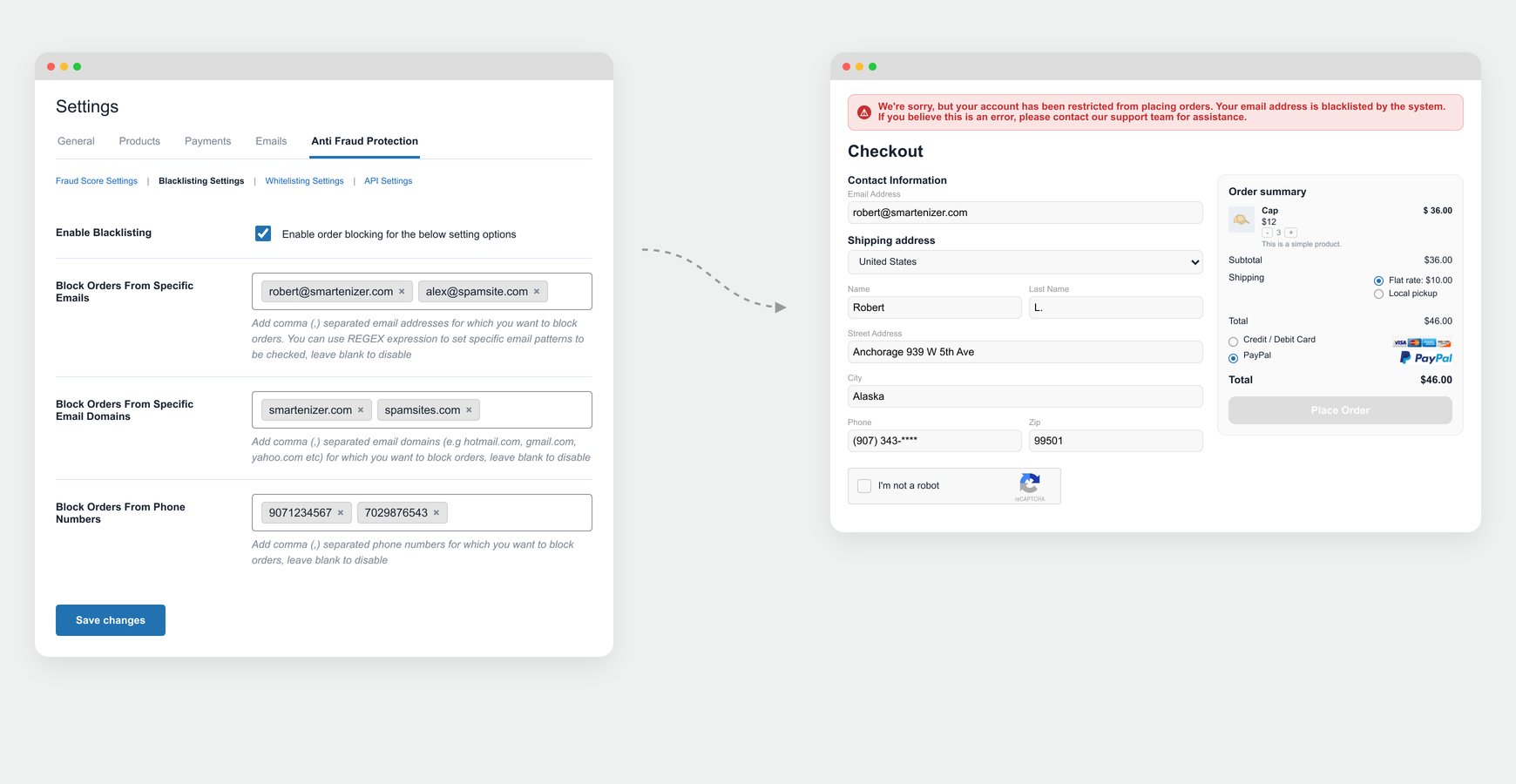
Fraud risk scoring flags orders for review. Blacklisting stops them outright. When a blacklist rule matches, checkout is halted immediately and the customer sees a validation message that you control.
  • Block specific email addresses, email domains, or phone numbers
  • Block specific IP addresses or entire IP countries
  • Block customers connecting through a VPN
  • Restrict checkout for selected WooCommerce user roles
  • Block specific shipping addresses, including similarity matching to catch near-identical fraud attempts
  • Block shipping by country, state, or ZIP and postal code
block fraud orders on woocommerce checkout page to stop velocity attacks and stop card testing attacks
Block specific users to prevent fraud orders

Protect your best customers from being blocked by mistake

No fraud filter is useful if it turns away paying customers. Whitelisting lets you guarantee that trusted customers, partners, and repeat buyers always get through checkout, even if they happen to match a blacklist rule. Whitelist rules always take priority over blacklist rules.

  • Whitelist specific email addresses or entire email domains
  • Whitelist trusted IP addresses
  • Whitelist selected WooCommerce user roles
  • Whitelist specific payment methods
  • Whitelist countries, IP countries, states, and ZIP or postal codes

Stop bots before they ever place an order

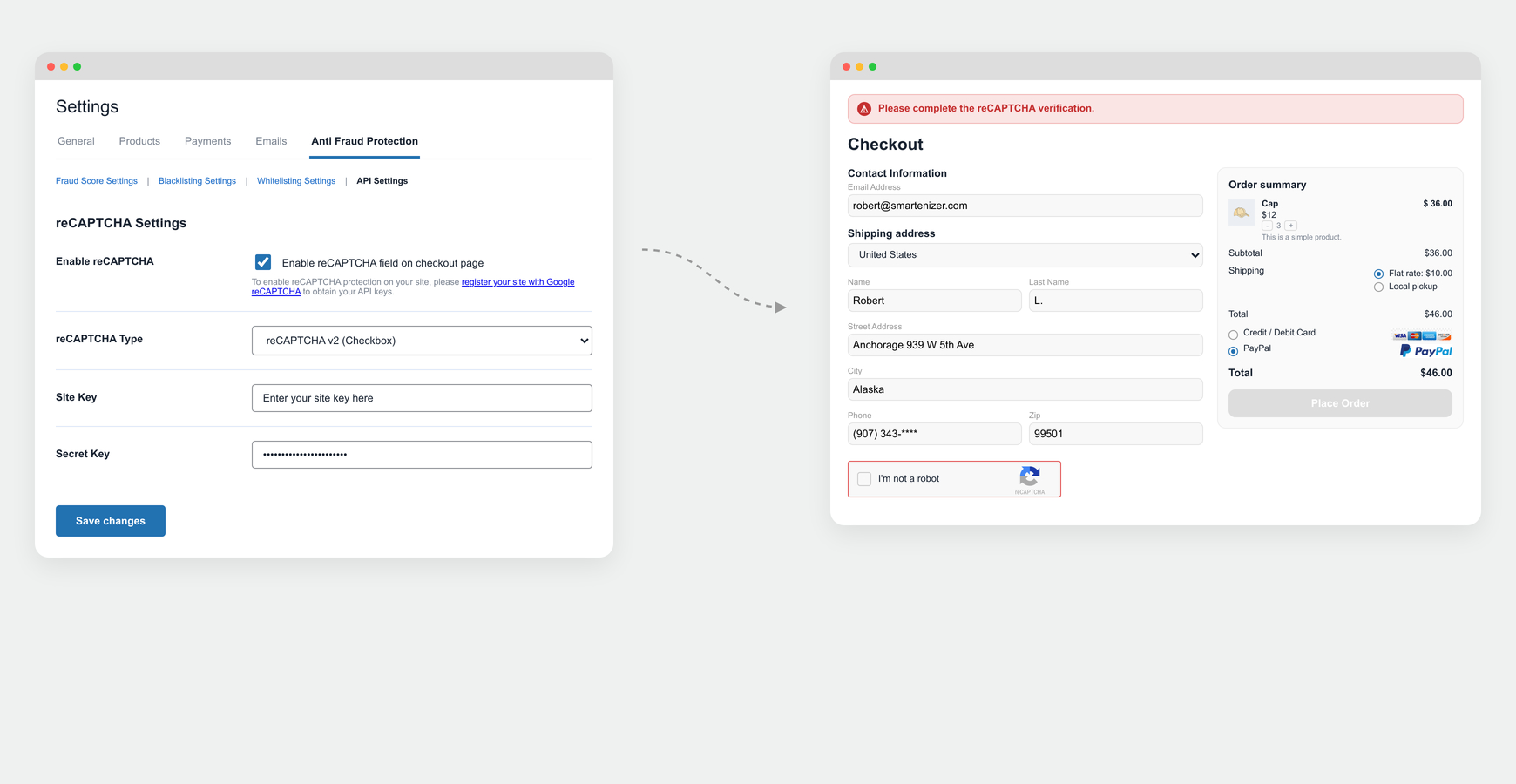
Many fake orders and card testing attempts are not placed by a person at all. Built-in Google reCAPTCHA integration adds a bot-detection layer directly to your checkout, with no separate plugin required.
  • Works with WooCommerce Classic Checkout and Checkout Blocks
  • Stops automated bot submissions and spam orders
  • Adds an extra layer of protection against automated card testing
Recaptcha on checkout page to stop fake orders and stop card testing attacks
Recaptcha on woocommerce checkout page to stop velocity attacks and stop card testing attacks

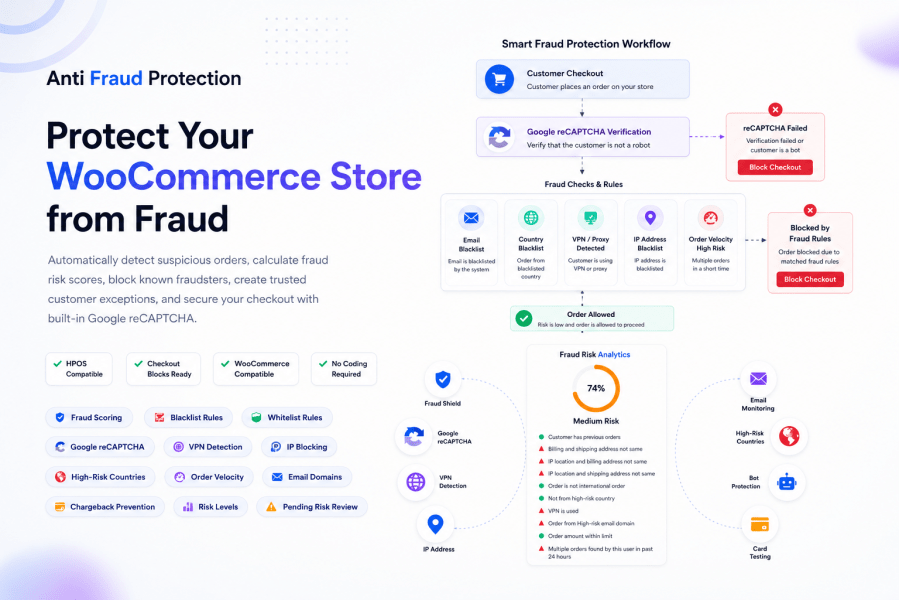
How Anti-Fraud Protection for WooCommerce works

  1. A customer starts checkout on your WooCommerce store.
  2. Google reCAPTCHA validates the request, if enabled.
  3. The order is evaluated against your configured fraud risk checks and given a risk score from 0 to 100 percent.
  4. The order is classified as low, medium, or high risk based on your defined thresholds.
  5. High-risk orders are automatically set to Pending Risk Review, so you can act on them.
  6. Blacklist rules are checked. If a rule matches, checkout stops and the customer sees your custom message.
  7. If the customer also matches a whitelist rule, the whitelist overrides the blacklist and the order goes through.
Fraud Risk Scoring flags orders for your review. It does not block orders automatically. Use Blacklisting rules if you want matching orders stopped at checkout.

Built for the situations that put stores most at risk

  • Running a product launch or holiday sale, when fraud attempts typically spike
  • Accepting international orders and needing to catch billing, shipping, and IP country mismatches
  • Noticing repeated orders from the same customer, IP address, or region in a short time frame
  • Selling high-value products that attract card testing and carding attacks
  • Getting flooded with small test transactions from a stolen card list
  • Needing to block a specific fraudulent customer without touching your other fraud rules
  • Wanting to allow VIP customers, wholesale partners, or your own team to check out without triggering fraud rules

Why store owners choose Anti-Fraud Protection for WooCommerce

Most fraud plugins force you to accept fixed rules and hope they match how your store actually operates. Anti-Fraud Protection for WooCommerce works differently: you decide which fraud signals matter, how much weight each one carries, and what happens when a threshold is crossed. That means a small boutique store and a high-volume international store can both configure the same plugin to match their own risk profile, instead of relying on a generic, one-size-fits-all rule set.

It is also built to run quietly in the background. Fraud checks do not add noticeable delay to your checkout, so customers experience a fast, normal buying process while your store stays protected.


Frequently asked questions

What does Anti Fraud Protection for WooCommerce do?

Anti Fraud Protection automatically detects and blocks suspicious orders before they are processed. It assigns a dynamic risk score to every order based on custom rules — like IP location mismatches, billing/shipping address differences, high-risk email domains and first-time buyer behavior.

How does the risk scoring system work?

Every order is evaluated against your enabled fraud rules, each of which carries a weight you assign from 0 to 10. The plugin combines these weights into a total risk percentage per order. You can view this score directly inside the WooCommerce order detail page, so you always know why an order was flagged.

Will this plugin slow down my checkout process?

No. Anti Fraud Protection is built to be lightweight and fast. Fraud checks run in the background without adding any noticeable delay to your customers' checkout experience.

Can I block orders from specific countries, IPs, or email addresses?

Yes. The plugin includes a full Blacklist System that lets you block orders by email address, email domain, phone number, IP address, IP country, shipping country, state, or zip code. You can also restrict specific user roles such as guests or subscribers.

What happens if a legitimate customer gets blocked?

You can whitelist trusted customers by email, email domain, IP address, user role, payment method, or shipping region. Whitelisted users always bypass all fraud checks. The whitelist overrides the blacklist to ensure smooth ordering for safe customers.

Can I detect and block card testing attacks (velocity attacks)?

Yes. The plugin detects and blocks bulk bot orders and repeated transactions from the same customer, IP, or region, which are the hallmarks of card testing and velocity attacks.

What fraud signals does the plugin check for?

The plugin evaluates a wide range of risk conditions, including: first-time buyer, billing/shipping address mismatch, IP country vs. billing country mismatch, IP country vs. shipping country mismatch, high-risk email domains, high-risk countries, international orders, and high-value order thresholds.

Can I customize the error message shown to blocked customers?

Yes. You can write a custom error message that appears at checkout when an order is blocked, so customers receive a professional, store-branded message instead of a generic error.

How is Anti Fraud Protection different from other WooCommerce fraud plugins?

Anti Fraud Protection gives you full control over every fraud rule, you decide which conditions to enable, and how much weight each one carries. This flexible, store-specific scoring approach means you can tailor fraud detection to your exact business needs, rather than relying on fixed, one-size-fits-all rules. It is also priced affordably at $89/year, making it accessible for small to mid-size stores.

Will the plugin help me reduce chargebacks?

Yes. By blocking fraudulent orders before payment is processed, Anti Fraud Protection prevents unauthorized transactions from completing, which directly reduces chargeback rates and the associated penalties from payment processors.

Is this plugin suitable for stores that sell internationally?

Absolutely. The plugin includes specific rules for international orders, IP-to-country mismatches, and high-risk country filtering, making it especially useful for stores accepting cross-border payments.

Extension information

  • PHP version required: 7.4
  • Tested with WordPress: 7.0.2
  • Tested with WooCommerce: 10.9.4
  • Requires at least WordPress: 6.0
  • Requires at least WooCommerce: 8.0

Countries

  • Worldwide

Related Products

Price $79 annually
Rated 3.4 out of 5 stars
Price $279 annually
Rated 3.2 out of 5 stars
Price $59 annually
Rated 3.1 out of 5 stars
Price $109 annually
Rated 2.7 out of 5 stars
Price $109 annually
Rated 2 out of 5 stars
Price $49 annually
Rated 4.1 out of 5 stars
Price $109 annually
Rated 2.3 out of 5 stars
Price $109 annually
Rated 2.6 out of 5 stars
Price $109 annually
Rated 2.3 out of 5 stars
Use of your personal data
We and our partners process your personal data (such as browsing data, IP Addresses, cookie information, and other unique identifiers) based on your consent and/or our legitimate interest to optimize our website, marketing activities, and your user experience.




