
Product Icon

Automatic Order Expiration for WooCommerce

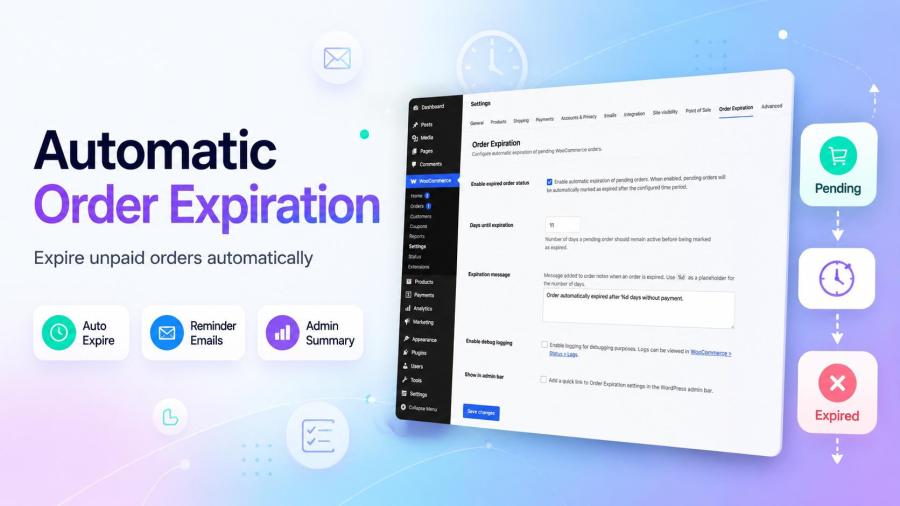
Automatically expire pending WooCommerce orders. Customer reminders, admin summaries, custom expired status. HPOS compatible.
Choose a billing option
$49
Save 20%
$98 $78.40

Subscription includes

  • Product updates and improvements
  • Customer support
  • 30-day money-back guarantee

If your WooCommerce store accepts bank transfers, BACS payments, or cash on delivery, you’ve likely dealt with pending orders that pile up and never get paid. Automatic Order Expiration for WooCommerce solves this automatically – expiring unpaid pending orders after a configurable period, sending customers a reminder before it happens, and notifying you with a summary when it does.

What This Extension Does

Automatic Order Expiration monitors your pending orders in the background and automatically transitions them to a dedicated “Expired” status after a configurable number of days. Before expiration, it sends your customer one final reminder email – giving genuinely-intending customers a chance to complete their payment. When orders expire, you receive a clean admin summary with order details and direct links.

WooCommerce’s built-in Hold Stock feature only handles “On hold” orders from card payment gateways. It doesn’t cover BACS, bank transfer, or cash on delivery orders. This extension fills that gap with a complete, UI-based solution that requires no code.
Key Benefits

  • Clean up your orders dashboard automatically. Stale pending orders no longer accumulate indefinitely. Set your expiration window once, and the plugin handles the rest on a twice-daily automated schedule.
  • Recover lost sales with reminder emails. A customizable reminder email sent 24 hours before expiration gives customers one more chance to complete their payment – with smart duplicate prevention ensuring each customer receives exactly one reminder per order.
  • Stay informed without manual monitoring. When orders expire, you receive a batch summary email listing all affected orders with direct admin links. No need to check your dashboard manually.
  • Keep reporting clean with a dedicated “Expired” status. Automatic expirations are separated from manual cancellations in your order reports. Filter, search, and report on expired orders independently.
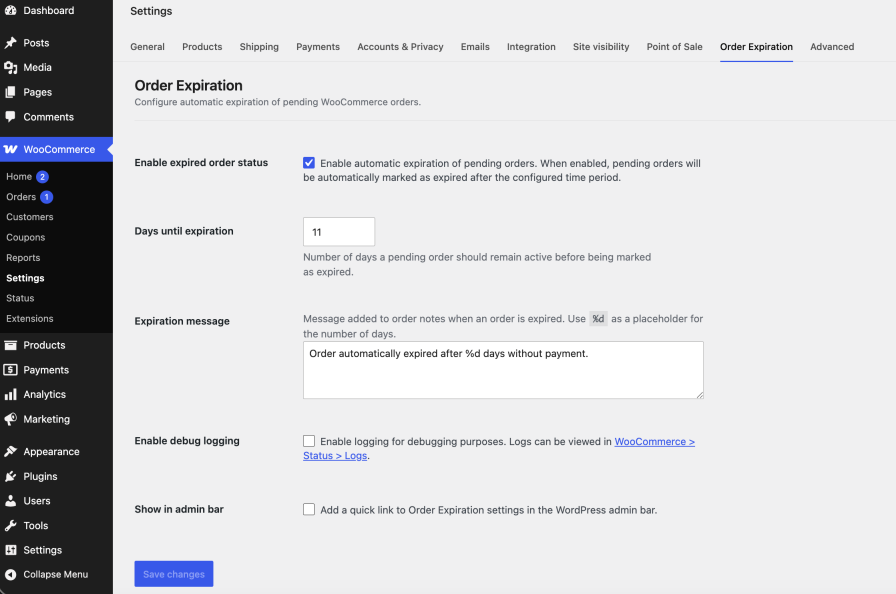
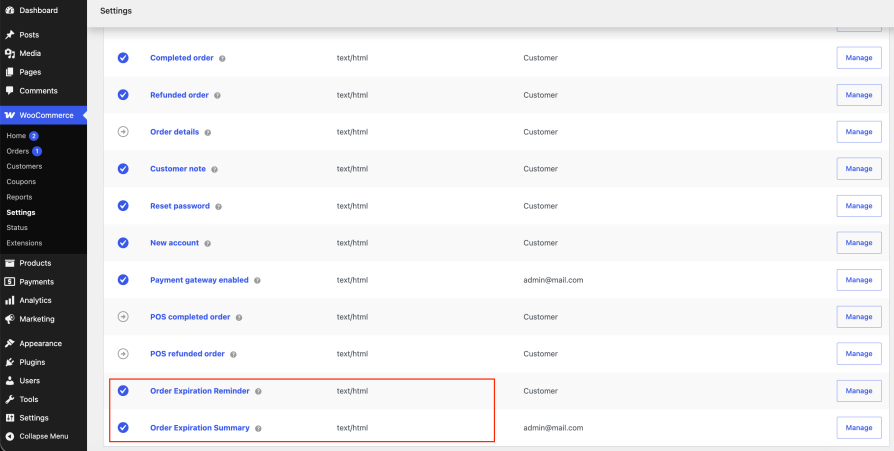
  • Works natively in WooCommerce Settings. Core behavior lives in WooCommerce → Settings → Order Expiration, and both notification emails are managed under WooCommerce → Settings → Emails — right where you already manage every other WooCommerce email, complete with the native Preview button. No separate admin page, no cluttered dashboard menu.

Common Use Cases

Bank Transfer / BACS Stores
Customers order and promise to transfer payment, then disappear. After your configured window (e.g., 10 days), orders expire automatically. Customers receive a reminder 24 hours before – recovering those who simply forgot.

Cash on Delivery Stores
COD orders occasionally fall through when customers change their minds after ordering. Auto-expiration keeps your pending list clean and your reported inventory accurate.

Wholesale / B2B Stores
B2B buyers sometimes request quotes via the order system and go silent. Automatic expiration clears these orders without requiring manual intervention from your team.

High-Volume Stores
If you process hundreds of orders monthly with some percentage of manual payments, the admin summary email tells you exactly how many expired each cycle – batch visibility without dashboard monitoring.

How It Works

  1. Install and activate the plugin through the WordPress Plugins screen.
  2. Configure in WooCommerce → Settings → Order Expiration. Set your expiration period and enable the feature. Customize the reminder and summary emails under WooCommerce → Settings → Emails.
  3. The plugin runs automatically twice daily via WooCommerce’s existing scheduled tasks. No additional server configuration required.
  4. Customers receive one reminder email 24 hours before their order expires.
  5. When orders expire, they move to “Expired” status and you receive an admin summary.

Frequently asked questions

How do I automatically cancel pending WooCommerce orders?

Enable the plugin under WooCommerce → Settings → Order Expiration and set the number of days a pending order can remain before it's automatically marked as "Expired". No coding required.

Will automatically expiring an order delete it?

No. Orders are never deleted - they move to a dedicated "Expired" status and stay in your database, fully viewable and reversible from WooCommerce → Orders.

Does this work with BACS, bank transfer, or cash on delivery orders?

Yes - that's the exact use case. It covers any manual payment method that WooCommerce's built-in Hold Stock feature doesn't handle, since Hold Stock only works for instant payment gateways.

Can I send customers a reminder before their order expires?

Yes. A reminder email goes out 24 hours before expiration, registered as a native WooCommerce email under WooCommerce → Settings → Emails, with full subject and heading customization and Preview support.

Is this compatible with WooCommerce HPOS (High-Performance Order Storage)?

Yes, fully compatible - it uses WooCommerce's official order APIs exclusively, with no direct database queries.

Does this add extra cron jobs or slow down my store?

No. It reuses WooCommerce's existing twice-daily scheduled sales task instead of registering a new cron job, so there's no added server load.

How do I clean up pending orders that are already old in my store?

Once enabled, the plugin checks pending orders on its regular schedule and expires any that are already older than your configured window - no manual bulk action needed.

Related Products

Price $279 annually
Rated 3.2 out of 5 stars
Price $79 annually
Rated 3.4 out of 5 stars
Price $59 annually
Rated 3.1 out of 5 stars
Price $109 annually
Rated 2.7 out of 5 stars
Price $49 annually
Rated 4.1 out of 5 stars
Price $109 annually
Rated 2 out of 5 stars
Price $109 annually
Rated 2.3 out of 5 stars
Price $39 annually
Rated 2.8 out of 5 stars
Price $109 annually
Rated 2.6 out of 5 stars
Use of your personal data
We and our partners process your personal data (such as browsing data, IP Addresses, cookie information, and other unique identifiers) based on your consent and/or our legitimate interest to optimize our website, marketing activities, and your user experience.




