

Subscription includes
Support
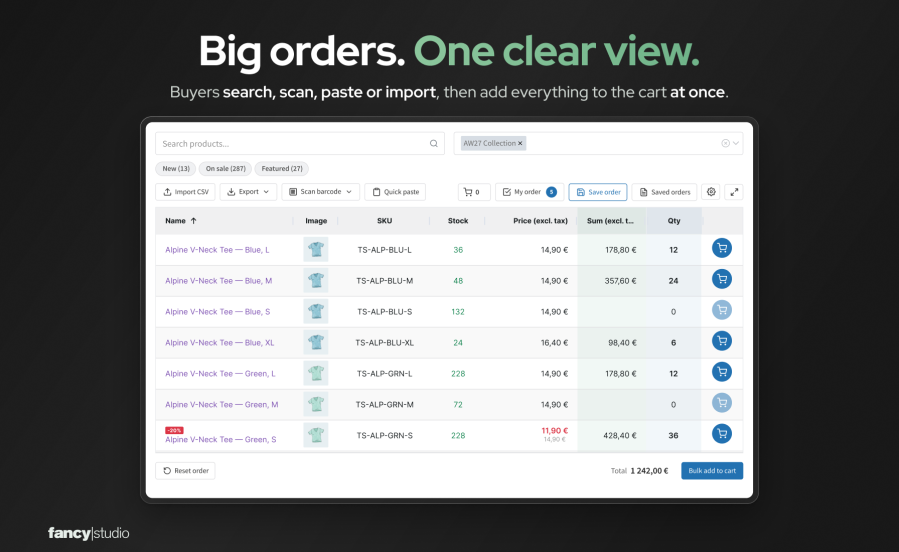
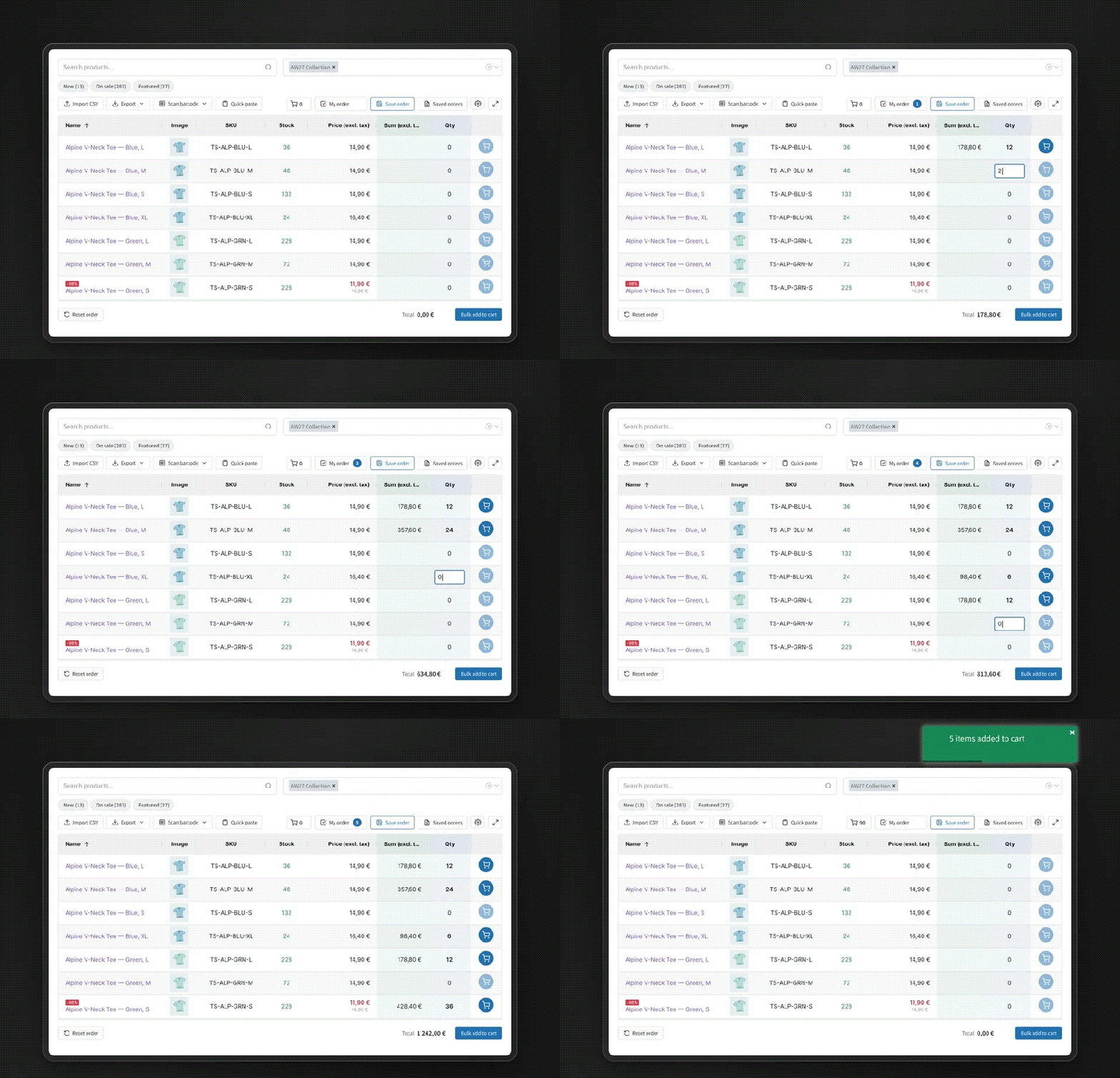
B2B Quick Order Grid is a bulk order form for WooCommerce wholesale stores. Your customers type, paste, scan, or import the products they need into one table, enter quantities, and add the whole order to the cart. Unlike the standard shop, nobody opens a product page for each item. When a customer would rather phone or email, your sales reps can place the order on that customer’s behalf in the same form.
Wholesale customers rarely browse. They come with last week’s order, a spreadsheet, or a shelf to restock.
Some customers will always phone or email their order. With ordering for customers turned on, a sales rep picks one of their assigned customers, fills in the same order form, and reviews a summary before the order is created.
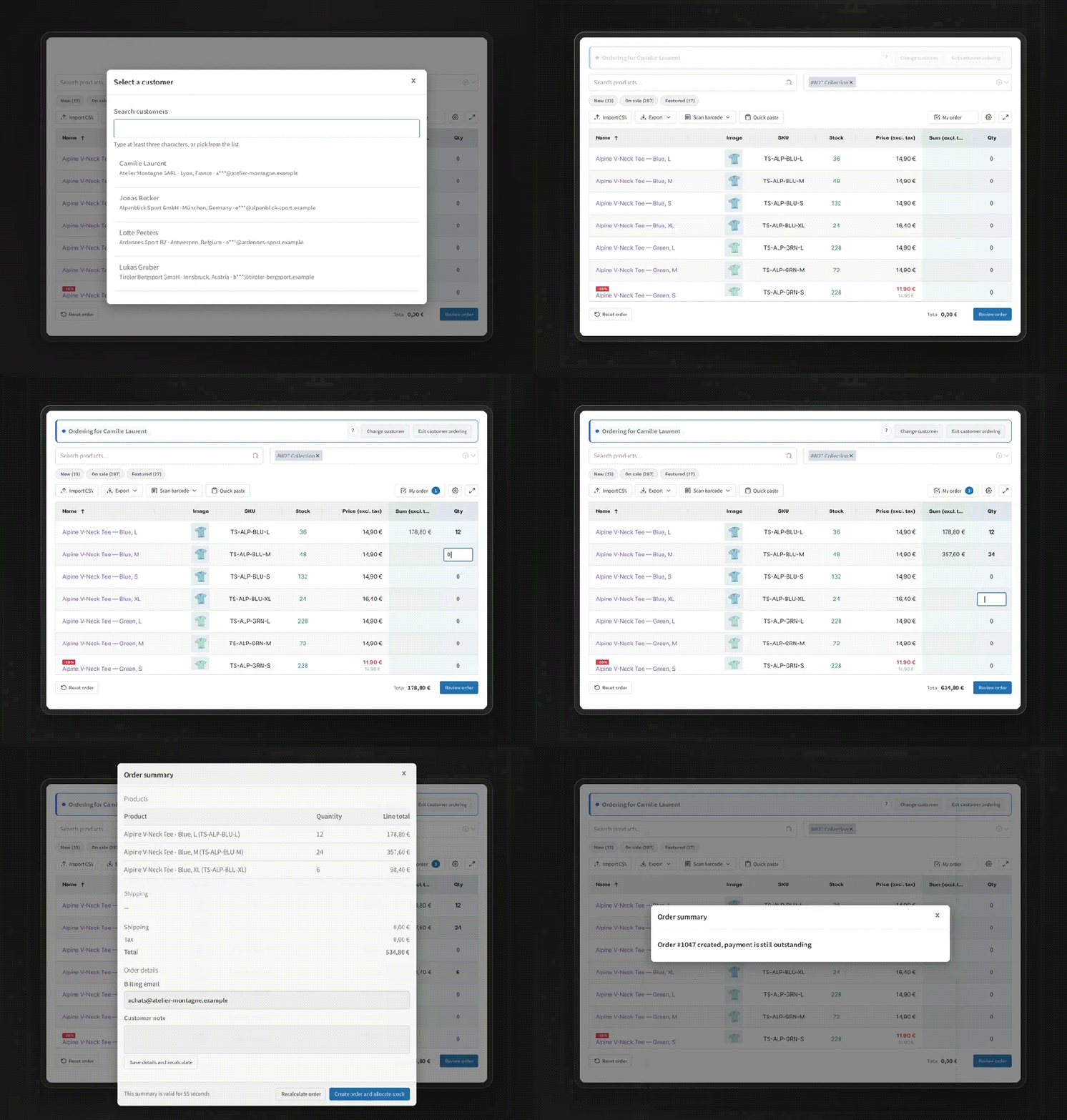
The mode is off until you turn it on, and it is deliberately narrow: physical simple and variable products with managed stock, whole quantities, your store currency, core WooCommerce tax and shipping, and an offline payment method. When something is not supported, the summary stops and says why instead of showing a guessed price.
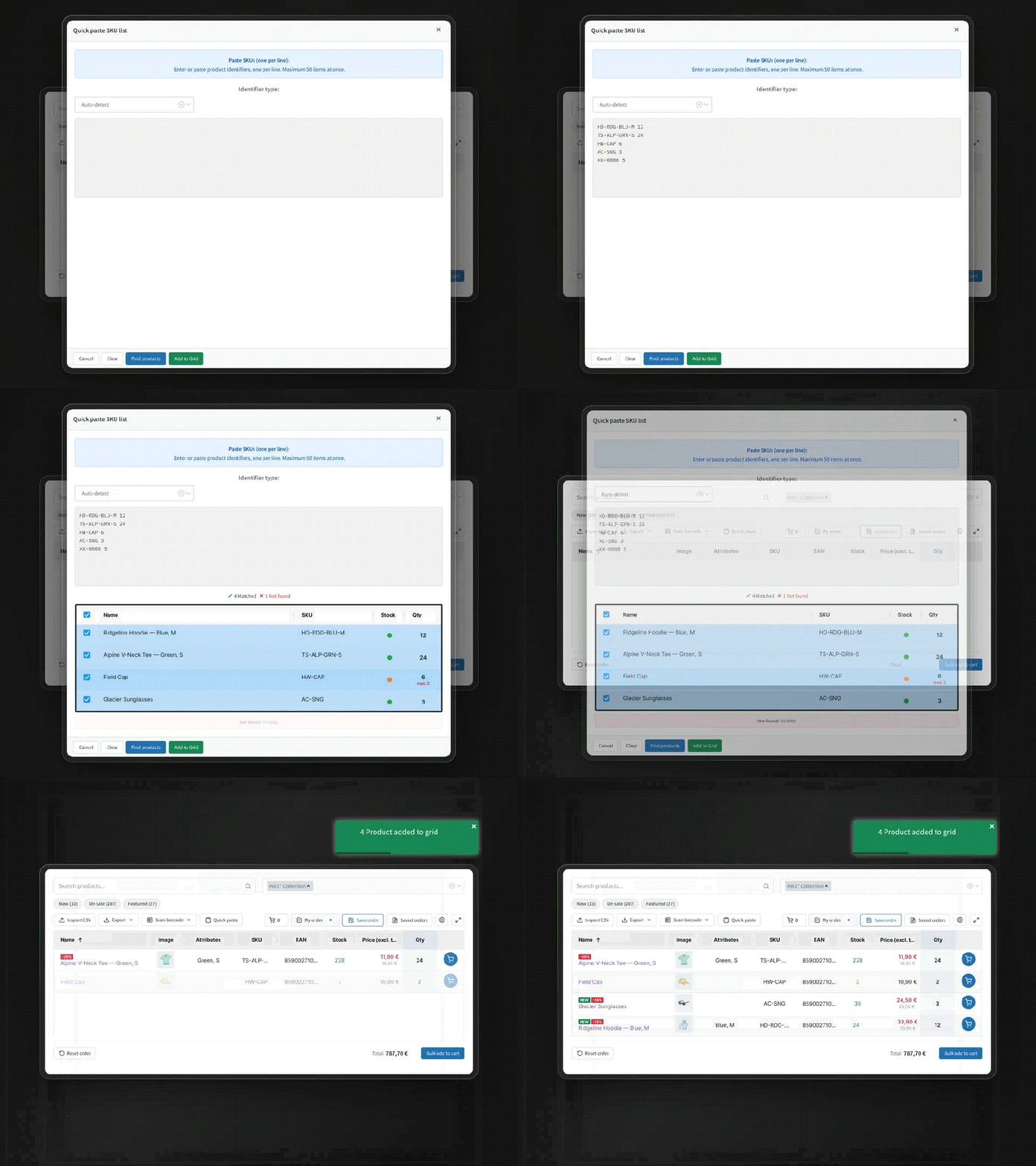
Customers scan with the camera of a phone, tablet, or laptop, or with a USB or Bluetooth scanner that types like a keyboard. The scan is matched against the product’s barcode or SKU. Supported formats: EAN-13, EAN-8, UPC-A, UPC-E, and Code 128. The camera needs HTTPS.
[b2b_quick_order_grid] shortcode to any page. A Quick Order page is created for you on activation. The form uses its own styles, which you adjust in a live styling editor.B2B Quick Order Grid is an ordering tool. It does not set wholesale prices by role, manage quotes, or handle B2B registration, and ordering on behalf of customers does not calculate commissions or take online payment. It works alongside the extensions you use for those.
Yes. Use the Demo button to open a store with sample products, where you can search, enter quantities, paste SKUs, and add a whole order to the cart.
Add the B2B Quick Order Grid block or the shortcode to any page. The form uses its own styles, so it does not depend on your theme's product templates, and you can match colors, spacing, borders, and font size in the live styling editor.
The form reads each product's WooCommerce price for the current visitor and adds products to the normal WooCommerce cart, so pricing extensions that adjust WooCommerce product prices are reflected. It does not set prices itself. For ordering on behalf of customers, a B2B pricing extension needs its own integration first; the settings screen names any plugin that prevents customer prices from being calculated reliably.
Above the product count you set in Settings (Server-side threshold), the form loads products page by page as customers scroll instead of loading the whole catalog. In our test store with 20,000 products, exporting the full catalog used about 150 MB of memory.
Yes. Choose everyone, logged-in users only, or specific roles in WooCommerce > Settings > Quick Order Grid > General.
No. If you allow everyone, guests can search, scan, paste SKUs, import a CSV, and add to the cart, and their saved templates are kept in their browser. Export needs a logged-in account. Logged-in customers have their templates saved to their account.
Yes. It is off by default. A rep picks a customer assigned to them, fills in the order form, and reviews a summary recalculated on the server with that customer's prices, taxes, and shipping. Confirming creates an on-hold order for the customer, reduces the stock, and records who prepared it.
No. Reps stay signed in as themselves. There is no switching into the customer's account, so the customer's session and cart are not touched, and each rep reaches only the customers assigned to them.
The mode covers physical simple and variable products with managed stock, whole quantities, your store currency, core tax and shipping, and an offline payment method. Virtual and downloadable products, backorders, coupons, fees, and third-party pricing rules stop the summary with the reason shown. With WooCommerce Tax automated taxes switched on, ordering for customers turns itself off. It does not calculate commissions or take online payment.
Any USB or Bluetooth scanner that types the code like a keyboard, and the camera of a phone, tablet, or laptop. The camera needs HTTPS. Supported formats: EAN-13, EAN-8, UPC-A, UPC-E, and Code 128.
A CSV, TSV, or TXT file with a column for the SKU or barcode and a column for the quantity. You map the columns after uploading. Excel users can save their sheet as CSV.
Choose one of three modes: one row per parent product with options selected in a popup, one row per variation, or both.
Your store keeps working. Products, prices, the cart, checkout, and orders are standard WooCommerce. The plugin keeps its own data (saved templates and settings) unless you turn on "Remove data on uninstall".
Extension information
Quality Checks
Countries







