Product comparison
Subscription includes
Support
You have 200 variations. You need to change prices. Bulk Edit Variations Prices for WooCommerce lets you instantly update all your product variation prices at once — or schedule price changes to apply automatically on any date and time you choose.
You open a product with 50 variations and need to raise prices by 15%. That is 50 separate edits — one field at a time. A seasonal sale starts Monday, so you stay up Sunday night changing prices, then wake up early to start reversing them. You have 700 products spread across dozens of categories and only need to update three of them — but there is no way to skip the rest without deselecting every single product manually. You accidentally set the wrong price on three variations and do not notice until customers have already checked out.
These are not occasional inconveniences — they are hours of lost time and avoidable errors that compound every time you run a promotion.
Bulk Edit Variations Prices for WooCommerce gives you complete control over all your variation prices — right now, or on a schedule you set in advance — without writing a single line of code.
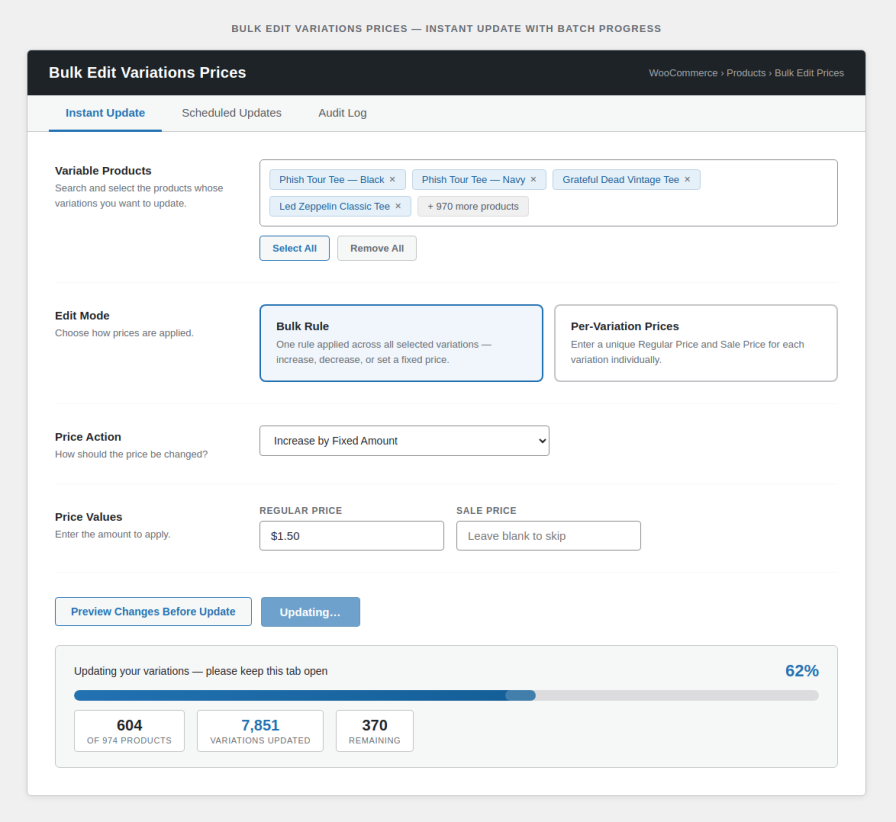
Changing variable product prices manually takes hours. Bulk Edit Variations Prices provides a one-click solution to modify all variation prices without editing each one separately — whether you have 10 variations or 10,000.
Working across a large catalog? Click Select All to load every variable product in your store into the editor instantly — no searching, no scrolling, no clicking product by product. On stores with hundreds of products, this alone saves significant time.
Need different prices for each variation? Switch to Per-Variation mode and enter a unique Regular Price and Sale Price for every variation individually — then apply instantly or schedule them to go live on any future date. No more workarounds, no multiple schedules.
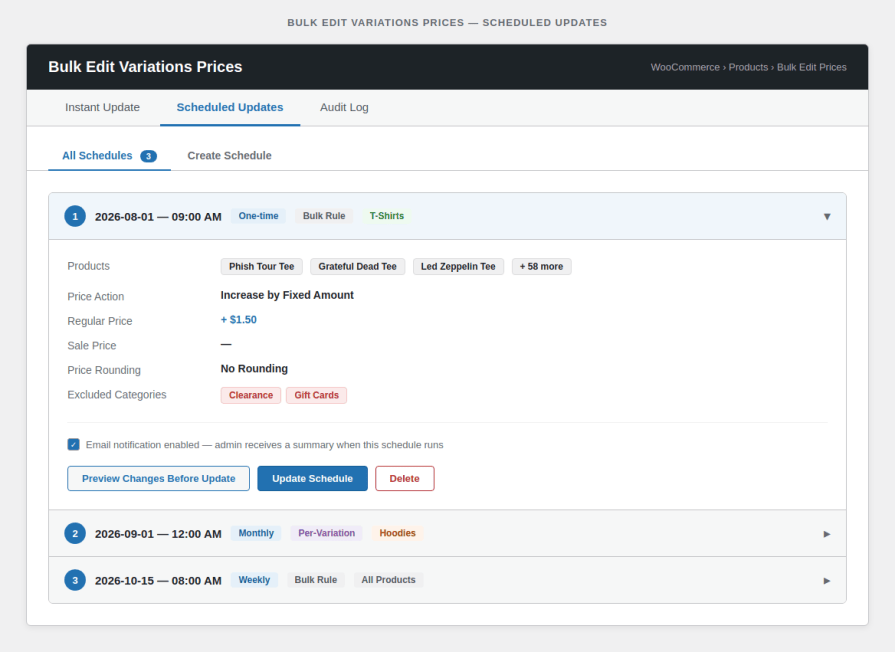
Plan your pricing strategy in advance. Create scheduled price updates that apply automatically at a date and time you set. The system handles everything completely independently — no manual work required on the day of the update.
Set a schedule once and let it repeat automatically — daily, weekly, or monthly. Perfect for stores with rotating promotions, seasonal pricing cycles, or regular markups that run on a fixed cadence.
Click Preview Changes Before Update to see a full table of every variation’s current price and what it will become after your update — before a single price is changed. Catch mistakes before they go live. No more costly pricing errors and no unnecessary load on your server.
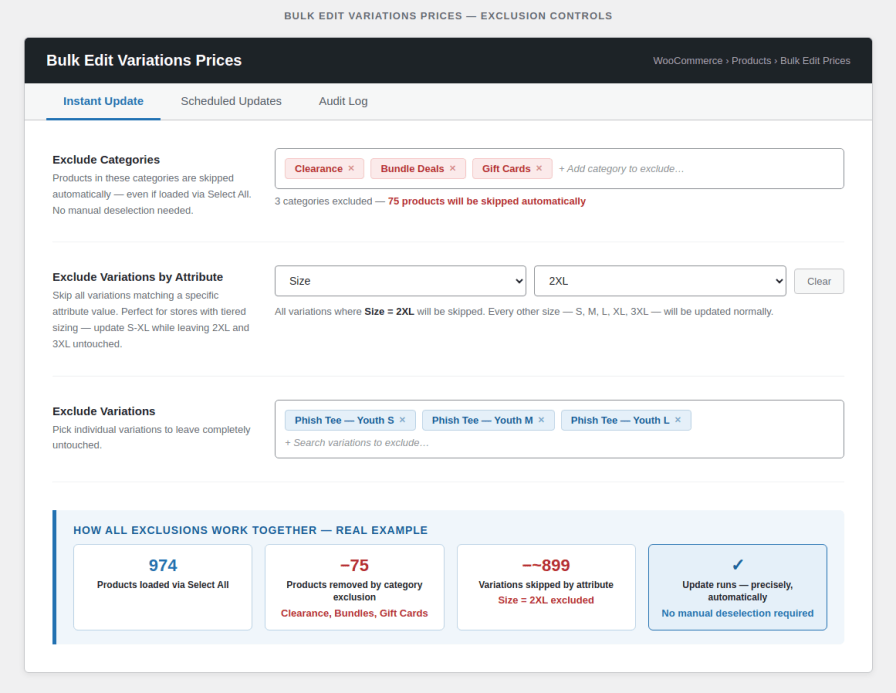
Running a store-wide price increase but need to leave certain categories untouched? Select one or more categories to exclude and every product in those categories is automatically skipped — even if you used Select All. No manual deselection of individual products needed, regardless of how many products are in the excluded categories.
Need to update only one variation type across your entire catalog — for example only “Size: Large” or only “Type: PRO”? Select an attribute and a value and the plugin will skip all variations that match, leaving the rest unchanged. Run one update for each variation type separately without creating complex workarounds.
Not every variation needs the same update. Select individual variations to exclude from any bulk edit or scheduled update, so the rest of your pricing stays exactly as it is.
Select a WooCommerce product category and instantly load all its variable products into the editor — no searching product by product.
After a percentage increase or decrease, prices often land on awkward numbers. Choose to round results to the nearest dollar, nearest 0.50, or nearest 0.05 — so your prices always look intentional, not calculated.
Receive an automatic email confirmation every time a scheduled price update runs — styled to match your store’s WooCommerce email branding. Know exactly when prices changed, how many variations were updated, and which products were affected — even when you are offline.
Every price update — instant or scheduled — is recorded in a built-in audit log. See who made the change, when it ran, what action was applied, and how many variations were updated. Full visibility over your pricing history at all times.
Scheduled updates do not create unnecessary data buildup in your database. The system automatically removes scheduled records after they apply — zero manual housekeeping required. Your store stays optimised and fast.
Monitor, modify, or remove scheduled updates from one intuitive interface. Easily adjust changes and delete price updates as needed — full command over your pricing plan at every stage.
Update both regular and sale prices independently by fixed amount or percentage — total flexibility for any pricing strategy, from a sitewide markup to a targeted clearance sale.
No. The plugin only runs inside your admin panel when you use it. There is zero impact on your storefront speed, product pages, or checkout.
Yes — always. The price preview table shows every variation's new price before anything is applied. You confirm, then update. No surprises.
That is the whole point. WordPress handles the schedule automatically — you do not need to be online or logged in when it runs. You can also enable email notifications per schedule, so you receive a confirmation the moment it fires.
Yes. You can select specific variations to skip, so they remain at their current price while everything else updates.
Never. Price changes only apply to product listings going forward. All existing orders and recorded prices are completely untouched.
Extension information
Quality Checks
Countries