

Subscription includes
Support
Bulk Product Price Update for WooCommerce is the all-in-one WooCommerce bulk price updater that lets you change product prices across your entire store in seconds. Whether you need to run a storewide sale, apply a bulk discount to a specific category, or mass update regular prices after a supplier increase — this extension handles it all with a visual filter builder, live preview, and one-click rollback.
Stop editing product prices one by one. With Bulk Product Price Update you can bulk edit product prices by category, tag, attribute, price range, stock status, product type, product name, or any custom field — and apply percentage discounts, fixed price adjustments, or set an exact price in a single operation.
Not every bulk price update should affect your entire catalog. The built-in filter builder gives you complete control over which products receive a price adjustment. Combine multiple filters with AND/OR logic to create precise product selections.
This WooCommerce price manager gives you full flexibility over how prices are calculated during every bulk price change:
Set start and end dates for your bulk sale price update and let WooCommerce activate and remove the sale price automatically. Perfect for flash sales, seasonal bulk discounts, Black Friday promotions, and any time-limited offer — without manually toggling prices on and off.
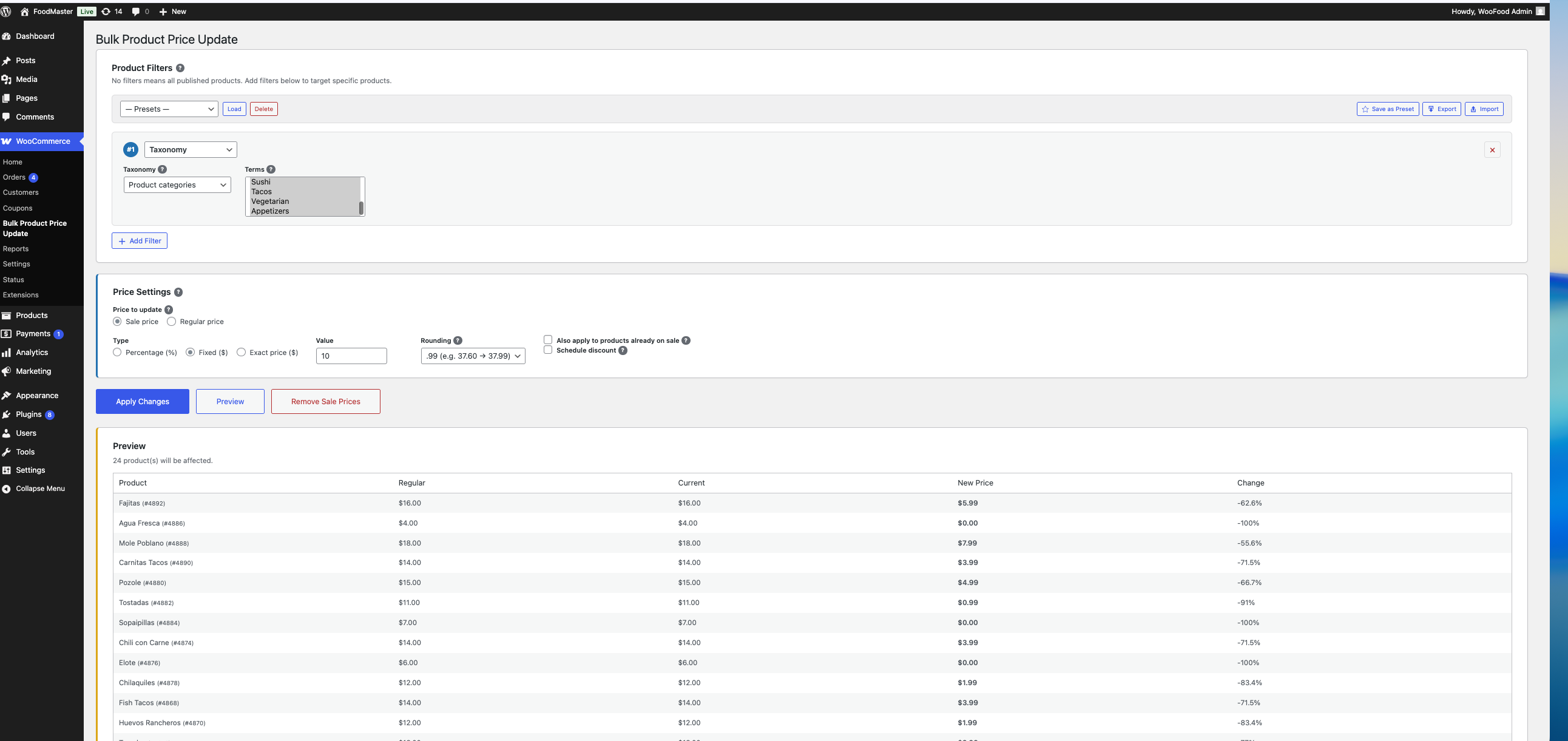
Never apply a mass price update blindly. The live preview table shows every matched product with its current price, new calculated price, and percentage change — before any data is saved. Products that will be skipped (already on sale, price out of range) are clearly flagged so you always know exactly what the bulk product price update will do to your catalog.

Applied a bulk discount by mistake? Every bulk price change is fully reversible. Click the Revert button to instantly restore all product prices to their exact previous values — regular price, sale price, and scheduled sale dates included.
Every bulk product price update is logged in a detailed run history table. Each entry shows the date, filters used, discount settings, and the total number of products affected. The complete audit trail makes it easy to review past bulk price changes and revert any run at any time.
The bulk product price updater processes products in small AJAX batches with a real-time progress bar. This means you can bulk edit prices for thousands of products without server timeouts — even on shared hosting. Adjust the batch size with the wcbdi_batch_size filter hook for fine-tuned performance.
Running the same bulk price edit regularly? Save your filter configuration as a named preset and reload it with a single click. Export all presets as a JSON file to share across multiple stores or import presets from another site. The bulk price editor also remembers your last used settings automatically, so your filters, relations, and discount configuration are ready when you return.
WCBDI_DEBUGInstall and activate Bulk Product Price Update for WooCommerce, then go to WooCommerce > Bulk Product Price Update. Use the filter builder to select the products you want to update, set your discount type (percentage, fixed amount, or exact price), click Preview to verify, and then click Apply Changes. All matching product prices are updated in one operation.
Yes. Add a Taxonomy filter, select "Product categories" from the dropdown, and choose the specific categories you want to target. Only products in those categories will be affected by the bulk price change. You can also filter by product tags or any WooCommerce attribute like Color, Size, or Brand.
Yes. Bulk Product Price Update for WooCommerce fully supports variable products. Each variation's price is updated individually. If you use a Price Range filter, only variations within that range are updated while others are skipped. The parent product's price data is automatically synced after all variations are processed.
Yes. When you select "Regular price" as the price to update, a Direction option appears. Choose "Increase" to raise prices by a percentage or fixed amount. This is ideal for adjusting prices after a supplier cost increase or currency change.
Enable the "Schedule discount" checkbox in the Price Settings section, then set the sale start and end dates. WooCommerce will automatically activate the sale price on the start date and remove it on the end date — just like scheduling a sale on a single product, but applied in bulk across all matching products.
Yes. Click the Preview button to see a detailed table with every matched product showing its current price, the new calculated price, and the percentage change. Products that will be skipped are clearly marked with a reason. No changes are made to your store until you click Apply Changes.
Every bulk price update is logged in the Run History. Click the Revert button next to any entry to rollback all affected products to their exact previous prices. The rollback restores regular prices, sale prices, and scheduled sale dates as they were before the run.
Yes. Add a Price Range filter and set a minimum and/or maximum price. Only products (or variations) with a regular price within that range will be included in the bulk price update. This is useful for applying different discount tiers to different price segments.
Click the Remove Sale Prices button. This removes the sale price from every product matching your current filters and restores each product to its regular price. Scheduled sale dates are also cleared.
Yes. Add a Stock filter to target products by their stock status (In Stock, Out of Stock, or On Backorder). You can also set a minimum and maximum stock quantity range to narrow down the selection further.
Yes. Add a Custom Field filter and enter the meta key (for example, _brand or _supplier). You can optionally set a specific meta value to match, or leave the value empty to match any product that has that custom field. This allows advanced bulk price editing based on any product data.
Categories
Extension information
Quality Checks
Countries







