

Product Icon

Call for Price Pro for WooCommerce

A simple WooCommerce plugin to help you hide product prices and show a “Call For Price” text to let customers call you to find out the price. Show the “Call for price” message or the custom message you want based on product type, price range, user-role, etc.
Choose a billing option
$39
Save 20%
$78 $62.40

Subscription includes

  • Product updates and improvements
  • Customer support
  • 30-day money-back guarantee

  • Create Customized Call-to-Actions for Specific Products
  • Let customers contact you via Phone, WhatsApp, email, or a custom link.
  • Custom Message for Simple Products
  • Variable Products wise Custom Call For Price Message
  • Call For Price Custom Message for Grouped Products
  • Give External Product-based Custom Call For Price Message
  • Engage Customers Based on Price Ranges
  • Hide WooCommerce Product Prices Strategically for Specific User Roles
  • Build Direct Connections with Integrated Forms
  • Never Lose a Sale on Out-of-Stock or Backorder Items

Key Features

  • Set personalized “Call for Price” text for particular product categories or tags to instantly grab attention.
    Example: For your exclusive luxury watches category, display “Contact us for pricing details” to build intrigue and foster direct communication.
  • Give Shoppers Multiple Ways to Get in Touch with You
    Choose what happens when customers click the Call for Price button—start a phone call, open WhatsApp or email, or redirect to a custom link.
    You can set your contact details for the call types globally or define it per product.
    Example: Set a global WhatsApp number for normal jewelry items, but for custom-made items like a Diamond Ring, direct inquiries to a phone number using a per-product option.
  • Customize the Call for Price Button Text for Each Contact Method
    Use your own call-to-action text based on the selected contact type to better guide customer interaction.
    Example: Use “Call Now” for phone inquiries and “Chat on WhatsApp” for mobile support
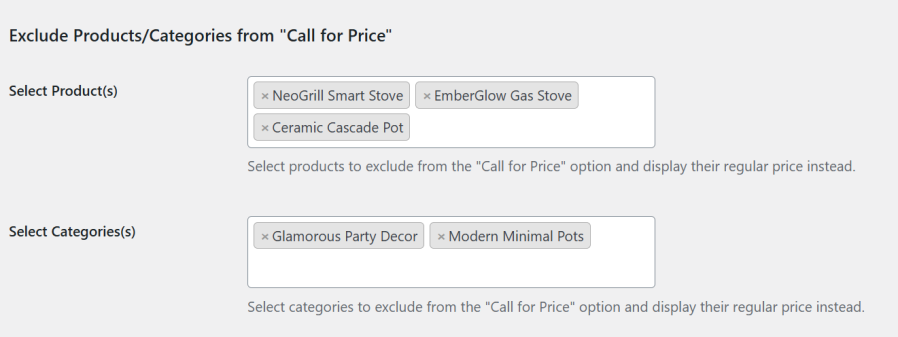
  • Exclude specific products or entire categories from showing the Call for Price label—even when applied globally.
    Example: Always show prices for bestsellers by excluding them individually, or keep entire categories like “Clearance” visible with regular pricing.
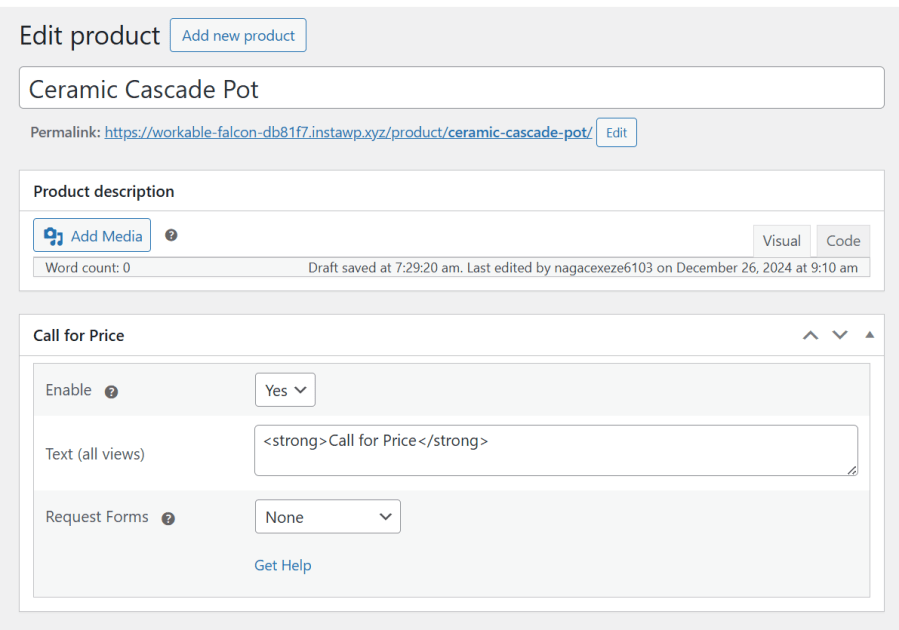
  • Add a meta box to each product’s edit page to set custom Call for Price labels or forms individually.
    Example: Show “Contact Us” with a form on a Diamond Ring, while other products follow your global settings.
  • Set custom text such as ‘Call for Price’ for default WooCommerce product types such as —simple, variable, grouped, or external.
    Set custom text such as ‘Call for Price’ for default WooCommerce product types such as —simple, variable, grouped, or external.Example: For a handcrafted wooden dining table, show “Call us for pricing and customization options” to highlight its unique value.
  • Use “Call for Price” on variable products to allow flexibility based on different options, such as size, color, or material.
    Example: For a luxury sofa available in multiple fabrics and finishes, display “Request Pricing for Your Preferred Design” to simplify the customer decision process.
  • Encourage customers to inquire about pricing for bundled products by setting a custom “Call for Price” message for grouped items.
    Example: For a bedroom furniture set that includes a bed, nightstands, and a wardrobe, use “Contact us for a special bundle price” to promote the complete set.
  • Redirect customers to external links with a tailored “Call for Price” message to guide them to third-party platforms or suppliers.
    Example: For a high-end camera listed on a partner website, display “View Pricing on Partner Store” and link them to the purchase page.
  • Show “Call for Price” only for products within a specific price range to maintain flexibility for premium or negotiable items.
    Example: For furniture priced above $2,000, entice customers with “Contact us for exclusive deals.
  • Control pricing visibility and apply the “Call for Price” option to specific user groups, such as wholesale customers or guest users.
    Example: Hide prices for guest users and encourage them to register or call for personalized pricing.
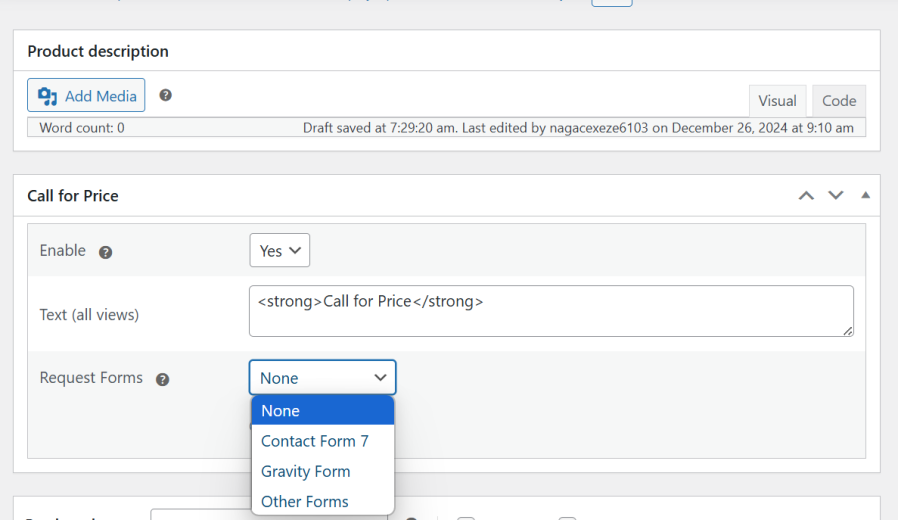
  • Integrate seamlessly with form plugins like Gravity Forms or Contact Form 7 to collect customer inquiries and requirements.
  • Enable “Call for Price” for out-of-stock products so customers can inquire about availability or pre-order options.
    Example: For a high-demand product like gaming consoles, show “Call us for restock updates” instead of losing potential customers.
  • Show stock status for products with no price to help customers know what’s available even without seeing the cost.
    Example: A product marked “Call for Price” still shows “In stock – 12 available,” giving buyers the confidence to reach out.

Additional Features to Enhance Customer Engagement

  • Redirect Customers to Custom Pages: Send customers to a custom URL from the “Call for Price” button, such as a contact page or lead capture form.
  • Boost Visibility by Hiding Confusing Elements: Replace “Add to Cart” or “Read More” buttons with “Call for Price” for clear customer actions.
  • Customize Related Product Labels: Use the “Call for Price” text on related products, homepages, or archives to keep messaging consistent.
  • Personalized Negotiation for Limited Stock: Use “Call for Price” for items on backorder or low stock to offer exclusive deals.
  • Dynamic Pricing Labels for Sales Promotions: Replace sale tags with “Call for Price” to draw attention to unique offers.

Create Customized Call-to-Actions for all Products from selected Product Categories

Set Call Type for the Call for Price Button

call type featureusing WhatsApp call type

Custom Message for Simple Products

Variable Products wise Custom Call For Price Message

Call For Price Custom Message for Grouped Products

Give External Product based Custom Call For Price Message

Engage Customers Based on Price Ranges

Hide WooCommerce Product Prices Strategically for Specific User Roles

Build Direct Connections with Integrated Forms

Never Lose a Sale on Out-of-Stock or Backorder Items

Show Stock Status for Products with Empty Prices
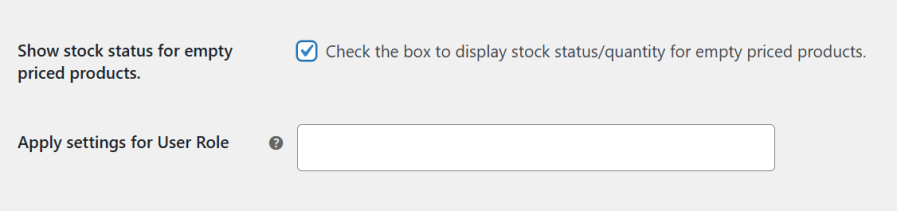

Integration with Form Plugins such as Contact Form 7 and Gravity Forms
Exclude Products or Categories from Call for Price
Add Meta Box to Each Product’s Backend
Let your Customers Request Pricing for Your Special Product/Service

Whether you are doing made-to-order business or selling high-value products or having a special bundle/ service for which you want to hide pricing and give a custom quote based on user requirements, this the best plugin for you. 

With the built-in logical conditions, you can strategically hide the default pricing of the product and replace it with custom text like Request Quote or Call for Price or whichever custom text you want. The Call for Price plugin makes you more accessible to customers and improves sales. 

Call for Price Free Vs Premium – Full Feature Comparison


Frequently asked questions

Can I replace the “Add to Cart” button text with a Call for Price Text?

Yes! Instead of the Add to Cart button, you can display custom text such as Call for Price or Request a Quote that guides your customers to call, email, or WhatsApp you to get the product price.

How can customers contact me using the Call for Price option?

When customers click the Call for Price button, they are directed to the action you configure, such as starting a WhatsApp chat, making a phone call, sending an email, or visiting a custom link like a contact or quote request page.

Does the Call for Price plugin work with different WooCommerce product types?

Yes. The Call for Price plugin works with simple, variable, grouped, and external WooCommerce product types.

Can I apply the Call for Price option to all products in my store?

Yes. You can enable the setting globally so all products display the Call for Price message.

Can I show a “Call for Price” message for out-of-stock products?

Yes. You can display a “Call for Price” message for products that are out of stock or on backorder, encouraging customers to reach out and reserve or inquire about availability

Can I show “Call for Price” only to specific user roles?

Yes. You can show “Call for Price”  message for certain user roles – like guests, wholesalers, or retailers – so the product price is hidden only for those roles.

Can I apply “Call for Price” only to specific products or categories?

Yes. You can enable the Call for Price option for selected products, product categories, or tags.

Can I show the “Call for Price message” differently in different parts of my store?

Yes. You can display different “Call for Price” messages on product pages, shop pages, and category or archive listings, so it fits perfectly wherever it appears and grabs your customers’ attention.

Can the “Call for Price” button redirect to a custom page?

Yes. You can set the Call for Price button to redirect customers to any URL you choose, making it easy to guide them to a contact page, quote request page, or any other destination.

Can I display a custom inquiry form with the Call for Price button?

Yes. You can embed a custom form created with plugins like Contact Form 7, Gravity Forms and other forms directly on your product page. This allows customers to submit inquiries instantly, making it easier for them to reach out without leaving the page.

I have another question.

Please fill out this pre-sales form.

Customer reviews

We are accepting reviews for this product, and will display them when we get a few more.

Extension information

  • PHP version required: 7.4
  • Tested with WordPress: 6.8.2
  • Tested with WooCommerce: 10.0.4
  • Requires at least WordPress: 4.4
  • Requires at least WooCommerce: 5.0

Countries

  • Worldwide

Related products

Price $79 annually
Rated 3.4 out of 5 stars
Price $279 annually
Rated 3.2 out of 5 stars
Price $59 annually
Rated 3.1 out of 5 stars
Price $109 annually
Rated 2.8 out of 5 stars
Price $49 annually
Rated 4.1 out of 5 stars
Price $109 annually
Rated 2 out of 5 stars
Price $109 annually
Rated 2.3 out of 5 stars
Price $109 annually
Rated 2.6 out of 5 stars
Price $109 annually
Rated 2 out of 5 stars
Use of your personal data
We and our partners process your personal data (such as browsing data, IP Addresses, cookie information, and other unique identifiers) based on your consent and/or our legitimate interest to optimize our website, marketing activities, and your user experience.




