
Product Icon

Custom Hide Shipping Methods for WooCommerce

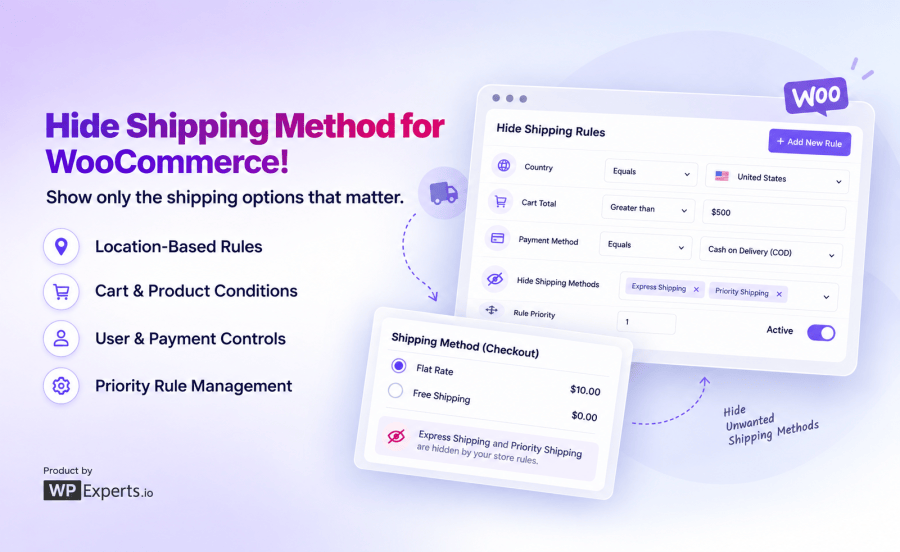
Hide or show WooCommerce shipping methods dynamically using rule-based conditions like location, cart, product, user, and payment method.
Choose a billing option
$49
Save 20%
$98 $78.40

Subscription includes

  • Product updates and improvements
  • Customer support
  • 30-day money-back guarantee

Take control of your WooCommerce checkout with Custom Hide Shipping Methods

Custom Hide Shipping Methods for WooCommerce is a rule-based WooCommerce plugin that lets you hide shipping methods automatically. It lets you hide shipping based on cart weight, location, user role, payment method, or almost any condition you set.

Why use Custom Hide Shipping Methods in WooCommerce?

Showing every shipping option to every customer isn’t always helpful. This plugin lets you display only the shipping methods that actually apply to each order.

  • Hide what doesn’t apply: Show Express Shipping only to customers who can actually use it.
  • Hide flat rate when free shipping is available: Stop customers from second-guessing a paid option when a free one already qualifies.
  • No-code rule builder: Build AND/OR logic with a point-and-click interface, no developer required.
  • 20+ hide shipping condition types: Location, product, cart, user role, and checkout-based rules, all combinable.
  • Real-time checkout updates: Rules apply instantly, no page reloads, no lag.
  • Priority control: Decide which rule wins when multiple conditions overlap.

Key features of Custom Hide Shipping Methods

Hide shipping methods based on cart weight or quantity

Heavy orders shouldn’t necessarily see the same shipping options as a single lightweight item.

  • Hide Express Shipping when cart weight exceeds a set limit.
  • Apply rules to specific weight ranges (e.g., 5–20 kg) for mid-tier handling.
  • Combine with quantity-based conditions for full control.

Hide free shipping or flat rate based on cart subtotal

Control when free or paid shipping methods appear based on the value of the cart.

  • Hide Free Shipping automatically when cart subtotal falls below your minimum.
  • Hide flat rate or other paid methods once Free Shipping becomes available, so customers aren’t stuck comparing options that shouldn’t be on the table.
  • Works on subtotal before or after discounts.

Hide shipping methods by location

Not every shipping method makes sense for every country, state, or postcode.

  • Hide costly international methods for domestic-only carriers.
  • Restrict or hide methods by Country, State, City, Postcode, or Shipping Zone.
  • Build location-specific shipping logic without duplicating shipping zones.

Hide shipping methods by user role

Wholesale customers, VIPs, and retail shoppers don’t need to see the same shipping menu.

  • Hide Standard Shipping for wholesale roles who use a dedicated carrier.
  • Create different shipping visibility for logged-in vs. guest users.
  • Pair with role-based pricing plugins for a fully tailored checkout.

Hide shipping methods by payment method

Some shipping methods shouldn’t be paired with certain payment options.

  • Hide Priority Shipping when Cash on Delivery is selected.
  • Prevent mismatched payment-and-shipping combinations that lead to support tickets.

Hide shipping methods by product, category, or shipping class

Fragile, oversized, or restricted items often need their own shipping rules.

  • Hide Standard Shipping when a fragile-item category is in the cart.
  • Apply rules by Product, Product Variation, SKU, Tag, or Shipping Class.
  • Useful for products that legally or physically can’t ship via certain carriers.

How the Custom Hide Shipping Methods rule engine works

Every rule is built from three main parts: the shipping method or methods to hide, the match logic (AND/OR), and one or more conditions.

Step What you do
1. Name the Custom Hide Shipping Methods in WooCommerce e.g., “Hide Flat Rate When Free Shipping Available”
2. Pick methods to hide Select one or more from a multi-select field
3. Set match logic AND (all conditions must be true) or OR (any condition triggers it)
4. Add conditions Choose a condition, operator, and value
5. Set priority Lower number = higher priority when rules overlap
6. Publish The hide shipping method rule goes live instantly at checkout

AND vs. OR conditions in Custom Hide Shipping Methods plugin explained:

Scenario Match logic Result
US customer, cart over 10kg AND (Country = US + Weight > 10kg) Rule triggers; both conditions met
US customer, cart under 10kg AND Rule doesn’t trigger; weight condition fails
US customer, cart under 10kg OR (Country = US + Weight > 10kg) Rule triggers; country condition alone is enough

Common use cases

  • Hide flat rate when free shipping is available.
  • Hide Express Shipping for heavy or oversized orders.
  • Hide Standard Shipping for wholesale or B2B customers using a separate freight arrangement.
  • Hide Priority Shipping when Cash on Delivery is selected.
  • Hide expensive shipping options for international orders.
  • Temporarily disable certain shipping methods during promotions or seasonal events.

Who is Custom Hide Shipping Methods for?

Store Type Typical use
General WooCommerce stores Hide flat rate the moment free shipping kicks in
Heavy/bulky product sellers Hide Express Shipping above a weight threshold
Wholesale and B2B stores Show role-specific shipping methods only
International sellers Restrict shipping visibility by country or zone
COD-restricted stores Hide premium shipping when COD is selected

Frequently asked questions

Does this plugin automatically hide flat-rate shipping when free shipping is available?

Yes. You can create a rule that hides Flat Rate (or any other method) whenever Free Shipping becomes available based on your cart subtotal conditions, no manual checkout management needed.

Can I hide all shipping methods except free shipping in WooCommerce?

Yes, either through the plugin's built-in "Show Free Shipping only" setting or by building a custom rule that hides every other method once your free shipping conditions are met.

Will hiding shipping methods slow down my checkout page?

No. Rule conditions are simple comparisons that run in milliseconds, so there's no noticeable impact on checkout speed or page load.

Does this work with WooCommerce Blocks checkout?

Yes. The plugin supports both the classic shortcode-based checkout and the newer WooCommerce Blocks checkout, so your rules apply no matter which checkout experience your store uses.

What happens if no hide shipping rule matches at checkout?

Nothing changes, WooCommerce displays shipping methods normally. The plugin only ever hides methods; it never shows methods that weren't already configured and available.

Can I create different shipping visibility rules for B2B customers vs. retail customers?

Yes. Using the User Role condition, you can hide specific shipping methods for wholesale roles while leaving retail customers' checkout unaffected, or vice versa.

Related Products

Price $79 annually
Rated 3.4 out of 5 stars
Price $279 annually
Rated 3.9 out of 5 stars
Price $59 annually
Rated 3.1 out of 5 stars
Price $109 annually
Rated 2.7 out of 5 stars
Price $109 annually
Rated 2 out of 5 stars
Price $49 annually
Rated 4.1 out of 5 stars
Price $109 annually
Rated 2.3 out of 5 stars
Price $39 annually
Rated 2.8 out of 5 stars
Price $109 annually
Rated 2.6 out of 5 stars
Use of your personal data
We and our partners process your personal data (such as browsing data, IP Addresses, cookie information, and other unique identifiers) based on your consent and/or our legitimate interest to optimize our website, marketing activities, and your user experience.




