

Subscription includes
Support
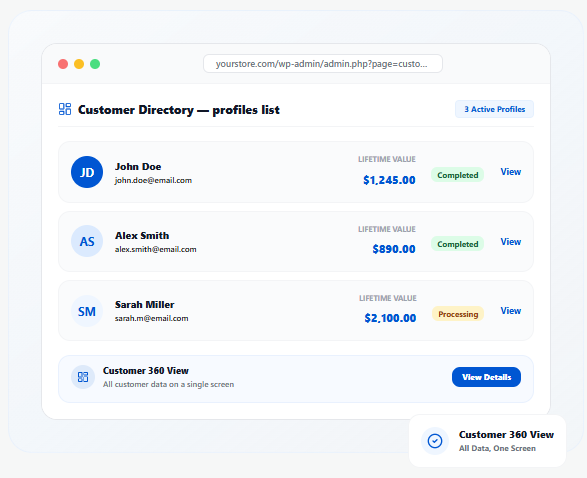
A complete customer profile — accessible from anywhere in WooCommerce.
A dedicated Customer Info page under WooCommerce with full customer details, orders, subscriptions, and support data in one view.
Open a quick-view sidebar directly from the Orders List or Order Details page — full context without navigating away.
View complete order history for any customer — order dates, statuses, totals, item details — all from one location.
See total revenue generated by each customer. Identify and prioritize high-value customers for targeted retention.
View active subscriptions, next renewal dates, and auto-renew status per customer. Compatible with WooCommerce Subscriptions.
With WooCommerce API Manager, view total licenses, active licenses, and connected stores per customer.
View HelpScout support tickets and past conversations directly inside the Customer Info dashboard.
Access Intercom conversations and customer interactions from within WooCommerce for faster support.
With Affiliate for WooCommerce, view referral counts, conversion rates, revenue, and commission status per customer.
Search by name or email from the dashboard or sidebar. Jump to any customer profile in seconds.
Open the Customer Info sidebar directly from the Actions column on the Orders List — one click to full context.
Customer data loads only when requested — no impact on store speed or admin performance. Optimized for HPOS.
Stop skimming thirty past orders before answering one support question. Customer Info writes a 50–80 word read of any customer — value tier, subscription health, open issues and churn risk — and exposes the same data to Claude through a built-in MCP server.
One paragraph a support agent can read in a few seconds.
The AI Customer Summary card sits on the Customer Info dashboard. Click Generate and it writes a tight 50–80 word read of the customer in front of you — weaving their value tier, subscription health, any open support issues and their churn risk into plain prose, citing the real numbers and dates.
A read-only MCP server, connected by URL. Nothing to install.
Customer Info ships an MCP server at /wp-json/customer-info-mcp/v1/mcp, secured by a built-in OAuth 2.1 authorization server. Add it to Claude as a remote custom connector and ask questions in plain language — it reads your live store to answer.
Claude, Gemini or OpenAI — billed to your account, not ours.
Requests go straight from your store to the provider you picked. Keys are stored encrypted and are never sent to zorem.com, and nothing is generated until you ask for it.
Whoever needs fast, full customer context — Customer Info delivers it instantly.
Get full customer context — orders, subscriptions, support history — before responding. Resolve tickets faster.
See lifetime value and order history at a glance. Make informed decisions on every customer interaction.
Track high-value customers, their subscriptions, licenses, and affiliate activity from one dashboard.
With API Manager integration, monitor licenses and connected stores per customer instantly.
Track referral counts, conversions, and commissions per customer alongside their order data.
Spot at-risk subscriptions and high-value VIPs to prioritize retention and proactive outreach.
Built to work with the tools you already use.
Customer Info is a WooCommerce extension that provides a centralized dashboard where store admins can quickly access customer details, order history, subscriptions, licenses, affiliate activity, and support conversations—all in one place.
Customer Info helps support teams respond faster by providing instant access to customer data from the WooCommerce Orders List and Order Details page. It also integrates with HelpScout & Intercom, allowing admins to view support tickets and past conversations directly inside WooCommerce.
After activating the plugin, you can access the Customer Info Dashboard under WooCommerce → Customer Info in the WordPress admin menu.
Additionally, you can open the Customer Info Sidebar directly from:
Yes! If WooCommerce Subscriptions is active, the plugin adds a Subscription Details Table, allowing you to track:
Yes, when WooCommerce API Manager is enabled, the plugin adds:
Yes! If Affiliate for WooCommerce is installed, Customer Info adds an Affiliate Widget, where you can see:
Yes, Customer Info is fully compatible with WooCommerce High-Performance Order Storage (HPOS).
No, Customer Info is optimized for performance and efficiency. It loads customer details only when requested, ensuring it does not affect your store’s speed.
Yes. When HelpScout or Intercom is connected, support tickets and past conversations appear directly inside the Customer Info dashboard alongside order history and subscription data — no switching between tools.
The AI Customer Summary generates a 50–80 word plain-English read of any customer on demand — covering their value tier, subscription health, open support issues, and churn risk. It uses your own Claude, ChatGPT, or Gemini API key, billed directly to your account. No customer PII (email, phone, address) is ever sent to the model.
Customer Info ships a read-only MCP server at /wp-json/customer-info-mcp/v1/mcp, secured by built-in OAuth 2.1. Connect it to Claude by URL and ask plain-language questions about any customer in your store — orders, subscriptions, licenses, and support tickets. Read-only by design, nothing can be changed through it.
Categories
Extension information
Quality Checks
Countries







