

Subscription includes
Support
Not every customer has the same history. Why treat every order the same?
A new order arrives in your WooCommerce store. But how much do you actually know about the person placing it?
EBA Customer Guard helps you answer these questions before you ship.
It transforms your existing WooCommerce order data into useful customer profiles, highlights important customer behavior, and gives you control over Cash on Delivery payments.
No more searching through individual orders just to understand a customer’s history.
Every customer has a story. Customer Guard makes that story easier to understand.
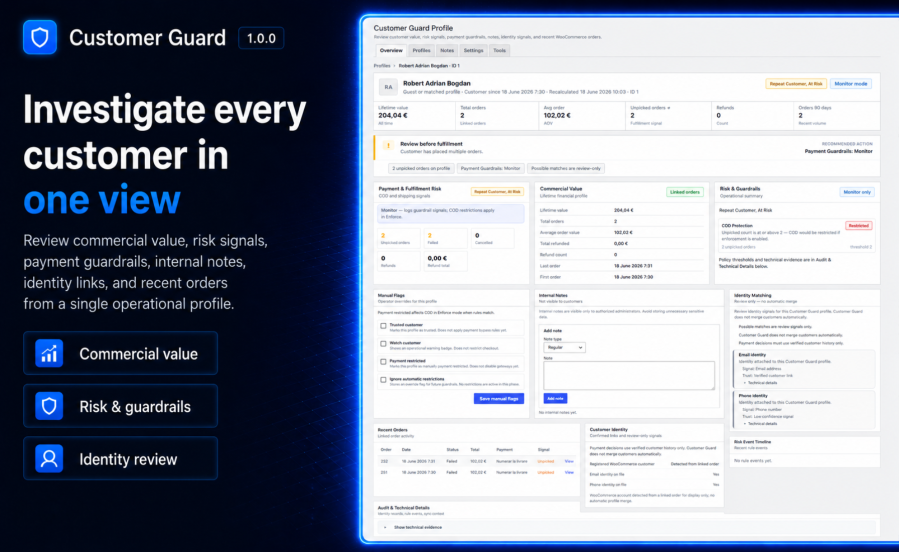
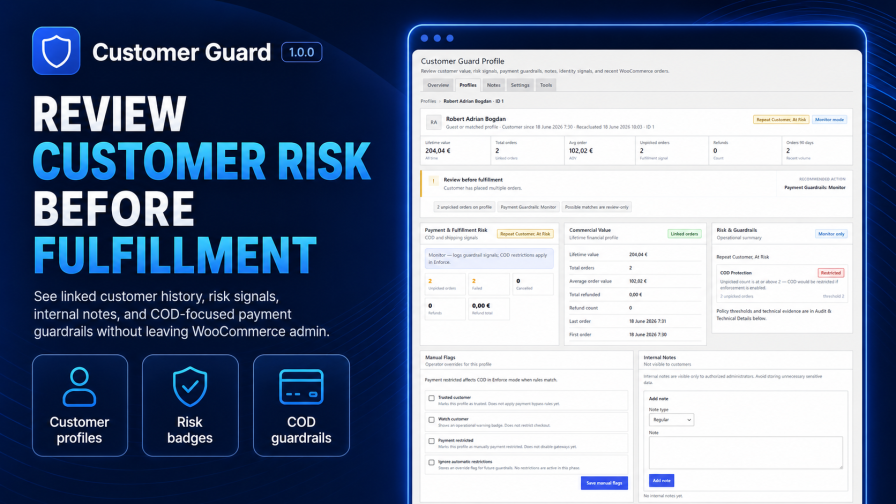
Open a customer profile to see:
Customer profiles are built from WooCommerce order data, without requiring every shopper to have a WordPress account.
Some customers deserve extra attention because they are particularly valuable. Others may require additional checks before fulfillment.
Customer Guard helps you recognize both.
Recognize your best customers
Identify repeat buyers and VIP customers using rules you configure for your store.
Spot customers who may need attention
Highlight customers with uncollected orders, refund patterns, or other configured risk indicators.
Make better-informed decisions
Use actual order history instead of relying on memory or searching manually through previous transactions.
Customer Guard displays helpful customer labels directly in your WooCommerce order management screens.
Uncollected Cash on Delivery orders can cost your business money.
You prepare the order, pack the products, and ship the parcel. Then the customer never collects it.
Shipping and return costs can quickly add up.
Customer Guard helps you manage this risk.
Configure rules based on verified customer history and choose how they affect Cash on Delivery at checkout.
Three operating modes are available:
For example, if a customer has a verified history of uncollected orders that meets your configured thresholds, Customer Guard can prevent Cash on Delivery from being offered on their next purchase.
The customer is not automatically banned from your store. The restriction applies to Cash on Delivery, not every payment method.
You decide the rules. Customer Guard helps enforce them.
Important customer information should not disappear between shifts or team members.
With private customer notes, your staff can record useful observations, such as:
Notes remain inside your WooCommerce admin and are not visible to shoppers.
Your team can also apply manual customer flags to support review and payment-related decisions.
You don’t need to open a separate platform to review customer behavior.
Customer Guard integrates with your WooCommerce administration screens.
From the Orders list
See available customer risk labels and identify orders that may need extra attention.
From an individual order
View a quick customer summary, relevant metrics, risk information, and a link to the complete profile.
From Customer Guard profiles
Explore linked order history, customer value, labels, and internal notes.
Customer Guard doesn’t require you to build your customer history from scratch.
If your store already has WooCommerce orders, you can run a historical synchronization to build profiles from existing data.
After setup, automatic synchronization keeps profiles updated as new orders arrive, order statuses change, or refunds occur.
Possible identity connections, including email and phone matches, are also displayed for review. For safety, possible matches are not automatically treated as confirmed customer identities or merged into one profile.
Customer Guard includes:
WooCommerce already stores valuable information about your customers.
EBA Customer Guard helps you use that information to recognize loyal buyers, identify potential problems, and make more informed fulfillment and payment decisions.
Know who you’re selling to, before you ship.
No. Customer Guard helps staff review customer history and signals. Payment Guardrails may hide Cash on Delivery in Enforce mode when configured rules match verified customer history. Other outcomes depend on your settings and manual review.
Yes. Payment Guardrails are designed for Cash on Delivery workflows in this release, including monitor and enforce modes.
Not as a general payment gateway blocker in v1.0.0. Guardrail enforcement focuses on Cash on Delivery according to your settings.
No. Customer Guard does not perform automatic customer merging. Identity matching provides review-only signals unless confirmed links exist in your data model.
Yes. Internal notes are team-only and managed on Customer Guard profiles for users with the correct capabilities.
Yes. The extension declares compatibility with WooCommerce High-Performance Order Storage (HPOS) when supported by your WooCommerce version.
Yes. Monitor mode lets you review guardrail decisions before Enforce mode changes Cash on Delivery availability at checkout.
Categories
Quality Checks
Countries







