
Product Icon

Gravity Forms Product Add-ons for WooCommerce

Build custom WooCommerce products with Gravity Forms to capture customer details, calculate option pricing, and send complete orders.
Choose a billing option
$109
Save 20%
$218 $174.40

Product comparison

Subscription includes

  • Product updates and improvements
  • Customer support
  • 30-day money-back guarantee

Sell products made to order

Gravity Forms Product Add-ons is a WooCommerce product configurator built on Gravity Forms. Attach a form to any WooCommerce product and the form becomes part of the product page: customers complete it, pricing updates in real time, and the details stay with the cart item, the order, the order emails and a linked Gravity Forms entry.

It suits any product that needs information from the customer before checkout: engraving and personalization, made-to-order and configure-to-order products, custom-priced products, deposits and donations.

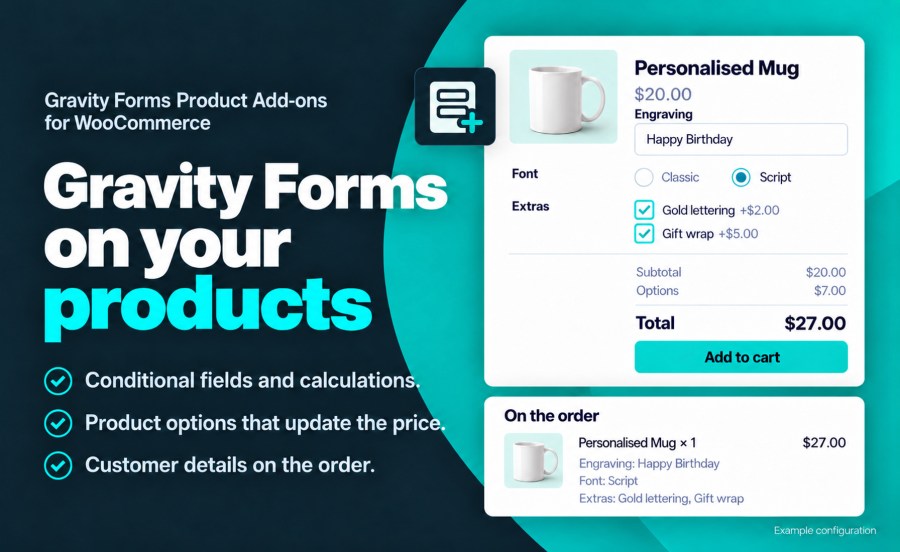
A Personalized Mug product page with an engraving, gold lettering and gift wrap, and totals of $20, $7 and $27
A product form with priced options and a live subtotal, options total and grand total.

Real-time pricing that reflects every choice

When customers select options that affect cost, the product price updates dynamically on the page. Use Gravity Forms pricing fields — products, options, quantities, and shipping — and the extension calculates the total in real time. Customers see exactly what they are paying for before they add anything to the cart.

You have full control over how pricing appears. Display the base price with a label like “Starting at $50”, hide the default WooCommerce price entirely for products the form prices in full, or customize the subtotal, options, and grand total labels individually.

Configure once, apply to whole catalogs

Assign a form to product categories and tags, and every product in them uses it. WooCommerce settings live on the form, so a change made there applies to every product using it, while any product can override individual sections with its own settings. The Products list shows the form assigned to each product and filters by form.
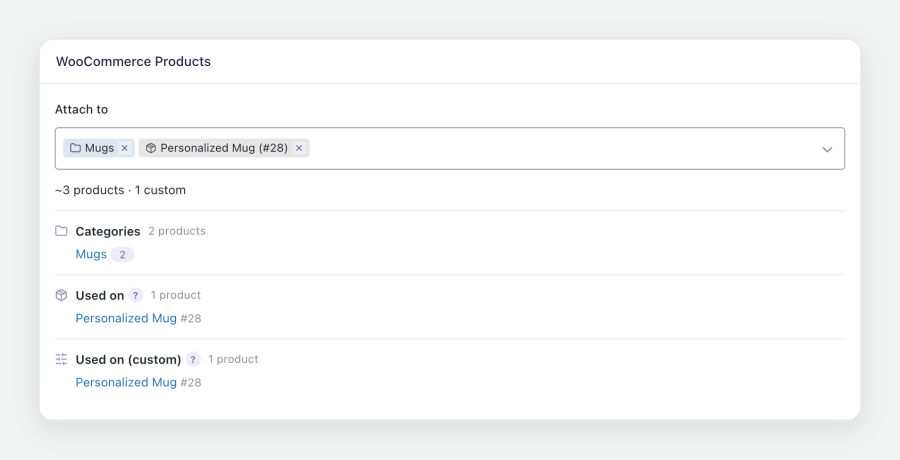
A form's WooCommerce tab with the Mugs category attached and the products that use the form
Categories, tags and products assigned from the form’s WooCommerce settings.

Deep WooCommerce integration

Gravity Forms Product Add-ons integrates with every stage of the WooCommerce purchase flow:
  • Configuration-aware cart. Each unique configuration is a separate cart item, and identical configurations are grouped with their quantities combined.
  • Cart editing. An Edit link on the cart item reopens the product with the customer’s selections filled in, and saving updates the item in place.
  • Cart and Checkout blocks. Form details display one per line in the Cart, Mini-Cart and Checkout blocks, as well as in the classic cart and checkout.
  • Configurable item details. Display every field, a selected set of fields, or a custom summary built from merge tags. Internal fields can stay on the admin order screen and out of customer emails.
  • One-to-one entry linking. Each order line item creates a Gravity Forms entry linked to the WooCommerce order, with payment status and transaction details synchronized as the order progresses.
  • Notification control. Gravity Forms notifications are sent when the order is placed, enabled per form or per product.
  • Reorder support. Customers reorder previous purchases with the form data populated from the original order.
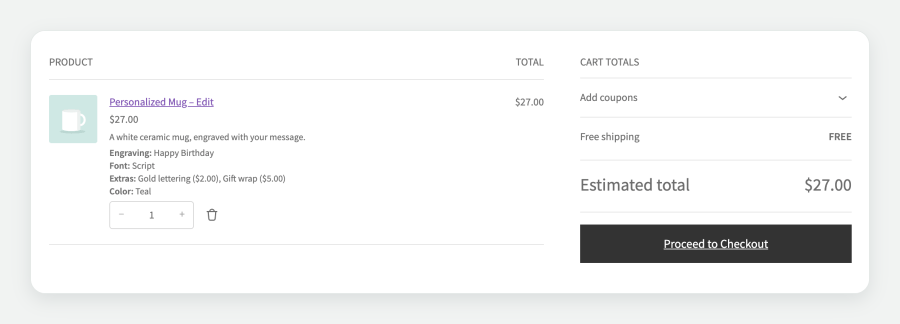
The Cart block with a Personalized Mug, its form details on separate lines and an Edit link
Form details on the cart item in the Cart block, with cart editing.

Shipping dimensions and stock from form fields

Map Gravity Forms fields to the cart item’s weight, length, width and height so shipping rates and labels reflect the configured product. Map a field to quantity to set the cart quantity from the form, or to reduce inventory by the field’s value when the order is placed.

Store API support for headless stores and AI agents

Each product’s form is published through the WooCommerce Store API, and items can be added to the cart with their form values. Submissions are validated and priced exactly as they are on the product page, which supports headless storefronts and AI shopping agents.

Broad compatibility

  • Simple and variable products. On variable products, the form appears after a variation is selected.
  • WooCommerce Subscriptions. Subscription products are supported, including entry handling for renewal orders.
  • WooCommerce Bookings. Configuration forms on bookable products.
  • Dynamic Pricing. Product page totals include Dynamic Pricing adjustments alongside form option costs.
  • Bulk Variation Forms. A separate form for the bulk order grid.
  • Gravity Perks and Quick View Pro. Works with Populate Anything, Conditional Pricing, Limit Choices, Nested Forms and many other perks, and with quick view modals.
  • Gravity Forms Repeater fields. Add a row for every player, guest or item, each row priced and listed on the order.
  • Block themes. Works with block themes such as Purple and Twenty Twenty-Five, including product templates built with the Add to Cart with Options block.
  • Cart and Checkout blocks and HPOS. Compatible with the block-based cart and checkout and with High-Performance Order Storage.

Structured data and SEO control

When a product’s price depends on its form, override the price in its structured data with a flat price or a price range, either added to the product price or replacing it, so search engines show accurate pricing.

Built for developers who need to extend it

Filters and actions cover cart item data, order item meta, pricing, field visibility, notifications and cart editing, and Gravity Forms logging records each step for debugging. The documentation lists the most common hooks.

Requirement: This extension requires Gravity Forms 2.9 or later (any license level). Gravity Forms is sold separately.


Frequently asked questions

Do I need Gravity Forms?

Yes. Gravity Forms Product Add-ons requires Gravity Forms 2.9 or later, at any license level. Gravity Forms is sold separately.

How is the product price calculated?

The cart price is the WooCommerce product price plus the total of the form's Product and Option fields. A $20 mug with $7 of options is added to the cart at $27. Set the Regular Price to $0 when the form sets the whole price.

Can I use one form on many products?

Yes. Assign a form to product categories and tags from the form's WooCommerce settings, and every product in them uses it. Settings made on the form apply to every product that uses it, and any product can override them section by section. See the documentation for both setups.

Can customers edit their configuration from the cart?

Yes. With cart editing enabled, an Edit link on the cart item reopens the product with the customer's selections filled in, and saving updates the item in the cart.

Does it work with the Cart and Checkout blocks?

Yes. Form details show one per line in the Cart, Mini-Cart and Checkout blocks, and in the classic cart and checkout.

Where do the customer's selections appear?

On the cart item, at checkout, on the order, in the customer's account, in order emails and in a Gravity Forms entry linked to the order. You choose whether the item shows every field, a selected set of fields, or a custom summary built from merge tags.

Can form fields set the shipping weight and dimensions?

Yes. Map form fields to the cart item's weight, length, width, height and quantity, and shipping rates and labels use those values.

Which extensions does it work with?

Gravity Forms Product Add-ons works with simple and variable products, WooCommerce Subscriptions, WooCommerce Bookings, Dynamic Pricing, Bulk Variation Forms, Quick View Pro, High-Performance Order Storage, and Gravity Perks such as Populate Anything, Conditional Pricing, Limit Choices and Nested Forms.

How do I get help?

Questions before you buy go through the pre-sales form. After purchase, open a ticket from your WooCommerce.com account. Support tickets are answered by the Gravity Forms Product Add-ons developer.

Extension information

  • PHP version required: 7.4
  • Tested with WordPress: 7.1
  • Tested with WooCommerce: 11.2
  • Requires at least WordPress: 6.9
  • Requires at least WooCommerce: 11.0

Compatibility

  • Cart & checkout blocks
  • High performance order storage (HPOS)

Countries

  • Worldwide

Requirements

  • Gravity Forms plugin is required

Customer reviews

Average rating 3.7

32 reviews from verified users

5 stars, 63% of reviews
4 stars, 6% of reviews
3 stars, 0% of reviews
2 stars, 0% of reviews
1 star, 31% of reviews

Click to rate

  • Rated 5 out of 5
    Evan LentzUnited States (US)Oct 25, 2026
    Really really good customer service. I appreciate how thorough and fast the responses are.
  • Rated 5 out of 5
    reklam2008SwedenSep 2, 2026
    Great plugin and great support
  • Rated 5 out of 5
    sheila95811d225cUnited States (US)Aug 25, 2026
    Excellent customer support. I reached out to the support team and within 24 hours, they investigated and resolved the issue. Highly recommend!
  • Rated 5 out of 5
    Fredrik HolmSwedenAug 25, 2026
    Great plugin that enables you to make really complex custom checkout flows. When we ran into our first issue using the plugin in approx 10 years we recieved incredibly fast and comprehensive support from Lucas. It turned out the issue wasn't the plugin but some of our custom theme code! Highly recommend this tool and the people behind it!
  • Rated 5 out of 5
    gdevenishUnited Kingdom (UK)Aug 22, 2026
    Lucas quickly helped diagnose an issue which was affecting our form, which was actually being caused by the main Gravity Forms update. After his diagnosis, we forwarded the details to the relevant team and the fix was sorted in a few days. The issue was not actually caused by the Element Stark plugin, but help was still provided regardless.

Related Products

Price $279 annually
Rated 3.9 out of 5 stars
Price $49 annually
Rated 2.7 out of 5 stars
Price $29 annually
Rated 3.7 out of 5 stars
Price $199 annually
Rated 4 out of 5 stars
Price $79 annually
Rated 4.2 out of 5 stars
Price $119 annually
Rated 3.5 out of 5 stars
Price $39 annually
Rated 3 out of 5 stars
Price $49 annually
Rated 3.9 out of 5 stars
Price $109 annually
Rated 4.6 out of 5 stars
Use of your personal data
We and our partners process your personal data (such as browsing data, IP Addresses, cookie information, and other unique identifiers) based on your consent and/or our legitimate interest to optimize our website, marketing activities, and your user experience.

