

Active installs
2K+
Subscription includes
Support
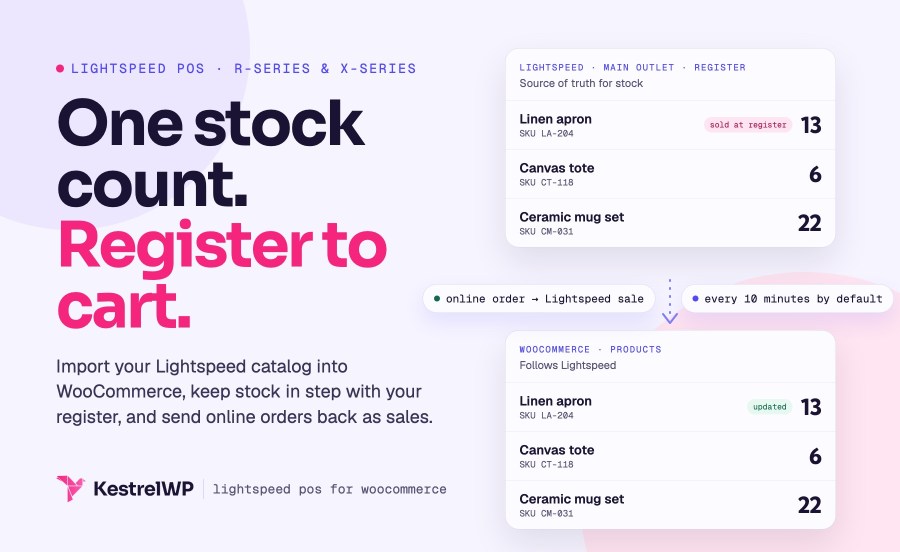
Lightspeed POS for WooCommerce is a Lightspeed POS integration that connects your online store to Lightspeed Retail, so you manage products, prices and stock once, at the register, and your WooCommerce store follows. It works with Lightspeed Retail (R-Series) and Lightspeed Retail POS (X-Series, formerly Vend). It imports your catalog, checks Lightspeed on a schedule you set, checks stock again at add to cart, and sends online orders back as sales. It does not work with Lightspeed eCom or Lightspeed Restaurant.
One plugin supports both. Your Lightspeed dashboard says Retail (R-Series) or Retail POS (X-Series), and you choose once under Lightspeed » Connection. The two behave differently, so here is what each does.
| Retail (R-Series) | Retail POS (X-Series, formerly Vend) | |
|---|---|---|
| Bringing products in | Load products into the Product Importer, then import and link them | One Import products from Lightspeed button; existing products are linked by SKU or GUID |
| Which stock is used | One primary Lightspeed inventory store | The outlet of the register you choose |
| Staying up to date | Separate jobs for product changes, new products and attribute sets, each with its own interval | Polling for products (every 10 minutes by default), customers (20) and images (1) |
| Prices | Default price becomes the regular price; a price level named Sale becomes the sale price | Default price becomes the regular price; no sale price is imported |
| Categories | Manual import that adds new categories | Replace, add to or ignore WooCommerce categories on each sync |
| Customers | Attached to the sale, or created, when orders sync | Synced both ways, matched by email |
| Sending orders | Enable sales sync with an Employee and Register; unlinked products are left off the sale | Sync orders; products that aren’t linked are left off the sale and named in an order note |
| Refunds | Full and partial refunds sync | A full refund voids the sale; a partial refund is sent as a return sale |
| Lightspeed account | No API plan requirement | Needs Lightspeed API access; check your plan with Lightspeed |
Choose Retail (R-Series) or Retail POS (X-Series) under Lightspeed » Connection and authorize the connection in Lightspeed. On X-Series, you then pick the outlet register whose stock you sell online. On R-Series with several locations, you pick one primary inventory store. Nothing syncs until that choice is made, so a half-configured store never writes to your register. Reconnecting on X-Series keeps your product and customer links, and you can reauthorize from the Connection screen to grant new permissions without disconnecting, so a refreshed login doesn’t mean starting over. If your Lightspeed account has several locations, the one you choose is the one whose stock your shoppers see.
On X-Series, click Import products from Lightspeed and the import runs in the background. Products already in WooCommerce with a matching SKU or GUID are linked instead of duplicated, and images download a few minutes later. On R-Series, load products into the Product Importer, then import and link them there. Lightspeed variants and Matrix items become variable products, each variation with its own stock, price and SKU, so your online catalog starts as a copy of the register’s. You review the result in WooCommerce and keep selling while the rest downloads.
The plugin checks Lightspeed in the background and updates WooCommerce with changes to products, prices and stock. On X-Series, products are checked every 10 minutes by default, customers every 20 and product images every minute. Each job can run as often as every minute, hourly, or not at all. This is polling, not instant: a sale at the register shows up in WooCommerce the next time the products job runs, and the add-to-cart check below covers the gap. If Lightspeed rate limits your store, lengthen the intervals rather than turning sync off.
Between scheduled updates, the plugin asks Lightspeed for current stock when a shopper adds a synced product to the cart, and again before checkout on the classic checkout. If Lightspeed says it is out of stock, WooCommerce blocks it. With order sync on, online orders, refunds and cancellations reach Lightspeed as sales and returns, so its stock follows. Lightspeed stays the source of truth: on X-Series the stock field on a linked product is locked and points you to Lightspeed, and on R-Series the product screen tells you whether a stock edit is pushed or replaced at the next sync.
Turn on order sync (called Enable sales sync on R-Series) and paid WooCommerce orders are recorded in Lightspeed as sales, against the register you choose. It is off by default. Sales are sent one way only: in-store sales are never imported into WooCommerce as orders, though their stock changes still reach your store through the sync. Your reports in Lightspeed then include online revenue, so one register report covers the store and the shop floor. On X-Series, products that aren’t linked yet are left off the sale and named in an order note, and orders that fail to send are retried for up to a day and can be resent in bulk from the Orders list.
Selling for local delivery or in-store pickup next to your register? Order Delivery for WooCommerce lets customers choose a delivery or pickup date and time at checkout, so they choose a slot before the order is sent to your register. Customers know when to expect the handover, and your team knows what to prepare.
Step-by-step setup and sync details are in the Lightspeed R-Series setup guide and the Get started with Lightspeed POS guide, which covers both series.
Built and supported by Kestrel, a long-time WooCommerce extension developer. Not sure which Lightspeed series you have? Contact Kestrel support.

Yes: Lightspeed Retail (R-Series) and Lightspeed Retail POS (X-Series, formerly Vend). It does not support Lightspeed eCom, Lightspeed Restaurant or other Lightspeed products. X-Series needs Lightspeed API access, so check your plan with Lightspeed.
Not in real time. The plugin polls Lightspeed on a schedule: on X-Series, products (including stock) every 10 minutes by default, and you can set anything from every minute to hourly. It also checks Lightspeed at add to cart, so a sold-out item is blocked between updates. There are no webhooks.
Yes. Lightspeed POS for WooCommerce, built by Kestrel, connects Lightspeed Retail (R-Series) or Lightspeed Retail POS (X-Series, formerly Vend) to your WooCommerce store: catalog import, stock sync and online orders sent to the register. It does not work with Lightspeed eCom or Lightspeed Restaurant.
Once order sync is on, yes, with limits. On R-Series, full and partial refunds sync to Lightspeed. On X-Series a full refund voids the sale and a partial refund is sent to Lightspeed as a return sale.
No. Lightspeed sales are never imported into WooCommerce as orders; their effect on stock reaches WooCommerce through the stock sync. The plugin also syncs one Lightspeed store or outlet per WooCommerce site, so a second location needs its own site.
WordPress 6.3 or later, WooCommerce 9.9 or later, PHP 7.4 or later with the OpenSSL extension, WP-Cron enabled and working loopback requests. It supports the Cart and Checkout blocks and High-Performance Order Storage. Bot protection such as Cloudflare Bot Fight Mode can stop the connection from completing.
Categories
Extension information
Quality Checks
Countries
Requirements






