
Product Icon

Order Management Solution for WooCommerce

Create WooCommerce manual and phone orders easily. Manage B2B sales, customer orders, and retail workflows with order management tools.
Choose a billing option
$69
Save 20%
$138 $110.40

Subscription includes

  • Product updates and improvements
  • Customer support
  • 30-day money-back guarantee

WooCommerce Manual & Phone Orders – Order Management Solution for Sales Teams & B2B

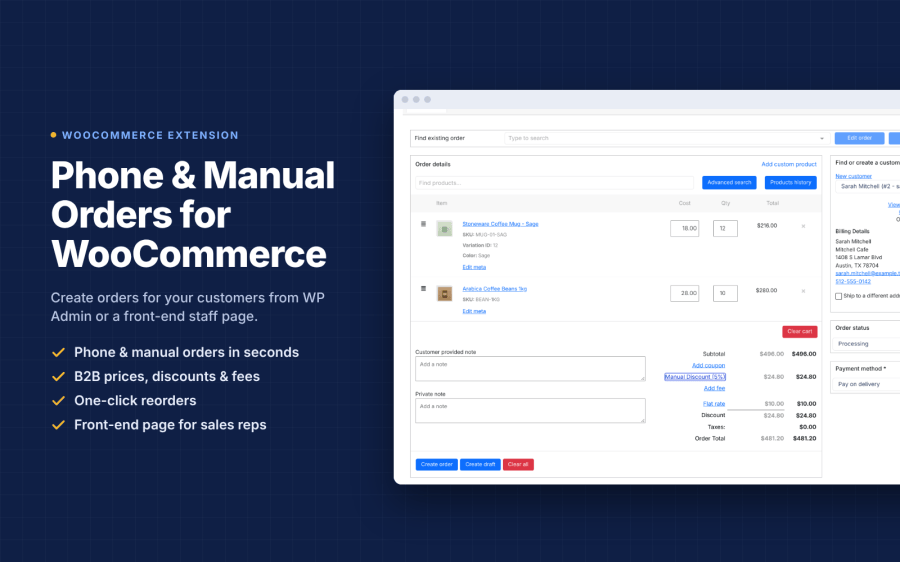
Take control of your WooCommerce order workflow with Ultimate Order Management Solution. Create manual orders, phone orders, B2B orders, wholesale purchases, and walk-in sales from the WooCommerce dashboard or a dedicated front-end interface.

Give sales representatives, call center staff, retail teams, and store administrators a faster way to create and manage orders on behalf of customers. Search customers and products, adjust quantities, apply special pricing, manage addresses, and complete orders without giving staff unnecessary access to the WordPress dashboard.

Whether you receive orders by phone, email, sales representatives, or in-store staff, this solution helps centralize your order workflow while reducing manual work and order-entry errors.

Why Choose Ultimate Order Management Solution?

WooCommerce is excellent for online purchases, but many businesses also receive orders through sales calls, customer service teams, retail staff, and B2B sales representatives. This solution gives your team the tools they need to create those orders quickly and efficiently.

  • Create Orders Faster: Create customer orders from the dashboard or a dedicated front-end ordering interface.
  • Support Phone & Offline Sales: Process orders while speaking with customers or assisting them in person.
  • B2B & Wholesale Workflows: Handle bulk purchases, negotiated pricing, special offers, and customer-specific order requirements.
  • Centralized Order Workflow: Manage manually created and online orders within your existing WooCommerce environment.
  • Improve Team Productivity: Reduce repetitive data entry with customer search, product search, address autocomplete, and order management tools.
  • Better Customer Service: Place orders on behalf of customers and quickly customize products, quantities, pricing, and order details.

Powerful WooCommerce Order Management Features

  • Manual & Phone Order Creation:
    Create orders directly from the WooCommerce dashboard or a secure front-end ordering page. Perfect for phone sales, customer service orders, walk-in purchases, and sales representatives.
  • Smart Customer Search:
    Quickly find customers using their name, email address, or partial billing and shipping address. Retrieve customer information and previous order details without manually searching through multiple screens.
  • Advanced Product & Variation Search:
    Find products and variations quickly, add them to an order, adjust quantities, and customize the order according to the customer’s requirements. Supports bundled products, composite products, and subscription items.
  • Flexible Pricing & Discounts:
    Apply special pricing, wholesale rates, negotiated prices, discounts, and promotional codes when creating customer orders.
  • Front-End Order Interface:
    Allow authorized staff to create orders without providing access to the WordPress administration area. The responsive interface works across desktops, tablets, and smartphones.
  • Clone, Resume & Edit Orders:
    Duplicate existing orders, resume incomplete order workflows, edit order information, and add custom fees or service charges when required.
  • Google Maps Address Autocomplete:
    Speed up billing and shipping address entry while helping staff reduce common address-entry mistakes during phone and manual orders.
  • Advanced Activity Logging & Reporting:
    Track staff activity and order history to understand how orders are created and managed across your team.
  • Role-Based Access Control:
    Control which staff members can create and manage orders. Assign permissions to administrators, shop managers, sales representatives, or other authorized user roles.
  • WooCommerce Integration:
    Work with your existing WooCommerce store and popular extensions. The solution supports workflows involving WooCommerce Subscriptions, Bookings, Memberships, and other compatible products.

Benefits for Your Sales Team

  • Close Phone Orders Faster:
    Create customer orders while speaking with customers instead of asking them to complete the checkout process themselves.
  • Streamline B2B Sales:
    Handle wholesale and business orders with flexible quantities, pricing, discounts, and customer-specific requirements.
  • Reduce Order Entry Errors:
    Use customer search, product search, variation selection, and address autocomplete to reduce repetitive manual entry.
  • Increase Average Order Value:
    Add complementary products, adjust quantities, and apply bundle or volume discounts while creating the order.
  • Improve Customer Service:
    Help customers complete purchases quickly when they need assistance placing an order.
  • Save Staff Time:
    Give sales and support teams a dedicated workflow for creating orders without navigating through unnecessary WooCommerce screens.
  • Keep Your Workflow Centralized:
    Continue using WooCommerce as the central platform for customer, product, inventory, and order information.

Who Can Use This Order Management Solution?

  • Call Centers & Customer Support:
    Create orders directly during customer calls and provide a faster assisted-shopping experience.
  • B2B & Wholesale Businesses:
    Process large orders, negotiated prices, special discounts, and customized product requirements.
  • Sales Representatives:
    Create orders for customers during meetings, sales calls, events, or field visits using the responsive front-end interface.
  • Retail Stores:
    Create walk-in and assisted orders without requiring customers to complete the standard online checkout process.
  • Store Managers:
    Manage manual orders, customer requests, order history, and staff activity from one WooCommerce-based workflow.
  • E-commerce Teams:
    Combine online orders with orders received through phone, sales staff, customer support, and other offline channels.

Real-World Use Cases

  • Phone Orders:
    A customer calls your store and wants to purchase several products. Your staff can search for the customer, add products, adjust quantities, apply pricing, and create the order during the call.
  • B2B Wholesale Orders:
    A business customer needs a large quantity of products at an agreed price. Your sales representative can create the order and apply the required pricing and discounts.
  • Retail & Walk-In Sales:
    Staff can create orders for customers from a tablet or smartphone without giving them full WordPress dashboard access.
  • Customer Service Orders:
    Help customers who are having difficulty completing checkout by creating and customizing the order on their behalf.
  • Repeat Customer Orders:
    Use existing customer and order information to quickly recreate or modify previous purchases.
  • Sales Team Orders:
    Allow authorized sales representatives to enter customer orders while working remotely, in-store, or during customer meetings.

Perfect For

  • WooCommerce Manual Orders
  • WooCommerce Phone Orders
  • WooCommerce Order Management
  • Manual Order Creation
  • Phone Order Management
  • B2B WooCommerce Orders
  • Wholesale WooCommerce Orders
  • Bulk Order Management
  • Front-End Order Entry
  • WooCommerce Order Entry
  • Sales Team Order Management
  • Call Center Order Processing
  • Retail Order Management
  • Customer Service Orders
  • B2B Order Management

How It Works

  1. Select or Create a Customer:
    Search for an existing customer or enter the required customer information.
  2. Add Products:
    Search for products and variations, select the required items, and adjust quantities.
  3. Set Pricing & Discounts:
    Apply the appropriate pricing, discount, promotional code, or negotiated customer rate.
  4. Enter Order Details:
    Add billing and shipping information and use address autocomplete to speed up the process.
  5. Review the Order:
    Check products, quantities, pricing, fees, customer information, and other order details.
  6. Create the Order:
    Complete the order and keep the transaction within your existing WooCommerce workflow.

Built for Modern WooCommerce Sales Workflows

Online checkout is not the only way customers purchase products. Many stores receive orders through phone calls, sales representatives, customer support teams, wholesale accounts, and physical retail locations.

Ultimate Order Management Solution gives your team a practical way to handle these sales while keeping customer and order information inside WooCommerce.

From a simple phone order to a large B2B purchase, your staff can search products, select variations, adjust quantities, apply pricing, manage customer information, and create orders through a streamlined workflow.

Designed for B2B & Wholesale Businesses

Business customers often require a different ordering process than regular online shoppers. They may request large quantities, negotiated pricing, special discounts, or assistance from a sales representative.

This solution makes it easier for your team to handle those requirements while using WooCommerce as the central order platform.

Sales representatives can create orders on behalf of customers, while role-based permissions help you control which team members can access order creation and management features.

Improve Your Customer Service

When customers prefer to order by phone or need help completing a purchase, your team can take care of the entire process for them. Quickly find their account, add products, update quantities, apply the appropriate pricing, and complete the order without sending them through multiple steps.

This assisted-order workflow helps your team respond faster while providing customers with a more personalized buying experience.

Final Thoughts

Make manual, phone, B2B, wholesale, retail, and assisted orders easier to manage with Ultimate Order Management Solution for WooCommerce.

With fast customer and product search, flexible pricing, front-end order entry, order cloning, address autocomplete, role-based access, activity tracking, and WooCommerce integration, your sales and support teams can manage customer orders more efficiently.

Give your sales team a faster way to create orders and turn customer requests into completed WooCommerce sales.


Frequently asked questions

Can I create manual orders in WooCommerce?
Yes! This WooCommerce order management plugin allows you to create manual orders, phone orders, and B2B orders directly from your WooCommerce dashboard or front-end interface.
Is this compatible with WooCommerce subscriptions?
Yes, this WooCommerce order management plugin works seamlessly with WooCommerce subscriptions, bookings, and membership plugins.
Can sales teams use this without admin access?
Absolutely! The front-end order screen allows staff to place orders without back-end access, perfect for call centers and retail teams using our WooCommerce phone order plugin.
Does this support B2B and wholesale orders?
Yes, this WooCommerce B2B order management solution supports negotiated pricing, volume discounts, and special offers for wholesale clients.
Can I manage phone orders with this plugin?
Yes! This WooCommerce phone order management plugin is specifically designed for call centers and support teams to process phone orders instantly.
Is this extension compatible with WooCommerce tax and shipping settings?
Yes! This WooCommerce order management plugin fully integrates with WooCommerce tax and shipping settings. Tax is calculated automatically based on your store's tax configuration, product tax classes, and customer location. Shipping costs are calculated using your configured shipping methods and zones, ensuring accurate pricing for all manual orders and phone orders
Can I duplicate or clone existing orders?
Yes! This WooCommerce order management plugin allows you to duplicate or clone any existing order with one click. All order details including customer information, products, pricing, shipping, and tax settings are copied automatically. You can then edit the cloned order before saving, making it perfect for repeat orders, B2B reorders, or creating order templates. This feature saves significant time when processing manual orders and phone orders for returning customers.
What’s the difference between this extension and free phone-order extension?
This WooCommerce order management plugin offers significantly more features than free alternatives. Key differentiators include: Front-end order interface for staff without admin access, B2B and wholesale pricing controls, order cloning and duplication, advanced customer and product search, Google Maps address autocomplete, role-based access control, comprehensive reporting, and professional support with regular updates. Free extensions typically only offer basic back-end order creation with limited features and support. This plugin is designed for businesses that need a professional, feature-rich order management solution for manual orders phone orders, and B2B workflows.
I can’t add a new customer; I see a message stating “Please enter an account password"

From your store's WP Admin dashboard, navigate to WooCommerce > Settings, click the Accounts & Privacy tab, and select the checkbox labeled When creating an account, automatically generate an account password.

I can’t add a new customer, I see a message stating “Please enter a valid account username”

From your store's WP Admin dashboard, navigate to WooCommerce > Settings, click the Accounts & Privacy tab, and select the checkbox labeled When creating an account, automatically generate a username from the customer’s email address.

Who can create manual orders using this extension?
This WooCommerce order management plugin offers flexible role-based access control. By default, Administrators and Shop Managers can create orders from the back-end dashboard. You can also grant access to custom roles like Sales Reps or Call Center Staff. Additionally, the plugin includes a secure front-end order interface that allows staff members to create orders without requiring admin dashboard access. This is perfect for call centers, retail staff, and sales teams who need to process phone orders and manual orders but shouldn't have full admin privileges. You have complete control over who can create, edit, and manage orders.

Extension information

  • PHP version required: 7.4
  • Tested with WordPress: 7.0
  • Tested with WooCommerce: 10.2
  • Requires at least WordPress: 6.1
  • Requires at least WooCommerce: 7.7

Countries

  • Worldwide

Related Products

Price $279 annually
Rated 3.5 out of 5 stars
Price $79 annually
Rated 3.4 out of 5 stars
Price $59 annually
Rated 3.1 out of 5 stars
Price $109 annually
Rated 2.7 out of 5 stars
Price $49 annually
Rated 4.1 out of 5 stars
Price $109 annually
Rated 2 out of 5 stars
Price $109 annually
Rated 2.3 out of 5 stars
Price $109 annually
Rated 2.6 out of 5 stars
Price $109 annually
Rated 2 out of 5 stars
Use of your personal data
We and our partners process your personal data (such as browsing data, IP Addresses, cookie information, and other unique identifiers) based on your consent and/or our legitimate interest to optimize our website, marketing activities, and your user experience.




