

Subscription includes
Support
Store owners with actual physical stores are able to observe and interact with their customers. This is useful to monitor interest in the products on view, and to gauge the reaction to the ticket prices. But in the online world, that customer connection is largely broken.

Pricing Analyser restores this connection, by monitoring activity within the store. It watches every product, day by day – sales, visitor interest, conversion and price history – and turns that into clear pricing recommendations based on rules you set. You review the recommendations, and apply the ones you agree with in a single click. Spot products that may be underpriced, overpriced, attracting interest without converting, slowing down, or losing you money. But don’t worry – nothing changes without your say-so.
With Pricing Analyser, you’re able to make smarter pricing decisions based on real performance data. That’s made even easier with a morning briefing email containing key actions for your day ahead – based upon yesterday’s store performance.
Pricing Analyser can also help with the tedious parts of pricing management – like bulk price changes, and sale price scheduling. And it will also calculate margins for you based upon your buy prices.
Pricing Analyser gives you a central dashboard where you can review product pricing performance across your store. For each product, you can see sales, customer interest, conversion rate, trending, price history, current price, recommendations and suggested new price.
You can create pricing rules based on the signals that matter most to your business. For example, you might choose to raise the price of products with unusually strong recent sales, reduce the price of products with weak conversion, or create a sale for products with excess stock.
The extension also includes tools for working at scale. Bulk utilities allow you to adjust prices, sales, floors and ceilings across multiple products at once, while daily briefing emails help to keep you informed about key developments within the store.
If you operate a price rounding style across a category of products, Pricing Analyser can help you implement and maintain it. So for example if you want to raise your prices across the board by 5%, but you also like your lower value product prices to be rounded down to .95c, and your higher value products rounded to the nearest whole dollar, or five dollars, Pricing Analyser can help you do that, saving you a great deal of time.
It isn’t a dynamic pricing engine, a customer-specific pricing tool (customer loyalty etc.), or a competitor price import tool. It is designed for general pricing management: helping store owners review what is happening across their catalogue, decide what action to take, if any, and apply those changes efficiently inside WooCommerce.
Pricing Analyser is organised around five main areas:
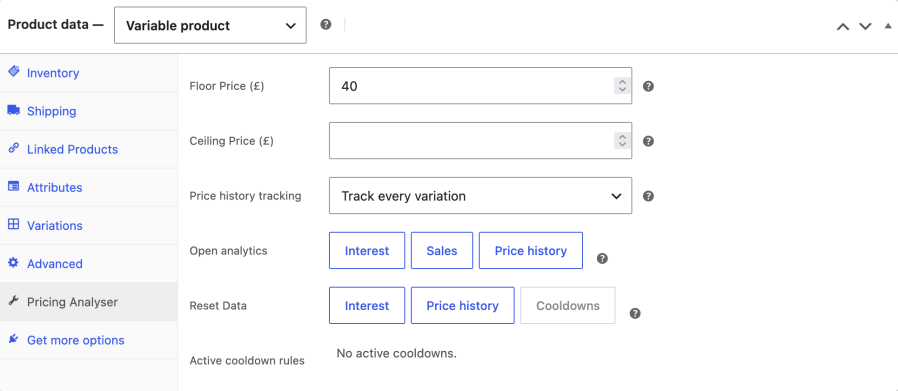
On the product edit screen, Pricing Analyser adds its own panel where you can view pricing analytics: price history, sales and interest charts, and manage product-level floor and ceiling prices. Here in this example you can examine the relationship between recent sales and price changes for a selected product.
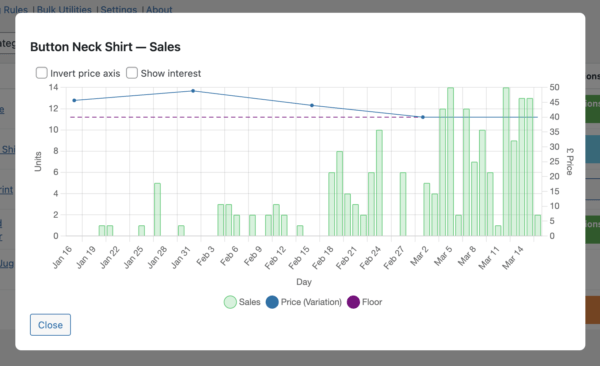
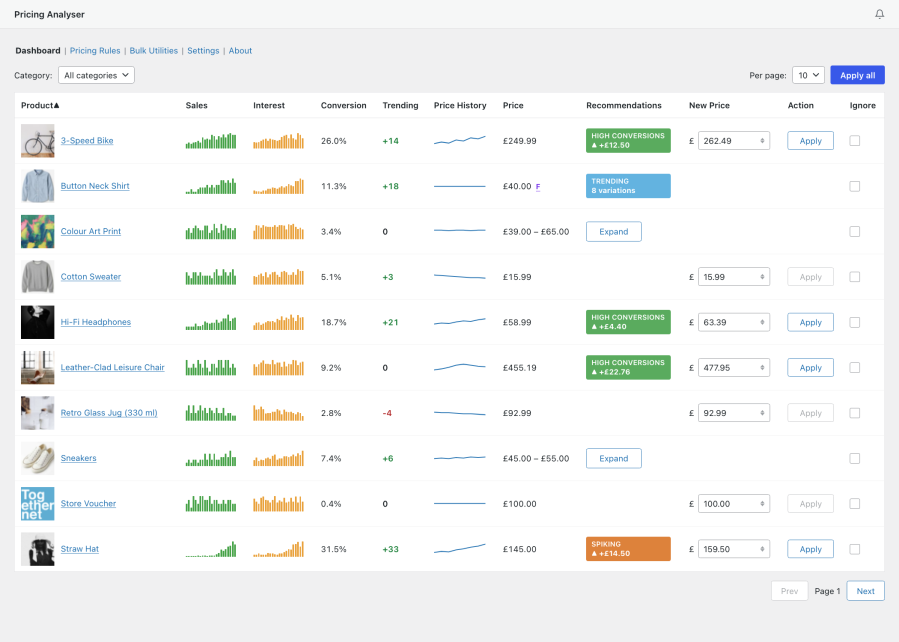
The main dashboard brings together the key metrics for each product and displays any matching pricing recommendations in one place. You can apply recommendations in a single click. Or dig down into the data. Clicking on any thumbnail chart reveals more.
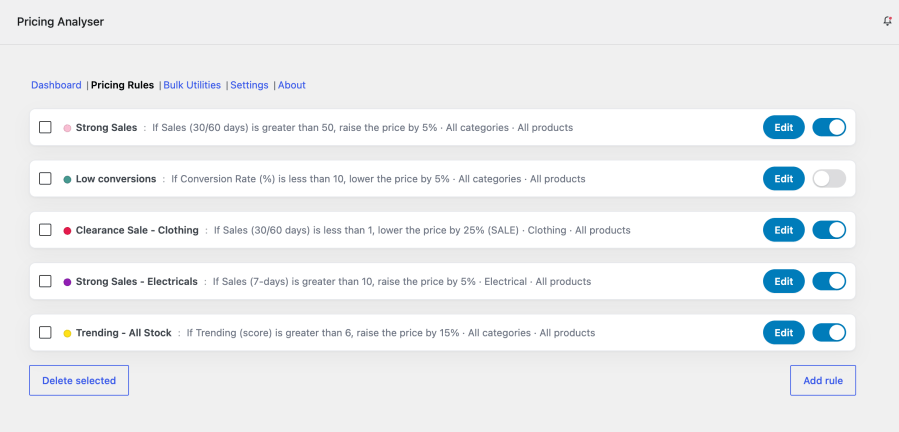
The dashboard’s pricing recommendations are driven by the pricing rules that you define. Rules let you decide when a product should be considered for a price rise, reduction or sale, based on product performance data. These rules are not fixed – you know your products best and what your sales expectations are. Pricing Analyser helps you to create sensible pricing rules you can apply to a single product, across a category or across your entire range.
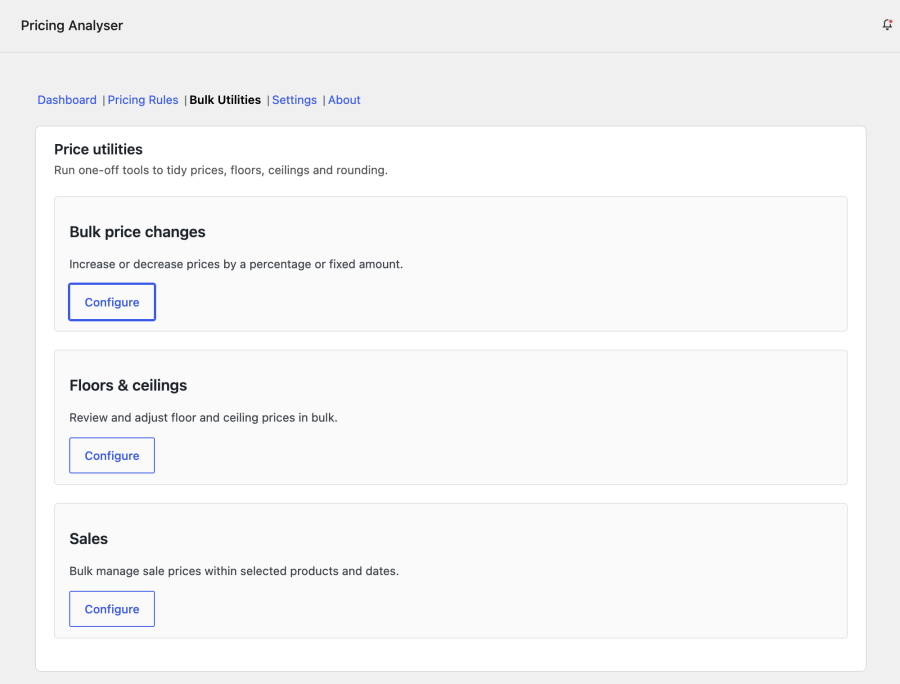
Pricing Analyser doesn’t just analyse – it helps you manage pricing. Bulk tools enable you to make broader pricing changes efficiently across multiple products, including bulk management of sale items, and floor and ceiling indicators to assist with margins management.
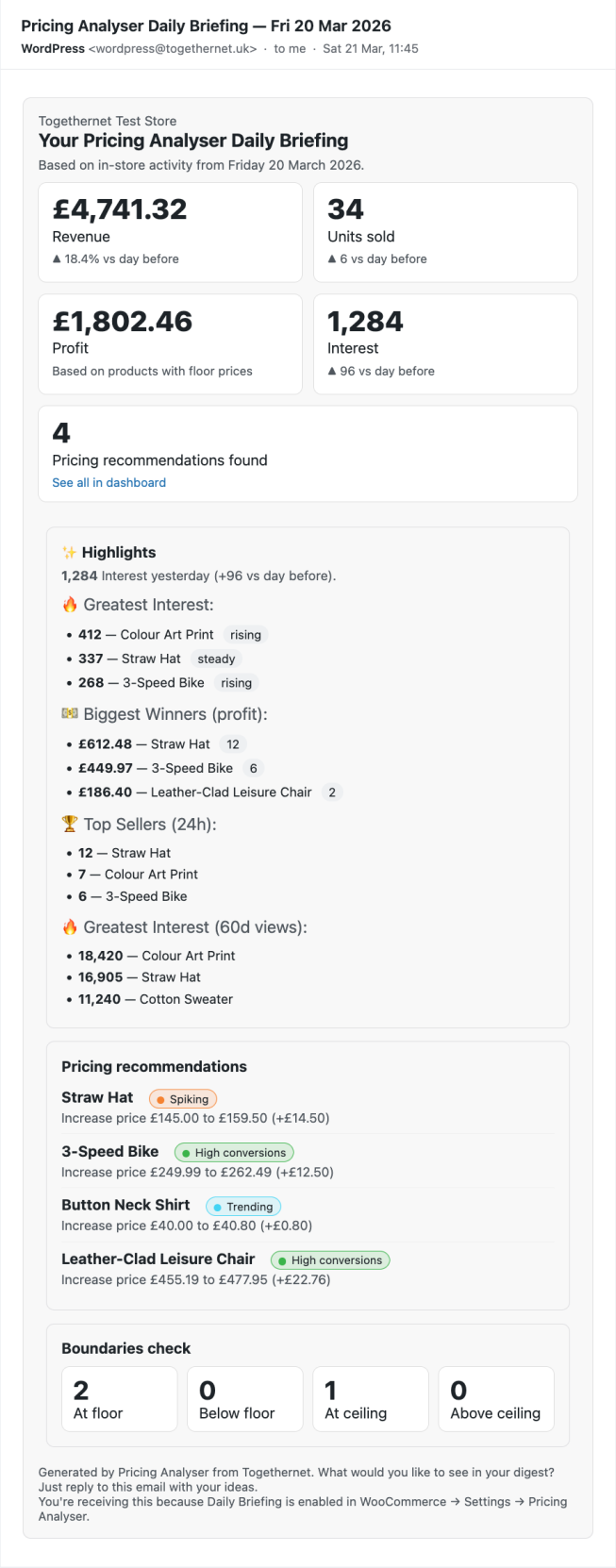
The daily briefing email provides a concise overnight summary of the last completed day’s store activity and flags notable pricing opportunities. You can set it to be the first thing delivered to your inbox; your heads-up for the day.
A typical workflow with Pricing Analyser looks like this:
You decide whether to accept any pricing recommendations. Recommendations are generated from store metrics and rules that you define. If you approve the suggested changes, they are then applied for you.
It's a daily measure of visitors' interest in a given product, based upon your store's traffic to that product, filtered for known bots.
Pricing Analyser doesn't import price lists. Instead, it recommends changes based on how each product is actually performing – and its bulk tools let you make store-wide adjustments without a spreadsheet.
Pricing Analyser helps you to apply and maintain consistent pricing across your store or any category of product. The pricing style refers to the rounding applied to a price. For one category of items - candy, for example - prices may be rounded to 99 cents - but in the same store, larger ticket items may be priced in whole units. When a bulk price change is applied, this rounding can be disrupted. Pricing Analyser has tools to re-apply price styles. Additionally when a price change is applied, the store manager can select to have a pricing style applied automatically, saving much work.
A floor price is the lowest price that you wish to sell a given item at. If you set it to your buy price, then Pricing Analyser can make you aware that a selling price would lead to a loss on that product. You can also use the floor price to calculate margins. Pricing Analyser has tools to allow you to apply a floor price in bulk. It will also optionally prevent you setting a price below floor.
A ceiling price is the highest price that you wish to sell a given item at. There may be reasons (legislation, competition,etc) why you would not wish to charge more than a given ceiling. Pricing Analyser has tools to allow you to apply a ceiling price in bulk. It will also optionally prevent a price being set that violates the ceiling price.
A pricing rule may lead to a recommendation for a price rise (or fall) due to recent sales activity (or lack of it). The rule then enters a cooldown period, the length of which can be set for each rule. This prevents the same rule firing again until the expiry of that cooldown period. This is to allow time for the price change to take effect and for the change to filter through to sales. Without a cooldown period, prices would be too volatile.
Extension information
Quality Checks
Countries







