

Product comparison
Subscription includes
Support
You delete a discontinued product. Its links are still out there: in Google results, old emails, ads, social posts, and customer bookmarks. The next shopper who clicks one should have somewhere useful to go.
Product 404 Redirects for WooCommerce automatically redirects recognized 404 product URLs to a relevant product category. It handles deleted products, products in the trash, and products set to Private, helping visitors discover alternatives and continue shopping.
For example: you remove a discontinued T-shirt, but a link in an old campaign still receives clicks. Instead of reaching a page-not-found error, those shoppers can reach the T-shirts category and browse your current range. If you have a direct replacement, edit the saved rule to send them there.
Have a direct replacement? Edit the saved redirect to send shoppers straight to it. Otherwise, automatic matching uses the product’s existing categories, preferring child categories and then categories with more products.
Your product may be gone, but its old links can still bring people to your store. Give traffic from Google search results, backlinks, emails, and saved bookmarks a relevant next step. Keep that interest connected to your current catalog.
Permanently deleted products use 301 redirects to signal a permanent move. Products in the trash or set to Private use 302 redirects because they may return. When a restored product URL loads normally again, the 404 redirect does not run.
Relevant destinations support a clear experience for visitors and search engines. Choose the closest useful alternative for each product. Use the redirect manager to point valuable old links to your closest replacement.
Manage everything under WooCommerce > Product 404 Redirects. Customize the visitor notice, its display duration, and styling. Enable a shop-page fallback when no category can be determined, and choose how long redirect event logs are retained.
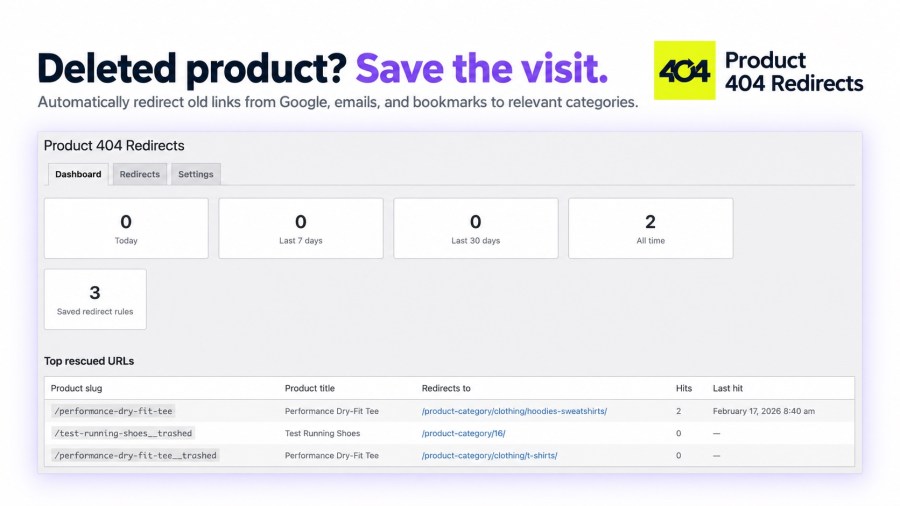
The dashboard shows activity for saved redirect rules today, over the last 7 and 30 days, and all time. The redirect manager lets you search saved rules, review their destinations, and edit or remove individual entries.
You worked to bring shoppers to your store. Give them a reason to stay. Explore the demo or add Product 404 Redirects before your next product removal.
When an old product link returns a 404, the plugin looks for a saved redirect or matching unavailable product and guides the visitor to a relevant category or your chosen destination. It covers deleted products, products in the trash, and products set to Private, so shoppers can keep exploring your store.
It can recover recognized links when the product is still in the trash or relevant WordPress slug history remains. It cannot reconstruct a permanently deleted product if no product record or saved redirect mapping remains. Install it before future deletions so it can capture product-to-category mappings automatically.
Permanently deleted products with a saved mapping use 301 (Moved Permanently). Products in the trash or set to Private use 302 (Temporary), allowing them to return later. When a restored product URL loads normally, the plugin leaves it alone.
Yes. Open a saved rule in the Redirects tab and change its destination to a replacement product, category, or another relevant URL on the same store. Automatic category matching gives you a starting point, and you can choose a more specific destination when needed.
Yes. An optional, dismissible notice explains that the original product is no longer available and invites visitors to browse alternatives. You can customize the text, include the original product name with the {product} placeholder, adjust the display duration, and add custom CSS.
Enable Fallback to shop page to send visitors to your shop when no product category can be determined. If a category used by an existing saved rule is later deleted, that rule falls back to the shop page when available. You can edit saved rules to choose a more relevant destination on your store.
The redirect engine exits early on requests that are not 404s. It uses local product data and saved rules rather than an external redirect service. A cached 404 served before WordPress runs can prevent interception, so clear affected cached URLs after changing products or rules. The visitor notice is rendered in the browser.
Yes. The plugin declares compatibility with High-Performance Order Storage and works with product URLs and redirect data rather than order storage.
Yes. When an old Google result, backlink, email, or bookmark points to a recognized product URL that now returns a 404, the plugin redirects the visitor to a relevant category or your chosen destination. A permanent 301 redirect signals a move for permanently deleted products. Choose a relevant replacement so shoppers can find something useful and continue shopping.
Categories
Extension information
Quality Checks
Countries







