
Product Icon

Product Availability Slots for WooCommerce

Product Availability Slots for WooCommerce can help you Sell Products on Fixed Time Slots in your WooCommerce Shop.
Choose a billing option
$49
Save 20%
$98 $78.40

Subscription includes

  • Product updates and improvements
  • Customer support
  • 30-day money-back guarantee

Product Availability Slots for WooCommerce lets you sell limited-time products during fixed time slots in your WooCommerce shop.

Using this plugin, it’s easy to sell products on specific days at specific time slots. Offering products on a limited time can create a sense of urgency which can trigger the user to make the purchase right away.
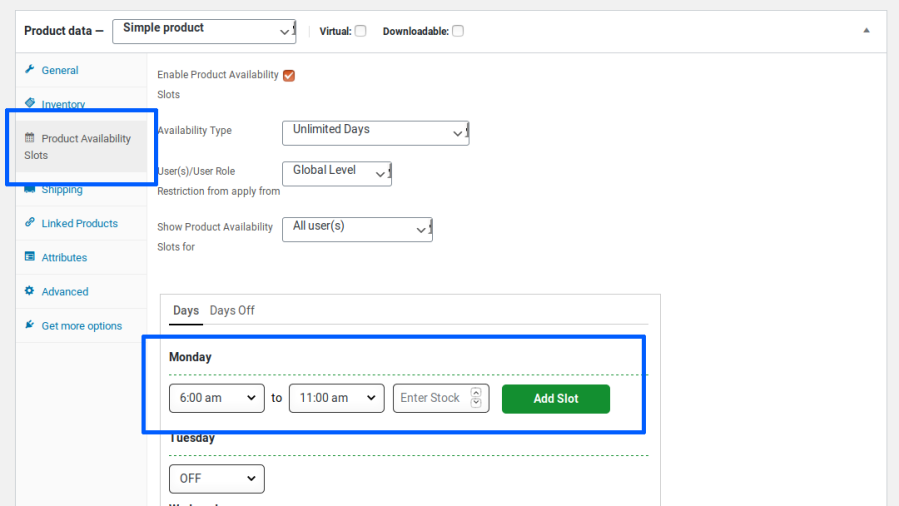
How do you set up and Manage Product Availability Slots for WooCommerce?

  • For simple products, the settings will be available in a separate section named “Product Availability Slots”.
  • Create a new product or edit an existing product.
  • For variable products, the settings can be found in each variation.
  • Enable the Product Availability Slots checkbox.
  • If you want to restrict the product purchase only to days of the week, then in the Availability Type option, set the value as “Unlimited Days”.
  • If you want to restrict the product purchase to a specific date range, then in the Availability Type option, set the value as “Limited Days”.
  • Set the Start and End Time for the days in which you want to sell the product.
  • You can also configure multiple time slots for a single day. To add additional time slots, click the “Add Slot” button.
  • Your Users can purchase the products only within the specified time. Outside the specified time, a notice will be displayed about the next available date.
Product availability configuration

What your Users will See?

Once configured, the product will be available for purchase at the specified time slots.
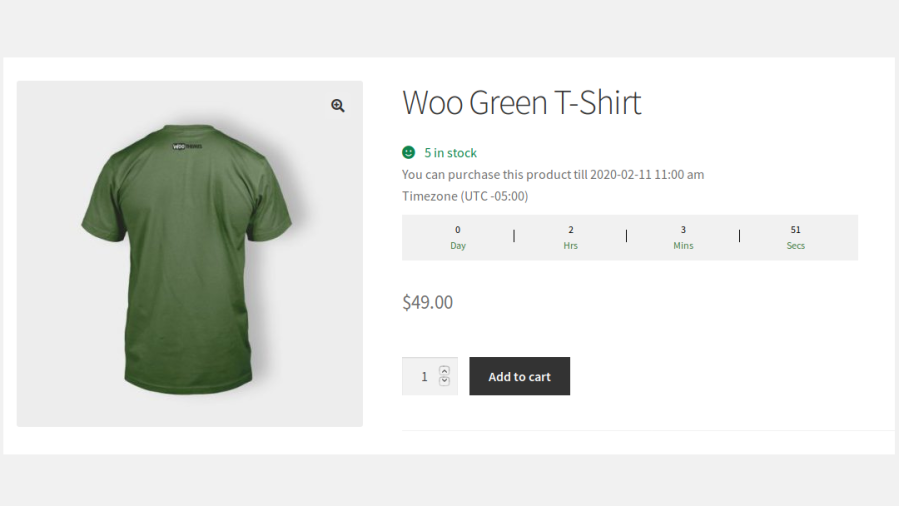
Product purchasable on specified time

Outside the specified time slot, the Add to Cart button will be hidden for the product and the product’s next available date will be displayed.
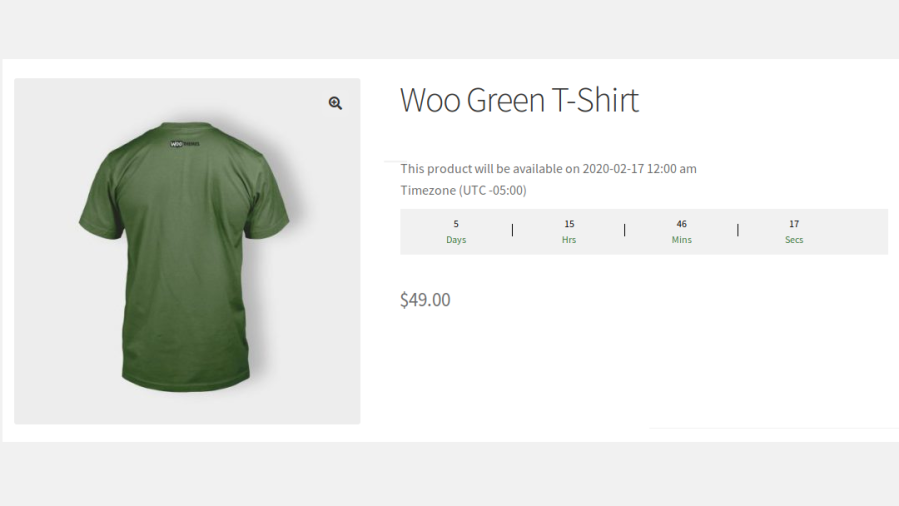
Product not purchasable at specified time

Features

1) User Type

Works for both Registered Users & Guest Users.

2) Product Type

Works for both simple products & variable products.

3) Product Purchases can be restricted based on the following scenario,

  • Specific date range
  • Specific days of the week
  • Specific time slots for each day

4) Schedule Single/Multiple Time Slots for each day.

5) Product Availability Slots can be configured to multiple products at once through Bulk Actions.

6) Restrict the number of quantities for a product that can be sold in each time slot.

7) Restrict Product Purchasing capability to specific Users or User Roles.

8) Days off can be configured for individual products.

9) A Countdown Timer can be displayed to highlight the following details on the Shop & Product Page,

  • Product Purchase Availability End Date and Time
  • Next Available Date and Time

10) Option to hide the products that are not purchasable anymore on the site.

11) Option to hide the Time Zone Details on the product page.

12) Availability Date can be displayed based on WordPress Format.

13) The Time Interval between each slot can be set based on,

  • 15 Minutes
  • 30 Minutes
  • 1 Hour

14) Option to set the Buffer Time for users to complete the purchase after the time slot is exceeded.

15) Option for site admin to restrict the purchases on their site temporarily.

16) Translation Ready & Customizable Messages.


Frequently asked questions

Is it possible to sell the products that can be purchased on specific days of the week with time slots?

Example: Monday (09 am – 11.30 pm), Wednesday (09 am – 11.30 pm) & Friday (09 am – 11.30 pm).

Answer

Yes, it is possible. Please check by following the below steps,

  • Create a New Product/Edit the Existing Product.
  • Enable the Product Availability Slots checkbox.
  • Select “Unlimited Days” in the Availability Type option & select With Time Slots in the Days option.
  • Select “Multiple Time Slots” in Days with option.
  • Set the Start Time as 09 am & End Time as 11.30 pm for Monday, Wednesday & Friday.
  • Save the settings so that users can purchase the products only within the specified time. Outside the specified time, a Notice & Countdown Timer will be displayed about the next Available Date & Time.


Is it possible to sell some of the products only from Wednesday to Saturday every week?

Yes, it is possible. Please check by following the below steps,

  • Create a New Product/Edit the Existing Product.
  • Enable the Product Availability Slots checkbox.
  • Select “Unlimited Days” in the Availability Type option.
  • Select Without Slots in the Days option.
  • Enable the following checkboxes,
    • Wednesday
    • Thursday
    • Friday
    • Saturday
  • Save the settings.
Is it possible to sell the products that can be purchased only during the Specific Date Range[i.e. AUG 01, 2023 to AUG 31, 2023]?
  • Create a New Product/Edit the Existing Product.
  • Enable Product Availability Slots checkbox.
  • Select “Limited Days” in the Availability Type option.
  • Select Without Slots in the Days option.
  • Set the From Date as AUG 01, 2023 & To Date as AUG 31, 2023.
  • If you don’t want to sell on some days[i.e. Saturday & Sunday] in between the above date range, then disable the checkboxes for those 2 days.
  • Save the settings.

Note: Once the To Date has been reached, then the product will not be purchasable anymore on the site.

Why the products are not moving to draft/not hidden when the product becomes unavailable even though I enabled this checkbox[Hide Expired Products]?

Please check the below details about the flow of the Hide Expired Products option,
We have given "Availability Type" as "Unlimited Days" & "Limited Days".
i) If you choose "Unlimited Days", then the configured product will be available for purchase based on the slots configured on your site & it will continue.
If the user comes to your site on the unavailable slot, a message will be displayed with the date & time so that they can come to know when this product will be again available for purchase. In this case, the product will not be hidden in this scenario.
ii) If you choose "Limited Days", then you need to set the "From & To Date Range" so that the product will be purchasable only in between the From & To Date & users can purchase the product only in the configured slots[ex. every Wednesday from 10:00 a.m. to 06:00 p.m. from June 01 to June 30].
Once the To Date[June 30] has been reached, then the corresponding product will be expired & from then onward the product is no longer purchasable anymore on your site.
At this moment, this product will be visible on your site but users can't purchase & the below message will be displayed on the shop & product page.
"Currently, this product is Unavailable".
In this case, if you wish to hide this product automatically from your site, then you can make use of this option[Hide Expired Products].
iv) Similarly, it follows the same behavior for the Variable Products.

For example:

Product A contains two variations[V1 & V2].
V1 - Availability Date Range[10th June - 20th June]
V2 - Availability Date Range[15th June - 28th June]

  • In this case, if you view the product between 10th June to 20th June, then you can see the availability information when selecting both variations.
  • Variation V1 will be hidden from the selection after 20th June & the whole variable product will be moved to draft after 28th June. This is how this option will work.

Customer reviews

Average rating 4.7
6 reviews
5 stars, 83% of reviews
4 stars, 0% of reviews
3 stars, 17% of reviews
2 stars, 0% of reviews
1 star, 0% of reviews
6 reviews
  • mattyohoh
    Rated 5 out of 5
    Support
    Apr 7, 2025
    Support
    Out of the box, the plug-in does it's job exactly as described elegantly and efficiently with a clean and intuitive UI on the front and backend. Well documented. We had a requirement that we raised with support and they quickly understood the issue and provided a prompt update to the plug-in. 10 stars!
  • tanguyg1
    Rated 5 out of 5
    Functionality
    Dec 18, 2024
    Functionality
    "A Fantastic Plugin for Managing Availability with Ease" I’ve been using the Product Availability Slots plugin to set up my subscription box store, and it has been a game-changer! This plugin is incredibly powerful and allows me to limit the number of orders per day with ease, ensuring I can manage my inventory and delivery schedule without any hassle. The flexibility and functionality it provides are outstanding. Setting up availability rules is straightforward, and the plugin integrates seamlessly with WooCommerce. Thanks to this tool, I was able to program my store exactly the way I wanted, with specific limits on orders for each day. Highly recommended for anyone looking to manage produc...
  • cloudconnection
    Rated 5 out of 5
    Jul 10, 2023
    Works smart and easy!
    This plugin does not need much server ressources, is easy to configure, and works smart. The support team was open for additional features and improvements and fast in develop them and provide them for all other users in their upcoming versions. Keep that, thx guys!
  • tincommunication
    Rated 5 out of 5
    May 11, 2022
    BON PLUGIN
    J'ai eu quelques soucis pour comprendre comment parametrer le plugin mais le support est très réactif et efficace. BRAVO
  • genxrideratl
    Rated 5 out of 5
    Sep 20, 2021
    Great plugin and very responsive support
    I was looking for this exact functionality. There was one issue which I reported to the team and they were extremely responsive and quickly did an update to address it. The use case I have is that a bakery I'm doing a website for has two pick-up or delivery days a week. Currently they are having to manually go in and turn on and turn off inventory twice a week. This plugin is nice and basic but well developed and does the trick.

Extension information

  • PHP version required: 7.4.0
  • Tested with WordPress: 6.9
  • Tested with WooCommerce: 10.4.2
  • Requires at least WordPress: 6.2
  • Requires at least WooCommerce: 8.2.0

Compatibility

  • High performance order storage (HPOS)

Countries

  • Worldwide

Related Products

Price $279 annually
Rated 3.2 out of 5 stars
Price $79 annually
Rated 3.4 out of 5 stars
Price $59 annually
Rated 3.1 out of 5 stars
Price $49 annually
Rated 4.1 out of 5 stars
Price $109 annually
Rated 2.8 out of 5 stars
Price $109 annually
Rated 2 out of 5 stars
Price $109 annually
Rated 2.3 out of 5 stars
Price $109 annually
Rated 2.6 out of 5 stars
Price $109 annually
Rated 2 out of 5 stars




