

Subscription includes
Support
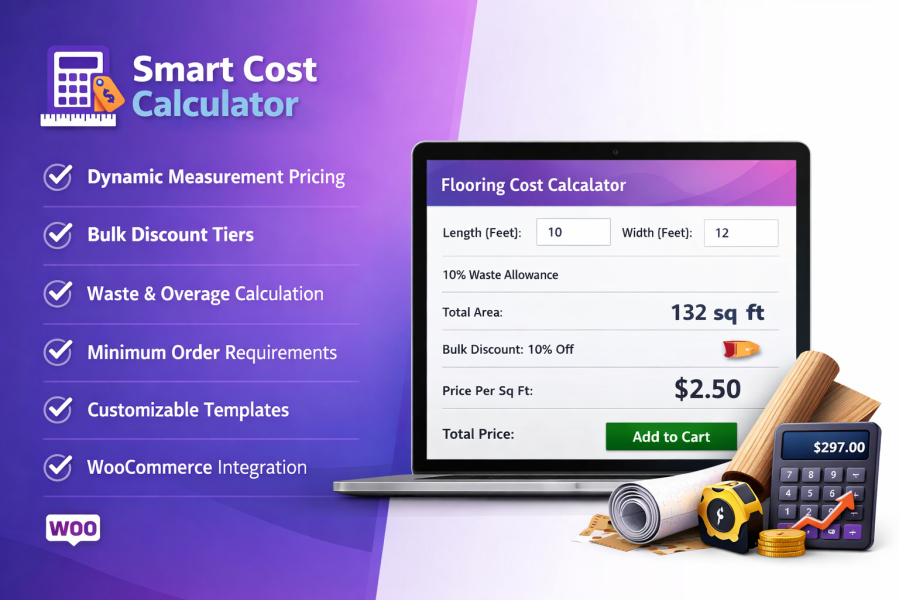
Smart Cost Calculator for WooCommerce is a powerful WooCommerce cost calculator plugin that lets store owners sell products based on customer-defined measurements instead of fixed quantities. Shoppers can enter the exact size they need—such as length, area, volume, weight, or coverage—and the plugin calculates the final product price instantly using your pricing rules.
This WooCommerce measurement-based pricing solution is ideal for stores selling flooring, fabric, tiles, construction materials, liquids, food items, cables, blinds, and made-to-order products where pricing depends on size, weight, or coverage rather than standard product quantities.
Many products cannot be priced accurately using standard WooCommerce quantity fields. Smart Cost Calculator allows customers to enter precise measurements directly on the product page and automatically calculates the appropriate price.
Price products using the measurement method that best matches how they are sold. Customers enter the dimensions or quantity relevant to the product, and the WooCommerce price calculator automatically calculates the final cost.
Price products by linear measurement with WooCommerce price by length calculations. This option is ideal for products such as ropes, wires, pipes, fabrics, and cables. Customers enter the required length, and the product price updates automatically.
Multiple length units are supported, helping improve measurement accuracy while eliminating manual calculations.
Use WooCommerce pricing by weight for products sold according to weight, including food items, grains, oils, raw materials, and bulk products. Customers select the required weight and see the calculated price instantly.
This provides consistent pricing while simplifying measurement-based and bulk purchases.
Calculate product prices based on total area with WooCommerce area-based pricing. This method is designed for products such as carpets, blinds, flooring, tiles, and panels.
Customers enter both length and width to calculate the required area and pay according to the space they need.
Allow customers to enter a total area value using a single input field. This method is ideal for printing services, wallpaper, and other surface-based products where the total area is already known.
The simplified input makes measurement-based purchasing easier without sacrificing pricing accuracy.
Calculate pricing based on box or package coverage for products such as tiles and packaged flooring. Customers enter their required dimensions, and the system calculates how many boxes are needed before applying the price per box.
This helps prevent under-ordering and makes it easier for customers to purchase the required amount of material.
Use WooCommerce volume-based pricing for products sold by volume, such as mulch, soil, sand, and liquids. Customers enter length, width, and height, and the calculator automatically determines the required volume and price.
This removes guesswork and provides consistent volume-based pricing.
Calculate pricing based on total surface coverage for products such as wrapping materials, coatings, and other surface-based products. Pricing is calculated using the applicable sides or surfaces of the product.
This method is especially useful for packaging and industrial applications.
Create measurement-based pricing ranges so customers receive better rates when purchasing larger quantities or measurements. This encourages larger purchases by reducing the effective cost as the required size increases.
Configure measurement and pricing rules at the product or variation level.
Apply discounts automatically when customers enter larger measurements. No coupon codes are required, keeping the purchasing and checkout process simple.
Add an automatic extra allowance to account for cutting waste, installation loss, or material overage. This helps customers order sufficient material and can reduce the need for follow-up orders.
Set minimum measurement values to prevent low-value or unprofitable orders. Customers receive immediate feedback when their entered measurement does not meet the required minimum.
Manage inventory using calculated measurements instead of standard unit quantities. Stock is automatically adjusted as measurement-based orders are placed.
Smart Cost Calculator for WooCommerce is designed for stores that sell products where size, weight, volume, area, or coverage determines the final price.
It is especially useful for businesses selling:
Smart Cost Calculator makes it easier to sell measurement-based products in WooCommerce by automating calculations, improving pricing accuracy, and giving customers an instant view of their final product cost.
Smart Cost Calculator is a WooCommerce plugin that allows store owners to sell products based on customer-defined measurements such as length, area, volume, weight, or coverage. The final price is calculated instantly on the product page based on your pricing rules.
The plugin is ideal for products where pricing depends on size rather than quantity, including:
Smart Cost Calculator supports multiple pricing methods:
Yes. Prices update instantly on the product page as soon as the customer enters or changes their measurements. No page reload is required.
Absolutely. You can define tiered pricing ranges so larger measurements receive lower per-unit prices. This encourages larger purchases and increases average order value.
Categories
Extension information
Quality Checks
Countries







