


Instalações ativas
20K+
Comparação de produtos
A assinatura inclui
Suporte
Deixe que os clientes façam reservas, agendem compromissos ou contratem locações por conta própria, sem precisar telefonar. Economize tempo e marque compromissos deixando seu site fazer o trabalho por você.

Não importa quais opções você tenha a oferecer aos seus clientes, com o Bookings, é possível:
Com qualquer uma das opções, você também pode bloquear agendamentos durante sua folga, reservando um tempo para lidar com suas outras prioridades, e criar um intervalo entre as reservas, garantindo que a programação seja adequada para você.
Especifique os períodos como quiser. A extensão permite configurar as reservas em dias, horas e até minutos.

Você pode definir um número mínimo e máximo de participantes: limite um agendamento a uma pessoa por vez para compromissos ou deixe várias pessoas reservarem uma aula ou excursão.

Ofereça descontos para grupos ou indivíduos que reservarem vários períodos, mostre preços mais baixos para compras antecipadas e mais altos nos finais de semana ou defina preços especiais para crianças. Com o Bookings, você personaliza os preços como quiser.
Se os seus serviços forem online ou se você estiver enviando algo para o cliente, exiba a disponibilidade no fuso horário dele para que ele agende o horário que realmente deseja. Assim, quer os agendamentos venham de Nova York, Novo México ou Nova Zelândia, eles estarão no horário definido. Sem compromissos inesperados!
Isso é ideal para aulas virtuais, compromissos online ou locações que precisem ser entregues ao cliente.
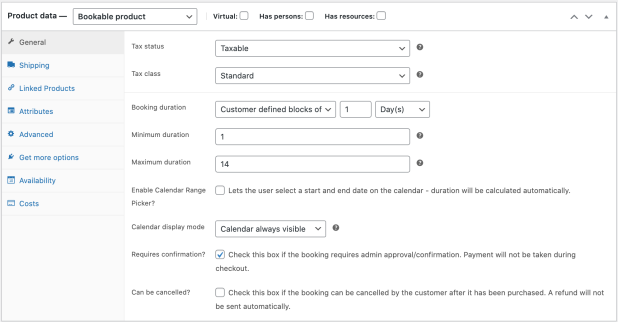
Configure as confirmações para que você tenha tempo de analisar o agendamento antes de torná-lo oficial. Envie lembretes automáticos antes de um agendamento para reduzir casos de não comparecimento e defina se cancelamentos são permitidos.

Lembre os clientes dos seus compromissos enviando notificações por e-mail quando a reserva for feita, quando for confirmada e um dia antes da data agendada.
Se quiser ir além, envie um lembrete especial diretamente do seu site.
Para evitar compromissos simultâneos, atribua os recursos necessários a uma reserva em particular. Por exemplo, se a noiva das 14h agendar uma prova de roupa e um estilista até às 15h30, o estilista aparecerá como indisponível para a noiva que quiser reservar uma prova de roupa para as 15h. Você nunca terá que se preocupar em ter o mesmo recurso ofertado a dois clientes ao mesmo tempo.

Use a visualização de calendário para ver como está a programação do seu dia ou mês. Atualize agendamentos existentes ou a disponibilidade ou use os filtros para ver recursos/serviços específicos.
Os clientes ainda telefonam para agendar compromissos, à moda antiga? Adicione-os manualmente ao calendário enquanto estiver ao telefone.
Gerencie reservas na sua loja e visualize-as no Google Agenda após 60 segundos ou menos.
Para oferecer uma experiência totalmente personalizada, considere estas extensões que outros clientes do WooCommerce usam com o Bookings.
WooCommerce Bookings is a scheduling and reservations extension for WooCommerce. It lets customers book appointments, reserve time slots, or rent equipment directly on your store, without leaving your site or calling to check availability. It is designed for appointment-based businesses, rentals and hires, reservations, and other time-based services, so you can sell time and availability the same way you sell products.
To accept bookings in WooCommerce, you create a bookable product, which works like a standard product but adds settings for availability, duration, pricing, people, and resources. WooCommerce Bookings gives you these tools directly inside WooCommerce, so bookings flow into your existing store, cart, and checkout. You can start from included bookable product templates to configure common scenarios more quickly, or build a product from scratch. Read more in our guides on Creating a Bookable Product and Introduction to WooCommerce Bookings.
Yes. WooCommerce Bookings lets you set availability rules at the store level, the product level, and the resource level, and these rules work together to determine which time slots can be booked. You can define booking duration, lead time, buffer periods between bookings, and which days or times are available. This helps you keep bookings within the hours you actually work and reduces the risk of overbooking. Read more about the availability settings.
Yes. You can set a fixed booking duration in blocks (for example, a one-hour session), or let customers define how many blocks they want, such as booking several hours in a co-working space. Duration can be measured in minutes, hours, days, weeks, or months. For day-based bookings, you can also enable a calendar range picker so customers select a start and end date directly on the calendar.
Yes. WooCommerce Bookings supports flexible pricing so your rates can reflect how you actually charge. You can set a base cost applied once per booking and a block cost that scales with the length of the booking, charge different rates for different time periods, and offer discounts for certain bookings. You can also charge per person and set different prices for different person types, such as adults and children.
Yes. The resources feature lets you define assets such as staff members, rooms, or equipment, each with its own availability schedule and capacity. You can link a resource to one or more bookable products, so a single staff member or room is not double-booked across the different services that use them. You can let customers choose a resource, or have the system assign the first available one automatically.
Yes. With the person setting, customers can make a booking for multiple people at once. You can define different person types with their own costs, such as adults and children, and set minimum and maximum numbers of people per booking. You can also count each person as a booking so that capacity and resources are reserved accordingly.
Yes. You can require confirmation on a bookable product, so instead of paying at checkout right away, the customer submits their booking details for your approval. Once you approve the booking, the customer receives an email requesting payment. This is useful when you want to review availability or details before committing to a booking. Read more on Creating a Bookable Product: Requiring Confirmation.
Yes, when you add the separate WooCommerce Deposits extension. Together, the two let customers pay an initial deposit to secure a booking, with the balance due later, and you can set deposits as a fixed amount or a percentage of the total. Collecting a deposit can help reduce last-minute cancellations and support a more predictable revenue stream, which is helpful for higher-value services and rentals.
Yes. You can sync your site's bookings with a Google Calendar so your schedule stays current alongside your other tools. Inside your store, you can also view bookings in a calendar or list view and filter them by product and resource, which helps you keep track of upcoming appointments and reservations in one place.
Yes, with the WooCommerce Bookings Availability add-on (sold separately). It adds a calendar block that shows available slots on a weekly or monthly calendar, and a schedule block that lists available slots for a day, week, or month. Customers can customize and add a booking to their cart directly from these blocks, which can help surface your availability beyond the product page.
WooCommerce Bookings works with any WooCommerce payment gateway, so you can collect payment for bookings using the same payment methods you already use for other products. Because bookings flow through your normal WooCommerce cart and checkout, you do not need a separate payment setup to start accepting paid bookings.
Yes. For hotel rooms, bed and breakfasts, or vacation rentals, you can pair WooCommerce Bookings with the free WooCommerce Accommodation Bookings add-on. This add-on is built for overnight stays, including setting a site-wide check-in and check-out time, so night-based reservations behave the way guests expect.
You can, by combining WooCommerce Bookings with WooCommerce Subscriptions to add a recurring payment option for appointment-based offerings. This suits businesses like coaching or classes, where a customer pays on an ongoing basis. Note that WooCommerce Bookings on its own is designed for scheduled bookings rather than automatically repeating events.
Yes, when you pair WooCommerce Bookings with Product Add-Ons. This lets you offer additional free or paid options on a bookable product, such as extras, upgrades, or custom requests. Offering relevant add-ons at the point of booking can help increase the value of each booking while giving customers a more tailored experience.
WooCommerce Bookings is a strong fit for service and rental businesses that sell time or availability, such as salons, consultants, coaches, trainers, tour operators, equipment and vehicle rentals, and venues. It is especially useful if you already run your store on WooCommerce and want bookings to live inside the same store, cart, checkout, and product catalog rather than in a separate tool.
WooCommerce Bookings is not designed for one-off event tickets or for recurring events. If you are selling tickets to a single event or workshop, WooCommerce Box Office is a better fit, because an event is distinct from a scheduled booking. For events that repeat on a regular weekly or monthly cadence, WooCommerce Bookings is not built to handle recurring events on its own.
It can, through a few of its options. Requiring confirmation lets you review bookings before payment, and pairing it with WooCommerce Deposits lets you collect an upfront deposit that encourages customers to keep their booking. You can also decide whether customers are allowed to cancel a booking. These tools give you more control over commitment and scheduling, though outcomes will vary by business.
Yes. WooCommerce Bookings adds an admin area where you can review all bookings, view or edit the details of a booking, and see bookings in a filterable calendar view. You can also manually add bookings, send notices to customers who booked a specific product, and import or export bookings using a CSV file, which helps you stay organized as your booking volume grows.
Categorias
Informações da extensão
Verificações de qualidade
Funciona com
Compatibilidade
Países




