Instalações ativas
100K+
Comparação de produtos
A assinatura inclui
Suporte
Você consegue garantir o quanto pode faturar com sua loja neste mês? Se você ofereceu produtos baseados em assinatura, é bastante possível fazer isso.
Com o WooCommerce Subscriptions, você pode criar e gerenciar produtos com pagamentos recorrentes, uma renda residual que você pode monitorar e com a qual pode contar.
O WooCommerce Subscriptions permite que você introduza uma variedade de assinaturas para produtos e serviços físicos ou virtuais. Crie clubes com os produtos do mês, assinaturas semanais de serviços ou até mesmo pacotes de cobrança anual de software. Adicione tarifas de inscrição, ofereça testes gratuitos, ou defina períodos de validade.
Um modelo com base em assinatura permitirá que você capte uma receita residual maior e tudo o que precisa fazer é enviar os pedidos.
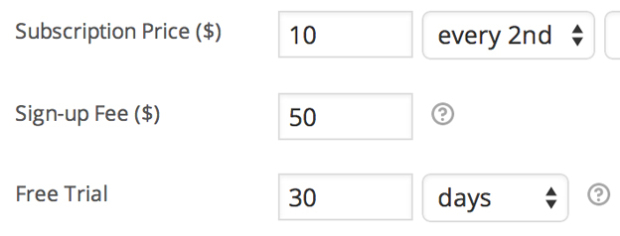
Cobre um valor inicial, para contabilizar os custos de configuração do cliente, ou permita que eles experimentem antes, incluindo taxas de inscrição e testes gratuitos em todos os produtos de assinatura.
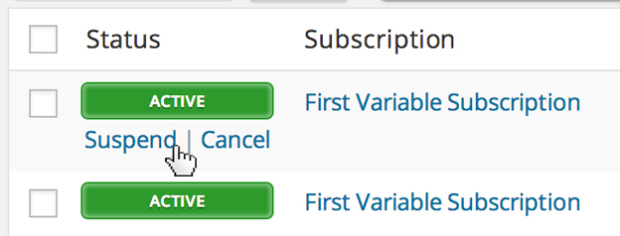
Store Os proprietários de lojas recebem um gerenciamento completo, com todas as funcionalidades, na tela de administração WooCommerce > Editar assinatura. É possível suspender ou cancelar uma assinatura, alterar a validade do período de testes, adicionar itens, envio, taxas ou impostos à assinatura ou modificar o total recorrente dos pagamentos futuros.
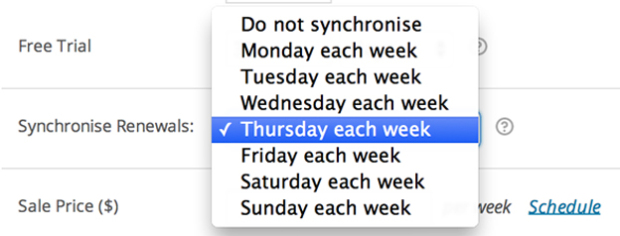
Se você deseja fazer o envio apenas em determinados dias do mês ou alinhar todos os clientes para o mesmo período de associação anual, é possível usar a funcionalidade de sincronização de renovação do WooCommerce Subscriptions. É possível até mesmo tornar o primeiro pagamento proporcional, em relação a uma compra de assinatura sincronizada.
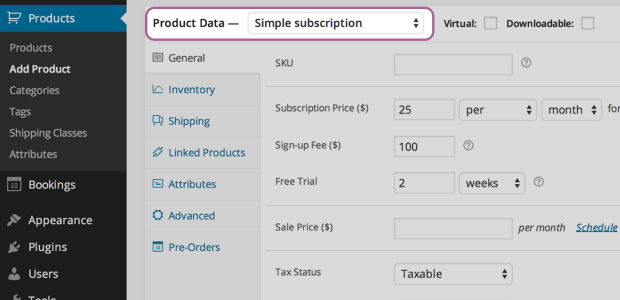
Ao criar um produto de assinatura, é possível permitir o download do produto, que ele seja virtual ou físico, cobrar pagamentos de renovação semanal, mensal ou anualmente, restringir o produto a um por cliente e até mesmo cobrar pelo envio apenas no pedido inicial.
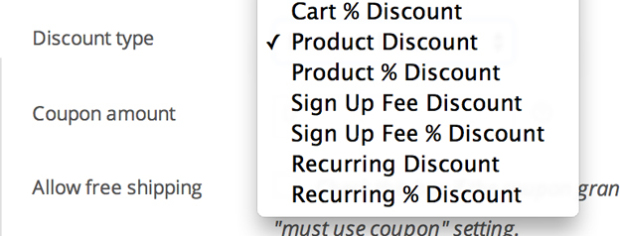
Ofereça aos clientes um desconto em seus pagamentos mensais ou apenas na taxa de inscrição. As assinaturas incluem cupons recorrentes de desconto e cupons para a taxa de inscrição.
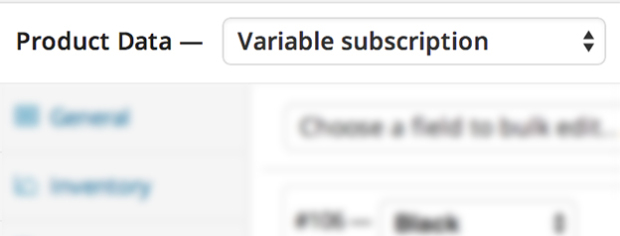
Crie produtos de assinatura variados e permita que os clientes optem por uma assinatura que atenda às necessidades deles. Você pode até permitir que os clientes escolham seu próprio cronograma de cobrança.
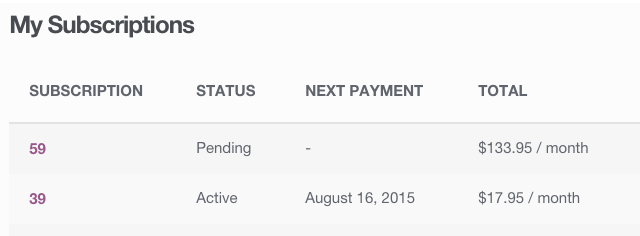
Os clientes têm a possibilidade de também gerenciar suas próprias assinaturas. Com a página Minha conta > Visualizar assinatura, os assinantes podem suspender ou cancelar uma assinatura, alterar o endereço de entrega ou a forma de pagamento para futuras renovações e fazer upgrade ou downgrade de sua assinatura.
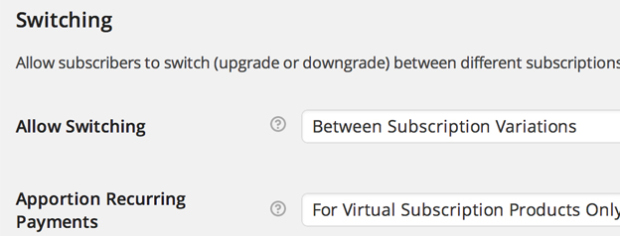
Permita que os clientes façam upgrade, downgrade ou crossgrade entre produtos de assinatura distintos. Com opções flexíveis de rateio para o valor recorrente, taxa de inscrição e duração, também é possível personalizar os custos de mudança para um novo produto de assinatura para atender às necessidades da sua loja.
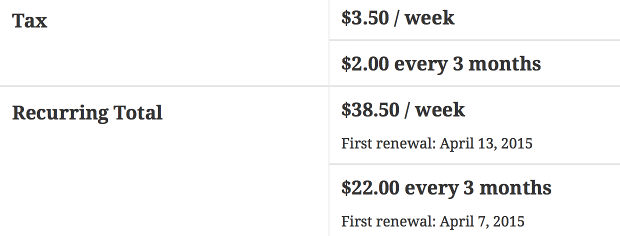
Sua clientela pode inclusive comprar diferentes produtos de assinatura na mesma transação, e o Subscriptions os agrupará para reduzir as taxas do gateway de pagamento e as despesas logísticas gerais de suas futuras renovações.
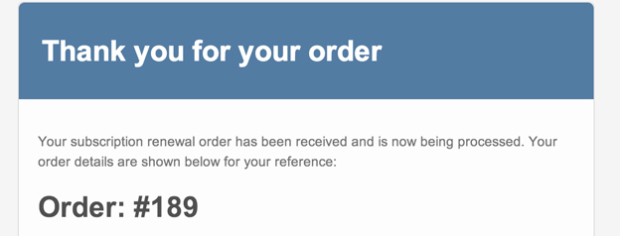
Notifique automaticamente seus clientes quando um pagamento de renovação de assinatura for processado, uma assinatura for cancelada ou uma assinatura tiver expirado, com os e-mails de assinatura integrados.
Não importa se você quer enviar um conjunto de produtos surpresa para clientes fiéis todo mês ou cobrá-los por um serviço presencial prestado por sua pequena empresa, o WooCommerce Subscriptions pode simplificar o processo de obtenção dessa tão importante renda residual.
Você conseguirá acompanhar o seu número de assinantes, quando a cobrança deles é enviada e o quanto de receita está sendo gerado, o que significa que você sempre saberá o percentual de receita com o qual sua loja poderá contar, enquanto você continua a evoluir.
WooCommerce Subscriptions is a recurring payments extension for WooCommerce that lets you sell products and services billed on a repeating schedule. You can charge customers weekly, monthly, or annually, and you can apply it to physical, virtual, or downloadable products. Common examples include product-of-the-month clubs, weekly service subscriptions, and yearly software billing plans.
WooCommerce Subscriptions is designed to help you turn one-time sales into recurring revenue you can count on. Instead of relying on repeat manual purchases, customers sign up once and are billed automatically on their schedule, which can help stabilize cash flow. Built-in reports let you track recurring revenue and the number of active subscribers, so you have a clearer view of what your store can expect month to month.
WooCommerce Subscriptions integrates with over 25 payment gateways for automatic recurring payments, including WooPayments, Stripe, PayPal Payments, and PayPal Braintree. If you prefer to accept manual renewal payments, those can be processed through any WooCommerce payment gateway, with automatic email invoices and receipts. For the full breakdown of which gateways support automatic versus manual renewals, see the Subscriptions payment gateways guide.
No. While you can use Stripe and many other gateways with WooCommerce Subscriptions for automatic recurring payments, the subscriptions themselves are created and managed on your own site, not inside your payment gateway. This means you manage billing schedules, renewals, and subscription changes from your WordPress dashboard rather than logging in to a separate provider account.
Yes. WooCommerce Subscriptions lets you add a free trial so customers can try before they buy, and you can charge an initial sign-up fee to cover setup costs. You can combine both on the same product, or use each on its own. This gives you flexible pricing options that can lower the barrier to signing up while still covering upfront costs.
Yes. From the My Account area, subscribers can suspend or cancel a subscription, update their shipping address or payment method for future renewals, and upgrade or downgrade their plan. Letting customers handle these changes on their own can reduce the number of support requests your team needs to answer.
Yes. WooCommerce Subscriptions supports upgrades, downgrades, and cross-grades between subscription products. It includes flexible proration options for the recurring amount, sign-up fee, and length, so you can control how switching costs are calculated. This is useful if you offer tiered plans and want customers to move between them without starting over.
WooCommerce Subscriptions includes an automatic failed payment retry system that can rebill a failed recurring payment, which helps you avoid losing revenue from a single declined charge. The retry system is a setting you turn on, and it applies to payments that fail after it is enabled. You can learn more in the failed payment retry documentation.
Yes. The renewal synchronization feature lets you align renewals to a specific day, such as the first of the month or a set weekday, which is helpful if you only ship on certain days or want all customers on the same billing term. You can also prorate the first payment so customers are charged fairly for the partial period before their first synchronized renewal.
Yes. With variable subscriptions, you can offer several options under one product and let customers choose the plan that suits them, including their own billing schedule. This works well when you sell the same service at different tiers, such as basic, standard, and premium plans, each with its own price.
Yes. WooCommerce Subscriptions adds two coupon types beyond standard WooCommerce coupons: a recurring product discount and a sign-up fee discount. You can use recurring discounts to create limited coupons that apply to only a set number of payments, which gives you control over promotions without discounting the plan forever.
Yes. Customers can purchase different subscription products in a single transaction, and WooCommerce Subscriptions groups them to reduce payment gateway fees and simplify future renewals. If you enable mixed checkout, shoppers can also buy subscription and non-subscription products together in the same order.
Yes. WooCommerce Subscriptions includes a gifting option that lets shoppers purchase a subscription for another person. This can help you reach new customers and grow recurring revenue, since the recipient becomes a subscriber on your store.
Yes. WooCommerce Subscriptions includes built-in emails that notify you and your customers when a renewal payment is processed, when a subscription is cancelled, and when a subscription expires. These automatic messages help keep customers informed so there are fewer surprises around billing.
WooCommerce Subscriptions lets you create dedicated subscription products, and you can also offer customers a choice between a one-time purchase and a subscription on your existing products.
They solve different problems and are often used together. WooCommerce Subscriptions handles recurring billing: payment schedules, renewals, and failed payment retries. WooCommerce Memberships handles access control: restricting content or products to members. If you want members billed on a recurring cycle with free trials, upgrades, or the ability to pause, the two extensions integrate so Subscriptions manages payments while Memberships manages access.
No. If your goal is simply to bill customers on a repeating schedule for products or services, WooCommerce Subscriptions handles that on its own. You would add WooCommerce Memberships only if you also need to restrict access to gated content, courses, or member-only products. For recurring memberships that combine billing and access, the two work together.
WooCommerce Subscriptions is designed for stores that sell ongoing value and want automated, recurring billing. It suits subscription box businesses, service providers billing retainers for work like maintenance or consulting, software and SaaS billing, and any store turning repeat purchases into recurring plans. If you need flexible billing schedules, free trials, and customer self-service, it is a strong fit.
WooCommerce Subscriptions is built for recurring billing, so it is not the right tool if your store only sells one-time purchases with no repeating payments. If your main need is restricting access to content or products rather than charging on a schedule, WooCommerce Memberships is a better starting point.
WooCommerce Subscriptions is built for recurring billing, which is the core of any subscription box or repeat-shipment model. You can set weekly, monthly, or annual schedules, sync renewals to a shipping day, and charge shipping in a way that fits your fulfillment.
Yes. Store owners get full subscription management from the Edit Subscription screen in the WordPress dashboard. You can suspend or cancel a subscription, change the trial expiration, add items, shipping, fees, or taxes, and modify the recurring total for future payments. This gives you hands-on control when a customer's needs change.
Categorias
Informações da extensão
Verificações de qualidade
Compatibilidade
Países