
Product Icon

Customer / Order / Coupon Export for WooCommerce

Export customers, orders, and coupons from WooCommerce manually or on an automated schedule.
Choose a billing option
$79
Save 20%
$158 $126.40

Subscription includes

  • Product updates and improvements
  • Customer support
  • 30-day money-back guarantee

Easily Export Orders, Customers, and Coupons from WooCommerce

While WooCommerce gives you reporting and order fulfillment tools, many merchants still need to use external systems for customer management, order fulfillment, or simply need an easy way to get data out of WooCommerce.

We’ve simplified the data transfer from WooCommerce to CRMs, fulfillment providers, or other systems with a customer, order, and coupon exporter that outputs CSV and XML formatted files. The WooCommerce Customer / Order / Coupon Export plugin lets you export individual orders, customers, or coupons, bulk export records on-demand, and create multiple automated exports to transfer customer and order data via FTP, HTTP POST, or email. You can also create your own custom formats that can include any customer or order meta.

Best of all, because our export process runs asynchronously in the background on your site, you can complete other tasks or leave your site completely while your export runs!

Customer / Order / Coupon Export Features

  • Export customer, order, and coupon data, including custom fields in CSV or XML formats
  • Create custom export formats to ensure your files are formatted just right
  • Process exports asynchronously so you can export thousands of records while working elsewhere on your site (or taking a well-deserved break!)
  • Generate bulk exports on demand to quickly access customer, order, and coupon data based on properties like customer registration date or order status
  • Manually export and transfer customer and order data via email, FTP, or HTTP POST
  • Create automated exports to create and send customer and order exports on a recurring schedule.
  • Compatible with many other plugins including Local Pickup Plus and Checkout Add-Ons. Click here for a full list of known compatible plugins.

Flexible, customizable formats

While we offer a number of predefined formats, you can also create your own customer, order, or coupon formats to ensure your file is organized just right for your business, CRM, or order fulfillment system. Custom formats let you rearrange and add new fields, including meta data and static values, and you can configure your export for CSV or XML outputs.
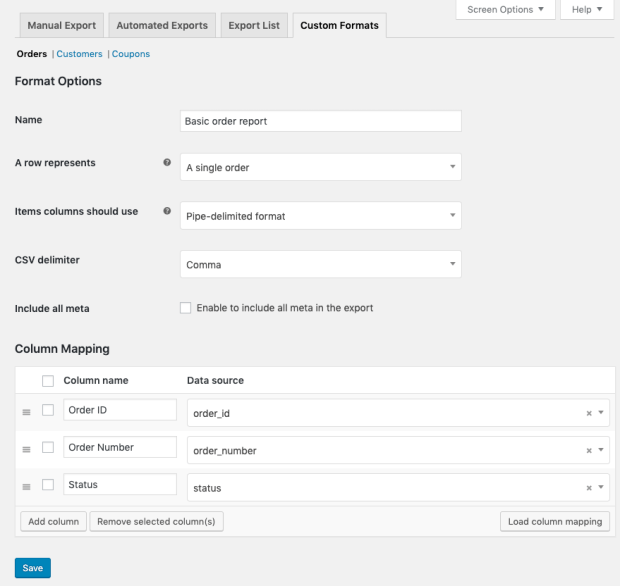
Creating a custom export format

Scheduled, automated exports

You can setup automated exports to send customer and order data via email, FTP, or HTTP POST on a regular schedule. This is ideal for order fulfillment workflows or for updating your mailing lists without any extra work. Once a customer or order is included in an automated export, it will be marked as exported and excluded from any future runs of that export to avoid duplicate.

Automated exports can be sent on a recurring basis (e.g. every day or every 5 minutes) and order exports can also be sent immediately after payment.
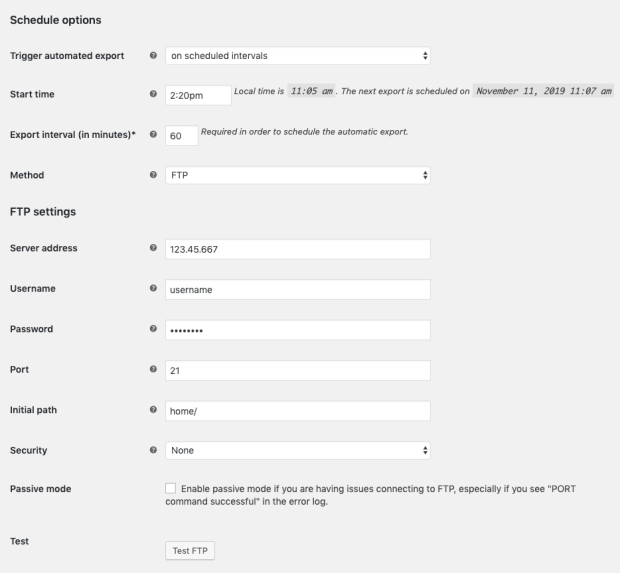
Scheduling an automated export

Quick and easy manual exports

Beyond automated exports, you can also generate exports manually by selecting the particular customers or orders you want or by using filters to target data based on some attribute (e.g. customer registration date or order status).
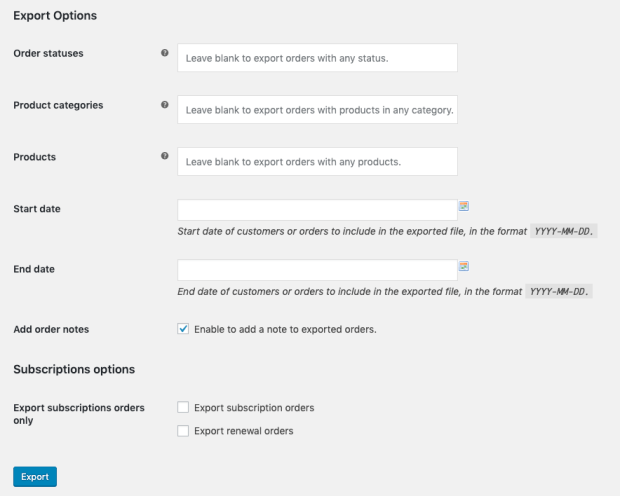
Options for a manual bulk export

Background processing for uninterrupted workflow

We know your time is valuable, and few things are more tedious than watching a load screen when you’re exporting thousands of orders. Our plugin exports data asynchronously in the background of your site, so there’s no need to interrupt your work to babysit a modal. Exports will process in the background while you work elsewhere on your site, or even leave your site completely. We store exports for 14 days in our Export List so you grab your exported file when it’s convenient for you.
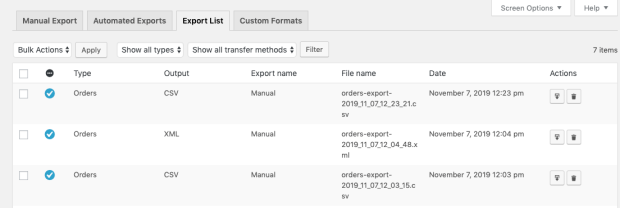
Export list

We <3 Developers!

Need some customizations that aren’t possible with the core plugin settings? Customer / Order / Coupon Export Suite includes ample hooks for developers to further customize export output or plugin behavior. Click here to read our developer documentation.

How to Get Started (in 5 minutes or less)

  1. Buy this extension 🙂
  2. Download and install into your WooCommerce store
  3. Check out the plugin documentation for sample files and setup guides.
  4. Enable automatic exports and add your FTP, HTTP POST, or email information.
  5. That’s it! Sit back and enjoy your easily exported customers and orders!

Need another reason to buy? When you purchase a SkyVerge-developed extension, you’re getting the highest quality extensions for your WooCommerce store. Gain peace of mind by knowing that when you purchase our products, your store’s performance is as important to us as it is to you.

SkyVerge


Extension information

  • PHP version required: 7.4
  • Tested with WordPress: 7.0
  • Tested with WooCommerce: 10.8.1
  • Requires at least WordPress: 5.6
  • Requires at least WooCommerce: 4.0.0

Countries

  • Worldwide

Languages

English (United States), French (France)

Customer reviews

Average rating 4.2

43 reviews from verified users

5 stars, 67% of reviews
4 stars, 14% of reviews
3 stars, 2% of reviews
2 stars, 0% of reviews
1 star, 16% of reviews
  • Rated 4 out of 5
    Jesse StraeterUnited States (US)May 3, 2025
    Plugin works as described. Very easy to export orders with this plugin which we are using it for. I do wish there was some more custom pre-set options. For instance, we export orders daily that are in Processing or On Hold status. To do this, we have to manually select that each time. Similarly, we need to uncheck the Mark as Exported option each time for our purposes. It would be great to have additional pre-defined options to address these on the Custom Formats page so we wouldn't have to change them each day. All-in-all though, the plugin is great and gets us what we ultimately need!
  • Rated 5 out of 5
    alexjcallUnited Kingdom (UK)Feb 2, 2025
    Really easy to use and extremely helpful to get a download of orders. No idea why it isn't a standard feature on woo commerce, though.
  • Rated 1 out of 5
    weltentaenzerberlinGermanyJan 15, 2025
    Keeps trying to charge my credit card, no way to cancel subscription. Very annoying. Been trying to cancel this already for 2 years, luckily my cc is not active anymore, but Im getting tired of these emails!!
  • Rated 5 out of 5
    Thom JonesUnited States (US)Oct 2, 2024
    Orders can be exported with all data available. I use it with a csv format, but having json available might be very nice in the future. Customer Service also is very prompt and knowledgeable. Great addition to Woo!
  • Rated 5 out of 5
    getechmarketingUnited Kingdom (UK)Aug 2, 2024
    Our company required a more robust export option for orders so we could automate order processing with our in-house order fulfillment. This plugin gave us (pretty much) exactly what we needed as I could customise and reorganise the columns and control which data was exported including how and when, becoming an essential part of our e-commerce platform. A real benefit to this plugin is the ability to automatically generate and send an order export immediately after an order has been placed, whereas another plugin I tested could only offered time-based file generation. Although it didn't give me all the options I would like (e.g. pulling product data from custom fields), the devs maintain a pretty comprehensive Git with boilerplate code snippets to help you modify the plugin's functionality. When I did face issues, Zach was brilliant at providing support.

Related Products

Price $279 annually
Rated 3.2 out of 5 stars
Price $199 annually
Rated 4 out of 5 stars
Price $119 annually
Rated 3.5 out of 5 stars
Price $109 annually
Rated 4.6 out of 5 stars
Price $29 annually
Rated 3.6 out of 5 stars
Price $79 annually
Rated 4 out of 5 stars
Price $49 annually
Rated 3.9 out of 5 stars
Price $49 annually
Rated 3.6 out of 5 stars
Price $59 annually
Rated 2.8 out of 5 stars
Use of your personal data
We and our partners process your personal data (such as browsing data, IP Addresses, cookie information, and other unique identifiers) based on your consent and/or our legitimate interest to optimize our website, marketing activities, and your user experience.
