
Product Icon

Quantity Slider for WooCommerce

Replace the standard quantity input with an interactive slider that makes selecting product quantities faster and more intuitive for your customers.
Choose a billing option
$99
Save 20%
$198 $158.40

Subscription includes

  • Product updates and improvements
  • Customer support
  • 30-day money-back guarantee

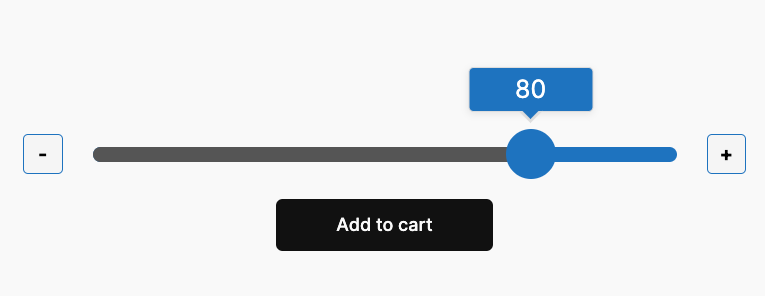
Quantity Slider for WooCommerce replaces the standard quantity input on product pages with an interactive slider. Customers drag a handle or tap plus/minus buttons to choose quantities instead of typing into a small field.

That makes shopping faster on mobile, reduces input errors, and gives your product pages a cleaner, more professional layout. Configure each product individually, or set store-wide defaults and styling from one admin screen.

Top benefits

  • Improve customer experience with a visual slider instead of a tiny number field
  • Increase mobile conversions with touch-friendly drag and tap controls
  • Control quantity limits with per-product or per-variation min, max, and step values
  • Match your brand with global color, tooltip, and add to cart button styling
  • Launch faster with global product defaults for new products

How it works

When the quantity slider is enabled on a product, customers see a slider in place of the default quantity field. They can:

  • Drag the slider handle to change quantity quickly
  • Click the plus (+) or minus (-) buttons for precise step-by-step adjustments
  • See the current quantity in an optional tooltip above the handle
  • View an optional quantity display below the slider and optional min/max labels beside it

Enable the slider per product from the Inventory tab, or set global defaults under Quantity Slider in the WordPress admin menu. Per-product settings override global defaults when configured. For variable products, quantity rules can be set per variation, and the slider can stay hidden until a variation is selected.

Key features

  • Per-product and global defaults for enable, min/max/step, tooltip, and display options
  • Simple and variable product support with per-variation quantity rules
  • Tabbed global appearance settings for colors, slider dimensions, and tooltip styles
  • Tooltip presets including rounded, pill, square, rectangular, dark, and minimal
  • Add to cart button width and spacing controls for a tighter product page layout
  • Responsive layout for classic and block-based WooCommerce product pages
  • No code required — configure everything from the WordPress admin
  • HPOS compatible and tested with current WordPress and WooCommerce releases

Frequently asked questions

What does this plugin do?

Replaces the standard quantity input field with an interactive slider on product pages. Customers drag a handle or click buttons to select quantities instead of typing numbers. This makes quantity selection faster and easier, especially on mobile devices.

How does this improve my store?

Replaces the standard quantity input field with an interactive slider on product pages. Customers drag a handle or click buttons to select quantities instead of typing numbers. This makes quantity selection faster and easier, especially on mobile devices.

How does this improve my store?

Customers can select quantities more quickly and accurately. The visual slider reduces errors from typing wrong numbers and provides a better mobile shopping experience. This can lead to fewer abandoned carts and higher conversion rates.

Can I use this for products that must be sold in specific quantities?

Yes. Set the step value to match your requirement. For example, if you sell items in packs of 6, set the step to 6 and minimum to 6. Customers can then only select 6, 12, 18, and so on.

Can I set minimum order quantities?

Yes. Set the minimum quantity value for any product. This is useful for bulk items, wholesale products, or items with minimum order requirements.

How does this work with variable products?

Each variation can have its own quantity settings. When a customer selects a variation, the slider appears with that variation's specific minimum, maximum, and step values. For example, a small t-shirt might have a max of 5, while a large t-shirt might have a max of 10.

Can I use different settings for different products?

Yes. Each product has independent settings. You might set a minimum of 10 for bulk items, a maximum of 2 for limited stock items, and step values of 3 for items sold in packs.

Will this slow down my site?

No. The plugin is lightweight and only loads on product pages where it's enabled. It uses minimal JavaScript and CSS, so it has negligible impact on page load times.

Can I get help customizing the slider appearance?

Yes. While the plugin works out of the box, we can provide guidance on customizing the CSS to match your theme. Contact support for assistance with styling options. The latest version now includes many styling setting for each separate element.

Customer reviews

We are accepting reviews for this product, and will display them when we get a few more.

Extension information

  • PHP version required: 7.2
  • Tested with WordPress: 7.0
  • Tested with WooCommerce: 10.9
  • Requires at least WordPress: 5.8
  • Requires at least WooCommerce: 5.0

Countries

  • Worldwide

Related Products

Price $79 annually
Rated 3.4 out of 5 stars
Price $279 annually
Rated 3.2 out of 5 stars
Price $59 annually
Rated 3.1 out of 5 stars
Price $49 annually
Rated 4.1 out of 5 stars
Price $109 annually
Rated 2.7 out of 5 stars
Price $109 annually
Rated 2 out of 5 stars
Price $109 annually
Rated 2.3 out of 5 stars
Price $39 annually
Rated 2.8 out of 5 stars
Price $109 annually
Rated 2.6 out of 5 stars
Use of your personal data
We and our partners process your personal data (such as browsing data, IP Addresses, cookie information, and other unique identifiers) based on your consent and/or our legitimate interest to optimize our website, marketing activities, and your user experience.




