Product Icon

Intuit Payments Gateway for WooCommerce

Allow customers to securely save multiple payment methods to their account for faster checkout.
Choose a billing option
$99
Save 20%
$198 $158.40

Subscription includes

  • Product updates and improvements
  • Customer support
  • 30-day money-back guarantee

Easily and Securely Accept Credit Cards via Intuit

The Intuit Payment Gateway extension provides an advanced payment integration for WooCommerce while providing the security and reliability that comes with using Intuit for payment processing. This extension supports merchants using an Intuit Payments account for eCommerce processing.

Intuit Payments provides increased security in payment processing, as customer credit card information is tokenized before being sent through your server, meeting the lower level PCI SAQ A-EP compliance level. The customer doesn’t see a difference in the checkout process, but payment data is more secure behind the scenes.

Let your customers save their credit cards and bank accounts to their WooCommerce account for fast and easy checkout. Includes full support for WooCommerce Subscriptions!
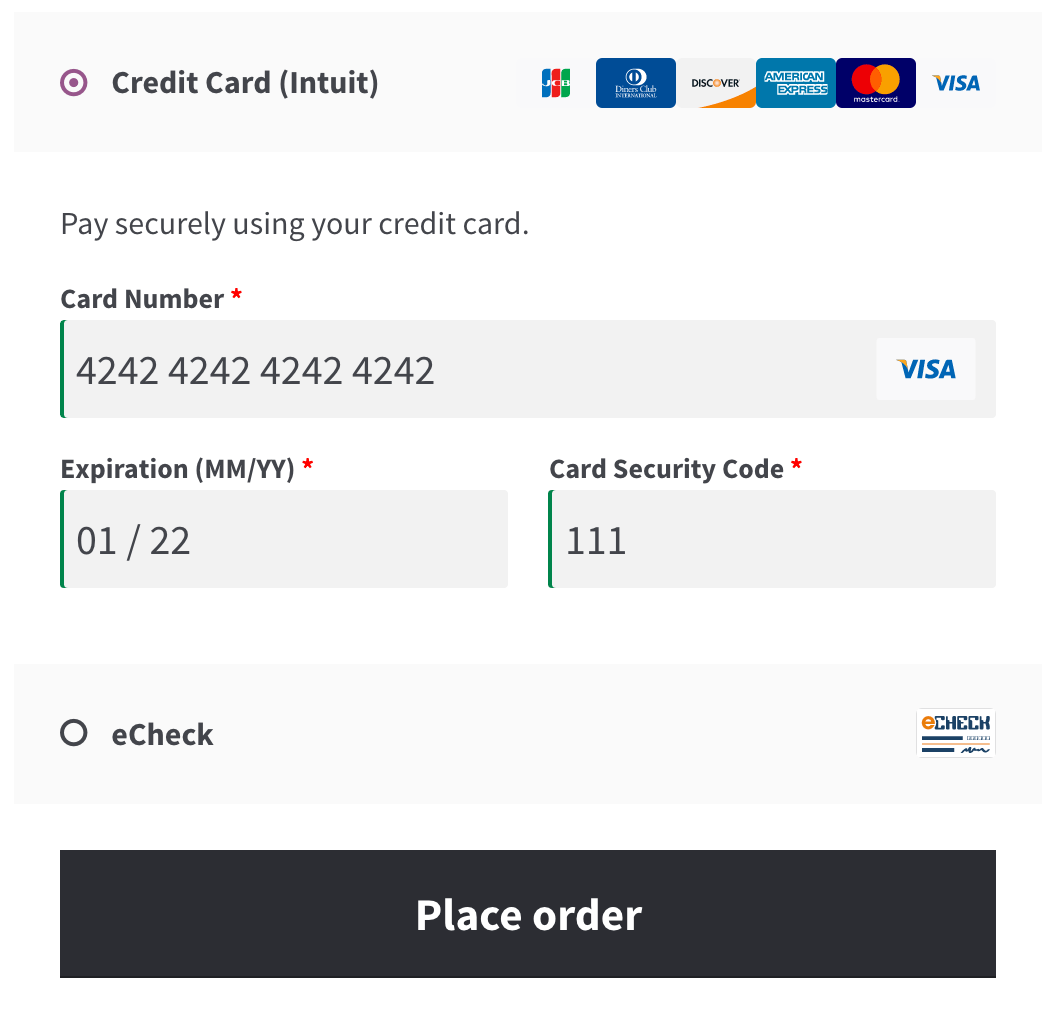
WooCommerce Intuit Payments Credit Card form
Credit Card form

The Intuit Payment Gateway extension allows you to keep the customer on your site for the checkout process, allowing you maximum control over checkout so that you can test and implement the most effective experience for your store. An SSL certificate is required for PCI compliance due to the direct checkout to ensure that your customers’ credit card information is secure.

Why Use Intuit Payments

  • Process refunds / voids automatically from within WooCommerce
  • Capture prior authorized transactions right from the WooCommerce edit order screen
  • Force charges for orders with only virtual items instead of authorizing them NEW
  • Automatically capture transactions when order status changes to a paid status NEW
  • Full Support for WooCommerce Subscriptions
  • Full support for WooCommerce Pre-Orders
  • Customers can securely save their payment method to their account for easier checkout
  • Supports Intuit Payments client-side tokenization for improved security, meeting PCI SAQ A-EP compliance standards NEW
  • Accepts eChecks with Intuit Payments account NEW
  • Updated payment form at checkout with retina icons
  • Adds a mobile-friendly checkout with numerical inputs for card type and security code
  • Customers can add saved payment methods to their accounts without going through checkout
  • Customers can add a nickname for a saved payment method to make checkout even smoother NEW
  • Show detailed decline messages at checkout instead of generic errors
  • Customers never leave your site during checkout
  • Accept Major Credit Cards / Debit Cards – Visa®, MasterCard®, American Express®, Discover®, Diner’s, UnionPay, JCB

Simple, Integrated Checkout

Using the Intuit Payment Gateway extension allows you to decide what your checkout process will look like, while keeping the customer on your site for the entire process. This gives you maximum control over this experience, providing a slick checkout process for the user and maximum customizability for the business owner.

WooCommerce SkyVerge gateways saved methods with nicknames
Using Saved Cards

Mobile checkout is enhanced as well, offering automated card formatting and numerical (tel type) fields for easier input.

WooCommerce SkyVerge Payment Gateway mobile checkout form
Mobile Credit Card Form

You can now opt to show detailed decline messages to your customers, no more “an error occurred” error messages!

WooCommerce Intuit Payments detailed decline messages
Detailed Decline Message

Support for Automatic Refunds & Voids – NEW

Shop employees can now process refunds for an order paid for with Intuit Payments directly from within WooCommerce — no more logging into your merchant account to process refunds! Speed up your store management by creating full or partial refunds from the “Edit Order” screen and sending the transaction automatically to Intuit by clicking “Refund via Credit Card”.

WooCommerce Begin Automatic Credit Card Refund

If the transaction has not been captured or settled, a transaction void will be performed automatically instead to cancel the order.

Securely Save Customer Payment Methods

Customers can easily & securely save multiple payment methods to their account for faster checkout, which are displayed in unified “My Payments” section of their account. Payment data is stored on Intuit’s secure servers, so your responsibility for PCI compliance is significantly reduced. There’s no limit to the number of payment methods a customer can store on their account, and both credit cards and eChecks are supported.

WooCommerce Intuit Payments enhanced saved payment methods
Saved payment methods

Customers can also change their active payment method, add payment methods, and remove payment methods from the My Account page. The “Add Payment Method” workflow is seamless and tokenizes card information for future use without requiring the customer to go through checkout!

WooCommerce Intuit Payments: Add payment
Customer Add Saved Payment

Full Support for Subscriptions and Pre-Orders

Intuit Payments is an ideal gateway for WooCommerce Subscriptions, offering support for all of Subscriptions features – payment date changes, subscription date changes, and more. The gateway also fully-supports WooCommerce Pre-Orders, so you can take customer’s payment information upfront and then automatically charge their payment method once the pre-order is released.

Intuit Payments eChecks – NEW

Customers with US bank accounts can checkout using their bank account information for a checking or savings account. To use this feature, you must have eChecks enabled for your Intuit Payments account.
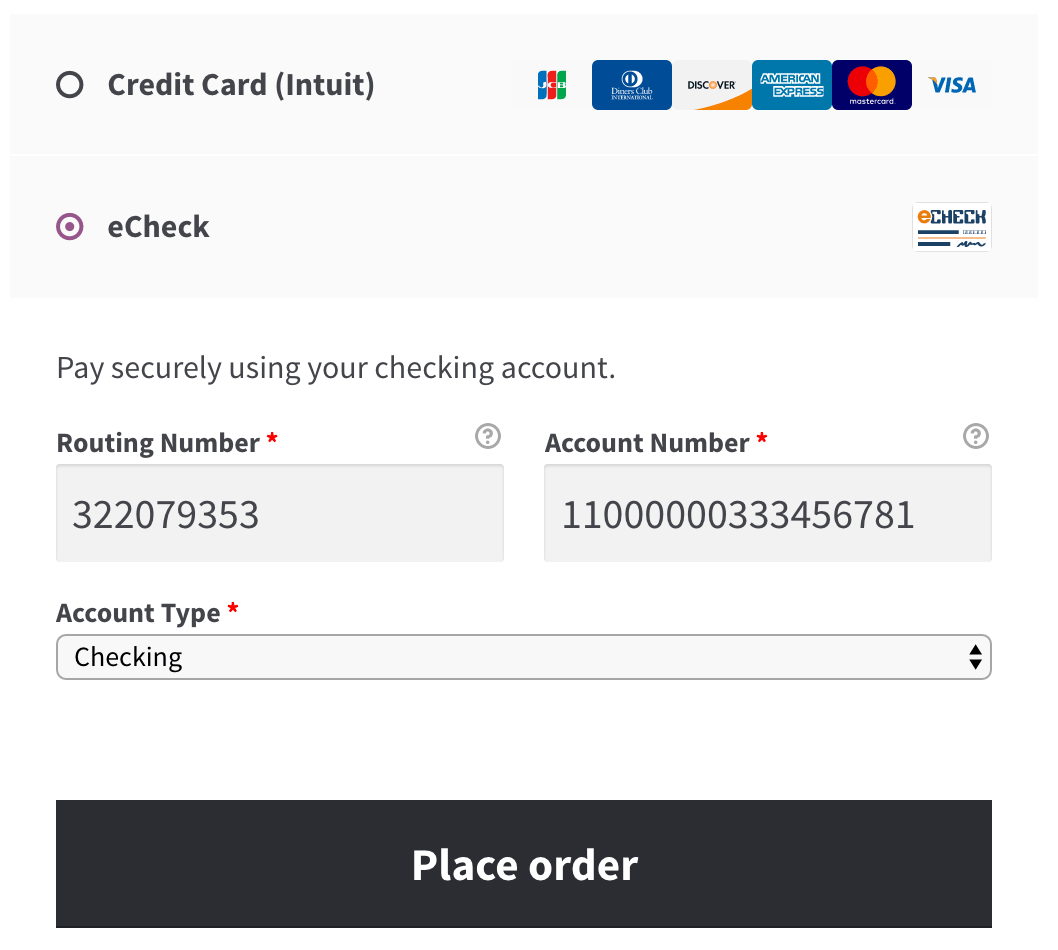
WooCommerce Intuit Payments eCheck form
eCheck form

Capture Charges directly from WooCommerce

Some users choose to set the payment gateway to only authorize charges rather than authorize & capture them. However, this requires the user to then log into the payment gateway admin to capture charges. This extension allow you to optionally capture previously authorized transactions directly from the WooCommerce Edit Order screen rather than logging into your gateway control panel to do so. Simply edit the order, select the “Capture Charge” action, and charges will be captured through Intuit.

WooCommerce SkyVerge gateway capture charges
Capture Charge

How to Get Started

  1. Buy this extension 🙂
  2. Download and install into your WooCommerce store
  3. Login to your Intuit Payments account (sign up here if you don’t have an account yet) and grab your credentials
  4. Save this info in settings under WooCommerce > Settings > Payments
  5. That’s it! Sit back and enjoy easy payment processing using Intuit!

Need any more reason to buy? When you purchase a SkyVerge-developed extension, you’re getting the highest quality extensions for your WooCommerce store. Gain peace of mind by knowing that when you purchase our products, your store’s performance is as important to us as it is to you.

This is not an integration with QuickBooks POS services, but is rather a payment integration using Intuit’s payment processing capabilities. If you’re looking for a QuickBooks POS integration, please suggest or vote for it under WooIdeas.

Customer reviews

Average rating 3.9
37 reviews
5 stars, 65% of reviews
4 stars, 5% of reviews
3 stars, 3% of reviews
2 stars, 11% of reviews
1 star, 16% of reviews
37 reviews
  • Mauricio Gastelum
    Rated 1 out of 5
    Functionality
    Jun 3, 2025
    Functionality
    Has not worked once and no way to assess why.
    • SkyVerge
      Jun 6, 2025
      Hello. Sorry to hear that plugin isn’t working. If you haven’t contacted our support team yet, please reach out to us directly and we will be happy to get this resolved! - S.M.
  • Gordon Seirup
    Rated 1 out of 5
    Support
    Nov 25, 2024
    Support
    Inexcusable Travesty
    I always recommend to my clients that they use a payment processor other than Intuit. Why? Because I have personally witnessed 3 separate occasions where Intuit shut down my client's processing account without notice, causing hours upon hours of hassle, headache, and lost revenue while fighting with Intuit support. It's not a problem with their WooCommerce extension, it's a problem with the rotten core of the company.
    • SkyVerge
      Dec 26, 2024
      Hey there, thanks for the review and providing your feedback on Intuit. It sounds as if the issues here were directly with Intuit, I am sorry that you had such a bad experience with their support. While our plugin is an interface between your site and Intuit Payments, we aren’t able to support account issues from our end. I am glad to hear that the extension isn’t the issue here. If you do have any issues with our plugin, please reach out to our support team and we will be happy to help out! - S.M.
  • tomwaller1
    Rated 1 out of 5
    Support
    Aug 23, 2024
    Support
    A nefarious user set up an account on our company website and began running credit cards to see which one worked. In response Intuit shut down our payment gateway and closed our account. The ensuing three weeks of no income nearly wrecked my company. I called and called, escalating my situation to their second level of customer service at least 5 times without effect. Now 50 days later I’m back in touch with them. This all too possible scenario exposes a big flaw in their services. What saved us was PayPal stepping in and getting their payment gateway up and running in one afternoon. What i found out is the WordPress and Woo Commerce can accommodate two gateways simultaneously, one enabled a...
    • SkyVerge
      Sep 23, 2024
      Hey there, thank you for rating our plugin. It sounds as if the delays getting the gateway functioning were from the Intuit team. Our plugin acts as a bridge between WooCommerce and the payment gateway provider (Intuit in this case). We can work to resolve issues with the plugin and assist in payment issues within WooCommerce. We are not able to work within your Intuit account or expedite support with their team however. I’m sorry that it took such a long time for Intuit to get your account reactivated, but happy to hear that PayPal helped maintain payments in the interim. Appreciate the recommendation for the plugin to help with nefarious users. We also suggest using a reCaptcha or Honeypot...
  • danaed582fceaf0
    Rated 1 out of 5
    Functionality
    Jul 4, 2024
    Functionality
    Had this for over a year and could never get it to work. Would connect to site then disconnect - over and over and over again.
    • SkyVerge
      Jul 29, 2024
      Hey there, sorry that the plugin has been disconnecting from Intuit. When this happens, it is generally caused by caching or security plugins. Intuit sends the plugin an expiration time for the authentication every hour or so. If this time is cached, it can disconnect as it sees the authentication as expired. If you are still seeing this issue, please reach out to our support team and we can work to resolve this issue.- S.M.
  • rae22b2e6f3ff4a
    Rated 1 out of 5
    Mar 28, 2024
    ZERO Customer Support
    The plugin is not currently working. Cannot get in touch with a human to help.
    • SkyVerge
      Apr 3, 2024
      Hey there! I’m sorry to hear the plugin is giving you trouble. We’d love to learn more and make it right. Could you please get in touch with us by opening a support request? We can look into this further with you. - J.S.

Extension information

  • PHP version required: 7.4
  • Tested with WordPress: 6.9
  • Tested with WooCommerce: 10.4.3
  • Requires at least WordPress: 5.6
  • Requires at least WooCommerce: 3.9.4

Compatibility

  • Cart & checkout blocks
  • High performance order storage (HPOS)

Countries

  • 🇺🇸 United States

Languages

English (United States)

Requirements

  • Intuit Payments accounts are only available for merchants in the US.
  • An SSL certificate is required to ensure your customer credit card details are safe.
  • A QuickBooks Online account setup to support Intuit Payments is required to use this gateway
  • This extension is a payment gateway for Intuit and does not sync to QuickBooks

Related products

Price $29 annually
Rated 3.5 out of 5 stars
Price $279 annually
Rated 3.2 out of 5 stars
Price $49 annually
Rated 2.7 out of 5 stars
Price $109 annually
Rated 4.6 out of 5 stars
Price $119 annually
Rated 3.5 out of 5 stars
Price $109 annually
Rated 3.4 out of 5 stars
Price $79 annually
Rated 4 out of 5 stars
Price $139 annually
Rated 3.7 out of 5 stars
Free download
Rated 4.5 out of 5 stars