Product Icon

Bulk Category Creator for WooCommerce

Create, organise, and assign WooCommerce product categories in bulk — faster than ever with built-in AI. Describe your store, and the AI generator instantly suggests a full category hierarchy ready to import. Perfect for new stores, store migrations, and large catalogues.
Choose a billing option
$29
Save 20%
$58 $46.40

Subscription includes

  • Product updates and improvements
  • Customer support
  • 30-day money-back guarantee

Build your entire WooCommerce category structure — in minutes, not hours

Setting up a new WooCommerce store? Adding a new product line? Migrating from another platform? The one task every store owner dreads is the same: creating product categories one by one through the WordPress admin. It’s slow, repetitive, and completely unnecessary.

Bulk Category Creator is the only WooCommerce extension that gives you three powerful ways to build your full category structure — manual bulk entry, CSV import, and an AI-powered generator — all from a single screen, in a fraction of the time.
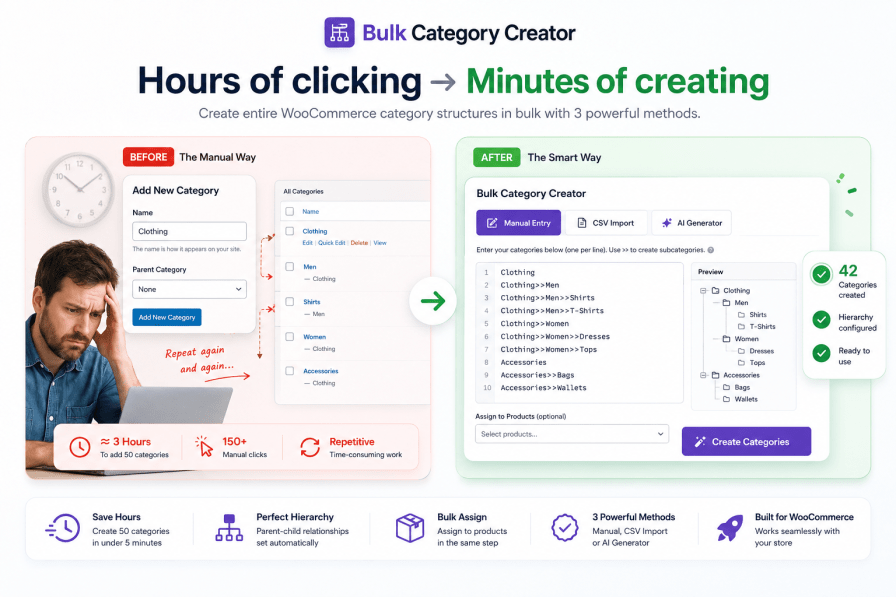

The hidden cost of creating categories manually

Most store owners don’t realise how much time category setup actually takes — until they’re three hours in and still only halfway done.
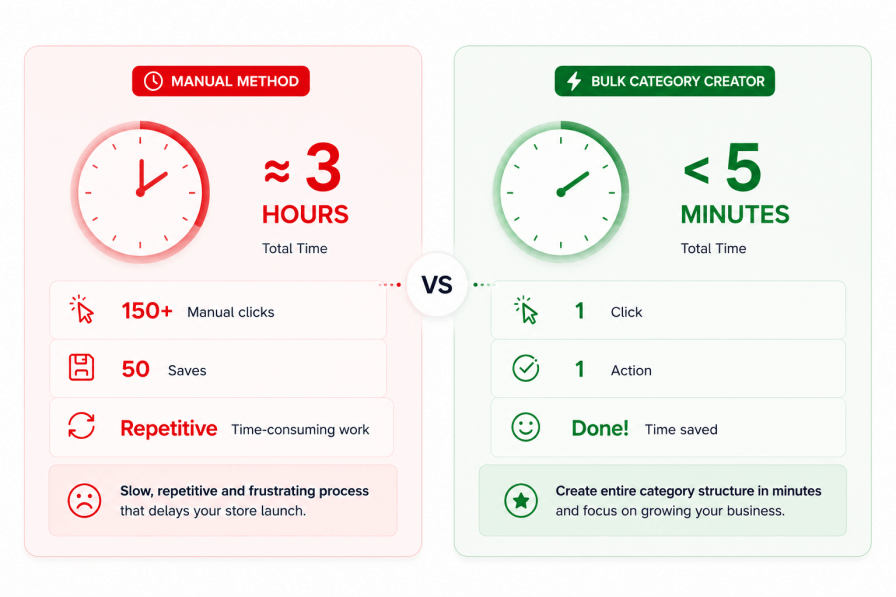
  • Adding a single category manually takes an average of 3–4 minutes — navigate, fill name, set parent, set slug, save, repeat.
  • A typical WooCommerce store needs 30–80 product categories at launch.
  • That’s 2–5 hours of pure admin work before you’ve listed a single product.
  • With Bulk Category Creator, the same 50 categories take under 5 minutes — and with the AI Generator, you don’t even need to think of the names yourself.

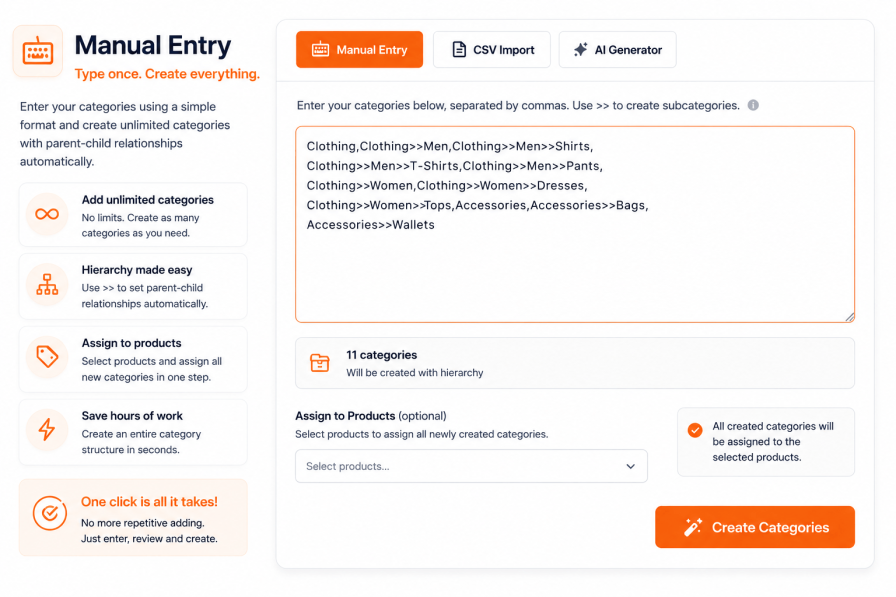
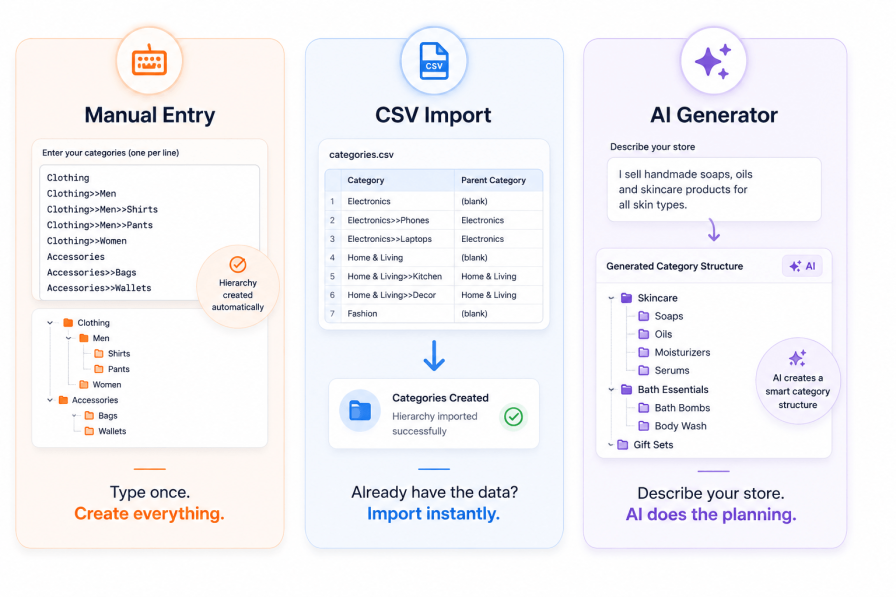
One extension, three ways to build your categories — your choice

Bulk Category Creator - Category creation methods

Unlike other WooCommerce category tools that offer only one method, Bulk Category Creator adapts to however you prefer to work. Whether you’re a hands-on store owner, a spreadsheet lover, or someone who’d rather just describe their store and let AI do the thinking — there’s a workflow for you.


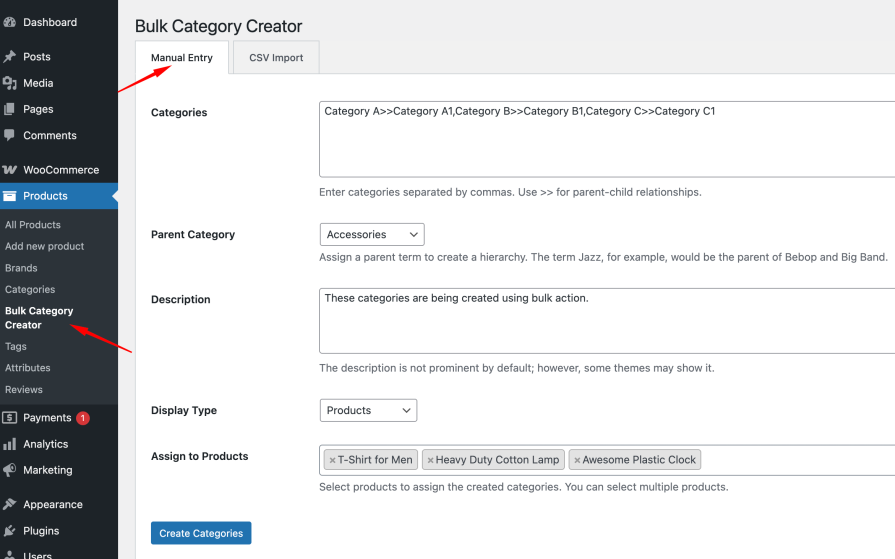
Manual entry — the fastest way to type your categories once

Already know your category structure? Type or paste all your categories at once using a simple hierarchy notation, hit Create, and they’re all done — with parent-child relationships set automatically.

  • Add as many categories as you need in one go — no limit
  • Use >> notation to create parent-child hierarchies automatically — e.g. Clothing>>Men>>Shirts
  • Assign all newly created categories to selected products in the same step
  • No page reloads, no back-and-forth — one screen, one click

Real example — what you type vs what gets created:

Electronics,Electronics>>Smartphones,Electronics>>Smartphones>>Android,
Electronics>>Smartphones>>iOS,Electronics>>Laptops,Clothing,
Clothing>>Men,Clothing>>Women,Clothing>>Kids

9 perfectly structured categories, with correct parent-child relationships, created in one click.
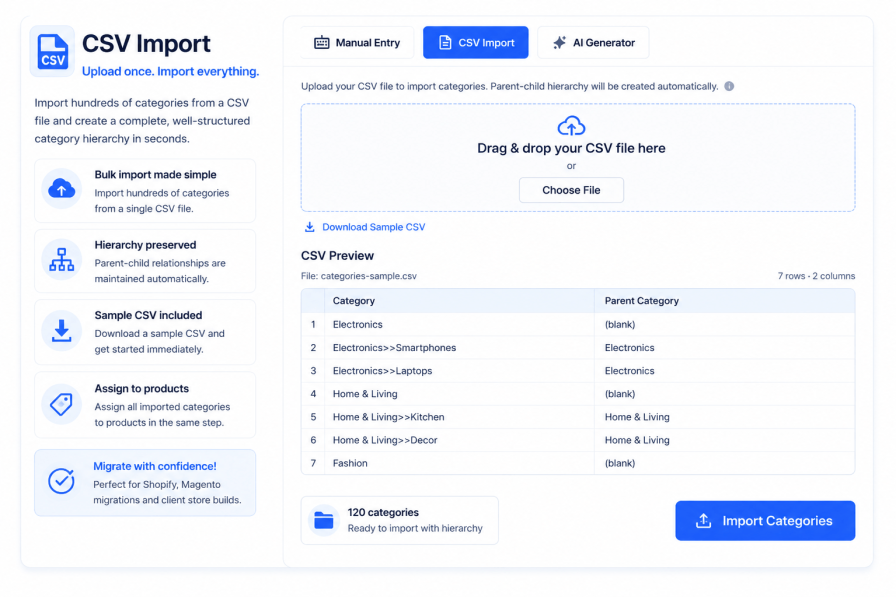

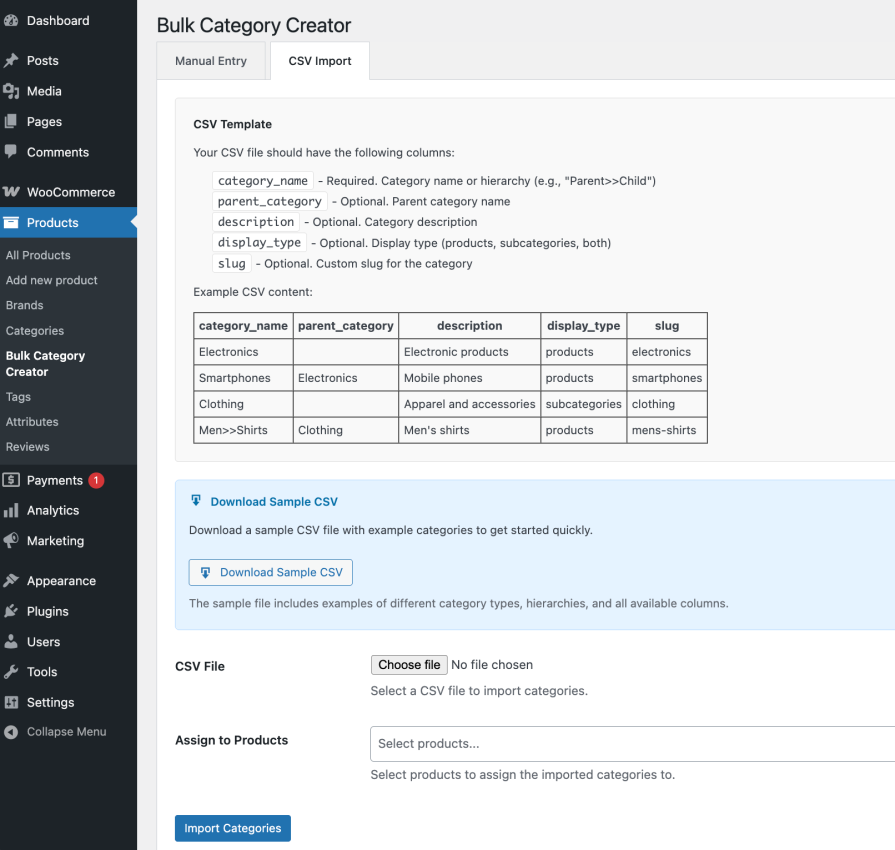
CSV import — bring your existing structure straight in

Already have your category structure in a spreadsheet — or migrating from another platform? Upload a CSV and your entire category tree is created instantly, with parent-child relationships preserved.
  • Import hundreds of categories from a single CSV file
  • Parent-child hierarchy supported in the CSV structure
  • Download a sample CSV to get started immediately
  • Assign all imported categories to products in the same operation
  • Perfect for Shopify or Magento migrations, client store builds, and template-based setups

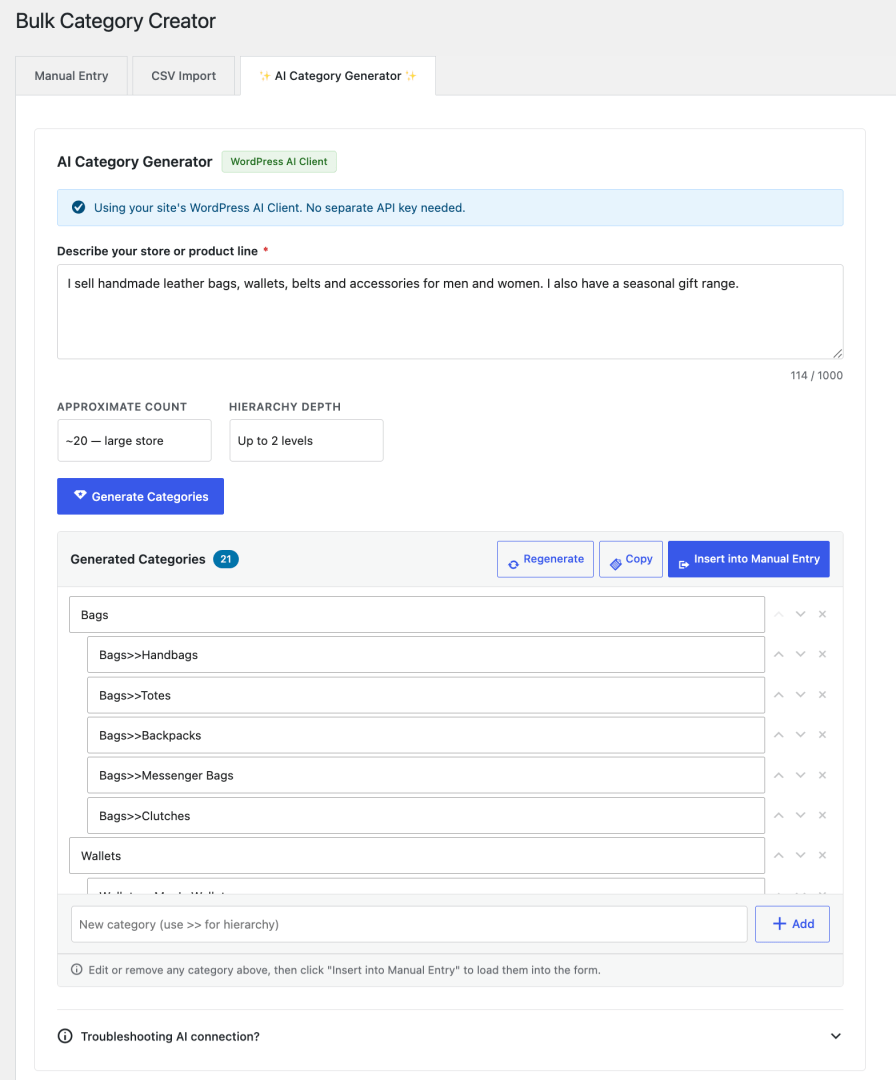
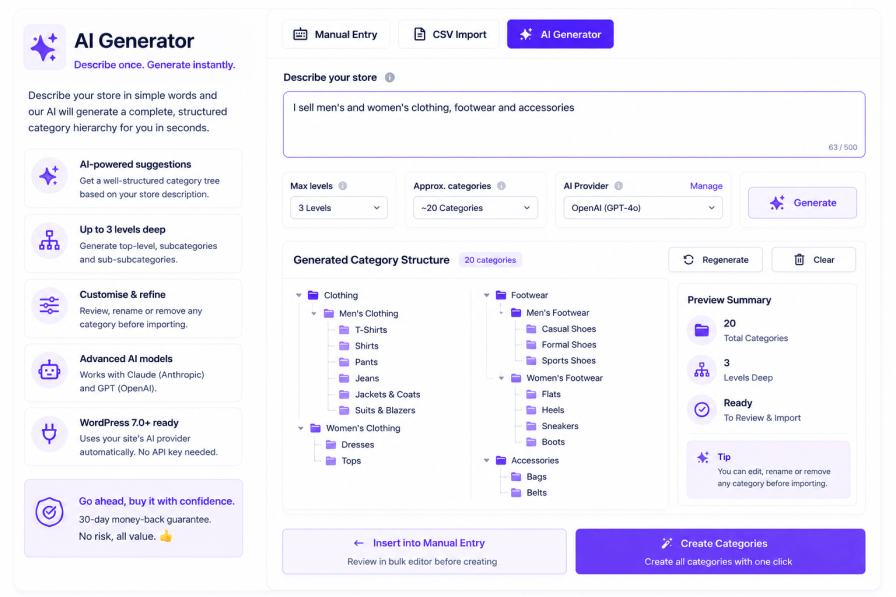
AI Category Generator — describe your store, get a full category tree instantly

Bulk Category Creator - AI Category Generator Demo

This is the feature no other WooCommerce category tool has. Instead of planning your category structure yourself, just describe your store in plain English — and the AI generates a complete, structured, ready-to-import category hierarchy in seconds.

  • No planning required — describe your store, get a logical category tree back
  • Editable before importing — review, rename, or remove any suggested category before it’s created
  • Supports up to 3 levels of hierarchy — top-level, subcategory, and sub-subcategory
  • Choose the approximate number of categories — from ~6 for a small store to ~40 for enterprise
  • Works with Anthropic Claude and OpenAI GPT — enter your API key once inside the plugin
  • On WordPress 7.0+, uses your site’s existing AI provider automatically — no separate key needed

See it in action — what you type vs what you get:

You type AI generates
“I sell handmade leather bags, wallets, belts and accessories for men and women. I also have a seasonal gift range.” Bags
Bags>>Tote Bags
Bags>>Shoulder Bags
Bags>>Backpacks
Wallets
Wallets>>Men’s Wallets
Wallets>>Women’s Wallets
Belts
Accessories
Gifts>>Gift Sets
Gifts>>Seasonal Collections

Review the suggestions, edit anything you want to change, then click Insert into Manual Entry — and create them all in one click.
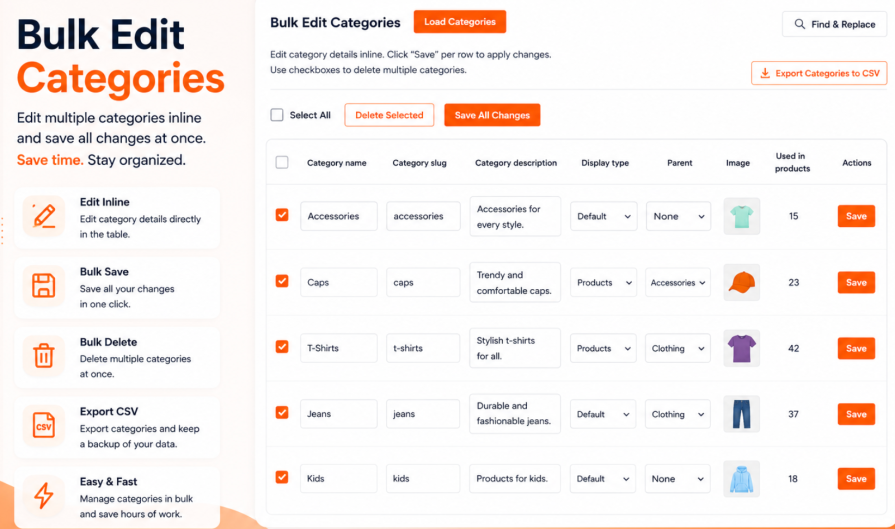

Auto-assign categories to products — skip the second round of admin work

Creating categories is only half the job. Normally, you’d then have to go through each product and manually assign it to the right categories. Bulk Category Creator eliminates that second step entirely.
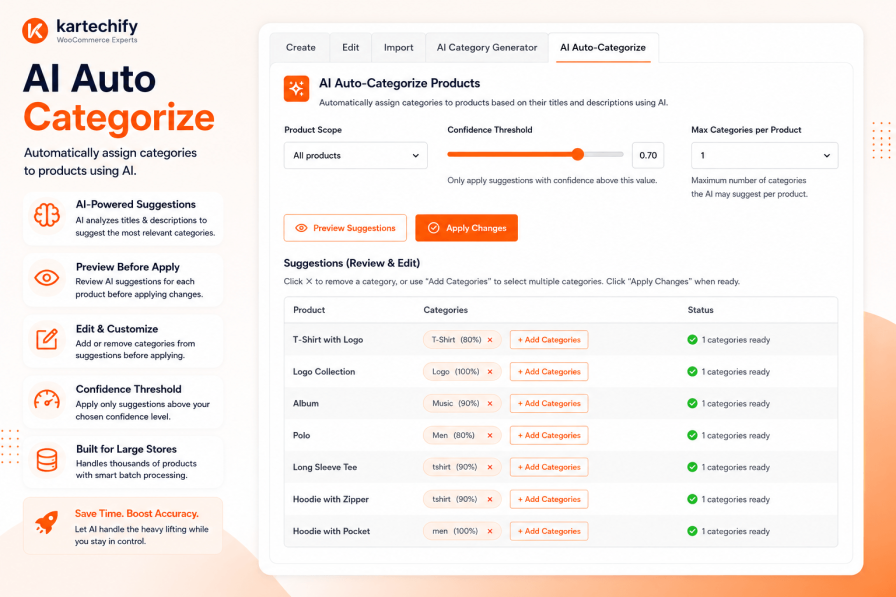
  • Select one or multiple products directly from the category creation screen
  • All newly created categories are assigned to the selected products automatically
  • Works with all three methods — manual entry, CSV import, and AI Generator
  • Searchable product selector — works smoothly even with large catalogs

Bulk Category Creator for every store type — real examples

Here’s how different store owners use Bulk Category Creator from day one:

  • A fashion store launching with 60 categories across Men, Women, Kids, Accessories, and Sale — created in under 3 minutes using AI Generator
  • A WooCommerce developer building the 5th client store this month — imports a pre-built category CSV template and has it done before the first coffee
  • An electronics retailer adding a new Smart Home product line — types 20 categories with three levels of hierarchy using Manual Entry, assigns them to 40 products in the same step
  • A Shopify migrator who exports categories from Shopify to CSV and imports them into WooCommerce without re-typing a single name
  • A wholesale store with 120 product categories — built in one session using CSV import, not spread across two afternoons of clicking
  • A new store owner with no technical background — uses the AI Generator, describes their store in one sentence, and has a professional category structure ready before they’ve even read a tutorial

Built for the future of WordPress — AI-native from day one

Bulk Category Creator is one of the first WooCommerce extensions to fully embrace the WordPress 7.0 AI stack. On stores running WordPress 7.0 or later with an AI provider configured:

  • No separate API key required inside the plugin — the AI Generator uses your site’s existing AI connection automatically
  • Compatible with Anthropic Claude, OpenAI GPT, and Google AI via the WordPress Connectors API
  • Plugin actions are registered as WordPress Abilities — discoverable and executable by AI agents and automation tools

For stores on WordPress 6.x and below, the AI Generator works via a simple API key entered directly inside the plugin — no separate settings page, no complexity.


Everything included — full feature list

Bulk Creation

  • Create unlimited categories in a single operation
  • Parent-child hierarchy via >> notation — up to 3 levels deep
  • No page refresh or repeated clicking
  • Duplicate detection — won’t create a category that already exists

Manual Entry

  • Paste category names in bulk — comma-separated or one per line
  • Hierarchy notation automatically sets parent relationships
  • Instant preview of what will be created before you submit

CSV Import

  • Import categories from any CSV file
  • Parent-child structure preserved from your spreadsheet
  • Sample CSV download included
  • Ideal for migrations, client builds, and reusable templates

AI Category Generator

  • Describe your store → get a full category tree instantly
  • Editable result — rename or remove before creating
  • Choose depth (1–3 levels) and approximate count
  • Powered by Anthropic Claude and OpenAI GPT
  • Auto-uses WordPress 7.0 AI Client if configured — no key needed
  • Insert into Manual Entry with one click for final review

Product Assignment

  • Assign categories to products during creation — no second step
  • Multi-product selection with searchable dropdown

WordPress & WooCommerce Integration

  • Works with the standard product_cat taxonomy
  • Compatible with all major WooCommerce themes and page builders
  • Registered as WordPress Abilities — AI agent and MCP compatible
  • Lightweight — no impact on frontend store performance

See it in action

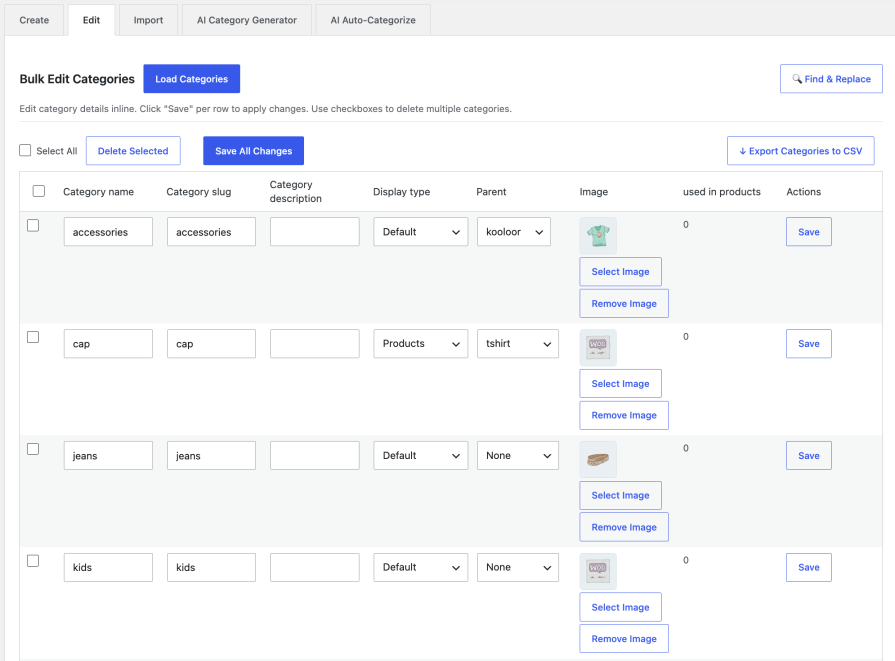
1. Manual Entry — type once, create everything

Bulk Category Creator - Manual Entry tab showing hierarchy notation

2. CSV Import — upload and done

Bulk Category Creator - CSV Import tab

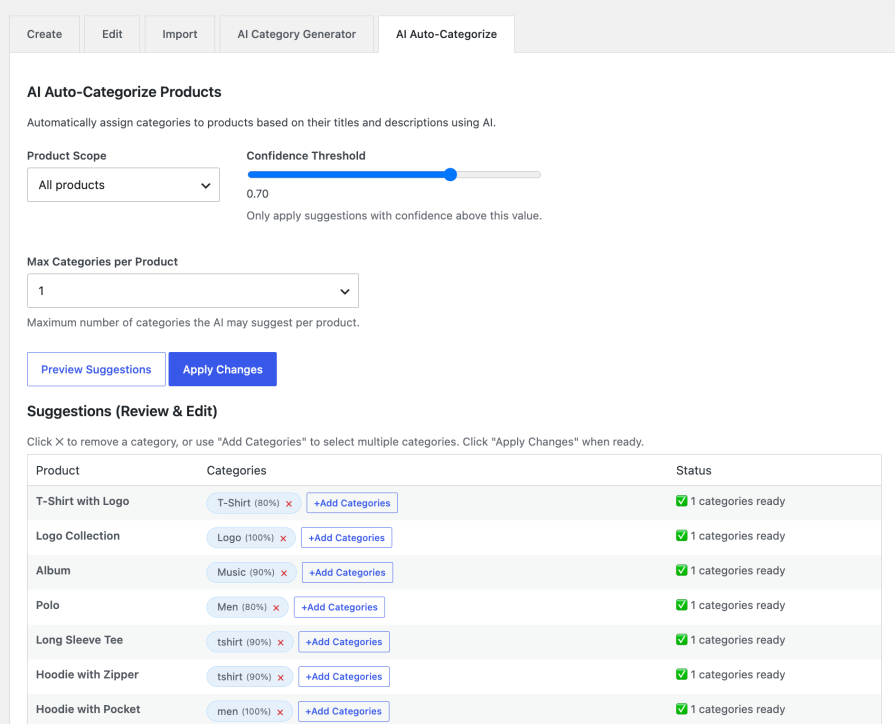
3. AI Category Generator — describe your store, get your categories

Bulk Category Creator - AI Generator tab showing prompt input and generated category list


Stop spending hours on category setup. Start in minutes.

Every hour you spend manually adding product categories is an hour not spent on what actually grows your store — finding products, marketing to customers, and making sales.

Bulk Category Creator gives that time back. Whether you type, import, or let AI do the thinking — your entire category structure is done before your first coffee break.

  • Three methods — manual, CSV, and AI — for any workflow
  • Parent-child hierarchy done automatically, every time
  • Assign categories to products in the same step — no double handling
  • AI Generator included — the only WooCommerce category tool with built-in AI
  • WordPress 7.0 AI-native — ready for the future of agentic stores
  • 30-day money-back guarantee — zero risk

A Smart Investment for Growing WooCommerce Stores

Save hours of repetitive work by creating and organizing categories in bulk. Whether you’re launching a new store, expanding your catalog, or migrating existing data, Bulk Category Creator helps you build a well-structured store faster and more efficiently.
Need another reason to choose us? Bulk Category Creator is developed by Kartechify, a trusted WooCommerce extension developer known for delivering reliable solutions backed by dedicated customer support.

Check out our other best-selling and popular plugins on WooCommerce.


Frequently asked questions

How do I create parent-child category hierarchies?

For Manual Entry: Use the >> separator to create hierarchies. For example:

  • Electronics>>Smartphones>>Android will create three nested categories
  • You can also select a parent category from the dropdown and then add child categories

For CSV Import: Use the category_name column with >> separator, or use the parent_category column to specify the parent:

category_name,parent_category,description Electronics,,Electronic products Smartphones,Electronics,Mobile phones Android,Smartphones,Android devices

Or simply:

category_name,description Electronics>>Smartphones>>Android,Android mobile devices
What format should my CSV file follow for importing categories?

Your CSV file should include these columns (only category_name is required):

Required:

  • category_name - The name of the category or hierarchy (e.g., "Parent>>Child")

Optional:

  • parent_category - Name of the parent category
  • description - Category description text
  • display_type - How to display category (options: products, subcategories, both)
  • slug - Custom URL slug for the category

Example CSV:

category_name,parent_category,description,display_type,slug Electronics,,Electronic products,products,electronics Smartphones,Electronics,Mobile phones and accessories,products,smartphones Clothing,,Fashion and apparel,subcategories,clothing Men>>Shirts,Clothing,Men's shirts,products,mens-shirts

You can download a sample CSV file from the plugin page to see the correct format.

Can I assign the newly created categories to existing products?

Yes! Both methods support product assignment:

Manual Entry:

  • Use the "Assign to Products" dropdown to select specific products
  • Select "All Products" to assign categories to all products in your store
  • The plugin will preserve existing category assignments and add the new ones

CSV Import:

  • Use the "Assign to Products" field below the file upload
  • Select specific products or choose "All Products"
  • All categories imported from the CSV will be assigned to the selected products

Note: The plugin adds categories to products without removing their existing categories.

What happens if I try to create a category that already exists?

The plugin handles existing categories intelligently:

For Manual Entry:

  • If a category with the same name and parent already exists, it will be skipped
  • No duplicate categories will be created
  • No error message will appear for existing categories

For CSV Import:

  • Existing categories are automatically detected and skipped
  • You'll see a summary showing:
    • Categories created successfully
    • Categories that already existed (skipped)
    • Categories that failed to create (if any)
  • If you're creating hierarchies (Parent>>Child), existing parent categories will be used for new child categories

Example: If "Electronics" already exists and you import "Electronics>>Tablets", the plugin will use the existing "Electronics" category and create only "Tablets" as its child.

This prevents duplicate categories and maintains your existing category structure.

Do I need to set up a separate AI account or API key to use the AI Category Generator?

Not necessarily. If your store is running WordPress 7.0 or later, the AI Category Generator automatically uses whichever AI provider you've already connected in your WordPress settings — no extra configuration needed inside the plugin. If you're on an earlier version of WordPress, you can simply enter an Anthropic Claude or OpenAI API key directly within the plugin's AI tab and you're good to go.

Customer reviews

We are accepting reviews for this product, and will display them when we get a few more.

Extension information

  • PHP version required: 5.6
  • Tested with WordPress: 7.0
  • Tested with WooCommerce: 10.8.1
  • Requires at least WordPress: 4.0
  • Requires at least WooCommerce: 7.0.0

Countries

  • Worldwide

Related Products

Price $79 annually
Rated 3.4 out of 5 stars
Price $279 annually
Rated 3.2 out of 5 stars
Price $59 annually
Rated 3.1 out of 5 stars
Price $109 annually
Rated 2.8 out of 5 stars
Price $49 annually
Rated 4.1 out of 5 stars
Price $109 annually
Rated 2 out of 5 stars
Price $109 annually
Rated 2.3 out of 5 stars
Price $109 annually
Rated 2.6 out of 5 stars
Price $109 annually
Rated 2.3 out of 5 stars
Use of your personal data
We and our partners process your personal data (such as browsing data, IP Addresses, cookie information, and other unique identifiers) based on your consent and/or our legitimate interest to optimize our website, marketing activities, and your user experience.