
Product Icon

B2B Quick Order Grid: Bulk Purchase, CSV Import, Barcode for WooCommerce

A bulk order form for wholesale stores. Buyers type, paste, scan, or import SKUs. Sales reps place orders on behalf of customers.
Choose a billing option
$79
Save 20%
$158 $126.40

Subscription includes

  • Product updates and improvements
  • Customer support
  • 30-day money-back guarantee

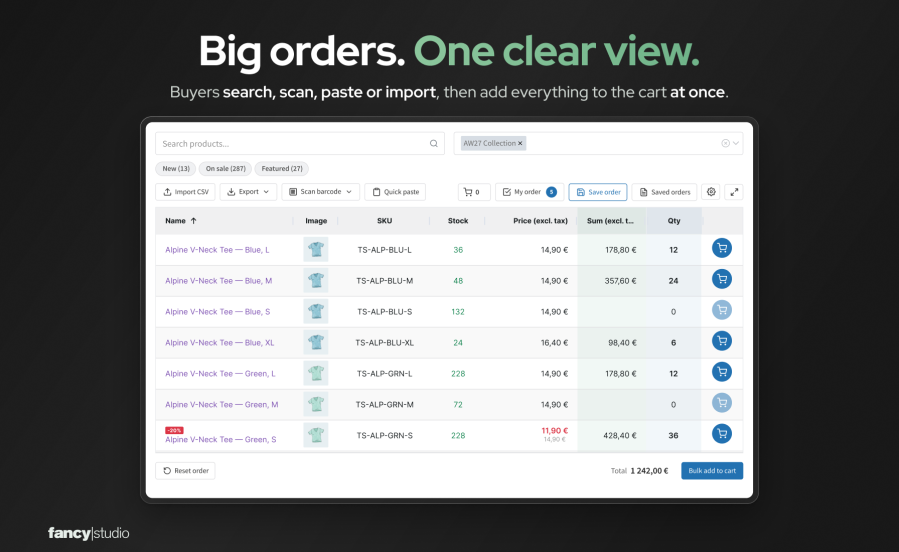
B2B Quick Order Grid is a bulk order form for WooCommerce wholesale stores. Your customers type, paste, scan, or import the products they need into one table, enter quantities, and add the whole order to the cart. Unlike the standard shop, nobody opens a product page for each item. When a customer would rather phone or email, your sales reps can place the order on that customer’s behalf in the same form.

  • Many products, one page. Customers enter quantities for as many products as they need and add them all to the cart with one click.
  • Repeat orders from a list they already have. Paste SKUs from an email, import a CSV file, or load a saved template such as “Weekly restock”.
  • Orders on behalf of customers. A sales rep picks an assigned customer and prepares the order with that customer’s prices, without logging in as the customer.
  • Barcode scanning without extra hardware. A phone camera or a USB scanner finds the product and adds it to the order.
  • Built for large catalogs. Above a product count you choose, products load page by page as customers scroll.

Your customers reorder from the list they already have

Wholesale customers rarely browse. They come with last week’s order, a spreadsheet, or a shelf to restock.
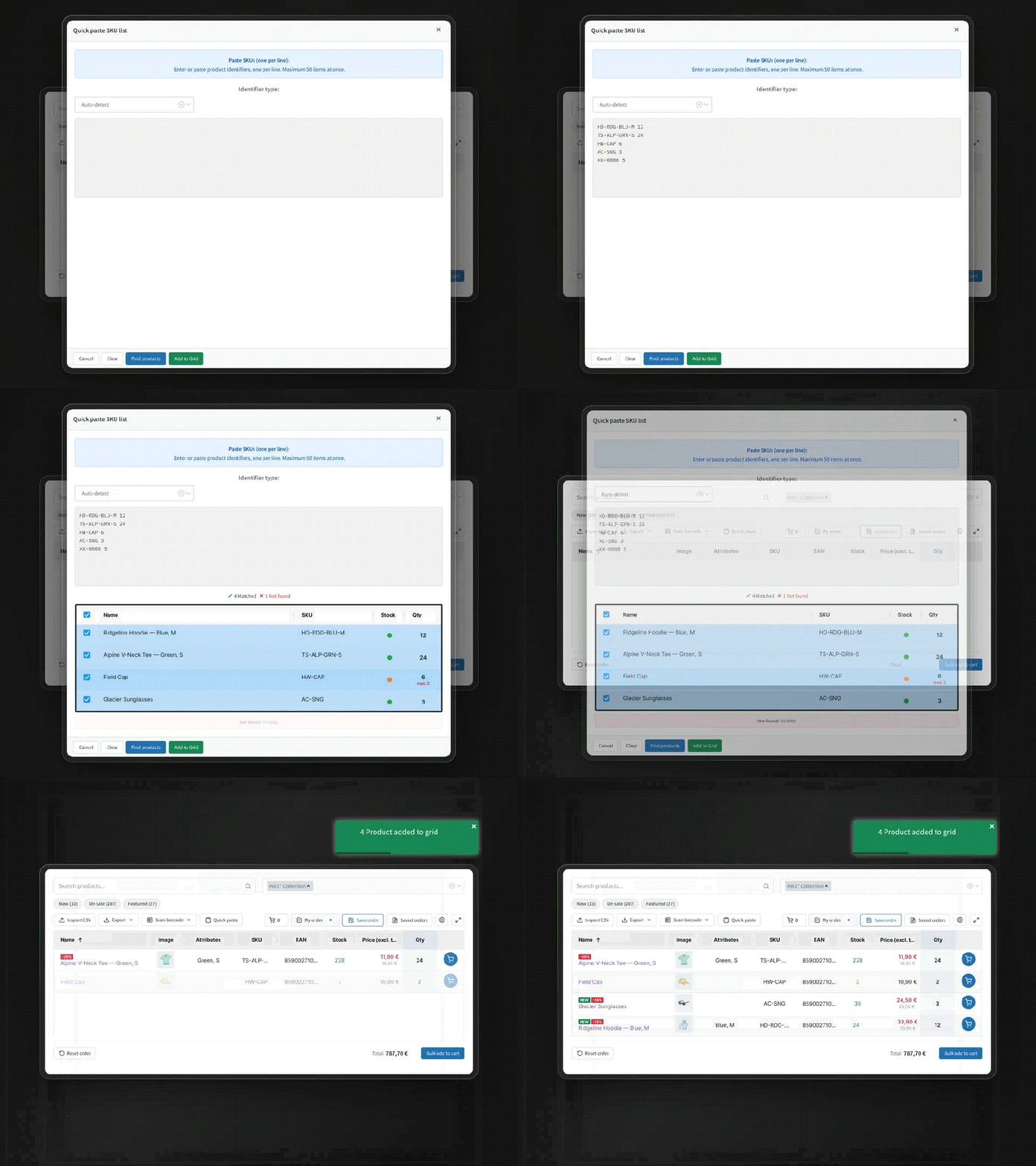
Animation: a pasted list of SKUs is matched to products and added to the order

  • Quick paste. Paste up to 50 lines of SKU and quantity at a time. Matched and unmatched codes are shown before anything is added.
  • CSV import. Upload a CSV, TSV, or TXT file and map the SKU and quantity columns. Excel users save their sheet as CSV.
  • Saved order templates. Customers save their usual order and load it next time, then adjust this week’s quantities.
  • Add another line. In My order, type a product name, SKU, or barcode and add it with its quantity, without scrolling the catalog.

Order many products from one page

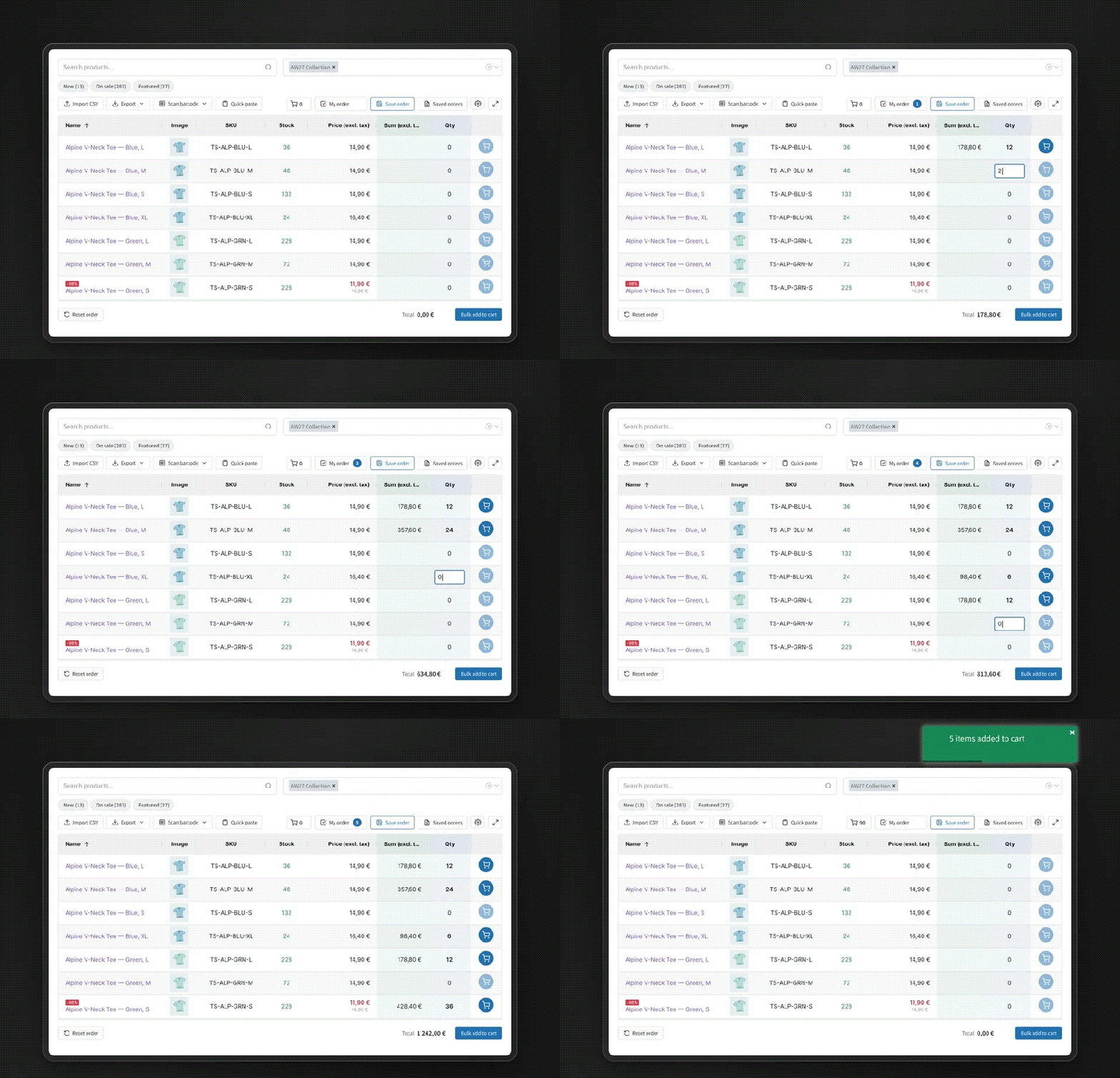
Animation: quantities typed row by row with Enter, then all products added to the cart at once

  • Bulk add to cart for every line with a quantity, with a running order total.
  • Live search and filters by name, SKU, barcode, and category, plus one-click filters for new, on sale, and featured products.
  • Quantity rules and stock are checked as customers type, so the cart doesn’t reject the order later.
  • My order view shows only the lines with a quantity.
  • Export the order to CSV, Excel (XLSX), or XML, or open a print view to save it as a PDF.
  • Checkout stays the same. Products go to the normal WooCommerce cart and your normal checkout.

Your team places orders on behalf of customers

Some customers will always phone or email their order. With ordering for customers turned on, a sales rep picks one of their assigned customers, fills in the same order form, and reviews a summary before the order is created.
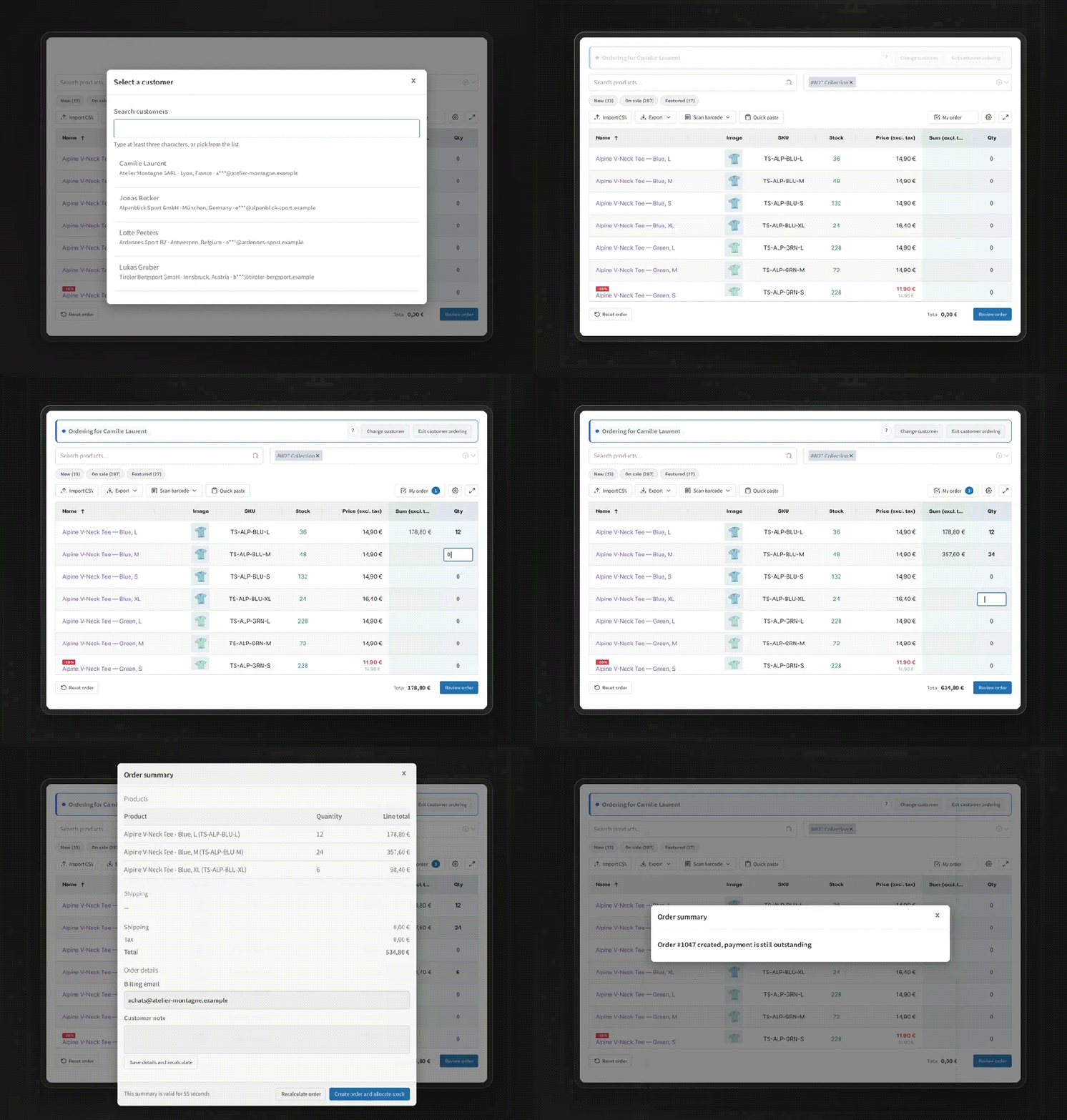
Animation: a sales rep picks a customer, enters quantities, reviews the summary, and creates the order

  • No logging in as the customer. Reps stay signed in as themselves, so the customer’s own account, session, and cart are left alone.
  • The customer’s own prices. Prices, quantity breaks, taxes, and shipping are recalculated on the server for that customer before the order is created.
  • Each rep sees only their customers. You assign customers to staff, and you choose which staff can use the mode.
  • Every order shows who prepared it. The order is created on hold with stock reduced, ready for your team to review.
  • Private products can be added to a customer’s order when you allow it.

The mode is off until you turn it on, and it is deliberately narrow: physical simple and variable products with managed stock, whole quantities, your store currency, core WooCommerce tax and shipping, and an offline payment method. When something is not supported, the summary stops and says why instead of showing a guessed price.

Scan barcodes with a phone or a scanner

Customers scan with the camera of a phone, tablet, or laptop, or with a USB or Bluetooth scanner that types like a keyboard. The scan is matched against the product’s barcode or SKU. Supported formats: EAN-13, EAN-8, UPC-A, UPC-E, and Code 128. The camera needs HTTPS.

Will it work with my store?

  • Theme and editor. Add the B2B Quick Order Grid block or the [b2b_quick_order_grid] shortcode to any page. A Quick Order page is created for you on activation. The form uses its own styles, which you adjust in a live styling editor.
  • Prices. The form reads each product’s WooCommerce price for the current visitor, so pricing extensions that change WooCommerce product prices are reflected. For ordering on behalf of customers, the settings screen names any plugin that prevents customer prices from being calculated reliably.
  • Large catalogs. Above the product count you set, the form loads products page by page instead of all at once.
  • WooCommerce features. Compatible with High-Performance Order Storage (HPOS) and the Cart and Checkout blocks. Works with simple and variable products.
  • Languages. Translated into 13 languages: Czech, Dutch, French, German, Hungarian, Italian, Polish, Portuguese, Romanian, Russian, Slovak, Spanish, and Swedish. Right-to-left languages are supported.
  • If you turn it off. Your products, prices, cart, checkout, and existing orders are standard WooCommerce and stay as they are.

Control for store owners

  • Access control for everyone, logged-in customers, or selected roles such as your wholesale role.
  • Column configurator: drag to reorder, resize, pin, and hide columns.
  • Variable products as a parent row, as a row per variation, or both.
  • Live styling editor for colors, spacing, borders, and font size, with a preview.
  • SEO controls for the page title, meta description, and robots setting.
  • Privacy tools: saved templates and staff drafts are included in WordPress personal data export and erasure.

Who it is for

  • Wholesale distributors and B2B manufacturers
  • Restaurant, hospitality, and office suppliers
  • Spare parts, hardware, and industrial suppliers
  • Stores with sales reps who take orders by phone, by email, or on visits
  • Any store with customers who place repeat orders

What it does not do

B2B Quick Order Grid is an ordering tool. It does not set wholesale prices by role, manage quotes, or handle B2B registration, and ordering on behalf of customers does not calculate commissions or take online payment. It works alongside the extensions you use for those.

Try it before you buy: open the live demo from the Demo button and place an order as a customer. Every purchase includes updates, support, and a full refund within 30 days of your date of purchase.

Frequently asked questions

Is there a demo?

Yes. Use the Demo button to open a store with sample products, where you can search, enter quantities, paste SKUs, and add a whole order to the cart.

Will it work with my theme?

Add the B2B Quick Order Grid block or the shortcode to any page. The form uses its own styles, so it does not depend on your theme's product templates, and you can match colors, spacing, borders, and font size in the live styling editor.

Does it work with wholesale pricing plugins?

The form reads each product's WooCommerce price for the current visitor and adds products to the normal WooCommerce cart, so pricing extensions that adjust WooCommerce product prices are reflected. It does not set prices itself. For ordering on behalf of customers, a B2B pricing extension needs its own integration first; the settings screen names any plugin that prevents customer prices from being calculated reliably.

Will it slow down a large catalog?

Above the product count you set in Settings (Server-side threshold), the form loads products page by page as customers scroll instead of loading the whole catalog. In our test store with 20,000 products, exporting the full catalog used about 150 MB of memory.

Can I show the form only to wholesale customers?

Yes. Choose everyone, logged-in users only, or specific roles in WooCommerce > Settings > Quick Order Grid > General.

Do customers need an account?

No. If you allow everyone, guests can search, scan, paste SKUs, import a CSV, and add to the cart, and their saved templates are kept in their browser. Export needs a logged-in account. Logged-in customers have their templates saved to their account.

Can my sales reps place orders on behalf of customers?

Yes. It is off by default. A rep picks a customer assigned to them, fills in the order form, and reviews a summary recalculated on the server with that customer's prices, taxes, and shipping. Confirming creates an on-hold order for the customer, reduces the stock, and records who prepared it.

Does the sales rep log in as the customer?

No. Reps stay signed in as themselves. There is no switching into the customer's account, so the customer's session and cart are not touched, and each rep reaches only the customers assigned to them.

Which orders can a sales rep not prepare?

The mode covers physical simple and variable products with managed stock, whole quantities, your store currency, core tax and shipping, and an offline payment method. Virtual and downloadable products, backorders, coupons, fees, and third-party pricing rules stop the summary with the reason shown. With WooCommerce Tax automated taxes switched on, ordering for customers turns itself off. It does not calculate commissions or take online payment.

Which barcode scanners work?

Any USB or Bluetooth scanner that types the code like a keyboard, and the camera of a phone, tablet, or laptop. The camera needs HTTPS. Supported formats: EAN-13, EAN-8, UPC-A, UPC-E, and Code 128.

What file format does the CSV import use?

A CSV, TSV, or TXT file with a column for the SKU or barcode and a column for the quantity. You map the columns after uploading. Excel users can save their sheet as CSV.

How do variable products appear?

Choose one of three modes: one row per parent product with options selected in a popup, one row per variation, or both.

What happens if I deactivate it?

Your store keeps working. Products, prices, the cart, checkout, and orders are standard WooCommerce. The plugin keeps its own data (saved templates and settings) unless you turn on "Remove data on uninstall".

Extension information

  • PHP version required: 7.4
  • Tested with WordPress: 7.1
  • Tested with WooCommerce: 11.1.0
  • Requires at least WordPress: 6.2
  • Requires at least WooCommerce: 8.0

Countries

  • Worldwide

Related Products

Price $279 annually
Rated 3.9 out of 5 stars
Price $79 annually
Rated 3.4 out of 5 stars
Price $59 annually
Rated 3.1 out of 5 stars
Price $109 annually
Rated 2.7 out of 5 stars
Price $49 annually
Rated 4.1 out of 5 stars
Price $109 annually
Rated 2 out of 5 stars
Price $109 annually
Rated 2.3 out of 5 stars
Price $39 annually
Rated 2.8 out of 5 stars
Price $59 annually
Rated 4.1 out of 5 stars
Use of your personal data
We and our partners process your personal data (such as browsing data, IP Addresses, cookie information, and other unique identifiers) based on your consent and/or our legitimate interest to optimize our website, marketing activities, and your user experience.



