Product Icon

All-In-One Product Slider Carousel for WooCommerce

WooCommerce product slider & carousel with Quick View, sale countdown timer, product video and click analytics. Gutenberg, Elementor & Divi.
Choose a billing option
$29
Save 20%
$58 $46.40

Product comparison

Subscription includes

  • Product updates and improvements
  • Customer support
  • 30-day money-back guarantee

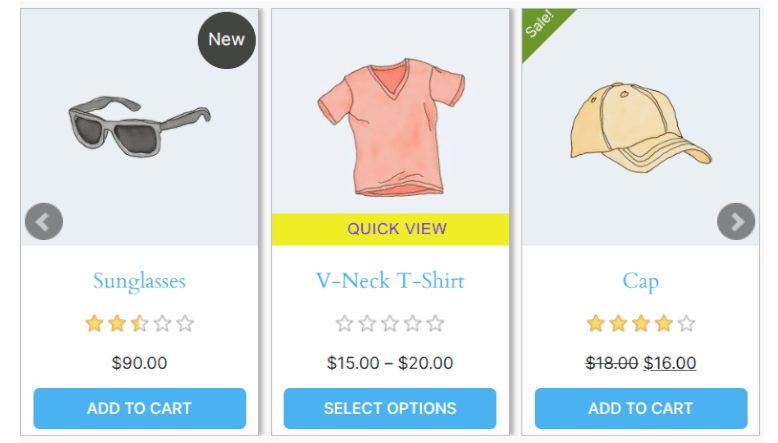
Turn any page of your store into a place where shoppers browse, preview and buy. All-In-One Product Slider Carousel shows your featured, best-selling, on-sale, new or hand-picked WooCommerce products in a responsive slider carousel. Customers can open a Quick View popup, watch a product video, or see a live sale countdown without leaving the page.

Add a slider with the native Gutenberg block, Elementor widget or Divi module, or paste a shortcode anywhere. No coding needed.
Where store owners use it

  • Homepage best sellers: a best-selling products slider that updates itself as orders come in.
  • Sale campaigns: an on-sale products carousel with a ticking countdown for Black Friday, holiday or end-of-season sales.
  • Category pages: a category product slider at the top of a collection or landing page.
  • New arrivals: a carousel that picks up your newest products automatically.
  • Blog posts and buying guides: hand-picked products beside your content, with Quick View so readers can add to cart right there.

WooCommerce Quick View popup inside the slider

Shoppers preview a product and add it to the cart in a popup, without navigating away from the page they’re on.

  • Full product gallery with thumbnail switcher
  • Price, rating, short description, SKU, stock status and categories
  • Add to Cart works inside the popup, including variable products with size, colour and other attribute selection
  • Button label and colours set per slider

Sale countdown timer for WooCommerce products

Create urgency on discounted products with a live countdown on each product card.

  • Reads the WooCommerce sale end date automatically, so there’s nothing extra to set up
  • Optional fallback date for products without a sale end date
  • Translatable unit labels (Days, Hrs, Mins, Secs)

Product video in the slider: YouTube, Vimeo or MP4

Show products in motion, right on the product card.

  • Add a YouTube, Vimeo or MP4 link to any product (Product → Advanced tab)
  • A play button appears on hover and opens a full-screen video lightbox
  • Works with every product type

Click analytics: see which products shoppers want

Every product card click is tracked automatically, across all your sliders.

  • Top clicked products per slider, shown as a bar chart in your admin
  • Filter by 7, 30, 90 or 365 days and by slider
  • Use the data to decide what to feature, discount or restock

Elementor product carousel, Divi product slider and Gutenberg block

  • Elementor: native drag-and-drop widget
  • Divi: native Divi Builder module
  • Gutenberg: Product Slider block for the block editor
  • Shortcode: works in pages, posts, widgets and theme templates

Seven ways to fill a slider

  • Featured products
  • On-sale products
  • Best sellers
  • Top rated products
  • New products (detected automatically)
  • Products from one or more categories
  • Hand-picked products

Carousel layouts, card styles and animation

  • Horizontal carousel, vertical slider, or ticker (marquee) mode
  • Three product card styles: clean card, hover overlay, and a detail-focused layout
  • Autoplay with adjustable speed, infinite loop and 16 easing effects
  • Touch and swipe enabled, fully responsive on mobile and tablet
  • Show or hide title, price, rating, Add to Cart, sale and new badges, categories and wishlist button

Compared with a basic product slider

Feature All-In-One Product Slider Carousel Basic product slider
Featured, sale, best seller, new, category and hand-picked sliders Included Usually included
Quick View popup with variable product add to cart Included Usually needs another plugin
Sale countdown timer on product cards Included Usually needs another plugin
Product video lightbox Included Usually needs another plugin
Product click analytics Included Usually not available
Native Elementor widget and Divi module Included Often shortcode only
Horizontal, vertical and ticker layouts Included Often horizontal only

Built for modern WooCommerce stores

  • Unlimited sliders, and as many per page as you need
  • Exclude out-of-stock products
  • Custom CSS per slider
  • Wishlist button compatible with YITH WooCommerce Wishlist and TI WooCommerce Wishlist
  • HPOS (High-Performance Order Storage) compatible
  • Multisite compatible and translation read

For More Info

Demo  View Documentation


Frequently asked questions

What does this WooCommerce product slider do?

It displays your WooCommerce products in responsive sliders and carousels: featured, on-sale, best-selling, top-rated, new, category or hand-picked products. Each slider can also include a Quick View popup, a sale countdown timer and product videos, and every product click is tracked in a built-in analytics report.

Can I show a best sellers slider on my homepage?

Yes. Create a slider, choose Best Sellers as the slider type, and add it to your homepage with the Gutenberg block, Elementor widget, Divi module or shortcode. The slider updates automatically as your sales change.

Does it work with Elementor and Divi without shortcodes?

Yes. It includes a native Elementor widget and a native Divi Builder module. Search for "Product Slider Carousel" in the widget panel or module library and select your slider. A Gutenberg block is included too.

Does Quick View work with variable products?

Yes. Customers can pick size, colour and other attributes inside the Quick View popup and add the product to the cart without visiting the product page.

Does the plugin support Gutenberg blocks?

Yes. You can insert sliders directly using the Gutenberg editor by selecting the Product Slider block.

How does the sale countdown timer work?

Set a sale end date on a product (Product → General → Sale price → Schedule → "To" date). The countdown appears on that product's card automatically. For products without an end date, you can set a fallback date in the slider settings.

Can I add videos to products in the slider?

Yes. Add a YouTube, Vimeo or MP4 link in Product → Advanced. A play button appears on the product card, and clicking it opens the video in a full-screen lightbox.

How does the countdown timer work?

Set a sale end date on any product (Product → General → Sale price dates → To). The countdown appears automatically. For products without an end date, set a global fallback date in the slider settings.

Can I see which products get the most clicks?

Yes. Go to All In One Product Slider → Analytics in your WordPress admin to see the top clicked products per slider, filterable by 7, 30, 90 or 365 days.

Can I create more than one slider, or put several on one page?

Yes. You can create unlimited sliders and place as many as you like on a single page.

Is the product carousel mobile friendly?

Yes. Sliders are fully responsive and support touch and swipe on phones and tablets.

Can I hide out-of-stock products from the slider?

Yes. Each slider has an option to exclude out-of-stock products.

Does it work with my wishlist plugin?

The slider can show a wishlist button that works with YITH WooCommerce Wishlist and TI WooCommerce Wishlist.

Is it compatible with HPOS and multisite?

Yes. It's compatible with WooCommerce High-Performance Order Storage (HPOS), works on multisite installs, and is translation ready.

Do I need coding knowledge?

No. Sliders come with sensible defaults, and you can adjust layout, colours and what's shown on each card from the settings screen. Custom CSS per slider is available if you want finer control.

Extension information

  • PHP version required: 7.2
  • Tested with WordPress: 7.1
  • Tested with WooCommerce: 11.1
  • Requires at least WordPress: 5.0
  • Requires at least WooCommerce: 3.2

Countries

  • Worldwide

Related Products

Price $279 annually
Rated 3.9 out of 5 stars
Price $79 annually
Rated 3.4 out of 5 stars
Price $59 annually
Rated 3.1 out of 5 stars
Price $109 annually
Rated 2.7 out of 5 stars
Price $49 annually
Rated 4.1 out of 5 stars
Price $109 annually
Rated 2 out of 5 stars
Price $109 annually
Rated 2.3 out of 5 stars
Price $39 annually
Rated 2.8 out of 5 stars
Price $59 annually
Rated 4.1 out of 5 stars
Use of your personal data
We and our partners process your personal data (such as browsing data, IP Addresses, cookie information, and other unique identifiers) based on your consent and/or our legitimate interest to optimize our website, marketing activities, and your user experience.



