Product Icon

Datalayer for WooCommerce

Stop losing conversions because of broken tracking. Track customer events using data layer, client and server-side for analytics & ads.
Choose a billing option
$99
Save 20%
$198 $158.40

Subscription includes

  • Product updates and improvements
  • Customer support
  • 30-day money-back guarantee

Accurate WooCommerce Tracking, from the Data Layer to the Server Side

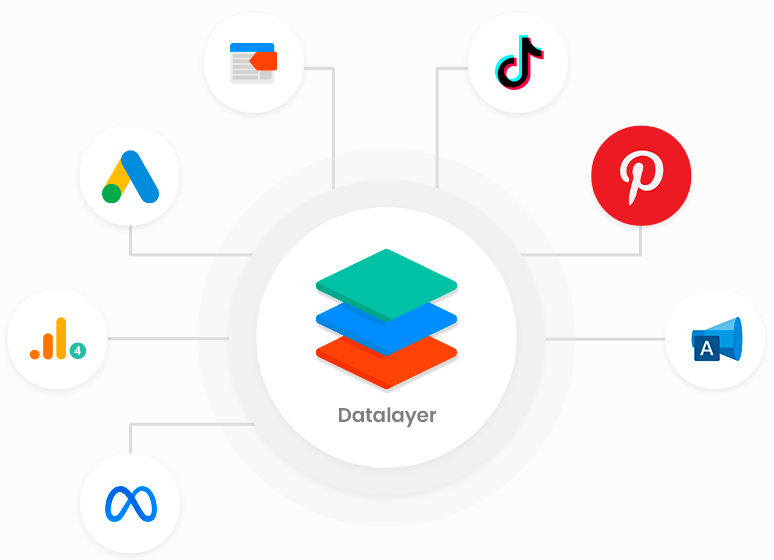
Datalayer for WooCommerce tracks every key customer interaction with confidence. Connect your WooCommerce store to GTM, GA4, Google Ads, Meta Ads, Microsoft Ads, TikTok Ads, Pinterest Ads, and more with accurate client-side and server-side tracking.

Built for all user types

For those who value simplicity
No need to learn complex tools or deal with technical configurations.
After your purchase, simply open a support ticket and our team will take care of the entire setup for you. Quickly, easily, and at no extra cost.

For developers and marketing professionals
All events are automatically sent following the GA4 standard, providing a solid foundation for server-side tracking, dynamic remarketing, funnel analysis, and more.


Automatic Event Tracking

Capture the entire customer journey automatically. From product views to purchases and refunds, every event is structured in the Data Layer and ready for your analytics and advertising platforms.
Shopping Journey

  • Product impressions & clicks
  • Product detail views
  • Add to cart / Remove from cart
  • Begin checkout
  • Shipping selection
  • Payment selection
  • Purchases
  • Refunds

Marketing & Engagement

  • Promotion impressions & clicks
  • Coupon usage
  • Wishlist events
  • User login
  • Consent Mode

One Tracking Setup for Every Marketing Platform

Configure your events once and use them across your analytics and advertising platforms.

  • Google Tag Manager (GTM)
  • Google Analytics (GA4)
  • Google Ads
  • Meta Ads
  • TikTok Ads
  • Microsoft Ads
  • Pinterest Ads

Platforms integrated with Datalayer for WooCommerce


One implementation. Multiple platforms.

Keep your marketing tools synchronized with accurate event data, without managing separate integrations for each platform.


See it in action

Watch the video to see how your store data is organized and sent automatically to the platforms you use, all without writing a single line of code.


Server-to-Server (server-side) Tracking

Improve tracking reliability and recover signals lost to browser restrictions and ad blockers.
Send events through a server-to-server (server-side) implementation using Google Tag Manager server-side. Deploy your server container on Google Cloud or Stape, and keep Client-side Tracking working alongside your server implementation.


Track Health

Keep your tracking healthy from setup to every recorded purchase.
Monitor, validate, and troubleshoot your tracking implementation. Verify purchase events, audit your configuration, and identify issues before they impact your analytics or advertising platforms.


Know what’s happening in your store, without opening another tool

Beyond sending data to your marketing platforms, the plugin allows you to track your conversion funnel and sales journey directly within the WordPress dashboard. You can identify exactly where customers drop off, access simple human-readable insights that explain your performance, and customize your report settings to focus only on the metrics that truly matter to your store’s growth. All insights are generated locally and securely using your own AI service key.


Features

Data Collection & Tracking

  • Capture detailed customer data to build effective, data-driven marketing strategies
  • Connect to Google Tag Manager
  • Real-time user behavior tracking
  • GTM import file with ready-to-use tags, triggers, and variables (client-side and server-side)
  • Popup consent mode with cookie blocking –NEW

Track Health

  • Monitor your tracking setup and get alerted when purchase events stop reaching the DataLayer –NEW

Marketing Tools

  • Generate product catalog feeds in XML for marketing tools
  • Track your store’s conversion funnel directly in the WordPress dashboard, no GA4 required –NEW
  • Get insights of your store data, generated from your own events and your own API key –NEW

Easy Setup

  • Quick installation and activation directly from your store’s WP Admin dashboard
  • Complete documentation to guide setup and usage. Access official documentation
  • Video tutorials on how to configure and use Datalayer and Google Tag Manager. Watch the tutorials here

Maintenance & Updates

  • Automatically receive the latest improvements and new features, keeping your store always up to date with the best market practices

Need Help with the Setup?

Our team can help you configure your tracking environment, including Google Tag Manager, GA4, Google Ads, Meta Ads, Microsoft Ads, TikTok Ads, Pinterest Ads, and server-side tracking.
Whether you’re starting from scratch or optimizing an existing setup, we’re here to help.


Frequently asked questions

Which ecommerce events does this extension track?

The extension follows the Google Analytics 4 standard and automatically tracks the following events:

  • add_payment_info
  • add_shipping_info
  • add_to_cart
  • add_to_wishlist
  • begin_checkout
  • login
  • purchase
  • refund
  • remove_from_cart
  • search
  • select_item
  • select_promotion
  • view_cart
  • view_item
  • view_item_list
  • view_promotion
Do I need to know how to code to use this extension?

No! Datalayer for WooCommerce was built for non-technical users. The entire data layer is added automatically. If you want to create custom tags in GTM, you can follow simple tutorials or rely on our professional support whenever needed.

Will the extension affect my store’s performance?

No. The extension is lightweight, optimized, and follows best performance practices for WordPress and WooCommerce. It only inserts the necessary scripts at the right moment, without slowing down your site.

Can I test if the events are working?

Yes. You can use the Test Debugger Bar or the Preview Mode in Google Tag Manager to verify if the events are firing correctly.

Does it work with custom themes or builders like Elementor?

Yes! The extension is compatible with any theme that follows WooCommerce standards. It also works seamlessly with builders like Gutenberg, Elementor, Divi, WPBakery, and others. Events and data will continue to be sent correctly.

Is the extension compatible with Google Tag Manager?

Yes! It was built to work with Google Tag Manager (GTM), both Web and Server-Side versions. Just install the plugin, activate the data layer, import our file, and start configuring your tags in GTM — no need to manually code events.

Is the extension compatible with the Stape platform?

Yes! This extension has been tested on the Stape platform and works perfectly. Simply install it, activate the data layer, import our file, and configure the platform and tags — all without coding.

Is the extension compatible with custom checkout plugins?

Yes. It was developed to be compatible with most popular WooCommerce extensions.

Is this extension compatible with consent solutions like Complianz?

Yes. The extension has its own consent popup and also works smoothly with solutions like Complianz, CookieYes, Cookiebot, and others.

Is the extension compatible with the Product Bundles extension?

Yes. It includes specific filters to handle product bundles, preventing individual items from appearing separately in the data layer. You can use the plugin’s hooks to adjust this behavior or reach out to our support team.

Do Intelligent Insights use AI?

Yes. We use artificial intelligence only to interpret the data and explain it clearly.

The data collection and calculations are done locally by the plugin.

No data is shared without your permission.

Extension information

  • WordPress version required: 5.0
  • WooCommerce version required: 5.0.0
  • PHP version required: 7.4
  • Tested with WordPress: 7.0
  • Tested with WooCommerce: 10.9.4
  • Requires at least WordPress: 5.2.0
  • Requires at least WooCommerce: 4.8.0

Compatibility

  • Cart & checkout blocks
  • High performance order storage (HPOS)

Countries

  • Worldwide

Languages

English (United States), Portuguese (Brazil)

Customer reviews

Average rating 5.0

31 reviews from verified users

5 stars, 100% of reviews
4 stars, 0% of reviews
3 stars, 0% of reviews
2 stars, 0% of reviews
1 star, 0% of reviews
  • Rated 5 out of 5
    mianItalyNov 5, 2025
    Excellent plugin and phenomenal support. I don't know what more you could ask for. It deserves 10 stars. I recommend it to everyone!
  • Rated 5 out of 5
    skidheavenUnited States (US)Jun 6, 2025
    This is a very useful plugin that solves a difficult problem at a reasonable price. The support is also top notch
  • Rated 5 out of 5
    petrddb43026900Czech RepublicMay 7, 2025
  • Rated 5 out of 5
    mfzroRomaniaApr 15, 2025
    Great support 🫡 i have some configuration on website that don't let gtm to work, but the support help me to fix in 10 minutes. Thanks for all
  • Rated 5 out of 5
    phmarianoBrazilJan 16, 2025
    Outstanding plugin! The implementation process was impressively quick, allowing us to dive straight into creating our reports with ease. In our opinion, this is hands down the best plugin available. We highly recommend it to anyone seeking a robust and comprehensive data layer solution for WooCommerce.

Related products

Price $279 annually
Rated 3.2 out of 5 stars
Price $109 annually
Rated 4.6 out of 5 stars
Price $79 annually
Rated 3.4 out of 5 stars
Price $59 annually
Rated 3.1 out of 5 stars
Price $109 annually
Rated 2.7 out of 5 stars
Price $109 annually
Rated 2 out of 5 stars
Price $49 annually
Rated 4.1 out of 5 stars
Price $109 annually
Rated 2.3 out of 5 stars
Price $109 annually
Rated 2.6 out of 5 stars
Use of your personal data
We and our partners process your personal data (such as browsing data, IP Addresses, cookie information, and other unique identifiers) based on your consent and/or our legitimate interest to optimize our website, marketing activities, and your user experience.



