
Increase Security with Extended Admin Tools
Use the Admin Tools for WooCommerce extension to increase security for you store and your customers.

Features
 |
Security first |
- Protect unauthorized access to the files on your webserver.
- Prevent editing plugin and theme code.
 |
Test and debug |
- Inspect the internal data stored in the WordPress DB tables for products and orders.
- Test your store’s checkout without actually charging customers.
- Route all emails to yourself on a local/staging site.
 |
Improve the user experience |
- Hide Related Products and Breadcrumbs.
- Enable browser cache to improve performance.
- Hide ×1 quantity.
Security settings
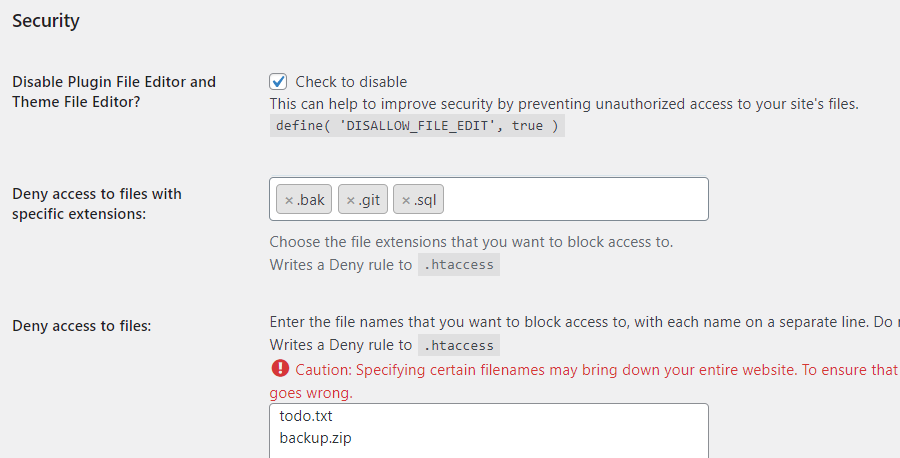
- Disable Plugin File Editor and Theme File Editor – This feature allows you to disable the Plugin and Theme File Editors in your WordPress admin. This can help to improve security by preventing unauthorized access to your site’s files.
- Deny access to certain files such as SQL, ZIP, and BAK – a particularly important security setting, which normally requires editing the .htaccess file.
Settings for posts and pages
- Revisions – Specify whether to keep revisions of posts and pages, and how many,
- Auto-date – Automatically update the date when saving posts, pages and products,
- Page excerpts – Enable the Excerpt metabox for Pages, which is hidden by default.
Geolocation simulation/spoofing
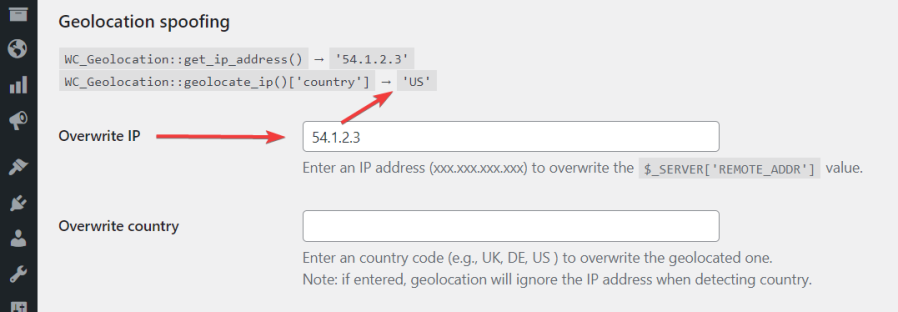
- Overwrite IP/Country – With these features, you can enter a specific country code or IP address to overwrite the geolocated information. This is useful for testing purposes when you want to simulate a different location for your website.
WooCommerce store tweaks
- Hide Related Products on Single Product pages – This can be useful if you want to streamline the product page and remove distractions for your customers.
- Hide breadcrumbs – Check if you need them. Breadcrumbs may not be necessary to help users understand their location within the site, or they do not fit with the overall look and feel of the site.
- Hide ×1 – When quantity is 1, do not show ×1 on Checkout and Order Review pages.
- Enable Block Editor for products – Use the Gutenberg block editor for product descriptions instead of the classic editor.
- Disable product image zoom – Turn off the magnifying glass zoom effect on Single Product pages. Also prevents loading the related JS and CSS, improving page performance and Google PageSpeed score.
- Disable product gallery lightbox – Prevent product images from opening in a lightbox overlay. Also prevents loading the related JS and CSS.
- Disable product gallery slider – Turn off the image slider/carousel on product galleries. Also prevents loading the related JS and CSS.
Email settings
- Custom “From” name and address – Override the default sender name and email address for all outgoing WordPress emails.
- SMTP configuration – Send emails through an external SMTP server instead of the default PHP mail function, with configurable host, port, authentication, encryption, and SSL verification settings.
- Email Tester – Send a test email directly from the settings page to verify that your email configuration is working correctly.
Performance
- Enable browser cache – This is an important setting that can help to improve the performance of a website. By setting a “cache max-age” parameter, web browsers will request a new version of the page less frequently, which can reduce the load on the server and improve the speed at which pages are displayed to users.
PHP and Apache settings
- PHP settings via .htaccess – Configure PHP time limit, max input vars, memory limit, post max size, and upload max size directly from the admin panel, without editing server configuration files.
- Apache Hardening – Deny access to sensitive file types (SQL, ZIP, BAK, etc.) and enable additional server-level security rules.
- ModExpires – Set browser cache expiration headers for static assets to improve page load times.
WooCommerce Subscriptions
- Set Subscriptions Staging Mode – This feature allows you to set Subscriptions into the Staging/Duplicate Site mode. This can be useful for testing out new subscription products or for a staging site for your WooCommerce store.
Development and debugging
- Show protected metas – Allows you to see and edit metadata that is normally hidden in the Custom Fields section of the WordPress editor when editing Products, Posts, and Pages. This can be useful for developers who need to access this information for debugging or customization purposes.
- Disable heartbeats – Heartbeats are a feature that enables real-time communication between the server and the browser of a logged-in user through regular “heartbeat” requests. These requests allow for features like auto-saving, post locking, and login expiration warnings. If the Heartbeat API is causing problems while you are debugging your site, disable it here.
- Disable cron – In WordPress, the “cron” is a built-in task scheduler that is used to perform routine tasks such as checking for updates, publishing scheduled posts, and sending email notifications. You may want to disable it on a development/local version of your site.
- Enable Data Inspector – This will show internal data for posts, pages, products, and orders as it is stored in the WordPress database tables.
- Enable Fake Payments – The Fake Payment gateway can be activated at checkout for testing or development purposes. When enabled, it will simulate the processing of an order without actually charging the customer. Supports both classic checkout and WooCommerce Blocks.
- Override “To:” for all emails – Route all outgoing emails to a specified address for testing.
- Bcc: for all emails – Send a blind copy of all outgoing emails to a specified address.
…and ever more coming with each new release!

Screenshots


Documentation
TIV.NET INC., based in Toronto, Canada, develops and supports the following WooCommerce extensions:
| Admin Tools |
A set of utilities for WooCommerce shop owners, administrators, and developers to secure, tune, and debug their store. |
| Multi-currency |
Lets customers pay in the currency of their choice. |
| Paywall |
Enables the monetization of various types of content, including videos, documents, etc., by allowing the sale of access to it. |
| Sales Assistant |
Manage store-wide sales from one place – schedule discounts by category, tag, and country instead of editing products one by one. |