
Admin Tools is a set of utilities for WooCommerce shop owners, administrators, and developers to secure, tune, and debug their store.
Installation
↑ Back to topTo start using a product from WooCommerce.com, you can use the “Add to store” functionality on the order confirmation page or the My subscriptions section in your account.
- Navigate to My subscriptions.
- Find the Add to store button next to the product you’re planning to install.
- Follow the instructions on the screen, and the product will be automatically added to your store.
Alternative options and more information at:
Managing WooCommerce.com subscriptions.
Note: This extension will not activate if WooCommerce is not installed or inactive.
Setup and configuration
↑ Back to topSettings panel
↑ Back to topAfter you activate this extension, navigate to WooCommerce > Settings in your store’s WP Admin dashboard and click the Admin Tools tab:

There are several sub-tabs that combine various settings into logical groups. Each sub-tab has its own Save button, which allows changing the settings of one group without touching the settings in other sub-tabs.
General settings
↑ Back to top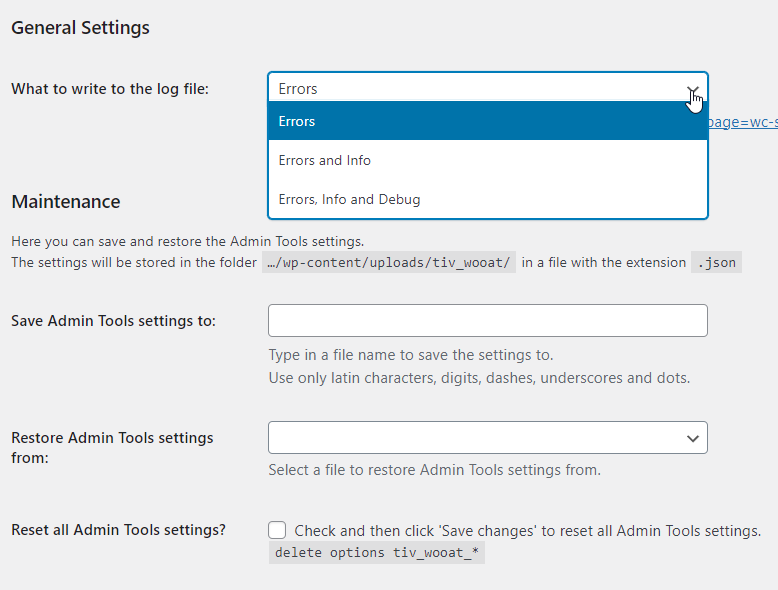
- What to write to the log file: keep this setting as Errors unless instructed by a Support representative.
- Save/Restore Admin Tools settings: use to save a certain set of settings in a file. For example, you can save staging and production settings. When you restore from that file, you receive that exact set of the options.
- Reset all Admin Tools settings: this will remove all Admin Tools settings from the Options table. Note: it does not affect the files created or modified by the Admin Tools, only the Options table in the database.
Posts/pages settings and SEO
↑ Back to top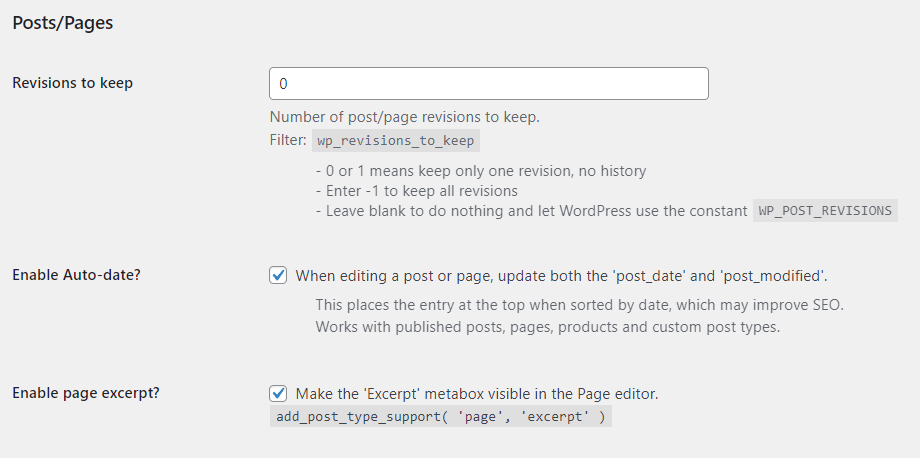
- Revisions to keep: here you can specify the number of posts/pages revisions to keep in the database.
- Enable Auto-date: if enabled, the
post_datewill be updated when you save posts, pages and products. An immediately visible effect of it is that the post goes to the top of the blogroll. Arguably, it also helps SEO. - Enable page excerpt: Make the ‘Excerpt’ meta box visible in the Page editor. By default, it’s hidden. By enabling, you can enter the excerpt text for any page.
Security measures
↑ Back to top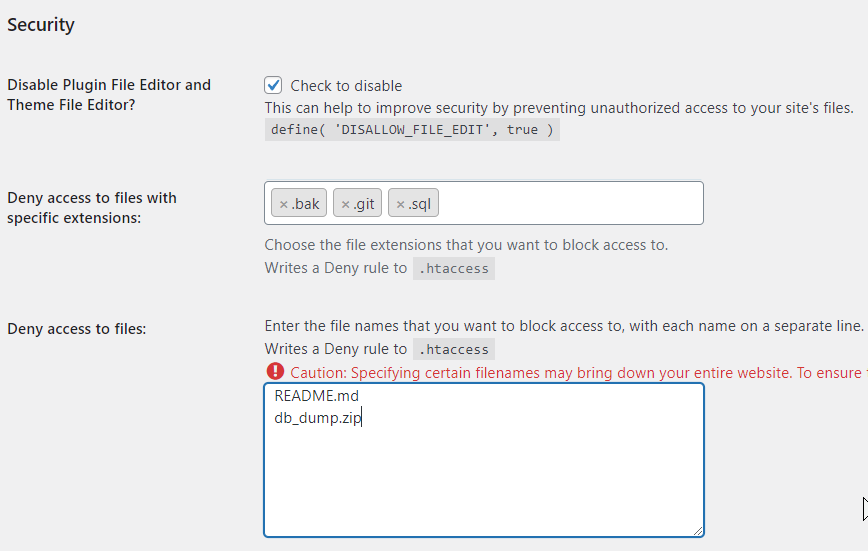
Here you can (and should) disable file editing in the Admin area and also put some security rules to the .htaccess file to prevent access to the files on your webserver.
Development/debug settings
↑ Back to top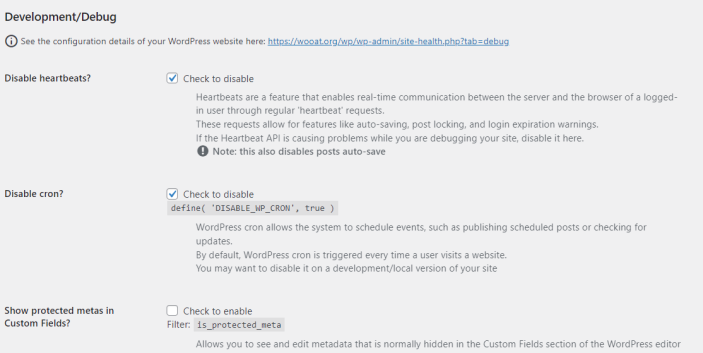
This section has many useful features such as Disable heartbeats/cron, Data inspector, Fake Payments gateway, etc. Each option has a detailed description.
Note: These options should only be used on development and staging versions of your site — not on a live/production site.
Geolocation testing
↑ Back to top
This section is needed to test how your store behaves when visited from various locations. It is especially useful when your site is multi-lingual and multi-currency, and the language and currency are set by geolocation.
Email debugging
↑ Back to top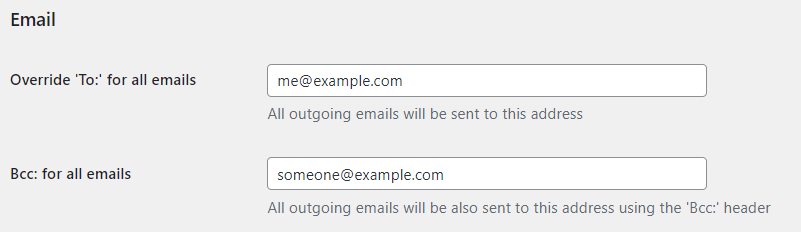
- Override ‘To:’ for all emails: this is useful for development and staging. All emails sent by WordPress and WooCommerce will be sent to the specified address and not to the actual recipient.
- Bcc: for all emails: this additional setting allows to receive copies of all outgoing emails. It can be used on the live site to verify that emails are sent correctly.
WooCommerce tweaks
↑ Back to top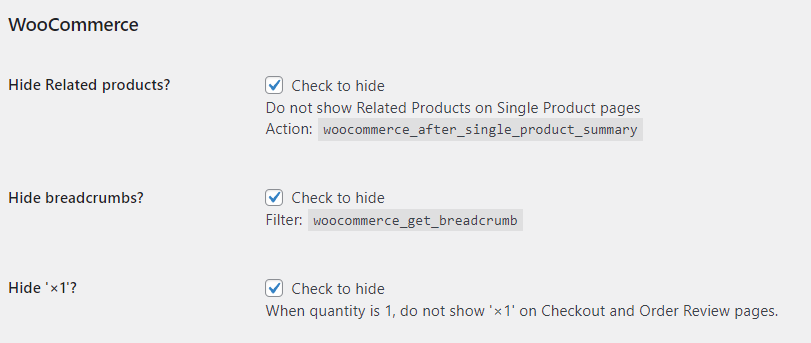
- Hide Related products: use it if you do not want to show related products on the Single Product page. In some cases, related products distract the customer and lead for “endless browsing” instead of purchasing.
- Hide breadcrumbs: there are cases when breadcrumbs are useless. This setting disables them on your WooCommerce store.
- Hide ‘×1’: this is a little tweak that removes the “x1” when there is only one item of the product in the cart. If there are more, “x2”, “x3” and so on are still displayed.
Use cases
↑ Back to topWe are continously adding settings to this extension. Please stay tuned for upcoming releases — thank you for your business.

