

Active installs
500+
Subscription includes
Support
Built specifically for Australian and New Zealand WooCommerce stores using MYOB AccountRight, the OPMC MYOB Integration helps merchants automate accounting workflows, reduce admin time and keep financial data synchronised in real time.
Whether you are processing a handful of orders per day or managing a high-volume WooCommerce store, the plugin is designed to deliver reliable, scalable synchronisation with flexible configuration controls.
Automatically convert WooCommerce orders into MYOB invoices so your accounting records stay accurate without manual data entry.
Sync product inventory between WooCommerce and MYOB to prevent overselling and ensure stock levels stay consistent across both systems.
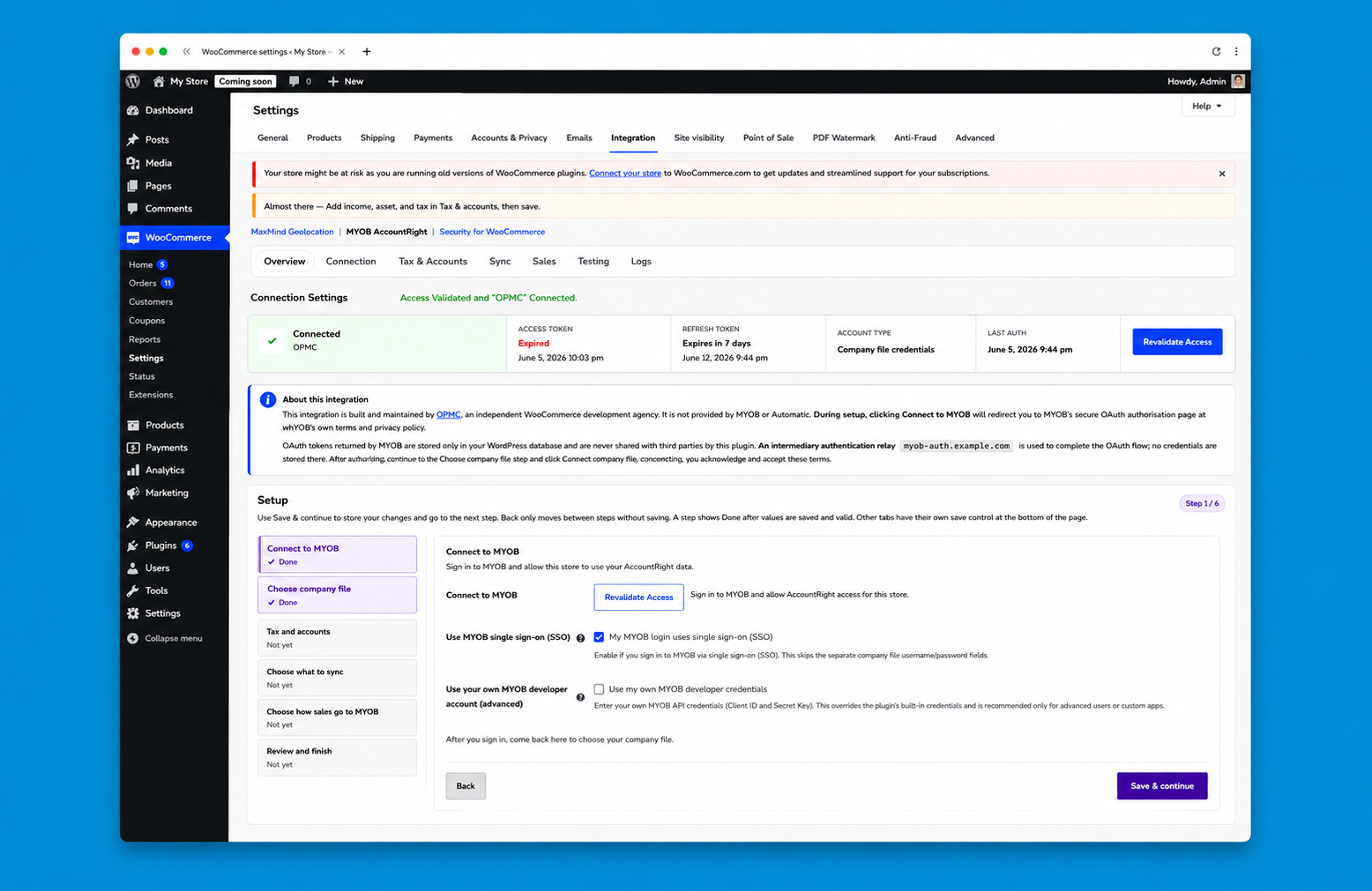
A simplified guided setup process helps merchants connect WooCommerce to MYOB quickly with clear step-by-step configuration.
Flexible sync options allow businesses to control tax handling, job code mapping, invoice creation behaviour, inventory sync and more.
Optimised sync processing and improved background handling ensure reliable performance for stores managing large order volumes
Instantly view connection status, authentication validity, and token expiry information directly within the plugin settings.
MYOB Integration allows you to automatically create invoices, sync customers, manage stock, taxes and streamline workflows directly from your WooCommerce store.
The plugin supports the following features:
Spend less time accounting and more time focusing on growing your eCommerce business. MYOB for WooCommerce reduces the amount of time you spend analysing, handling and processing your WooCommerce store order data.
The plugin keeps all of your store’s invoices in one place so you can
The latest version introduces a cleaner step-by-step onboarding experience that makes connecting WooCommerce to MYOB faster and easier.
Merchants can now:
This streamlined setup reduces configuration complexity and helps merchants get synchronising faster.
Performance improvements allow large numbers of WooCommerce orders to be synchronised to MYOB more efficiently.
This ensures reliable operation for high-volume stores and reduces delays when syncing historical orders.
Merchants can now map WooCommerce orders to MYOB Job Codes, allowing revenue to be categorised by project, department, or cost center.
This gives accounting teams more flexibility when tracking business performance in MYOB.
A new diagnostic reporting feature makes troubleshooting configuration or connection issues easier.
Support teams and merchants can quickly generate system diagnostics to identify and resolve integration issues.
Product synchronisation has been enhanced to ensure more reliable catalogue updates and improved product detail syncing between WooCommerce and MYOB.
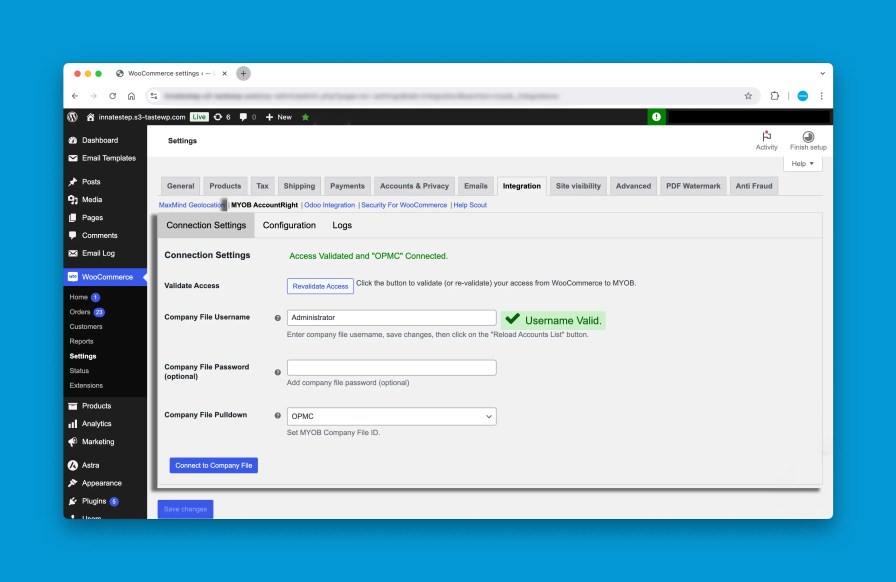
The latest release includes improvements that make synchronisation more reliable:
You can configure inventory synchronisation to run automatically using scheduled tasks. This ensures WooCommerce always reflects the latest stock levels from MYOB.
This helps prevent:
The plugin allows you to control exactly how data moves between WooCommerce and MYOB.
Configuration options include:
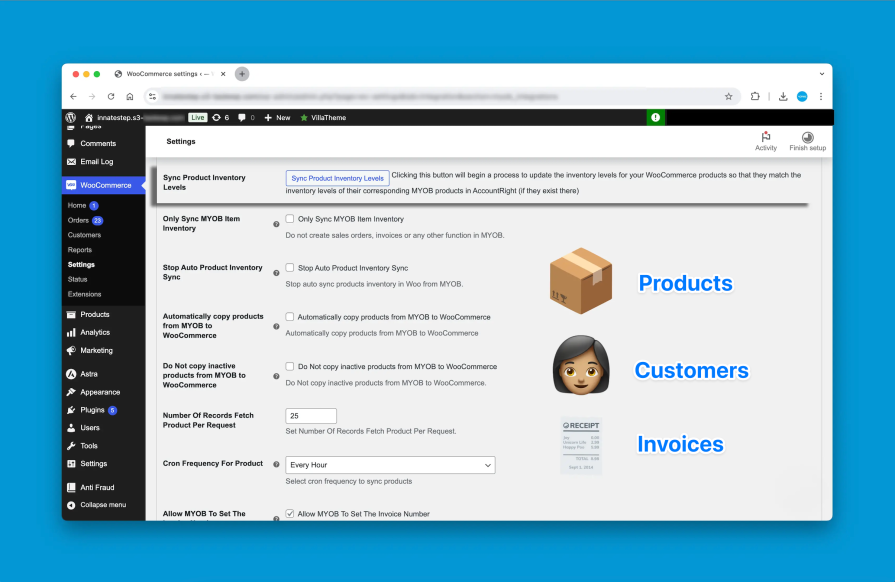
Products can be synchronised between WooCommerce and MYOB so that both systems reflect the same catalogue and inventory levels.
Inventory updates can be scheduled to run automatically to keep stock levels aligned.
MYOB remains the “source of truth” for all inventory information, ensuring your accounting data remains accurate.
The plugin supports WooCommerce variable products, allowing each variation to sync as its own inventory item in MYOB.
This enables accurate tracking for products with attributes such as:
Each variation is mapped using its unique SKU so MYOB inventory remains precise.
The plugin generates fully itemised invoices, allowing you to better track sales in MYOB and support complete inventory tracking.
By automating the connection between WooCommerce and MYOB, merchants can focus on running their business instead of managing spreadsheets and manual imports.
Connect MYOB and WooCommerce in minutes. Just generate an API key in MYOB, enter it into the plugin settings, and the integration securely handles the rest.
Learn more about installation and setup by reading our documentation.
Your purchase includes 12 months of support from our team. Whether you need help with setup, configuration or troubleshooting, we’re here to make sure your MYOB and WooCommerce integration runs smoothly.
Yes. The plugin can synchronise product inventory between WooCommerce and MYOB to help keep stock levels accurate across both systems.
Inventory sync can be configured to run automatically at scheduled intervals. When enabled, the plugin updates WooCommerce stock levels based on the inventory recorded in MYOB.
This helps prevent issues such as:
Inventory synchronisation works for both simple products and product variations, provided each product or variation has a unique SKU.
Yes. The plugin supports WooCommerce variable products, allowing each variation to sync with MYOB as an individual inventory item.
Each variation is mapped using its unique SKU, enabling accurate inventory tracking for products with attributes such as:
For example, a product with variations like Small, Medium, and Large can be synced as separate MYOB inventory items.
Note: Each variation must have a unique SKU to ensure proper synchronisation.
Orders are automatically synced to MYOB when they reach the configured order status (typically Processing or Completed).
When an order is synced, the plugin creates a corresponding invoice in MYOB that includes:
You can also configure the plugin to sync only paid orders, helping ensure that only finalised transactions are recorded in your MYOB accounting system.
If a WooCommerce product SKU does not exist in MYOB, the plugin can automatically create the product in MYOB during synchronisation.
This helps ensure that:
For best results, we recommend ensuring that all products and variations in WooCommerce have unique SKUs, as these are used to match items between WooCommerce and MYOB.
If an order cannot be synced to MYOB, the plugin logs the issue so it can be reviewed and resolved.
Common reasons an order may fail to sync include:
Once the issue is resolved, the order can typically be re-synced without creating duplicate invoices in MYOB.
Yes. The plugin is compatible with WooCommerce High-Performance Order Storage (HPOS).
HPOS is the newer WooCommerce order storage architecture designed to improve performance and scalability for larger stores. Compatibility ensures the plugin continues to work correctly with modern WooCommerce installations.
Extension information
Quality Checks
Countries







