

Aktive Installationen
100K+
Product comparison
Das Abonnement beinhaltet
Support
From adding a personal engraving, to upgrading to premium fabric, customizing products can keep your customers coming back. With Product Add-Ons, you can offer special options to your customers in a snap.
Product Add-Ons allow your customers to personalize products while they’re shopping on your online store. No more follow-up email requests—customers get what they want, before they’re done checking out.

Add options via text boxes, dropdowns, text areas, checkboxes, custom price inputs, even sample images. Add-ons can be added globally or per-product from the edit product page.
Product Add-Ons is one of the most popular extensions available for WooCommerce. It gives you and your customers even more options, including (but definitely not limited to):
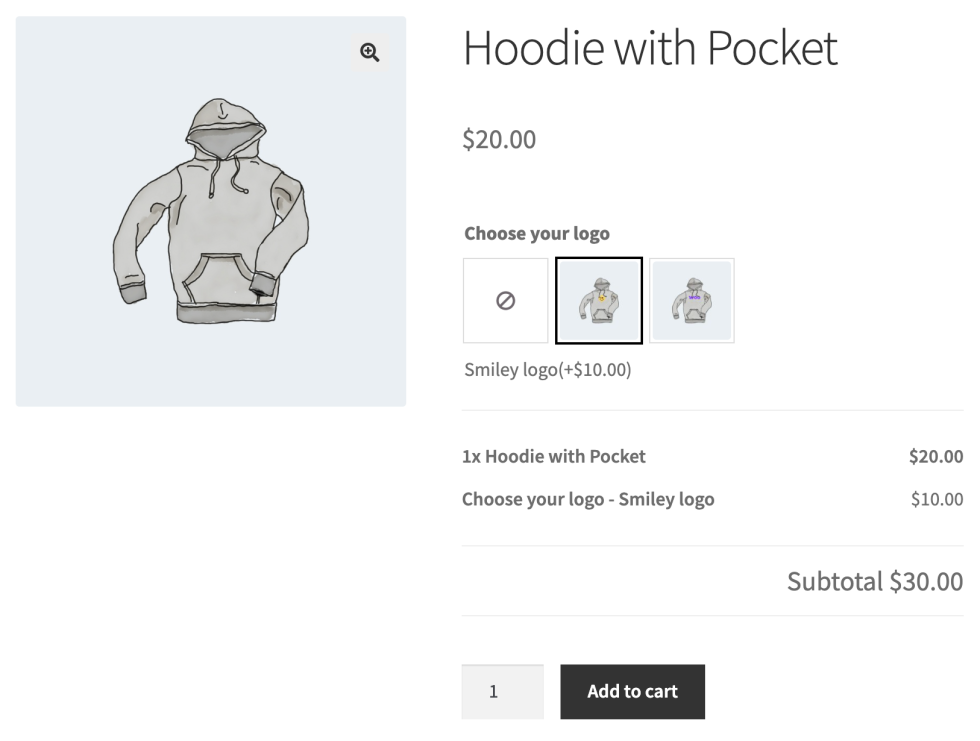
A picture is worth a thousand words, so why describe a customer’s personalization options when you can show them? With image-based selections, customers can see what they’re getting before they buy.
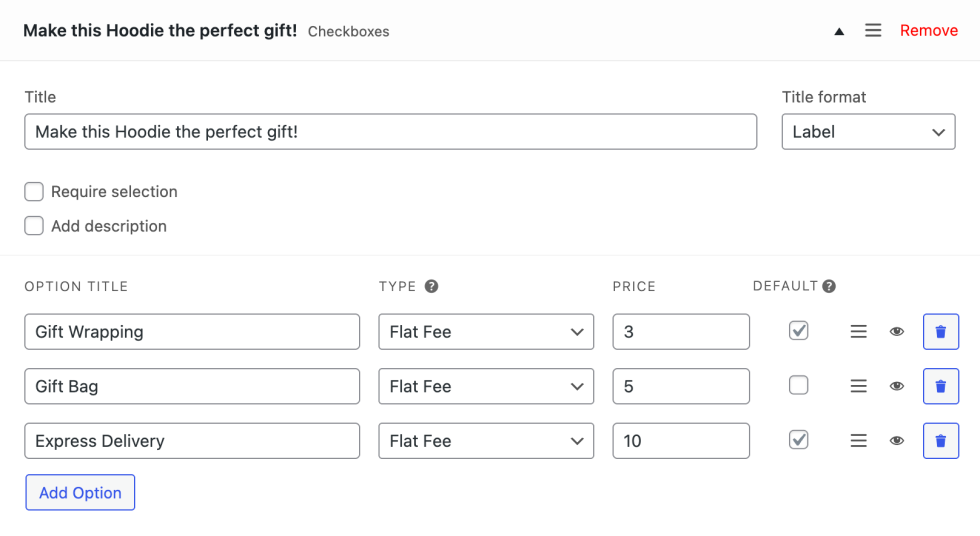
Charge customers a flat fee regardless of how many products they ordered. Perfect for a one-time set-up charge or a rush fee.
Charge a fee for the add-on based on a percent of the total price—this is especially useful for service-based add-ons that can be tougher to boil down to a flat fee.
Let your customers enter custom text to create a custom t-shirt, add a monogram or personalize a card.
Customer can choose between a few pre-defined options with a drop-down field for your add-on.
Checkboxes
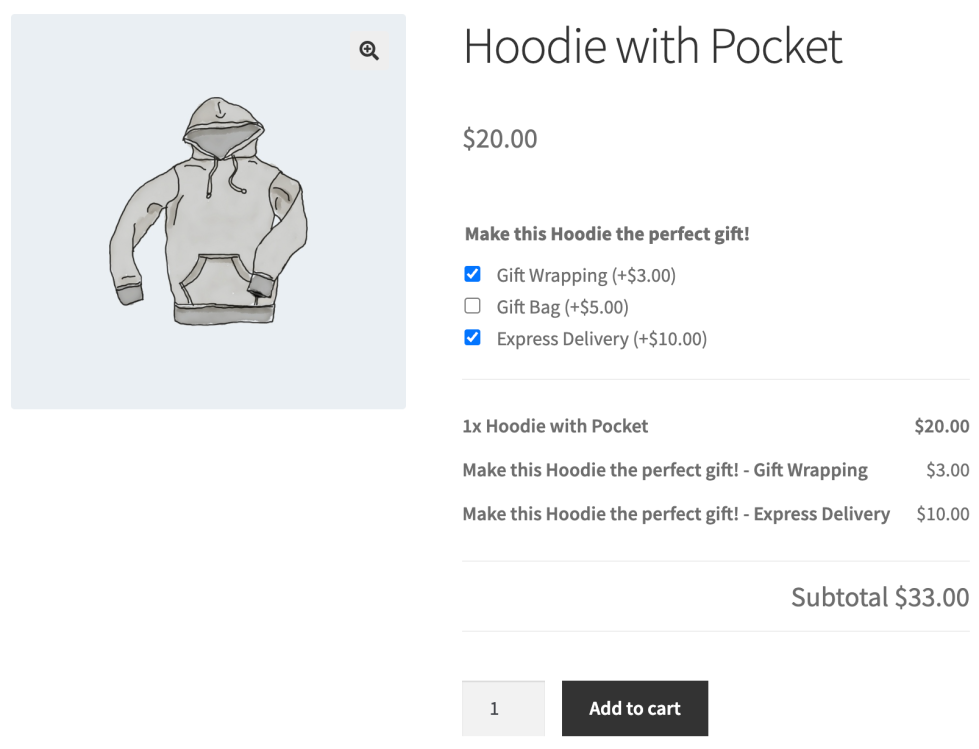
Make customization as simple and satisfying as checking a checkbox. Great for add-on services, like gift wrapping or express shipping.
Let your customers name their price, perfect for tips, donations, and gratuities!
Add-ons can be named, described, reordered, and (optionally) given prices.
The extension also works with:
Once set up, add-ons appear on product pages just above the add to cart button.
Ready to increase your store’s flexibility? Start using Product Add-Ons today.
Product Add-Ons for WooCommerce is a product customization extension that lets you offer paid or free options directly on your product pages. You can add options like gift wrapping, engraving, monograms, custom messages, premium upgrades, rush fees, tips, or donations, and shoppers configure them while they browse, before they reach checkout. Options can be added globally across products or set up per product from the edit product screen.
Product Add-Ons give customers a set of fields to personalize a product as they shop. It supports multiple choice options (shown as dropdowns, images, or radio buttons), checkboxes, short text, long text, file uploads, a date picker, quantity fields, and section headings. This makes it a fit for stores selling custom t-shirts, engraved jewelry, personalized cards, mugs, or made-to-order goods where shoppers need to add their own text, choices, or artwork.
Product Add-Ons includes several field types you can mix and match on a product page: multiple choice (dropdown, image, or radio), checkboxes, short text, long text, file upload, customer-defined price, quantity, date picker, and heading. Text fields can be restricted to letters, numbers, letters and numbers, or an email address, and long text fields can have a character limit. Headings help you group related add-ons into clear sections.
Yes. With Product Add-Ons, you can attach a price to an add-on as a flat fee, a percentage of the product price, or a fee that is calculated based on the product quantity. You can also apply a discount by using a negative value in the price field. This gives you flexible ways to price upgrades, services, and personalization without creating separate products.
Product Add-Ons is designed to help you present optional upgrades and paid extras at the moment a shopper is deciding to buy. By offering paid options such as gift wrapping, express handling, premium materials, or add-on services right above the add to cart button, you give customers straightforward ways to spend a little more on each order. Because add-ons can be priced as flat fees or percentages, you can match the pricing to each type of upgrade.
Yes. The customer-defined price field lets shoppers enter a value that is added to the product total, which works well for tips, gratuities, or donations. You can set a pre-filled default price and, if you prefer, limit the allowed price range. This gives you a simple way to accept flexible or pay-what-you-want amounts without building a separate product.
Yes. Product Add-Ons supports image-based selections, so customers can see a visual of each option rather than reading a text label. This is helpful when the choice is easier to understand visually, such as a color, finish, pattern, or style, and it lets shoppers see what they are getting before they buy.
Yes. You can create global add-ons that apply across your store, or add per-product add-ons from the individual product's edit screen. Global add-ons help you keep options consistent across similar products, while per-product add-ons let you tailor options to a specific item. You can also import and export add-ons to reuse them between products or global groups.
Yes. Product Add-Ons works with WooCommerce Subscriptions so you can add extra options and pricing to recurring subscription products, and with WooCommerce Bookings so you can offer upgrades on bookable products, such as an add-on treatment, a priority option, or a rush fee. Both extensions are separate purchases.
Product Add-Ons on its own does not show or hide fields based on a customer's earlier selections. If you need conditional logic, where certain options appear only after a specific choice is made, the recommended route is to use Gravity Forms together with the Gravity Forms Product Add-Ons extension. That combination is designed for more complex, interactive product forms.
Product variations are best when you sell a fixed set of predefined combinations, such as a shirt in set sizes and colors, each of which can have its own SKU and stock. Product Add-Ons is better when you want to collect custom input or offer optional extras on top of a product, such as engraving text, a gift note, an uploaded image, or a paid upgrade. Many stores use both variations for the core product choices and add-ons for personalization and optional services.
Choose Product Add-Ons when you want to layer options, personalization, or paid extras onto a single product. If your goal is to sell several products together as one package, Product Bundles is designed for grouping related products into a bundle. If shoppers need to build their own kit from a set of components with their own choices at each step, Composite Products is built for that guided, build-your-own experience. Product Add-Ons focuses on customizing one product rather than assembling multiple products.
Both are product personalization extensions on the WooCommerce Marketplace, so the right choice depends on how much configuration you need. Product Add-Ons, built by Woo, covers the core add-on field types, global and per-product options, and flat, percentage, and quantity-based pricing. Product Options and Fields, built by Addify, offers a larger field set and rule-based options such as user-role targeting and dependent fields. If you want a broader field library and conditional-style rules out of the box, it is worth comparing the two.
Product Add-Ons is a good fit for stores that sell personalized or made-to-order products, or that want to offer optional paid extras and services. That includes shops selling custom apparel, engraved or monogrammed gifts, printed items, cards, and stores that want to add gift wrapping, rush handling, tips, or donations. It is a practical choice when you need straightforward add-on fields and pricing without building a complex conditional form.
Product Add-Ons may not be the best choice if you need advanced conditional logic where fields change based on earlier answers, since that calls for Gravity Forms Product Add-Ons. It is also not intended for bundling multiple separate products together or for building configurable, multi-step kits, which are better served by dedicated bundling and composite-product extensions. If you mainly need predefined, stock-managed combinations, standard product variations may be enough.
Once you set them up, add-ons appear on the product page just above the add to cart button, so customers see and configure their options before adding the item to the cart. You can use heading fields to group related add-ons into clear sections, which keeps longer option lists organized.
Yes. Many add-on types include an option to require input or a selection before the product can be added to the cart. This is useful when you need a customer to make a choice or provide details, such as an engraving name or a required service option, before they check out.
Yes. Product Add-Ons is listed as compatible with WooCommerce cart and checkout blocks and with High Performance Order Storage, so it fits stores using the current block-based cart and checkout and the newer order storage setup. It also works with Smart Coupons, including the gift card feature.
Kategorien
Extension information
Quality Checks
Kompatibilität
Länder











