
Customers can use Order Withdrawal to send a request about an order without signing in. This guide explains how to enable the form, test a request, and review the notifications. Order Withdrawal is available in WooCommerce 11.1 and later.
Warning:
If you sell to customers in the EU, review the right of withdrawal and its exceptions that apply to your products and customers. The EU’s Your Europe guide explains the 14-day period and common exceptions. The customer order withdrawal feature does not guarantee compliance. For advice specific to your business and customers’ locations, consult a qualified legal professional.
Submission limits and timing
↑ Back to topThe form accepts requests for orders of any age. WooCommerce uses the order’s creation date only to show an age warning to the merchant; it does not determine whether the customer has a legal right to withdraw. See Withdrawal window warning before deciding how to respond.
Each order accepts one withdrawal request. Once a request has been matched to an order, a second request for that same order is declined at the form, and the customer sees: A withdrawal request has already been submitted for this order. Please contact us if you need help or want to make changes. You are not notified about the repeat attempt, so a customer who needs to change or add to an earlier request has to contact you directly.
Customers are also limited to one submission every 30 seconds, by email address and by IP address. A customer who submits again too quickly sees: Please wait before submitting another withdrawal request.
Order status doesn’t affect matching either. A withdrawal request can be matched to an order in any status, including orders that are already cancelled, refunded, or failed. Check the order’s current status before you act on a request.
How to enable
↑ Back to topOrder Withdrawal is disabled by default. To turn it on:
- Go to WooCommerce > Settings > Advanced > Features.
- Find Order withdrawal in the main list of features — it isn’t an experimental feature — and enable it. The description reads “Enable the public order withdrawal feature for customer requests.”
- Save your changes.
Once the feature is enabled, a new Order withdrawal field appears at the bottom of the Account endpoints group under WooCommerce > Settings > Advanced > Page setup. Change the value there to use a different URL — for example, entering cancel-order makes the form available at /my-account/cancel-order. The field is only added while the feature is on; if Order withdrawal is turned off, the field disappears from Page setup.
The /my-account/ part of the URL comes from whichever page is assigned as your My account page, also under Page setup. If you’ve renamed that page, the withdrawal form follows it. For the full list of account endpoints and page assignments, see Advanced settings.
You don’t need to re-save your permalinks after enabling the feature or changing the endpoint. WooCommerce refreshes the URL rules for you.
How customers submit a request
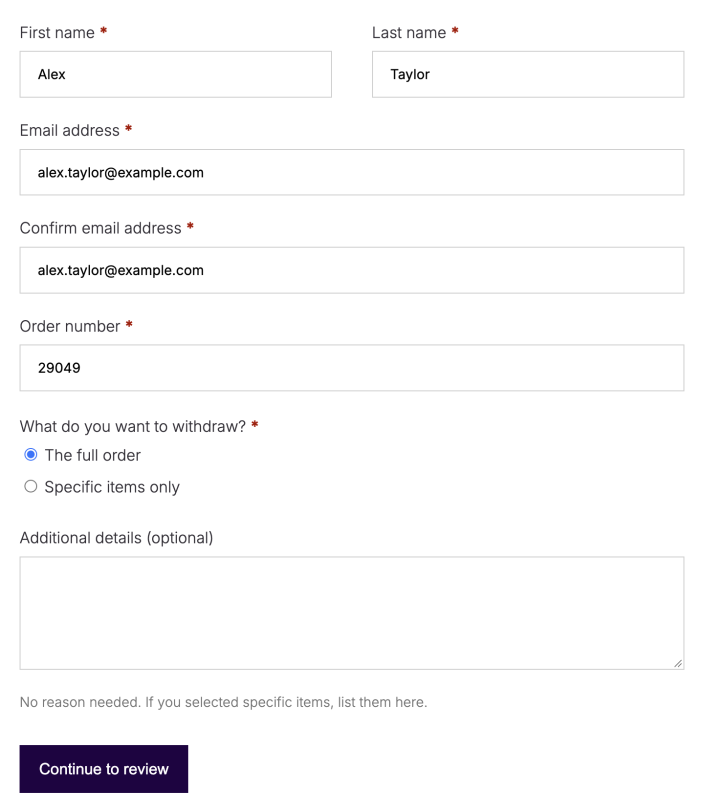
↑ Back to topWhen a customer visits /my-account/withdraw-order/, they’ll be presented with a withdrawal request form:
The form asks for the customer’s first and last name, email address (entered twice to confirm), and order number. The customer also chooses whether they’re withdrawing the full order or specific items only — choosing specific items requires a short description of which items in the “Additional details” field.
After filling out the info, the customer will have a chance to review it before submitting:
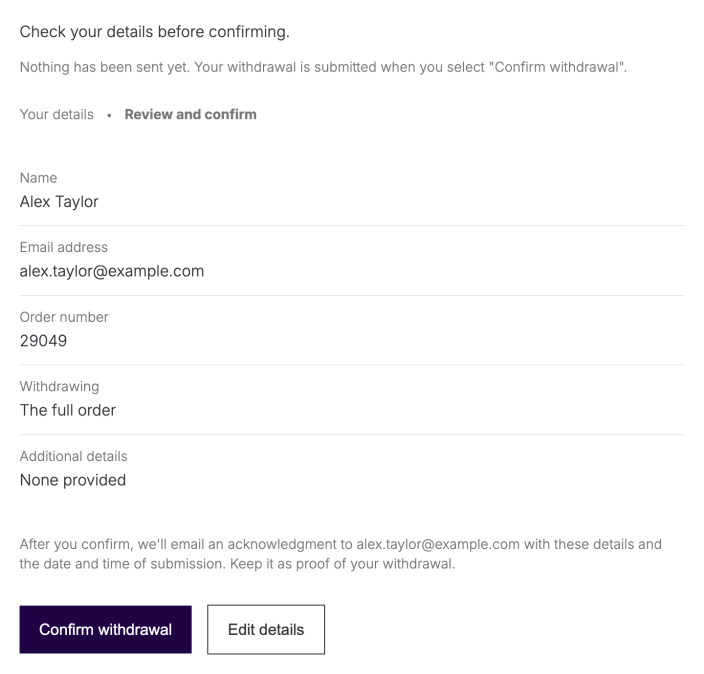
After a successful submission, the customer sees a confirmation screen. If the customer notification is enabled, they also receive an acknowledgment email containing their submitted details.
Review a withdrawal request
↑ Back to topWhen the merchant notification is enabled and a customer submits an order withdrawal request successfully, WooCommerce sends you an email. Successful requests that match an order also add an order note and an inbox notification, even if the merchant email is disabled.
Configure withdrawal notifications
↑ Back to topTo choose where the notifications go and whether they are sent, go to WooCommerce > Settings > Emails. When Order Withdrawal is enabled, the list includes Order withdrawal request for the merchant and Order withdrawal request received for the customer. Select Manage next to an email to change its settings. You can enable or disable each notification, edit its subject, email heading, and additional content, and preview it in the Email Preview section. See Editing Individual Emails and Email Preview.
Only the merchant notification has a Recipient(s) field. By default, it uses the site’s Administration Email Address under Settings > General; change the recipients in the merchant email settings. The customer acknowledgment is sent to the email address entered on the withdrawal form and has no recipient field.
When enabled, the merchant email includes the submitted details and, for a matched request, a link to the order.
For a matched request, an inbox notification appears on the WooCommerce home screen with a View order link.
If the order number and billing email match an existing order in your store, the withdrawal request is automatically linked to that order. An order note is added indicating the withdrawal request.
If the order number and email don’t match an order — a typo, or an order placed with a different email address — the request is still accepted. When the merchant notification is enabled, you receive an email saying that WooCommerce could not match the request to an order automatically and that no order note was added. No inbox notification is created either, so if that email is disabled, there is no email, order note, or inbox item to review. Use the customer’s name, email address, and the order number they entered to locate the order yourself.
When the customer notification is enabled, the customer receives the same acknowledgement email whether or not the request matched an order.
Withdrawal window warning
↑ Back to topIf the matched order is more than 14 days old, WooCommerce adds this line to both the inbox notification and the merchant email:
“This order is older than 14 days. Only orders within 14 days of delivery are eligible for withdrawal.”
The warning uses the order’s creation date because WooCommerce does not have a delivery date to check. A warning based on creation can appear before a delivery-based withdrawal period ends. For example, an order created on June 1 and delivered on June 5 can show the warning before 14 days have passed since delivery. Check the delivery date and applicable requirements rather than treating the warning as an eligibility decision.
This warning is informational. WooCommerce doesn’t decline, cancel, or hold the request because of it — the request is processed and matched normally, and the customer’s acknowledgment email is unaffected. Review the order date, check your store’s return policy or applicable local requirements for older orders, and decide how to respond.
Submitting a withdrawal request does not automatically change the order status, cancel the order, or issue a refund. It’s up to you how withdrawal requests are handled, whether that means approving a refund, requesting the item back, or following up with the customer for more information.
Test the form before sharing it
↑ Back to topUse a staging store and a fictional order with an email inbox you control. A successful test sends email, so avoid using a real customer’s details.
- Enable the feature and open the withdrawal endpoint while signed out. Confirm that the form loads under the page assigned as your My account page.
- Enter the test order number and billing email, complete the required fields, then review the details. Select Edit details to check that you can correct them.
- In WooCommerce > Settings > Emails, check the enabled state and recipients for both withdrawal notifications. On staging, submit a fresh fictional order with both notifications enabled, then repeat with one notification disabled. Each request should complete if every enabled email sends successfully; the disabled notification is skipped.
- For a matching order, confirm that an order note and a WooCommerce inbox notification were added. Check that the order status and payment remain unchanged.
- Submit the same matched order again after 30 seconds. Expect a message that a request has already been submitted. Use a different fictional order number to test an unmatched request; expect an email requiring manual review, with no order note or inbox notification.
If the form or notifications do not work
↑ Back to topIf the form returns a not-found page, confirm that Order withdrawal is enabled, the My account page is assigned, and you are using the saved endpoint value. Check any caching or redirect rules that affect account pages.
If the form says it could not submit the request, check WooCommerce > Settings > Emails: a disabled notification is skipped and does not block submission, but a failed send for an enabled notification prevents the request from completing. Another enabled notification may already have been sent before this error appears. After resolving the delivery problem, retrying can send that notification again. For the merchant notification, confirm the Recipient(s) addresses. Then check your email service, spam folders, and delivery logs. Mail-service acceptance does not prove that a message reached the inbox.
When responding to an older order or an unmatched request, review the order and contact the customer if you need more information. The request itself does not authorize a refund or decide legal eligibility.
Questions and support
↑ Back to topDo you still have questions and need assistance?
This documentation is about the free, core WooCommerce plugin, for which support is provided in our community forums on WordPress.org. By searching this forum, you’ll often find that your question has been asked and answered before.
If you haven’t created a WordPress.org account to use the forums, here’s how.
- If you’re looking to extend the core functionality shown here, we recommend reviewing available extensions in the WooCommerce Marketplace.
- Need ongoing advanced support or a customization built for WooCommerce? Hire a Woo Agency Partner.
- Are you a developer building your own WooCommerce integration or extension? Check our Developer Resources.
If you weren’t able to find the information you need, please use the feedback thumbs below to let us know.