
WooCommerce Bookings adds a new coupon discount type to Marketing > Coupons named Booking Person Discount. This coupon type allows a per-person discount on Bookable Products with the Persons feature enabled.
WooCommerce’s default cart and product coupons work great for discounts on bookings regardless of person settings.
Create a Booking Person Discount Coupon
↑ Back to topYou can follow these steps to create a per-person discount:
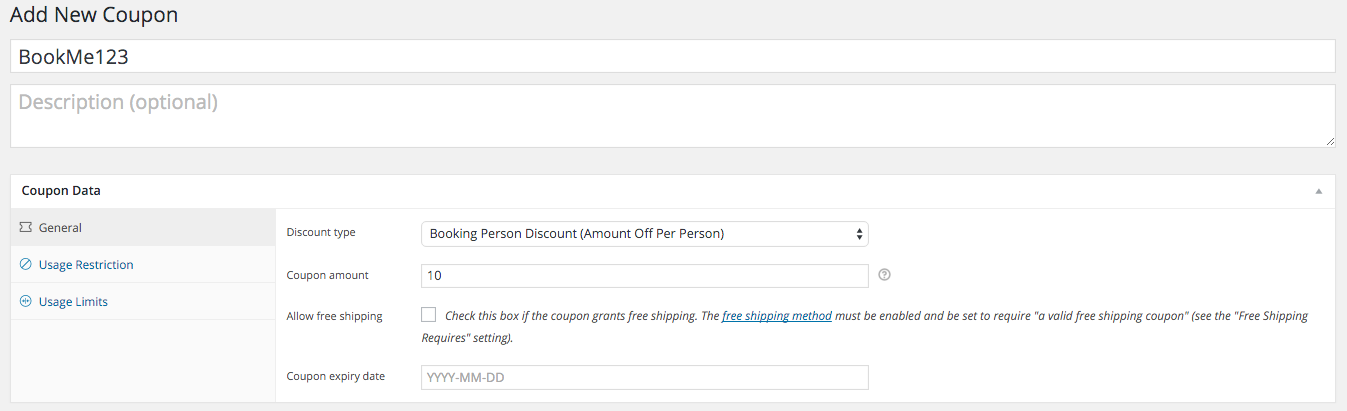
- Navigate to Marketing > Coupons.
- Enter the coupon code in the Add Coupon Code box at the top.
- Choose “Booking Person Discount (Amount Off Per Person)” as the discount type.
- Enter a Coupon Amount – the dollar amount to discount per person on the booking. Percentage discounts aren’t possible with per person coupons.
- Optionally configure an expiry date, the Usage Restrictions tab, and the Usage Limits tab like any other coupon. Read here for details on adding coupons in WooCommerce.
- Click Publish to publish the coupon code.
Once published, you can share the promotional code with your customers!
Questions and support
↑ Back to topSomething missing from this documentation? Still have questions and need assistance?
- If you have a question about a specific extension or theme you’d like to purchase, contact us to get answers.
- If you already purchased this product and need some assistance, get in touch with a Happiness Engineer via our support page and select this product’s name from the Product dropdown.

