
WooCommerce Subscriptions is compatible with many payment gateways that have the features necessary for processing automatic payments.
No Available Payment Gateways Warning
↑ Back to topCustomers can’t complete checkout with a subscription in the cart when none of your enabled payment gateways support subscriptions and you don’t accept manual renewal payments. A warning appears where the payment methods would normally be.
In the block checkout, customers and store managers see WooCommerce’s standard message:
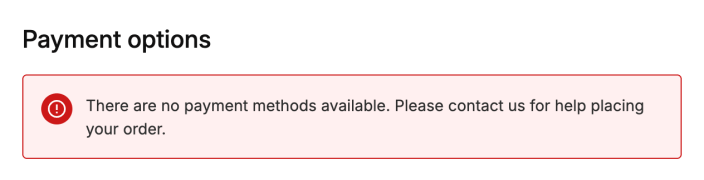
In the classic checkout, Subscriptions shows its own message instead. It tells customers that no available payment methods support subscriptions and asks them to contact you. Store managers see the same message with a link to this page.
Add a Payment Gateway
↑ Back to topIf there are no payment gateways installed yet, WooCommerce’s guide on choosing the right payment option for your store is a good place to start. Woo Subscriptions also has a guide on payment methods that support different Subscriptions features.
Enable a Payment Gateway
↑ Back to topTo enable a payment gateway:
- Go to WooCommerce > Settings > Payments.
- Find the payment provider you want to use, and select Enable. If the provider is already installed but not connected, select Complete setup instead.
- Follow the provider’s setup steps to connect your account.
Check Which Gateways Support Subscriptions
↑ Back to topThe Payments settings page doesn’t show which gateways support subscriptions. To check:
- See the Subscriptions payment gateways guide, which lists the features each gateway supports.
- Check the gateway’s own documentation or settings.
- Go to WooCommerce > Status and find Payment Gateway Support in the system status report. It lists each gateway that’s enabled and ready to take payments, with the features it supports.
A gateway that supports automatic renewals lists features such as subscriptions. If a gateway lists only products, like the bank transfer gateway below, it can’t take subscription payments:

Questions and support
↑ Back to topSomething missing from this documentation? Still have questions and need assistance?
- If you have a question about a specific extension or theme you’d like to purchase, contact us to get answers.
- If you already purchased this product and need some assistance, get in touch with a Happiness Engineer via our support page and select this product’s name from the Product dropdown.

