
During the beta, Woo Ads brings reporting from connected Google, Meta, TikTok, Reddit, and Snapchat accounts into one place in your WooCommerce dashboard. Use it to review and compare advertising results. It does not create, edit, pause, or optimize campaigns.
Before you start
↑ Back to topBefore connecting an advertising channel, confirm that you have:
- An active WooCommerce store.
- Permission to manage WooCommerce and install plugins if a supported channel extension is not already installed.
- A supported advertising account with permission to read its reporting data.
- Any channel extension needed for your preferred connection or advertising setup.
- A working WooCommerce connection and the data sharing required during Woo Ads setup.
- The Woo Ads plugin installed and active.
Connect an advertising channel
↑ Back to topWoo Ads can connect to supported advertising accounts directly or through an available channel extension. The options depend on the channel and your store’s configuration. These extensions can also help with advertising setup:
| Channel | WooCommerce extension |
|---|---|
| Google for WooCommerce | |
| Meta | Meta for WooCommerce |
| TikTok | TikTok for WooCommerce |
| Reddit for WooCommerce | |
| Snapchat | Snapchat for WooCommerce |
To connect a channel and start reporting:
- Go to Marketing > Advertising in your WordPress dashboard.
- Select Get started, follow the prompts to connect your store, and connect at least one advertising channel. Choose the connection option offered for that channel, then select Continue.
- Wait for the first reporting import. This can take up to one hour for each channel.
- Return to Marketing > Advertising to review the imported results.
If a channel does not appear: Check its connection in Woo Ads and confirm that you selected the expected advertising account. If you connect through an extension, confirm that the extension is installed, active, and connected. Update or reconnect it if it reports a connection problem.
If a connected channel has no reporting data: The first import can take up to one hour. Check the selected date range, the channel connection, and whether the account has reportable activity. Select the update information icon at the top of the report to check each channel. If an update fails, select Retry when offered, or Review connection if Woo Ads asks you to reconnect. If the channel still does not import, select Feedback to contact the Woo Ads team.
Understand the report
↑ Back to topOpen Marketing > Advertising to view the Board. Its Performance card shows results across advertising channels. Select a metric to see its chart, and select View all channels to compare channels in a table. Select a channel to view its campaigns.
Performance metrics
↑ Back to topBy default, the Performance card shows the following metrics for the selected period. Select the information icon beside a metric for more detail. Use Choose metrics to choose and reorder metrics across reporting views.
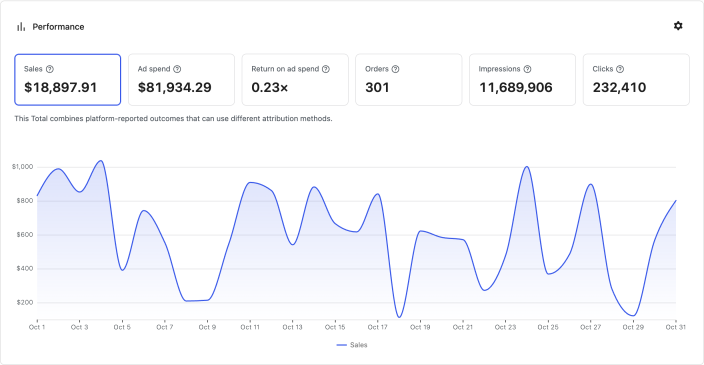
| Metric | What it means |
|---|---|
| Sales | Sales value attributed to ads by the advertising channels. |
| Ad spend | The amount the advertising channels report as spent on ads. |
| Return on ad spend | Attributed sales divided by ad spend. A return of 3.0 means the report attributes three times as much sales value as ad spend. |
| Orders | Orders attributed to ads by the advertising channels. |
| Impressions | The number of times the advertising channels report that ads were shown. |
| Clicks | The number of ad clicks reported by the advertising channels. |
Compare channel performance
↑ Back to topIn the Board’s Channels card, select View all channels to see the selected metrics for each channel. The report also offers a CSV download. Select a channel name to see its campaigns. A disconnected channel can still appear with its available reporting history and is labeled Disconnected.
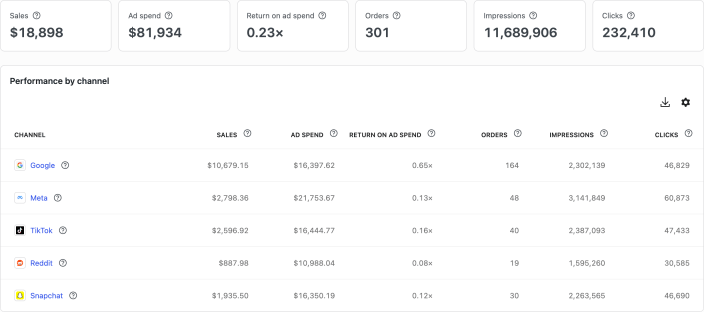
Additional metrics are available through Choose metrics, including ad spend as a percentage of sales, revenue after ad spend, average order value, ad spend per order, and click-through rate. Revenue after ad spend isn’t profit: it doesn’t subtract product costs, shipping, payment fees, taxes, or other expenses. A calculated metric may be unavailable when a required input is unavailable or can’t be combined.
Reporting period and data freshness
↑ Back to topUse the date control to choose the period you want to review. Select Compare to compare results with the previous equivalent period. The channel report shows results side by side for the selected period.
Woo Ads refreshes reporting data automatically. Data updated shows when the most recent successful update across connected channels completed. Select the information icon to see each connected channel’s latest update. A channel that hasn’t completed its first import can appear as Not imported yet, even when another channel has already provided data.
If a later import fails, the report may continue to show that channel’s most recent available data while another import is attempted.
If only some channels or metrics have data: Check Data updated and its per-channel times. A channel that has not completed its first import may be listed as Not imported yet. Also check the selected period and the affected channel’s connection.
Attribution and totals
↑ Back to topWoo Ads reports the results provided by advertising channels, including available history from channels that have since disconnected. Channels can use different attribution methods and windows, so they may report conversions at different times or attribute the same purchase to more than one channel.
Where a Total is shown, Woo Ads combines compatible channel data for the selected period. Calculated totals use the combined inputs. Woo Ads does not identify and remove purchases that more than one channel attributes to its ads.
Treat Total as a combined view of channel-reported results. It is not a unique-order count, a separate data source, or an independent attribution model.
Recent results can change after you first view them. Advertising channels may report conversions later or attribute a purchase to an earlier ad interaction while their attribution window is still open.
Differences between channel reports can come from:
- Attribution windows and methods.
- Delayed conversion reporting.
- The selected advertising account or date range.
- Currency handling.
- Refunds or later order changes.
- How ad interactions, visitors, orders, and purchases are matched.
If a Total is unavailable: Check whether the channels use different currencies or whether a required input is unavailable. Woo Ads does not convert currencies before combining money values.
If channels show different results: Confirm that you are reviewing the expected advertising accounts and the same date range. Different channels can use different attribution methods and windows, and more than one channel may attribute the same purchase to its ads.
Unavailable and partial data
↑ Back to topAn unavailable value is different from zero. Zero means the report received or calculated a value of zero. An unavailable value means Woo Ads cannot show a reliable value for the selected channel, metric, or period.
Data can be unavailable or partial when:
- A channel is new, inactive, disconnected, or still importing.
- The connected account has no reportable activity in the selected period.
- A channel does not provide a required metric.
- The available reporting history does not cover the full selected period.
- One channel import failed while other channels completed.
- A calculation is missing a required input.
Woo Ads shows monetary values and metrics calculated from them only when it can determine their currency. If a channel’s currency is missing, that channel’s affected values are unavailable. If displayed channels use different or unknown currencies, money-based Total values are unavailable. Count metrics and rates that do not depend on currency may still be available.
In Woo Ads, select Feedback to contact the product team.
For advertising account billing, account access, ad approval, or campaign delivery issues, use the support provided by the relevant advertising channel.
Questions and support
↑ Back to topDo you still have questions and need assistance?
- Get in touch with a Happiness Engineer via our Help Desk. We provide support for extensions developed by and/or sold on WooCommerce.com, and Jetpack/WordPress.com customers.
- If you are not a customer, we recommend finding help in the WooCommerce support forum or hiring a Woo Agency Partner. These are trusted agencies with a proven track record of building highly customized, scalable online stores. Learn more about Woo Agency Partners.