
Product Icon

Account Funds for WooCommerce

Award cashback, reward signups and reviews, issue refunds as store credit, and sell prepaid credit products. Complete WooCommerce loyalty system.
Choose a billing option
USD $89
Save 20%
USD $178 USD $142.40

Subscription includes

  • Product updates and improvements
  • Customer support
  • 30-day money-back guarantee

WooCommerce Store Credit & Loyalty System – Turn First-Time Buyers Into Repeat Customers

Account Funds lets you create a complete store credit, cashback, and customer rewards system for WooCommerce. Award cashback on purchases, reward milestone actions like signups and reviews, issue refunds as store credit, sell prepaid store credit products, and let customers top up their balance. Everything you need to keep revenue in your ecosystem and customers coming back.
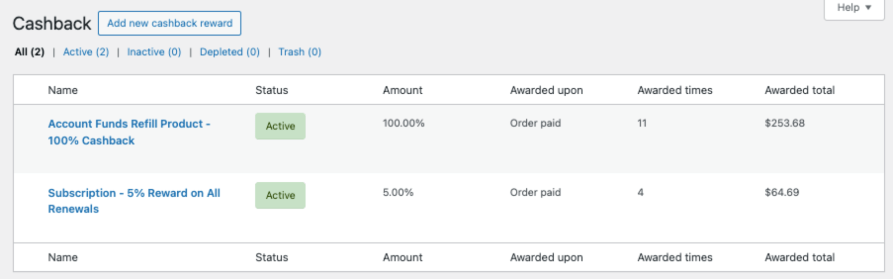
Adding cashback rewards with Account Funds for WooCommerce

What You Can Do With Account Funds

  • Cashback rewards on purchases: Award store credit when customers pay for orders or purchase specific products. You can set percentage-based or fixed amounts, and the eligibility system lets you control minimum order values, restrict to specific product categories, or exclude sale items and coupon orders.
  • Milestone rewards for customer actions: Give store credit when customers register an account or leave product reviews. Great for building loyalty from day one.
  • Partial payments with store credit: Customers can apply their available balance and pay the difference with credit card, PayPal, or any other WooCommerce payment gateway. No all-or-nothing restrictions that frustrate shoppers who don’t have enough balance to cover the full order.
  • Refund to store credit: Issue refunds instantly to customer balances instead of waiting 3-10 business days for payment processor refunds. Keeps revenue in your store while giving customers immediate resolution.
  • Store credit products: Sell prepaid store credit at full price or discounted, which works well for WooCommerce gift cards, B2B prepayment accounts, or promotional bundles (for example, customers pay $80 for $100 credit).
  • My Account top-up: Customers can add funds directly from their account page. You control the minimum and maximum top-up amounts.
  • Admin balance management: View all customer store credit balances at a glance from the WordPress Users screen, make manual adjustments, and track complete transaction history for accounting and customer service.
  • WooCommerce Subscriptions compatibility: Works with WooCommerce Subscriptions and Constellation for prepaid subscription payments and recurring credit awards as part of a membership.

Why Store Credit Beats Points Programs

Points-based WooCommerce loyalty programs add complexity. Customers need to understand conversion rates, remember point values, and do math at checkout. Store credit is simpler: $10 credit means $10 off. No confusion, no friction.

Account Funds advantages over WooCommerce points and rewards plugins:

  • Real currency, not abstract points: Customers see “$15.00 balance” not “1,500 points.” No conversion confusion at checkout.
  • Flexible award triggers: Cashback on orders, product purchases, account registration, and reviews. You configure exactly when and how credit is earned.
  • Works like a payment gateway: Store credit appears at checkout alongside credit cards and PayPal. Customers understand it immediately because it behaves like any other payment method.
  • Refund workflow built-in: Turn refunds into future purchases with one click. Most points plugins don’t handle this use case at all.
  • B2B prepayment ready: Wholesale customers can prepay with store credit products. No points-to-dollars conversion needed for invoicing or accounting.

Common Use Cases

Customer Loyalty & Retention

Award cashback on all orders to encourage repeat purchases. Customers who have a store credit balance are significantly more likely to return than those who don’t, since they’ve already got money in your store.

Registration Incentives

Give store credit when customers create an account. This converts guest checkouts into registered customers you can market to, and the credit balance gives them a reason to come back.

Review Rewards

Award store credit for each product review. You’re building social proof while giving customers a reason to engage after purchase. Set it to $2, $5, or whatever makes sense for your margins.

Refund Retention

Offer refunds as store credit instead of processing payment gateway refunds. You keep the revenue in your ecosystem while resolving customer issues faster than traditional refund processing.

Gift Cards & Prepaid Credit

Sell store credit products as WooCommerce gift cards. Customers can purchase credit for themselves or as gifts for others, and the balance applies automatically at checkout without coupon codes.

B2B & Wholesale Accounts

Let business customers prepay for orders. They add $500 to their account, you fulfill orders against that balance. This simplifies invoicing for repeat B2B customers and reduces payment friction on every order.

Membership Benefits

Grant monthly store credit to members using WooCommerce Subscriptions or Constellation. A $25/month membership that includes $10 store credit encourages members to make additional purchases beyond just claiming their membership benefit.

How It Works

For customers: Store credit appears as a payment method at checkout. They can use their full balance or combine it with another payment method for partial payment. Their balance is visible in My Account and throughout the shopping experience.

For store owners: Create cashback and milestone rewards from dedicated admin screens under Account Funds. Set eligibility rules, award caps, and active/inactive status. View all customer balances from the WordPress Users screen, and process refunds to store credit with one click from any order.

Track Everything With Built-In Reports

See deposits, redemptions, and balances over time. Filter by date range, view per-customer transaction history, and understand how store credit flows through your business. Reports show total deposits, usage rates, and outstanding liabilities for accounting purposes.

Requirements

  • WooCommerce 8.2 or higher
  • PHP 7.4 or higher

Frequently Asked Questions

Can store credit expire?

Yes. When configuring rewards, you can set expiration periods. Credit expires based on when it was earned, not when the reward was created.

Does this work with WooCommerce Subscriptions?

Yes. Customers can use store credit to pay for subscription renewals, and you can award store credit as part of an ongoing subscription or membership benefit.

Can I rename “Store credit” to something else?

Yes. In Account Funds settings, you can customize the customer-facing label to “Account funds,” “Store points,” “Wallet balance,” or whatever term fits your brand.

Does partial payment work with all payment gateways?

Yes. When partial payment is enabled, customers can apply their store credit balance and pay the remaining amount with any active WooCommerce payment gateway: Stripe, PayPal, Square, or any other.

Can I exclude certain products from store credit payment?

Store credit works as a payment method for all products. For cashback rewards specifically, you can configure eligibility rules to include or exclude specific products, categories, and product types.

Is there a REST API?

Yes. Account Funds extends the WooCommerce REST API to include customer balances and transaction data, which is useful for mobile apps, external integrations, or custom reporting dashboards.

Made by Kestrel logo


Frequently asked questions

Can customers combine funds with other payment methods?

Yes, if you allow it. Many stores keep it simple and let shoppers choose either funds or another method.

How do refunds work with Account Funds?

You can credit refunds back to the customer’s original payment method or their account balance for a faster resolution and immediate reuse. You have full control.

Can I limit who sees Account Funds?

Show the option only to logged‑in users or specific roles like wholesale customers using an extension like Constellation by Kestrel to restrict access to specific members.

Customer reviews

Extension information

  • WooCommerce version required: 4.0.0
  • PHP version required: 7.4
  • Tested with WordPress: 6.8.3
  • Tested with WooCommerce: 10.3.5
  • Requires at least WordPress: 5.6
  • Requires at least WooCommerce: 8.2

Compatibility

  • High performance order storage (HPOS)

Countries

  • Worldwide

Related products

Price USD $279 annually
Rated 3.2 out of 5 stars
Price USD $199 annually
Rated 4 out of 5 stars
Price USD $109 annually
Rated 4.6 out of 5 stars
Price USD $99 annually
Rated 4.7 out of 5 stars
Price USD $79 annually
Rated 4.2 out of 5 stars
Price USD $99 annually
Rated 3.4 out of 5 stars
Price USD $79 annually
Rated 3.4 out of 5 stars
Price USD $59 annually
Rated 3.1 out of 5 stars
Price USD $109 annually
Rated 3.1 out of 5 stars