

Active installs
40K+
Subscription includes
Support
With the FedEx Shipping Method, your shoppers at checkout will see and be charged for shipping based on your FedEx rates. The rates are determined via the FedEx API.
This extension requires that your store uses US or Canadian Dollars for its currency, US or Canada as the base country. To use the Legacy SOAP API, your server must have SOAP installed. It primarily works with ins and lbs, but other units can be converted automatically.
FedEx can calculate quotes worldwide, as it handles both domestic and international parcels:
| Domestic | International |
|---|---|
|
|
FedEx Shipping Method is a live rates extension for WooCommerce that connects your store to your FedEx account through the FedEx API. At the cart and checkout, shoppers see FedEx shipping options and are charged based on your FedEx rates, calculated from the package weight, dimensions, origin, and destination address. You can present every available service so customers choose, or return a single rate.
You need a FedEx account and API credentials, plus a WooCommerce store set to United States or Canada as its base country and US or Canadian Dollars as its currency. Your products also need weights and dimensions added, since the FedEx API and the built-in box packer use them to calculate accurate rates. Once connected, you add FedEx to a shipping zone to start offering rates.
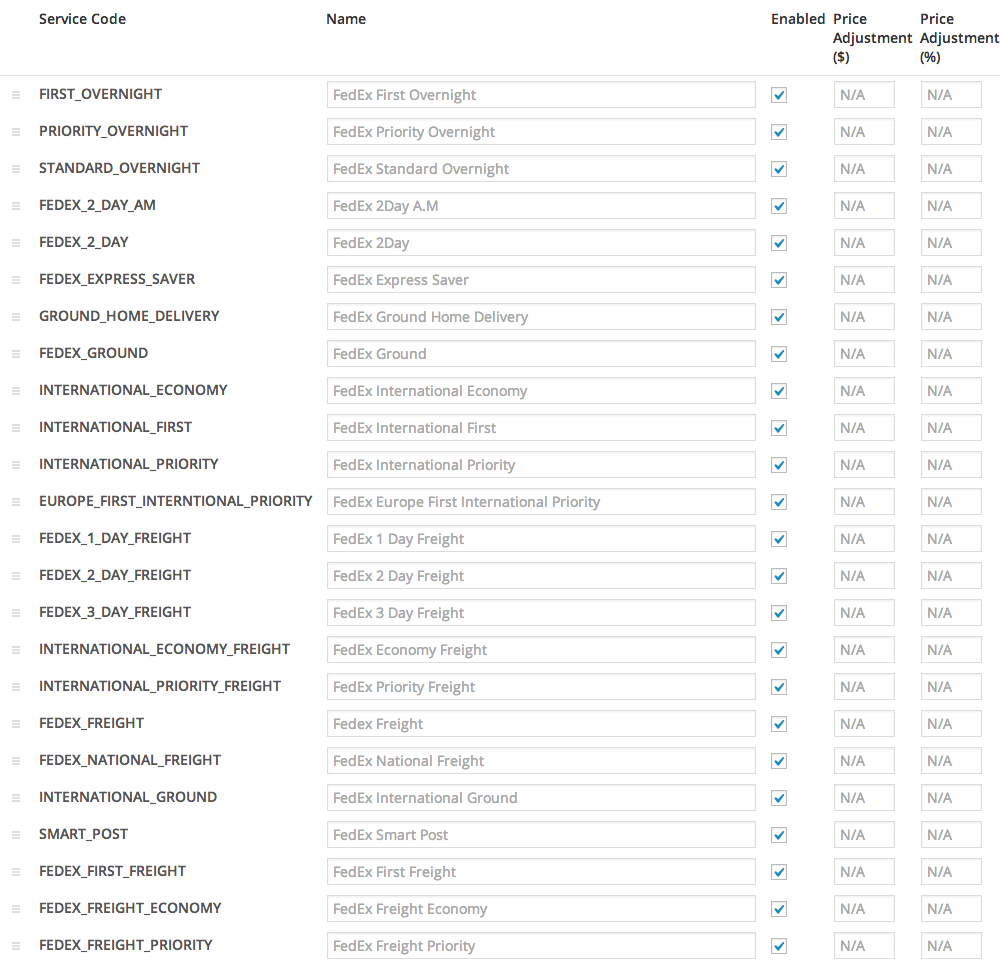
Yes. FedEx Shipping Method calculates quotes for both domestic and international parcels from a base country of the United States or Canada. It supports a wide range of FedEx services, including FedEx Ground, Home Delivery, Priority Overnight, Standard Overnight, Express Saver, International Priority, International Economy, and more, so you can offer the delivery speeds your customers expect.
Yes. By pulling rates directly from your FedEx account, FedEx Shipping Method helps you charge shipping that reflects real carrier pricing rather than flat estimates. This gives you tools to reduce the risk of undercharging and absorbing the difference, or overcharging and losing the sale. Rates update automatically based on the customer's address, cart weight, and package dimensions.
Yes. FedEx Shipping Method includes price adjustment options so you can add a flat amount or a percentage to the quote returned by FedEx. You can set these adjustments separately for each FedEx service, which is useful if you want to cover packaging, materials, or handling time without hiding those costs in your product prices.
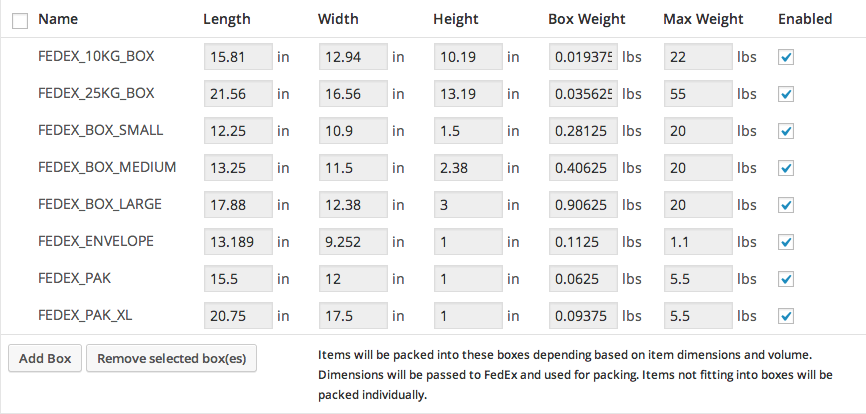
FedEx Shipping Method offers two packing methods. With per-item packing, each physical item in the cart is sent to the FedEx API and the quotes are combined. With pack into boxes, items are grouped into boxes you define by height, width, length, weight, and maximum weight, then sent to the API. The included box packer is mainly volume-based and is the recommended option for more realistic multi-item quotes.
Yes. FedEx Shipping Method supports FedEx One Rate flat pricing, which you can enable in the service settings, and FedEx Ground Economy (formerly SmartPost) when it is enabled on your FedEx account. These options give you tools to offer more predictable or budget-friendly shipping choices alongside standard rated services.
Yes. FedEx Shipping Method includes settings for FedEx LTL (less-than-truckload) Freight, which is designed for goods that weigh more than 150 pounds and are usually palletized. Freight options appear once an order exceeds that weight threshold, and Freight rates display on the checkout page because they require the recipient's city. You can also enable liftgate service as an additional surcharge on Freight deliveries for products that need it.
Yes. FedEx Shipping Method chooses between residential Home Delivery and commercial FedEx Ground automatically based on the address type, provided both services are enabled. If your FedEx account has Address Validation enabled, the residential flag can be set automatically. This helps customers see the correct service and rate for where they are shipping.
You can purchase shipping labels directly from FedEx, or use a dedicated label printing extension to handle labels from within your store. FedEx Shipping Method's core focus is live rates at checkout, so if streamlined in-dashboard label printing is a priority, browse the WooCommerce shipping label extensions to pair with it.
It is a strong fit for merchants based in the United States or Canada who already ship with FedEx and want customers to see accurate, account-based FedEx rates at checkout. It suits stores selling items of varying weights and sizes, stores that ship internationally, and businesses that handle heavier Freight shipments. If FedEx is your primary carrier, this official extension gives you a direct connection to your negotiated rates.
This extension may not be the right fit if your store's base country is outside the United States or Canada, or if your currency is not US or Canadian Dollars, since both are required. It is also carrier-specific to FedEx. If you ship primarily with other carriers, consider the UPS Shipping Method or USPS Shipping Method. If you mainly need discounted label printing rather than live checkout rates, look at WooCommerce Shipping.
FedEx Shipping Method is a live rates extension that shows your FedEx account rates to customers at checkout. WooCommerce Shipping is focused on creating discounted, ready-to-print shipping labels for carriers such as UPS, USPS, and DHL Express from inside your store. Many merchants use a live rates extension to quote shipping at checkout and a separate tool to handle labels, so the two can complement each other depending on your workflow.
To display live FedEx rates in WooCommerce, connect your FedEx account to your store using FedEx Shipping Method, add product weights and dimensions, and add FedEx to a shipping zone. Rates are then pulled from the FedEx API and shown when customers use the cart shipping calculator or fill in their address at checkout. Customers can choose from the FedEx services you have enabled.
Yes. In the Rates and Services settings you can enable only the FedEx services you want to offer, rename them so they read clearly to shoppers, and change the order they appear in. You can also choose to return all rates so customers pick their preferred option, or return a single rate. This gives you control over the checkout experience and helps prevent overwhelming shoppers with too many choices.
Categories
Extension information
Quality Checks
Compatibility
Countries
Requirements









