Product Icon

Advanced Order Approval for WooCommerce

Streamline the order-approval process for made-to-order products with the Advanced Order Approval extension for WooCommerce.
Choose a billing option
$79
Save 20%
$158 $126.40

Subscription includes

  • Product updates and improvements
  • Customer support
  • 30-day money-back guarantee

Require Order Approval for Made-to-Order Products

The Advanced Order Approval for WooCommerce extension adds order-approval functionality to your WooCommerce store. With the extension, you can create rules regarding and restricting order approval. Prevent customers from placing orders and making payments upfront or have an easy means to refund payments if you cannot fill their orders.

For custom orders, allow customers to pay upfront and wait for your approval, or wait and pay later after your approval.

Features

  • Wait and pay conditions
  • Pay and wait conditions
  • Option to restrict specific payment methods to Wait and Pay payment mode
  • Option to set an expiration date for making the payments of approved orders
  • Option to send payment reminder emails for unpaid approved orders
  • Paid orders will refund automatically if you do not approve the orders
  • Includes a separate table to view and manage the orders that require approvals

Benefits

Reduce unnecessary refunds

If you restrict upfront payments, you can decide when to bill and can avoid making refunds.

Convenience for Customers

Your customers can purchase made-to-order products directly from your store.
How does it work?

Pay and Wait order approval

  • A user adds products to their cart.
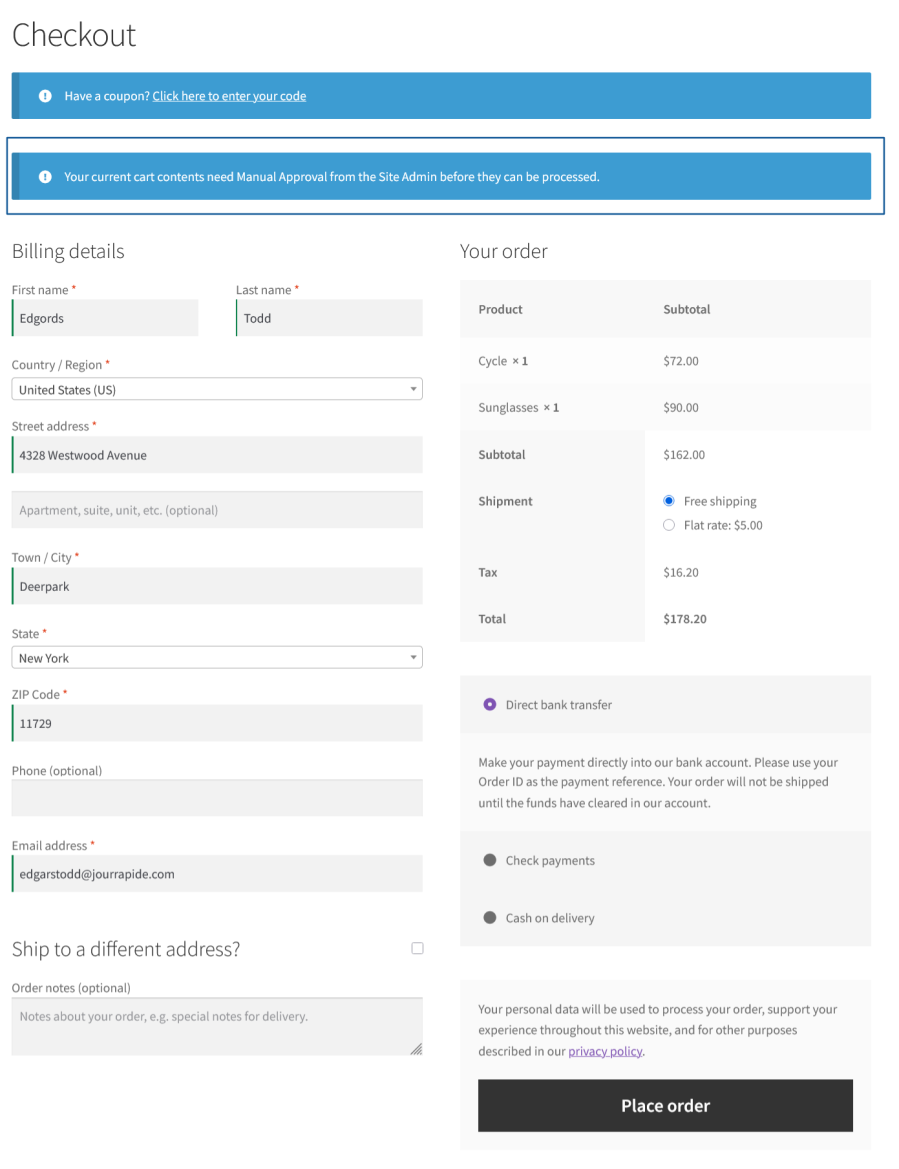
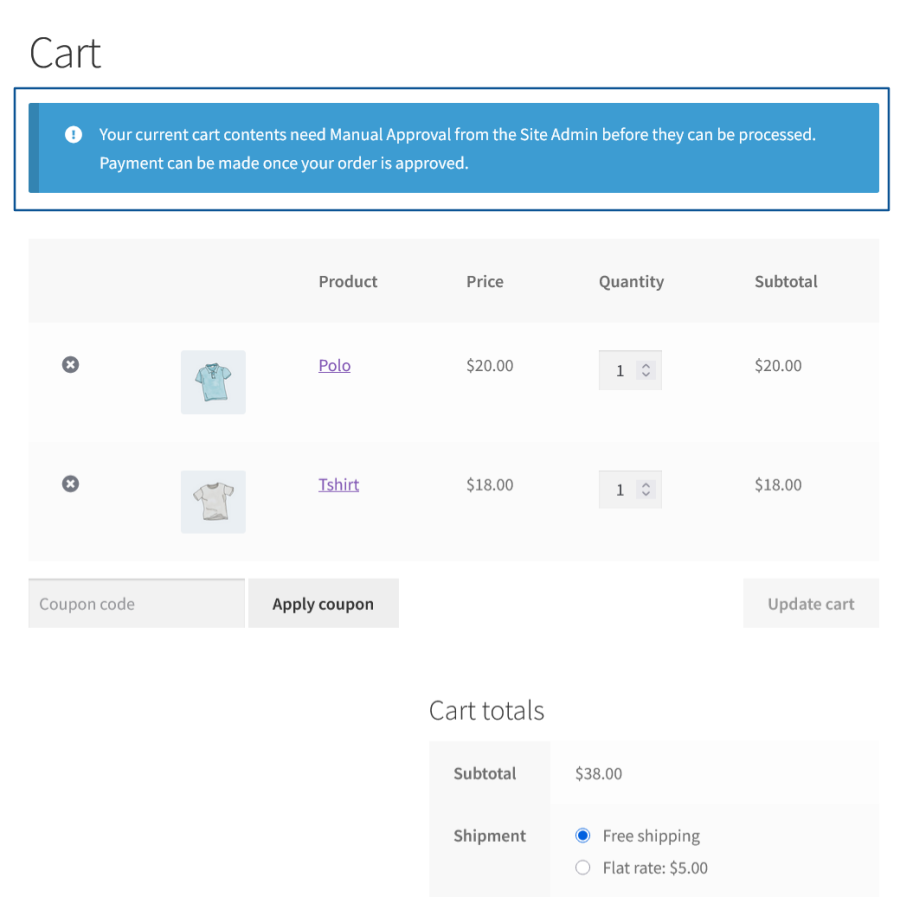
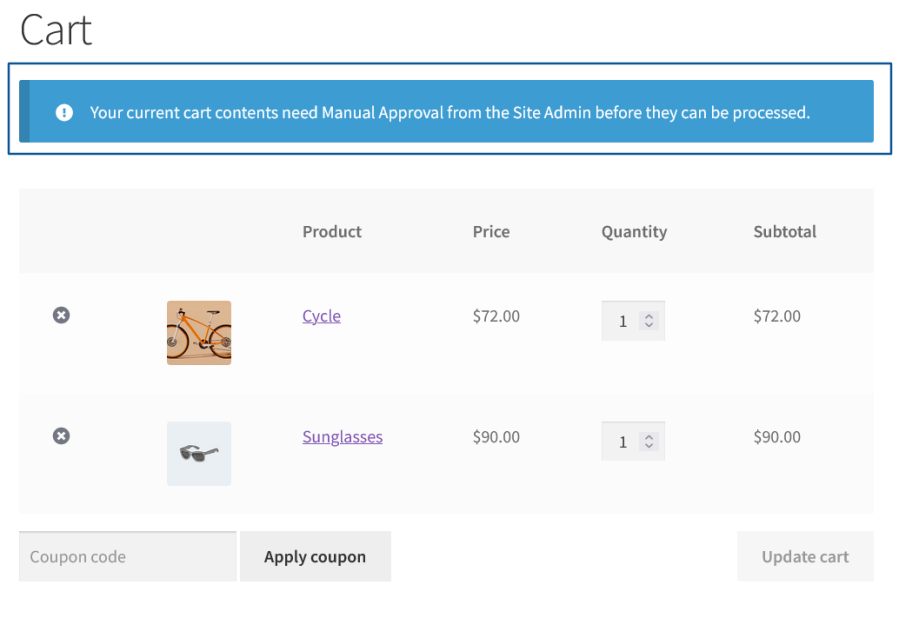
  • On the Cart and Checkout pages, a notice will be displayed informing the user that the order needs manual approval before it can be processed.
Approval is needed notice on the Cart page
Approval is needed notice on the Checkout page
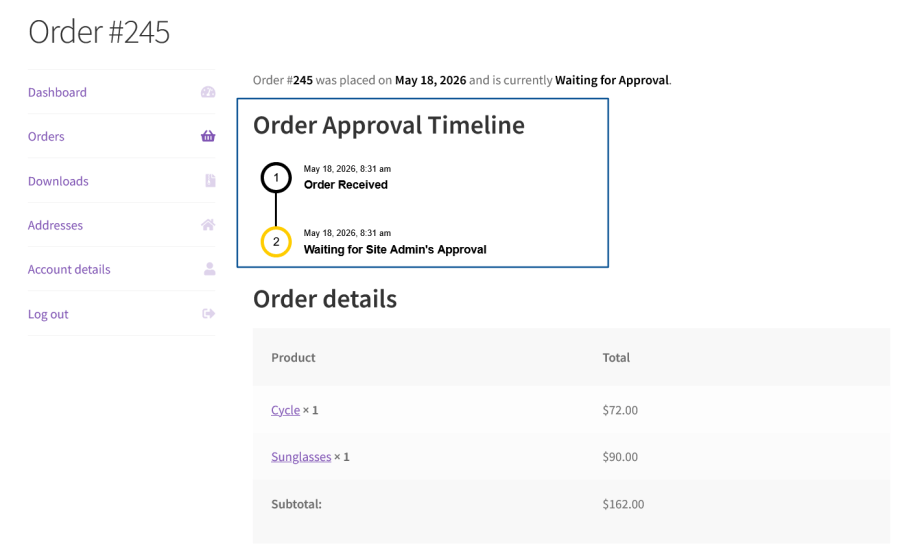
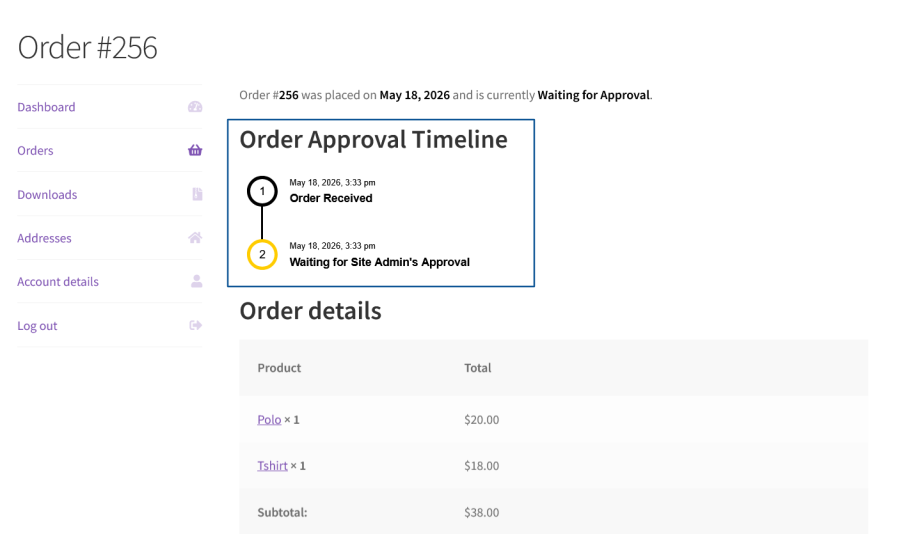
  • Once the user completes the purchase, they can view the status of the order approval from the My Account page.
User Waiting for Approval
  • The Site Admin can review the orders pending approval in the Advanced Order Approval section.


Admin post table

  • Once the order is approved, the order will be processed. If the order is rejected, the user will be notified.

Wait and Pay order approval

  • A User adds products to their cart.
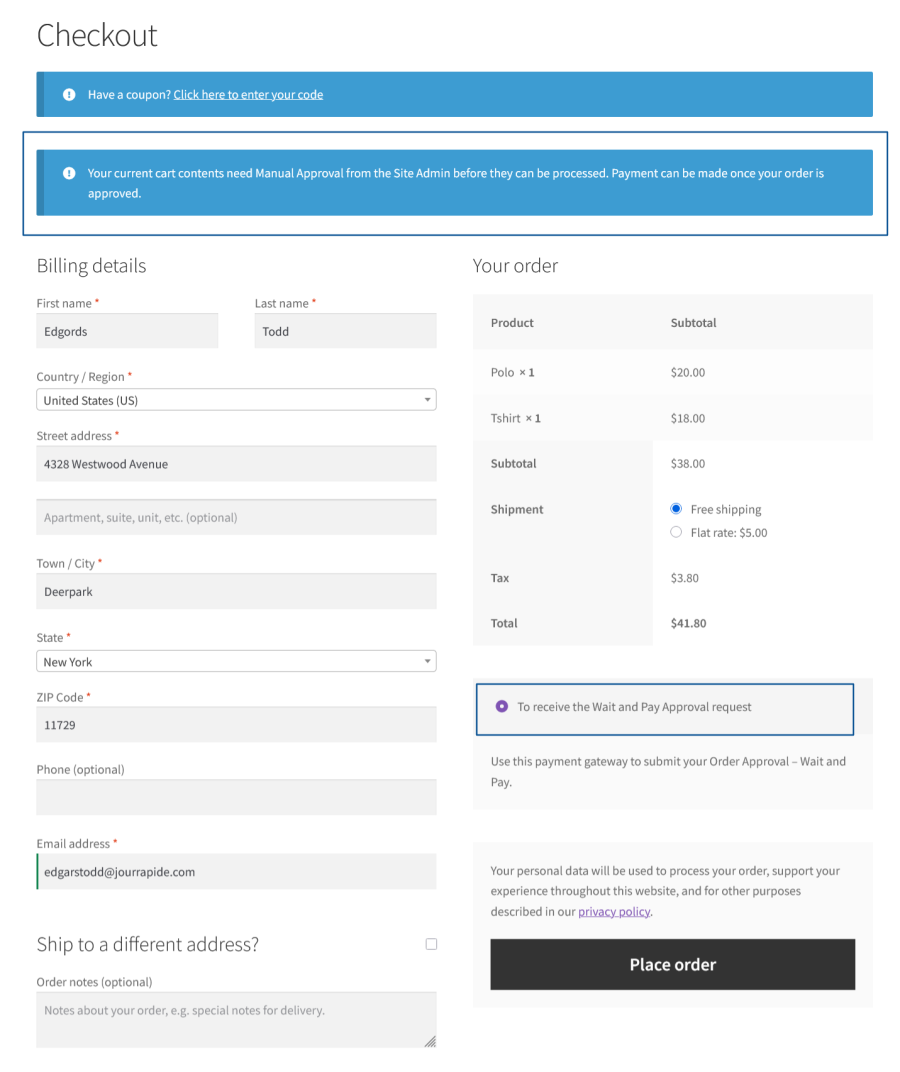
  • On the Cart and Checkout pages, a notice will be displayed to inform the user that the order needs manual approval before it can be processed.
Approval needed on the Cart page
Approval needed on the Checkout page
  • Once the user completes the purchase, they can view the status of the Order Approval on their My Account page.
User Waiting for Approval
  • The Site Admin reviews orders pending approval in the Advanced Order Approval section.
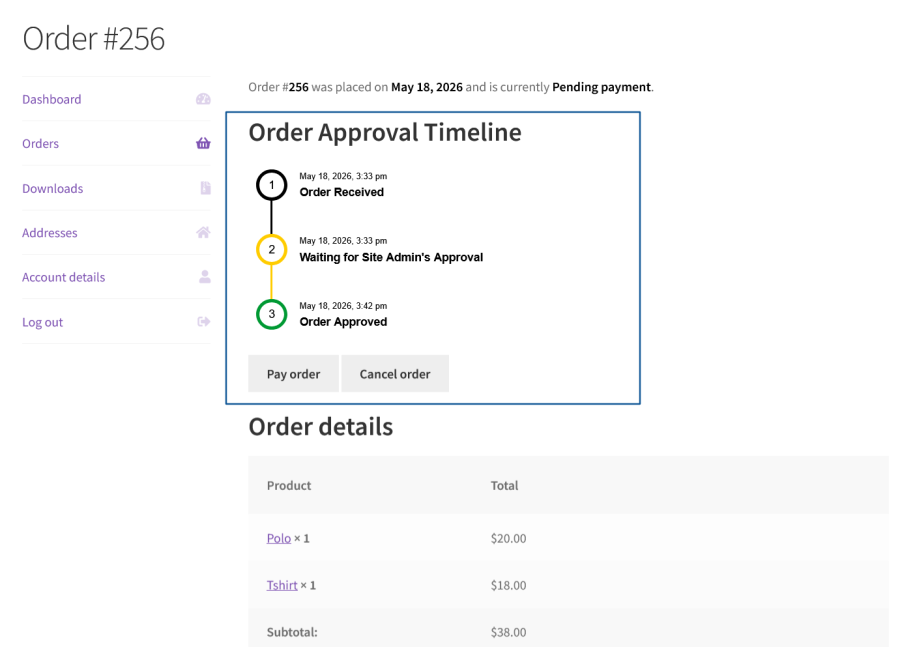
  • Once orders are approved, the user can make the payment for their order from their My Account page.
Order Approved – payment must be made
  • Upon successful payment, the order will be processed. If the Order is rejected, the user will be notified.

Popular Features

1. Manual Order Review & Approval Workflow

Hold matching orders for admin review before they’re processed, giving you full control over which orders actually get fulfilled.

Key Capabilities:

  • Global enable/disable switch for the entire order approval feature.
  • Complete status workflow: New, On-hold, Approved, Rejected, and Expired.
  • Admin approve/reject actions directly from the order approval screen.
  • Visual timeline showing each order’s approval history to both admin and customer.

2. Flexible Approval Modes: Pay & Wait vs. Wait & Pay

Choose whether customers pay upfront and wait for approval, or wait for approval first and pay once approved.

Key Capabilities:

  • “Pay and Wait” mode: Customer pays immediately, order is held for approval.
  • “Wait and Pay” mode: Order is held first; customer pays only after approval.
  • Dedicated “Wait and Pay” payment gateway to support deferred-payment approval.
  • Mode configured per rule, so different order types can follow different workflows.

3. Powerful Rule-Based Matching Criteria

Build precise rules to determine exactly which orders require approval, using AND/OR condition groups.

Key Capabilities:

  • Order-level conditions: Total, cart subtotal, and item count (less than/equal to or more than/equal to a value).
  • Product & category include/exclude conditions.
  • User & user role include/exclude conditions.
  • Shipping method include/exclude conditions.
  • Multiple condition groups can be combined with AND/OR logic for complex rule building.

4. Rule Validity & Scheduling

Limit when a given approval rule is active.

Key Capabilities:

  • Date range validity for time-limited approval rules.
  • Specific weekday targeting to apply rules only on chosen days.
  • Rule priority ordering when multiple rules could match the same order.
  • Active/Inactive status toggle per rule.

5. Payment Method Control per Rule

Limit which payment options customers see when an order requires approval.

Key Capabilities:

  • Selectable payment gateways shown specifically for orders matching a rule.
  • Applies independently of the store’s regular checkout gateway settings.

6. Configurable Payment Deadlines & Reminders

Keep approved orders moving toward payment with automated deadlines and reminders.

Key Capabilities:

  • Configurable due period (in days) for customers to pay after approval.
  • Configurable reminder timing (days before the due date) for automated payment reminder emails.
  • Automatic expiry handling once the payment window passes.
  • Background processing for reminders and expiration, without slowing down the site.

7. Complete Email Notification System

Keep both store admins and customers informed at every stage of the approval process.

Key Capabilities:

  • Admin email for new order approval requests.
  • Customer emails for approval request received, approved, rejected, expired, and
  • payment reminders.
  • Separate templates for both Pay and Wait and Wait and Pay flows.
  • Fully templated and overridable, following standard WooCommerce email structure.

8. Customer-Facing Order Timeline

Give customers visibility into where their order stands in the approval process.

Key Capabilities:

  • Order approval timeline displayed on the order and My Account pages.
  • Status-specific messaging for approved, rejected, and expired outcomes.
  • Customizable messages for cart notices and timeline states, editable from settings.

9. Cart & Checkout Protection

Prevent conflicts between approval-required and standard products, and stop orders from being cancelled improperly.

Key Capabilities:

  • Cart-level error messaging when incompatible products are combined.
  • Notice display at checkout informing the customer their order will need approval.

Extensive Features List

Order Approval System

  • Route qualifying orders through a manual approval process before fulfillment.
  • Compatible with both classic checkout and WooCommerce Checkout Blocks.

Approval Payment Modes

  • Pay and Wait: Customers pay upfront and orders await approval.
  • Wait and Pay: Customers place orders without payment and receive a payment link after approval. Unpaid approvals expire after a configurable period.

Approval Statuses

  • Track approvals through New, On-hold, Approved, Rejected, and Expired statuses.
  • Trigger automated actions and email notifications as statuses change.
  • Allow administrators to manually update approval statuses.

Rule-Based Approval Criteria

  • Create multiple approval rules with independent settings and payment modes.
  • Combine criteria using AND/OR logic for advanced workflows.
  • Configure rules based on:
    • Order totals and cart subtotals
    • Product quantities
    • Included or excluded products and categories
    • Specific users and user roles
    • Shipping methods
    • Date ranges and weekdays

Rule Configuration

  • Assign a payment mode and eligible payment gateways to each rule.
  • Activate, deactivate, and bulk manage approval rules.

Cart & Checkout Controls

  • Display customizable approval notices when approval is required.
  • Allow checkout only through selected payment gateways.
  • Automatically remove non-qualifying products from the cart.
  • Support dynamic placeholders to display removed product names in error messages.

Payment Deadlines & Expiry

  • Set payment deadlines for approved Wait and Pay orders.
  • Automatically calculate and track expiry dates.
  • Mark approvals as Expired when payment is not completed on time.

Payment Reminders

  • Send automated payment reminder emails before payment deadlines.
  • Configure custom reminder schedules.
  • Allow administrators to manually resend reminders.

Approval Management

  • Manage approvals from a dedicated admin screen.
  • View and edit approval details, customer information, order items, and payment data.
  • Link directly to related WooCommerce orders and customer approvals.
  • Display approval statuses within the WooCommerce Orders list.

Customizable Messages

  • Configure customer-facing notices and error messages.
  • Personalize approval-related checkout messages.
  • Support dynamic placeholders for product information.

Wait and Pay Gateway

  • Include a dedicated Wait and Pay payment gateway.
  • Customize the gateway’s title and description.
  • Display the gateway only when applicable approval rules are matched.

Custom Styling

  • Apply Custom CSS to modify frontend and admin appearances without editing plugin files.


Download the Advanced Order Approval extension to streamline the order-approval process for made-to-order products.

Requirements

Minimum PHP version: 5.6


Extension information

  • WordPress version required: 4.6
  • WooCommerce version required: 4.0.0
  • PHP version required: 7.4.0
  • Tested with WordPress: 7.0
  • Tested with WooCommerce: 10.8.1
  • Requires at least WordPress: 6.2
  • Requires at least WooCommerce: 8.2.0

Countries

  • Worldwide

Languages

English (United States)

Related Products

Price $279 annually
Rated 3.2 out of 5 stars
Price $79 annually
Rated 3.4 out of 5 stars
Price $59 annually
Rated 3.1 out of 5 stars
Price $109 annually
Rated 2.7 out of 5 stars
Price $109 annually
Rated 2 out of 5 stars
Price $49 annually
Rated 4.1 out of 5 stars
Price $109 annually
Rated 2.3 out of 5 stars
Price $39 annually
Rated 2.8 out of 5 stars
Price $109 annually
Rated 2.6 out of 5 stars
Use of your personal data
We and our partners process your personal data (such as browsing data, IP Addresses, cookie information, and other unique identifiers) based on your consent and/or our legitimate interest to optimize our website, marketing activities, and your user experience.