
Product Icon

Amazon Fulfillment (MCF) for WooCommerce

Connect your WooCommerce store to Amazon's MCF service using the Amazon Fulfillment (MCF) for WooCommerce extension and automate shipping orders to your customers.
Choose a billing option
$99
Save 20%
$198 $158.40

Subscription includes

  • Product updates and improvements
  • Customer support
  • 30-day money-back guarantee


Streamline deliveries with Amazon Multi-Channel Fulfillment for WooCommerce

Join the tens of thousands of businesses are already taking advantage of one of the most robust and versatile fulfillment networks in the world; the Amazon fulfillment network. With the Amazon MCF for WooCommerce plugin, you can quickly and easily connect your store to Amazon’s fulfillment network and benefit from seamless, simple, and reliable fulfillment.

How Amazon MCF Works

Sign up for Amazon MCF and install the WooCommerce plugin; then send a sample size or your full inventory to an Amazon fulfillment center. You’re now ready to take advantage of one of the most powerful fulfillment networks in the world!

When a purchase is made on your WooCommerce store, your order is automatically submitted to Amazon where it is picked, packed, and shipped directly to your customers.

Orders are sent white labeled using the same shipping methods as if ordering directly from Amazon.

Customer returns are sent directly to Amazon to be restocked.


You sell it, Amazon Picks, Packs & Ships it

Expedite the growth of your business by spending less time on fulfillment and more time on what matters. Leverage Amazon’s Multi-Channel Fulfillment (MCF) and plug your business into Amazon’s world-class fulfillment network complete with trusted shipping options.

  • Fast delivery with the efficiency and accuracy of Amazon Prime with expedited (1 working day) or standard (3 working days) delivery options.
  • Streamline operations by shipping your inventory to your local Amazon fulfillment center where Amazon will manage everything for you.
  • White label packaging so your customers do not associate your shipping with Amazon’s fulfillment network.
  • Shipping arrival estimates with the MCF Fast Badges (currently available in the US and UK regions). This feature calculates delivery estimates based on the buyer’s location.

Amazon Fulfillment (MCF) for WooCommerce Benefits:

  • Automatically ship orders from your WooCommerce site to your customers with MCF. Through this extension Amazon will pick, pack, ship, and track orders for you!
  • Remove the hassle of fulfillment and spend more time creating and selling great products!
  • This integration is fast and easy to set up and comes with a variety of options ranging from complete auto-pilot all the way down to specific product shipping options if desired.

Powerful Features

Configure Whole Store or Set Per Product

Easily toggle product fulfillment mode from the all products list or inside the individual product settings.
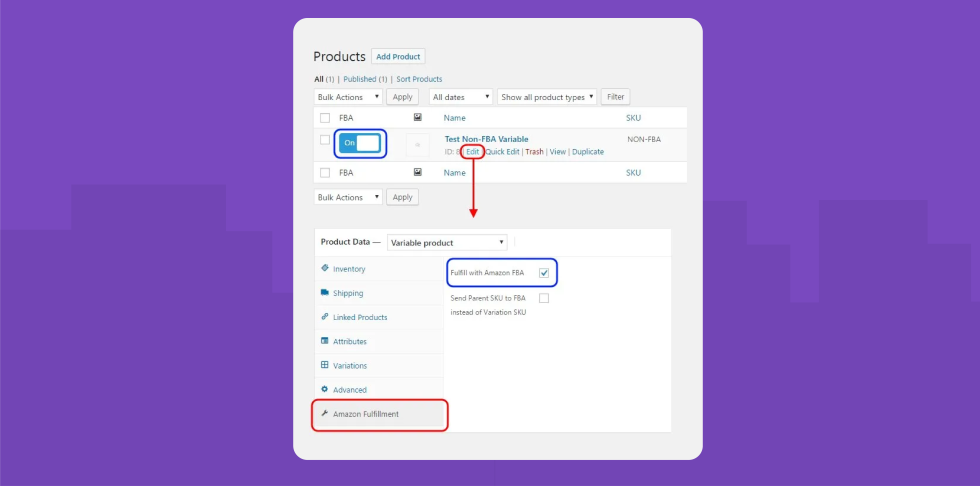
Amazon MCF Powerful Features


Compatible with ALL Amazon Regions Worldwide*

Whether you’re selling domestically or internationally this extension will connect to any single Region and Marketplace in Amazon.

For stores connected to the EU Region, it will even automatically switch Marketplace IDs for you behind the scenes based on each customer’s shipping address!


*Please see the Documentation for additional details on region support depending on authorization mode used. Current Region Support per authorization mode (new installations can only use the New Auth Token mode and support for Legacy Dev Credentials will be removed from the plugin shortly after all regions are supported by the New Auth Token mode)


Track MCF Order Statuses inside WooCommerce

Easily see where every product is in the shipping lifecycle right from your standard orders page.


Offer Amazon Shipping Speeds to Your Customers

Map WooCommerce shipping options to Amazon’s shipping speed categories: standard, expedited, and priority.


Advanced Email Notifications

  • Shipment Created
  • Order Shipped
  • Order Tracking
  • Failed to Ship
  • Shipment Created
  • Order Shipped
  • Order Tracking
  • Failed to Ship


Automatically Sync Stock Levels

Keep your WooCommerce stock levels synced from available inventory in Amazon and never oversell a product again.

Sync Amazon MCF Stock Levels

Mixed Orders

Orders can contain both MCF and non-MCF products, and will still be partially fulfilled through Amazon.

Amazon MCF Mixed Orders


Package Tracking for Customers

Your customers can access shipping and tracking information right from their View Order page.

Admins can also view the entire fulfillment history in the order notes.


Manually Send Orders to MCF

Manually send orders to MCF for one-off special cases or if your process requires manually approving orders prior to shipping.
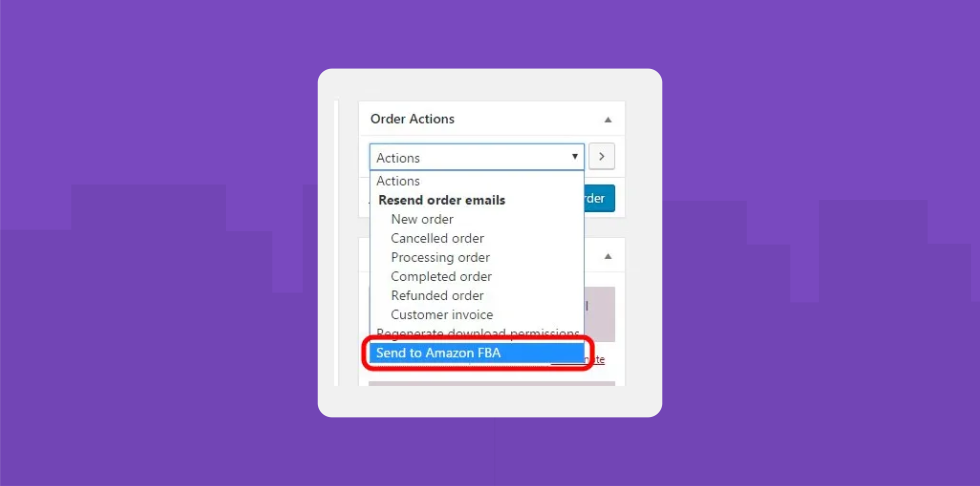
Manually Send Orders MCF


How WooCommerce Amazon Multi-Channel Fulfillment works:

This extension is flexible and can handle a wide range of shipping scenarios, but its main purpose is to automate order fulfillment through Amazon. This core objective drives how and when the extension is triggered to send an order’s data to Amazon. You would typically never ship a product before receiving valid payment, and this plugin works the same way.

WooCommerce Amazon Fulfillment only sends orders to MCF automatically after it detects the WooCommerce payment complete event. It has been tested with Stripe, PayPal, Authorize.Net, and Amazon Payments, but it should work with any other payment method that is properly built for WooCommerce which triggers the payment complete action.

Therefore, all other typical WooCommerce settings like payment gateways and shipping methods should be configured and working properly before integrating with MCF. Also, the value of each product SKU in WooCommerce must perfectly match the Seller SKU field in your MCF inventory in order for Amazon to process, pack, and ship the order (this means it’s CASE sensitive as well!). Every time the payment complete condition for an order is detected, WooCommerce Amazon Fulfillment will send the order, customer, and product information to MCF as an outbound fulfillment order for the products in the cart which are set to fulfill through Amazon. If there are any errors, the plugin will send you an email notification and will record an order note with a detailed record of the order data and the error.

Before using the extension, you will need to configure Amazon Marketplace Web Service (MWS) credentials which allow it to access to your Amazon fulfillment account. Read more in our Documentation.

Amazon Web Services, and the “Fulfillment by Amazon” logo are trademarks of Amazon.com, Inc. or its affiliates in the United States and/or other countries.

Requirements & Documentation

  • Product Documentation
  • WooCommerce version 3.0 or higher
  • An Amazon Pro Seller merchant account and MCF service

Customer reviews

Average rating 3.1
22 reviews
5 stars, 50% of reviews
4 stars, 0% of reviews
3 stars, 5% of reviews
2 stars, 0% of reviews
1 star, 45% of reviews
22 reviews
  • tazama2020
    Rated 5 out of 5
    Functionality
    Mar 4, 2026
    Functionality
    It was easy to install, easy to setup and it has been working for me for the past 4 years. If any issue I get a clear error message. Usually the error has to do with stock of fulfillment, I have not had issues with the plugin or the service itself so a 5 star rating is in its place. It does what it needs to do.
  • mikeassad
    Rated 5 out of 5
    Ease of use
    Nov 18, 2025
    Ease of use
    This plugin does exactly what it's meant to do - creates an MCF order from your WooCommerce order. It will keep the status of the order in sync with the Amazon MCF order and mark it completed when the order ships from Amazon. The only hiccup I get is when something goes out of stock with Amazon, the order can sit in 'Planning' with MCF forever and sometimes gets lost, event when inventory comes back into stock. So I have to manually cancel the order in MCF and then manually recreate it which is a lot of cutting and pasting. Would be nice to be able to cancel an MCF order from Woo and re-send it once the item is back in stock.
  • bizurksoftware
    Rated 1 out of 5
    Functionality
    Aug 14, 2025
    Functionality
    it doesn't work. I set the item to be fulfilled by FBA, submit the order, and the orders are just sitting in "processing" for a long time. The plugin offers zero information or status updates, so there's no way to troubleshoot it and see if the site even attempted to communicate with Amazon or not. I'm just sitting here staring at the order that is doing nothing... bad design, bad plugin, doesn't even work. The order DOES get send to FBA, the order even gets shipped out by Amazon MCF, yet the status still says "Processing"
    • Never Settle
      Aug 14, 2025
      I’m sorry to hear about your experience — I understand how frustrating it is when orders don’t process as expected. The “processing” status usually means the order hasn’t yet received a successful confirmation from Amazon, which can happen if there’s an account connection, SKU mapping, or inventory availability issue. The plugin does log all communication with Amazon so we can pinpoint exactly where it’s getting stuck. If you can open a support ticket and share your WooCommerce logs (WooCommerce → Status → Logs → Amazon MCF), we’ll review the exact API calls and help you get fulfillment working quickly. Our team is committed to resolving this for you so you can get back to running your store...
  • infatot
    Rated 5 out of 5
    Ease of use
    Jul 31, 2025
    Ease of use
    Over the past 6 months, I’ve been trying to connect my WooCommerce orders to Amazon FBA/MCF. I actually came across this plugin early in my search but dismissed it due to the low review ratings. Instead, I tried three other services that I assumed would be better: Veeqo – Didn’t work and support was unhelpful ExportYourStore – Also didn’t work. It kept creating duplicate products on my WooCommerce store and support was painfully slow M2E Pro – Stock wouldn’t sync with WooCommerce. Support was friendly but too slow to resolve anything At that point, I was pulling my hair out and genuinely starting to think it just wasn’t possible. As a last resort, I gave this plugin a shot, and I wish I had...
    • Never Settle
      Aug 14, 2025
      Thank you for such a detailed and thoughtful review — and for giving our Amazon Fulfillment (MCF) plugin a chance after your earlier experiences. We’re thrilled to hear it got you up and running with stock syncing and order fulfillment so quickly after months of frustration. We also appreciate you pointing out the shipping method workaround you found — that’s a great tip for other users, and we’ll keep it in mind as we explore future improvements. Regarding the delay in our email reply, we apologize for not getting back to you sooner. We aim to respond within one business day, and we’re reviewing what happened so we can prevent it in the future. Your feedback helps us improve and gives other...
  • prochutes
    Rated 5 out of 5
    Support
    Jan 5, 2025
    Support
    Support was able to solve the issues I was having.
    • Never Settle
      Jul 29, 2025
      Glad to hear!

Extension information

  • PHP version required: 7.4
  • Tested with WordPress: 6.9
  • Tested with WooCommerce: 10.0.0
  • Requires at least WordPress: 6.7
  • Requires at least WooCommerce: 8.0.0

Countries

  • Worldwide

Requirements

  • WooCommerce version 3.0 or higher
  • Amazon Pro Seller merchant account
  • Active Fulfillment by Amazon (FBA) service

Related Products

Price $99 annually
Rated 4.7 out of 5 stars
Price $79 annually
Rated 3.4 out of 5 stars
Price $59 annually
Rated 3.1 out of 5 stars
Price $109 annually
Rated 2.8 out of 5 stars
Price $49 annually
Rated 4.1 out of 5 stars
Price $109 annually
Rated 2 out of 5 stars
Price $109 annually
Rated 2.3 out of 5 stars
Price $109 annually
Rated 2.6 out of 5 stars
Price $109 annually
Rated 2 out of 5 stars



