

Subscription includes
Support
Managing product images can become a time-consuming task when your store has hundreds or thousands of products. Product Image Manager for WooCommerce lets you upload large batches of images and automatically assign them to the right products using flexible filename matching.
Instead of uploading and assigning images one at a time, set your filename rules, upload your images, and let the plugin process them in the background.
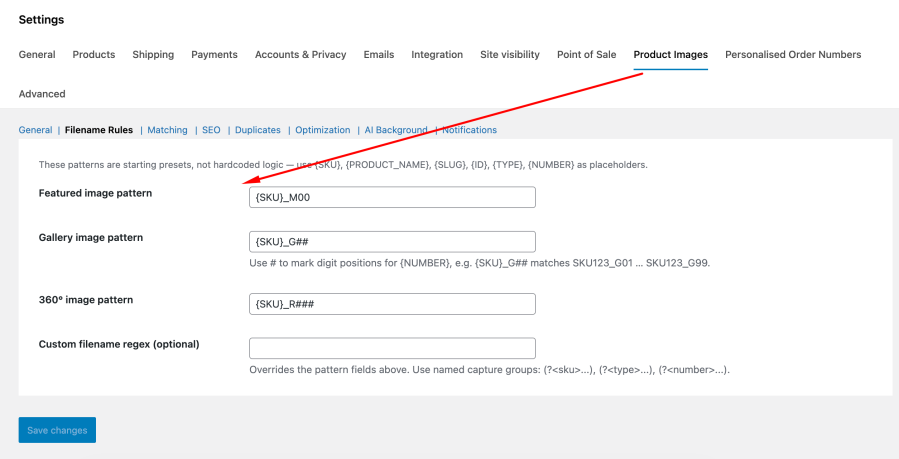
The plugin uses your image filenames to understand which product an image belongs to and what role it should have.
For example:
NIKE-AIRMAX_M00.jpg → Featured imageNIKE-AIRMAX_G01.jpg → Gallery imageNIKE-AIRMAX_G02.jpg → Gallery imageNIKE-AIRMAX_R001.jpg → 360° imageYou can use the default filename patterns or create your own rules to match the way your product catalog is organized.
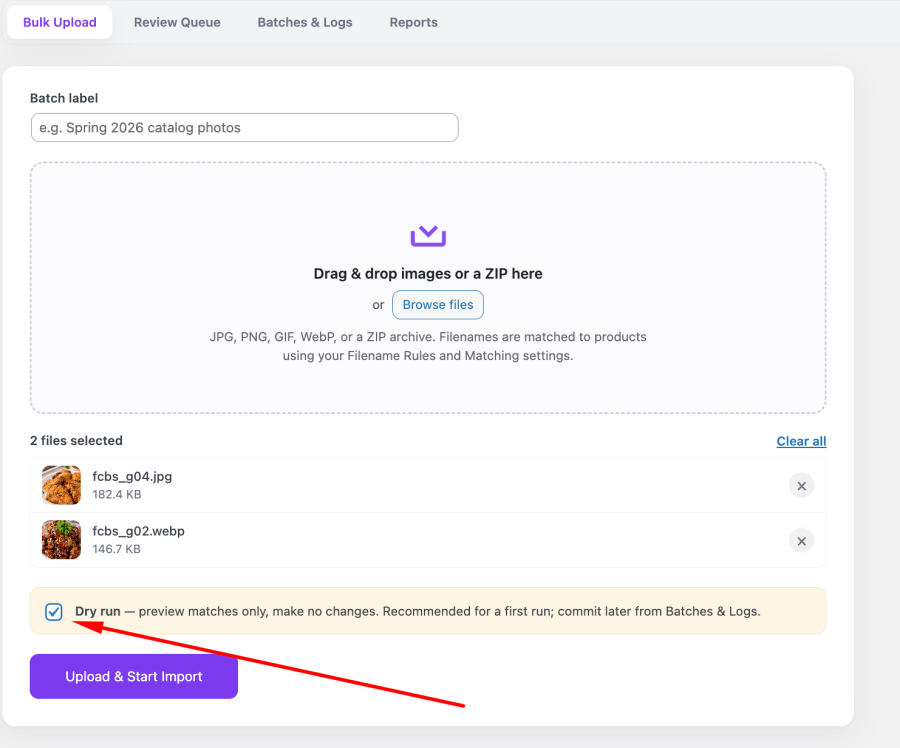
You don’t have to make changes blindly.
Dry Run lets you preview an import before it changes your store. The plugin analyzes the images and shows which products they would be assigned to without modifying your products or media library.
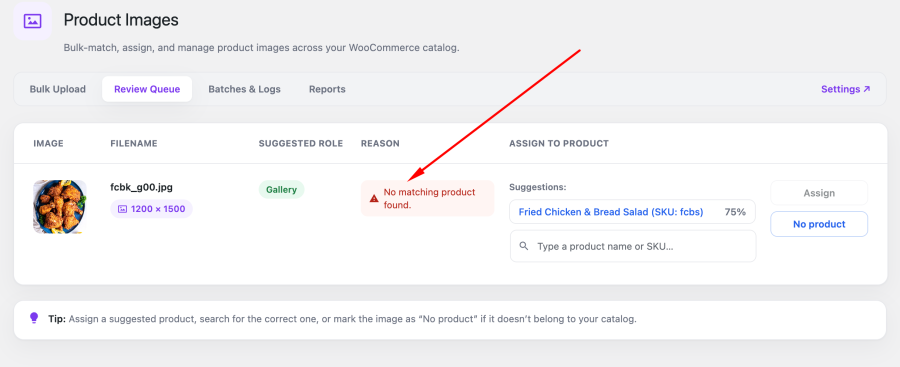
If an image cannot be matched confidently, it goes to the Manual Review Queue. You can see suggested products, confidence scores, and assign the image manually.
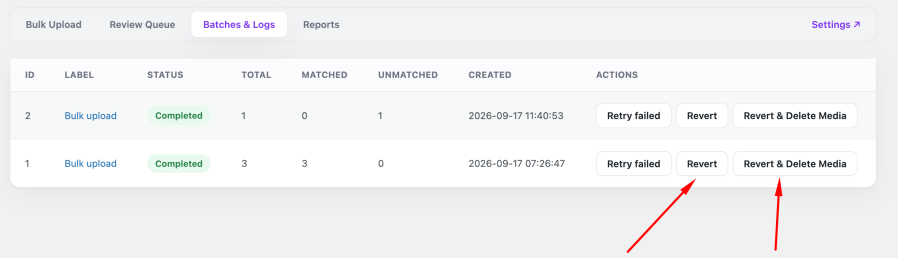
Every import keeps a record of the product image state before changes are made.
If you need to undo an import, use Revert to restore the previous featured and gallery images. You can also choose Revert & Delete Media to remove the attachments created by that import.
Product Image Manager can handle image optimization as part of the import process.
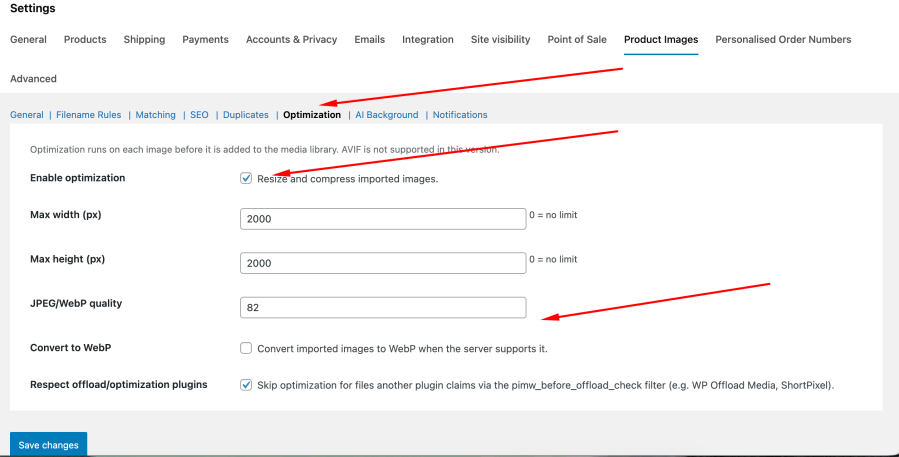
You can:
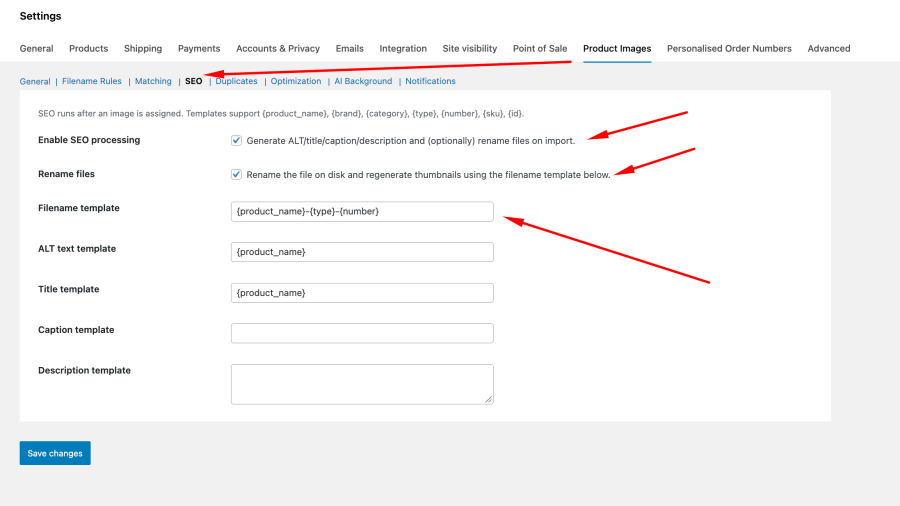
This helps you prepare your product images as they enter your media library instead of managing them separately.
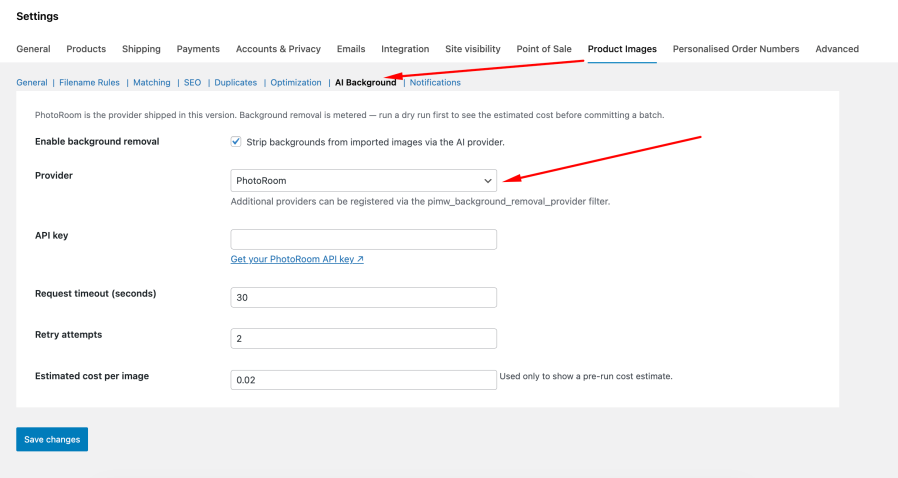
Need clean product images without manually editing every photo?
The optional AI Background Removal feature uses PhotoRoom to remove image backgrounds during the import process. The plugin provides an estimated cost before a batch is processed, helping you understand expected API usage in advance.
PhotoRoom is an optional third-party service and is disabled by default.
Large imports can be difficult to process in a single request. Product Image Manager uses background processing through Action Scheduler so images can be processed in configurable batches.
You can monitor each import through Batches & Logs, where you can pause, resume, retry, or cancel processing and review individual image results.
Product Image Manager also includes:
Whether you’re updating a product catalog, migrating images, or managing a large ecommerce store, Product Image Manager provides a structured way to import and organize product images without manually assigning every file.
Upload your images, let the plugin match them, review the results, and keep control over every change.
Yes. Product Image Manager processes images in the background using Action Scheduler, so you can import large image collections without relying on a single long-running request. Batch sizes can also be configured to suit your hosting environment.
The plugin reads your image filenames and uses configurable matching rules. You can match images using SKU, variation SKU, product ID, slug, product name, custom fields, Regex, or fuzzy matching.
Not necessarily. The plugin provides configurable filename patterns, and you can also use different matching methods or a custom Regex when your existing filenames follow a different structure.
Yes. Dry Run lets you preview the expected matches without changing your products or media library. You can review the results before committing the import.
Images that cannot be confidently matched are sent to the Manual Review Queue. You can review suggested products, see confidence scores, search for a product, and assign the image manually.
Yes. Every import records the previous product image state. You can use Revert to restore the featured and gallery images from before the import. You can also choose to delete the media created by the import.
Yes. The plugin supports simple products, variable products, and variations, including matching images using variation SKUs.
Yes. You can resize and compress images and optionally convert them to WebP when your server supports it. The plugin can also generate SEO-friendly filenames and image metadata such as ALT text, titles, captions, and descriptions.
Yes. The optional AI Background Removal feature uses PhotoRoom to remove image backgrounds during processing. It is disabled by default, and the plugin provides an estimated cost before processing a batch.
By default, no. Image matching, assignment, optimization, and reporting are handled on your own WordPress site. The optional PhotoRoom background removal feature sends the image being processed to PhotoRoom, while notification webhooks only send data to a URL you configure.
Extension information
Quality Checks
Countries







