Product Icon

Role Based Discounts for WooCommerce

Create custom discounts, schedule promotions, role based pricing, hide price & add to cart and offer free shipping.
Choose a billing option
$49
Save 20%
$98 $78.40

Product comparison

Subscription includes

  • Product updates and improvements
  • Customer support
  • 30-day money-back guarantee

Top Features

  • Rule-Based Pricing: Create multiple pricing rules.
  • Discount Types: Create simple discounts or tiered pricing based on customer roles.
  • Targeted Pricing: Apply discounts to specific products, categories, or tags.
  • Customer-Specific Pricing: Provide custom pricing for registered customers and different customer roles.
  • Schedule Pricing: Schedule discounts and surcharges to activate and deactivate automatically.
  • Inventory-Based Pricing: Automatically disable discounts when inventory levels fall below a specified threshold.
  • Customer-Specific Surcharges: Apply surcharges to specific customers or customer roles.
  • Quantity-Based Discounts: Set minimum and maximum order quantities to unlock discounts.
  • Discount Table: Display a customizable pricing table on product pages.
  • Pricing Based on Multiple Criteria: Calculate prices and discounts based on regular prices, sale prices, or default prices.
  • Hide Prices and Add to Cart Button: Hide prices and Add to Cart buttons for selected products, categories, or tags.
  • Customize Price and Add to Cart Text: Replace price and Add to Cart button text with custom messages.
  • Request a Quote Button: Replace the Add to Cart button with a Request a Quote button for custom pricing requests.
  • Free Shipping Based on Cart Value: Encourage larger orders by offering free shipping for carts within specified value ranges.
  • Import Prices: Bulk import product prices using CSV files.

Running a WooCommerce store means catering to different types of customers, including wholesalers, retailers, registered members, and guests. Not everyone should see the same prices or receive the same offers. With Role Based Pricing & Discounts for WooCommerce, you can show the right price to the right customer. It lets you control pricing for different user roles and create flexible discount rules that match your sales strategy.

Whether you want to offer exclusive discounts to loyal members, set different prices for guest users, or display a complete pricing table on product pages, this plugin gives you the tools to do it. You can create unlimited rules, apply them to specific products or categories, schedule promotions, offer free shipping, and even hide prices for certain users. It is an easy way to manage personalized pricing.
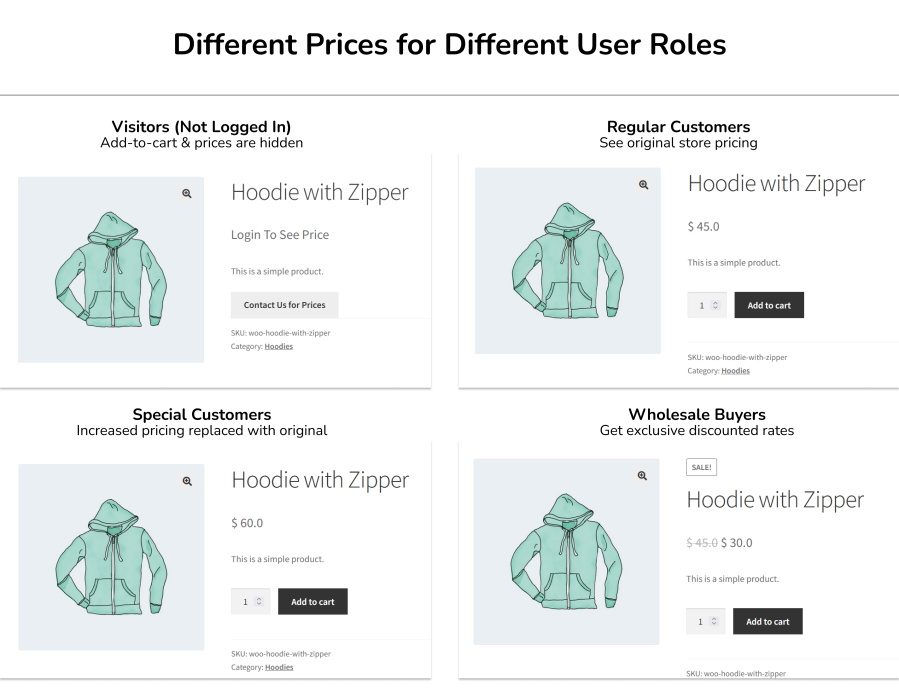
Different Prices for Different User Roles for WooCommerce

Product and Customer-Based Discounts

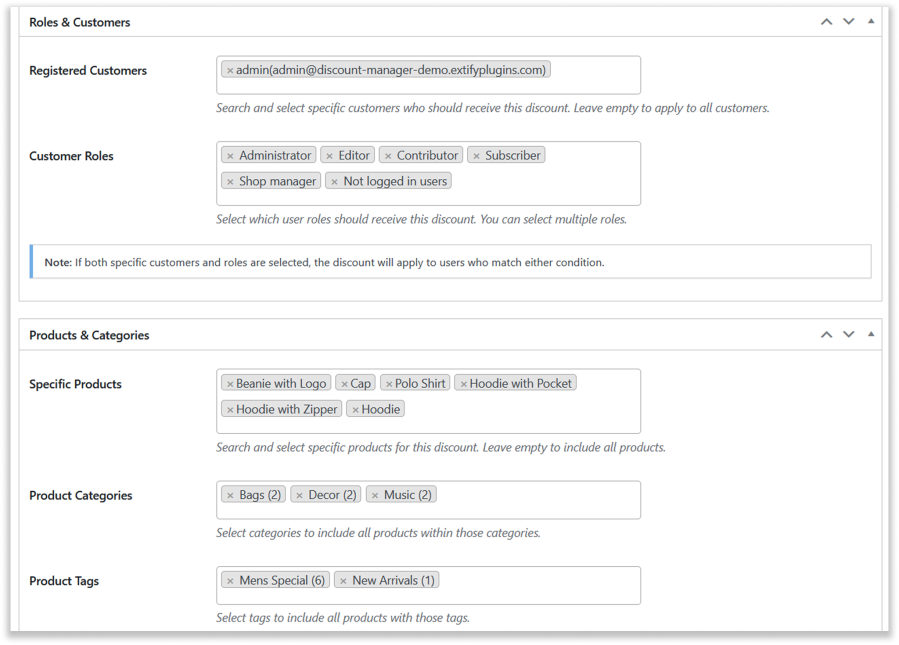
  • Targeted Discounts: Apply discounts to specific products, categories, and tags.
  • Role-Based Discounts: Offer personalized discounts and pricing to different customer roles or specific registered customers.

Different Prices for Different User Roles WooCommerce

Scheduling Discounts and Pricing

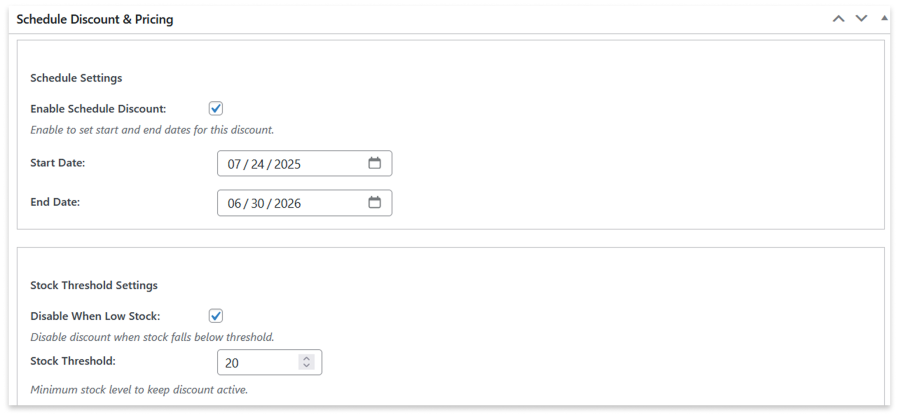
  • Schedule Discounts: Automatically activate or deactivate discounts and surcharges at specific times.
  • Set Quantity Thresholds: Disable discounts when inventory levels fall below a specified threshold.

WooCommerce Role Based Pricing and Discounts

Simple Discounts

Offer fixed or percentage-based discounts and apply them to specific products, categories, or tags. You can also restrict discounts to specific customer roles (e.g., Wholesaler or B2B) and registered customers with WooCommerce Role Based Pricing.

Example

  • 20% discount on the Shoes category for B2B customers.
  • $10 discount on Shirts for guest users.
  • 10% discount on New Arrivals (tag) for wholesalers.

Tiered Pricing (Role-Based Pricing)

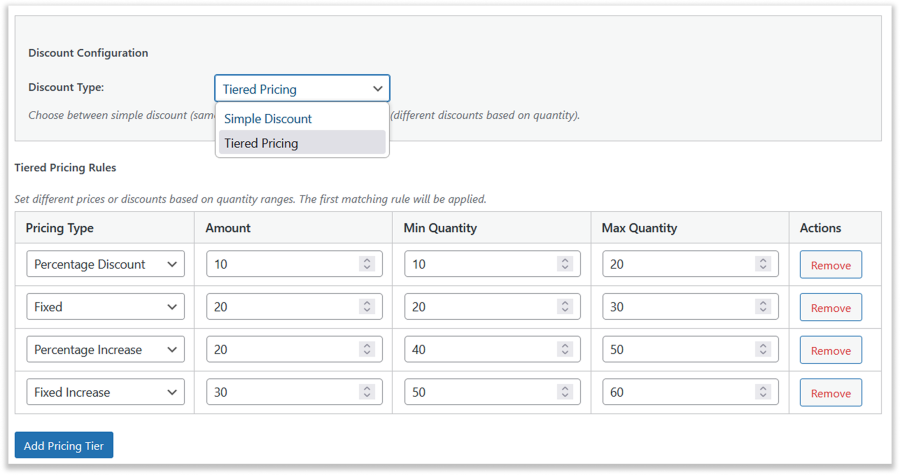
Using Role Based Pricing for WooCommerce, offer discounts or price increases based on order quantities. Set specific quantity ranges to trigger each pricing level.
Example

  • 10% discount for wholesalers purchasing 1–5 products in the Shirts category.
  • $20 fixed discount for wholesalers purchasing 6–10 products in the Shirts category.
  • 30% price increase for wholesalers purchasing 11–20 products in the Shirts category.
  • $100 fixed price increase for wholesalers purchasing 20–30 products in the Shirts category.

Tiered and Role-Based Pricing for WooCommerce

Display Pricing and Discount Tables on Product Pages

Display a discount table on product pages to clearly showcase different pricing tiers with WooCommerce Role Based Pricing & Discounts.
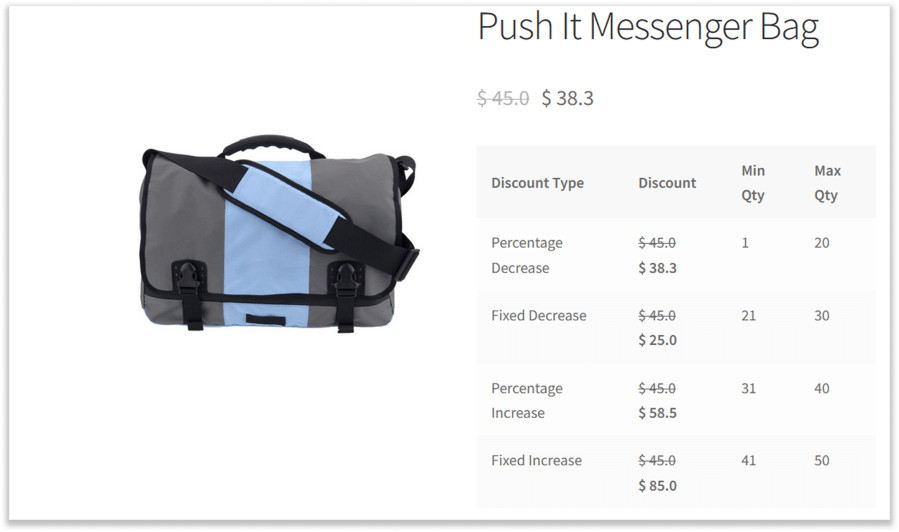
Pricing Table for WooCommerce Role Based Pricing

Hide Prices and Add to Cart Button

Hide prices and the Add to Cart button for selected products, categories, or tags. Replace price text or button labels with custom messages, or use Request a Quote with Contact Form 7 integration for bulk orders and custom pricing requests.
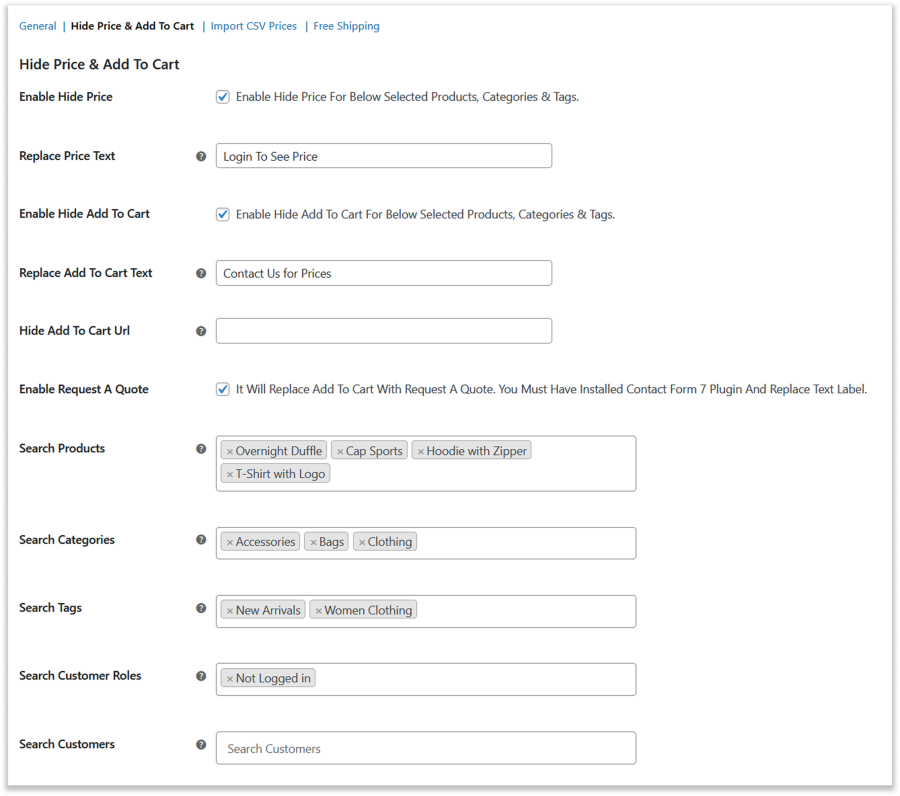
Hide Price and Add to Cart Button for WooCommerce

Offer Free Shipping

Offer free shipping for orders within a specified cart value range. Set minimum and maximum cart amounts, display custom messages about free shipping thresholds, and show a congratulatory message when customers qualify for free shipping.
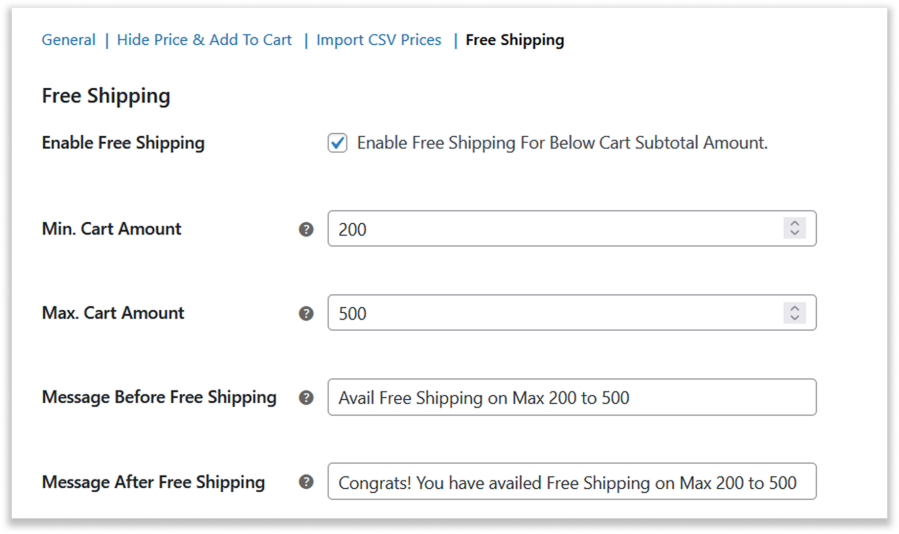
Offer Free Shipping in WooCommerce Role Based Pricing

Bulk Price Import via CSV

Easily import product prices in bulk using CSV files with the WooCommerce Discounts Plugin, streamlining large-scale price adjustments.
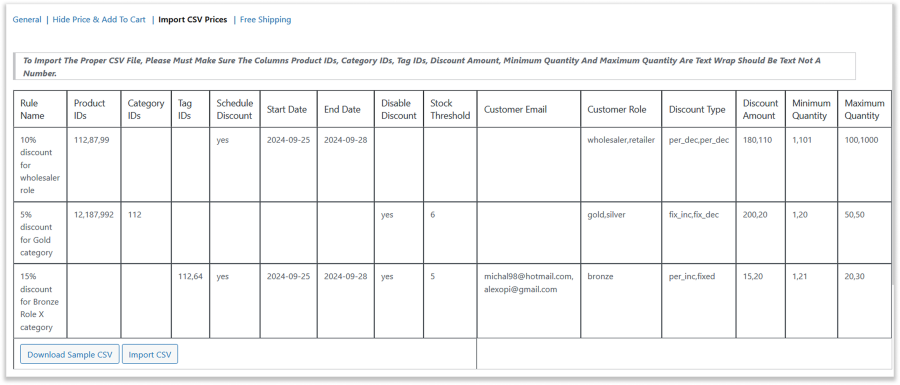
Import and Export Prices for WooCommerce Role Based Pricing

Compatibility & Integrations

Designed for flexibility and seamless performance, this plugin works smoothly with a wide range of popular WordPress themes, page builders, and WooCommerce extensions. Whether you’re running a single WooCommerce store or a WordPress multisite network, enjoy consistent performance across desktop, tablet, and mobile devices.

Compatible Themes

The plugin supports popular classic and modern WordPress themes, including:

  • Avada
  • Astra
  • Divi
  • Porto
  • Hello Elementor
  • Storefront and default WooCommerce themes
  • Block Themes: Twenty Twenty-Three, Twenty Twenty-Four, and Twenty Twenty-Five

Compatible Plugins & Extensions

Compatible with essential WooCommerce extensions, including:

Getting Started

  • Buy: Purchase Role Based Discounts for WooCommerce directly from WooCommerce.com.
  • Download: Download and install the plugin on your WooCommerce store.
  • Activate: Activate the plugin from your WordPress dashboard.
  • Configure: Go to WooCommerce > Discounts Manager to set up pricing rules and configure the plugin.
  • Need Help? Follow the complete installation and configuration guide.

Frequently asked questions

What types of discounts can I create?

WooCommerce Role Based Pricing and Discounts allows you to create both simple discounts and role based pricing. Simple discounts apply a fixed amount or percentage discount to a product or category. Tiered pricing allows you to offer discounts based on the quantity purchased, encouraging bulk purchases.

Can I offer different pricing to different customer groups?

Yes, you can apply different pricing rules to specific customer roles with WooCommerce role based pricing. This allows you to offer exclusive discounts or special pricing to VIP customers, wholesale customers, or other customer segments.

Can I apply discounts to specific products or categories?

Absolutely. You can target discounts based on products, categories, tags, and even specific customer selections.

How does the plugin handle time-based and inventory-based pricing?
You can schedule discounts to activate and deactivate automatically at specific times. Additionally, you can set up rules to automatically disable discounts when inventory levels fall below a certain threshold.
How do I create tiered pricing?

You can set up tiered pricing based on quantity, offering different discounts or price increases as customers purchase more items.

Can I apply surcharges to specific customers?

Yes, you can surcharge specific customers or customer roles.

Can I set minimum or maximum order quantities for discounts?

Yes, you can set quantity thresholds to trigger discounts or price adjustments.

Can I display a discount table on the product page?

Yes, you can customize and display a pricing table to clearly showcase pricing tiers to customers.

Extension information

  • PHP version required: 7.0
  • Tested with WordPress: 7.0
  • Tested with WooCommerce: 10.*.*
  • Requires at least WordPress: 6.0
  • Requires at least WooCommerce: 7.0

Countries

  •  Worldwide

Customer reviews

Average rating 3.7

3 reviews from verified users

5 stars, 67% of reviews
4 stars, 0% of reviews
3 stars, 0% of reviews
2 stars, 0% of reviews
1 star, 33% of reviews

Click to rate

  • Rated 5 out of 5
    michielpopmpNetherlandsApr 8, 2026
  • Rated 5 out of 5
    Jessica H. MaurerUnited States (US)Feb 4, 2026
    The support team at Extify is exceptional. Not only were they fast to answer my emails, but they were efficient in updating what I needed to make my store function correctly. We were able to launch within hours thanks to the support team's help!
  • Rated 1 out of 5
    heavydutykitsUnited States (US)Dec 13, 2025
    Crashing website and sent email to support team and never received response wasted money on this plugin, Instead of wasting more time in waiting bought other plugin.

Related Products

Price $279 annually
Rated 3.9 out of 5 stars
Price $79 annually
Rated 3.4 out of 5 stars
Price $59 annually
Rated 3.1 out of 5 stars
Price $109 annually
Rated 2 out of 5 stars
Price $109 annually
Rated 2.8 out of 5 stars
Price $49 annually
Rated 4.1 out of 5 stars
Price $199 annually
Rated 4 out of 5 stars
Price $109 annually
Rated 2.5 out of 5 stars
Price $39 annually
Rated 2.8 out of 5 stars
Use of your personal data
We and our partners process your personal data (such as browsing data, IP Addresses, cookie information, and other unique identifiers) based on your consent and/or our legitimate interest to optimize our website, marketing activities, and your user experience.