
Product Icon

Shared Space Booking for WooCommerce

Rent coworking spaces, studios, and meeting rooms through WooCommerce — book entire rooms or single desks with live availability.
Choose a billing option
$59
Save 20%
$118 $94.40

Product comparison

Subscription includes

  • Product updates and improvements
  • Customer support
  • 30-day money-back guarantee

1. What is Shared Space Booking?

Shared Space Booking is a complete space-rental system built on WooCommerce. It adds a “Shared Space” product type so you can sell time in coworking rooms, hot desks, studios, and meeting venues — by the hour, day, week, month, or year.

Rent each space as a whole room or as individual desks. Customers see live availability, pick their slot, and check out through WooCommerce. No commissions, no external platform — every booking is a real order.

2. Problems Solved

  • Double bookings. Real-time availability and a smart soft-lock make it impossible to sell the same slot twice.
  • Rigid pricing. Charge hourly to yearly, with seasonal rates and discounts.
  • Room or desk? Sell both from a single product.
  • Abandoned checkouts. Unpaid holds are released automatically and go back on sale.
  • No-shows and unpaid balances. Automatic reminders, deposits now, and the balance invoiced before check-in.
  • Scattered bookings. Everything lives inside WooCommerce.

3. Who is this plugin for?

  • Coworking spaces — private rooms plus hourly, monthly, or yearly hot desks.
  • Meeting and event venues — hourly slots with opening hours and notice rules.
  • Studios — hourly or daily rental with deposits.
  • Serviced offices — monthly and yearly dedicated-desk memberships.
  • Freelancers and agencies — a WooCommerce-native booking layer for clients.
  • Store owners — bring bookings in-house with no commissions.

4. Key Benefits

  • Fill every hour. Hourly-to-yearly pricing captures short gaps and long-term members.
  • No double bookings. Live availability and soft-locks keep your calendar accurate.
  • Convert more. A guided form and one-click “Book Now” popup speed up checkout.
  • Get paid your way. Deposits, automatic balance invoicing, Apple Pay and Google Pay.
  • Manage in one place. A dedicated admin calendar and booking manager.
  • Own your brand and data. Style the form to match your site and keep customers in-house.

5. How It Works

  • Create a space. Add a “Shared Space” product like any WooCommerce product.
  • Set pricing and rules. Fixed or flexible durations, hourly-to-yearly rates, seasons, discounts, and booking rules.
  • Add desks (optional). Generate desks and assign them to the room.
  • Customers book. Pick a slot, fill any fields, pay a deposit or in full, and check out.
  • Manage everything. Track, create, and edit bookings while availability updates automatically.

6. Main Features

6.1. Room or individual desks

Rent the whole room, single desks, or both. For example, hire “Meeting Room A” privately while selling the open floor as hot desks.
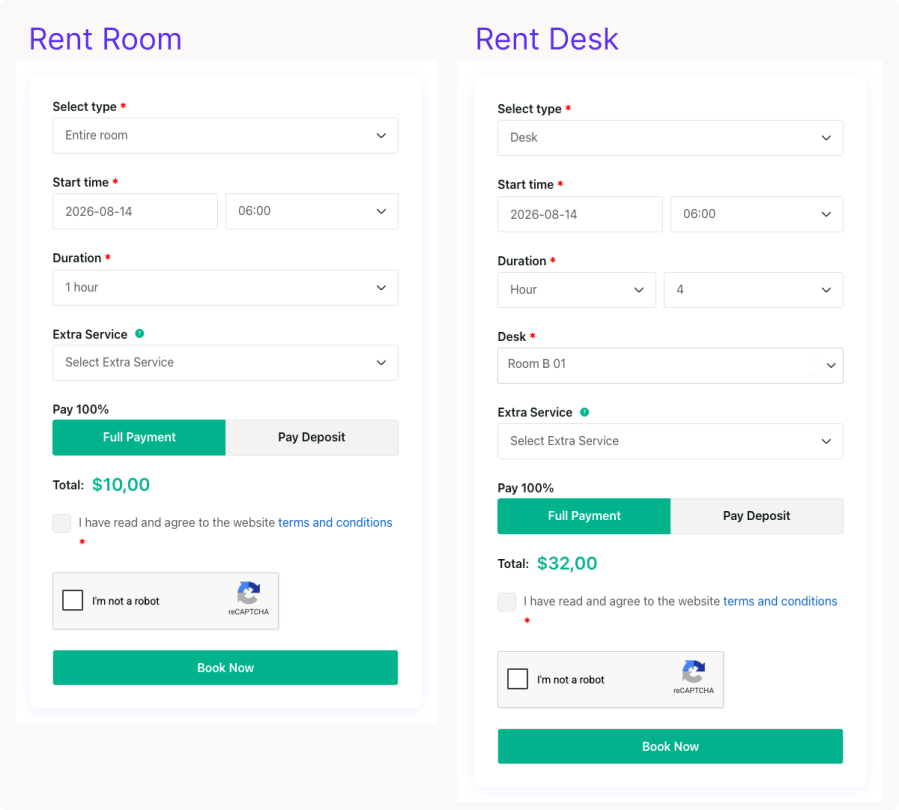
Room or individual desks

6.2. Fixed and flexible durations

Set packages or let customers choose their length, e.g. a 1-month desk membership or flexible hourly meeting rooms.
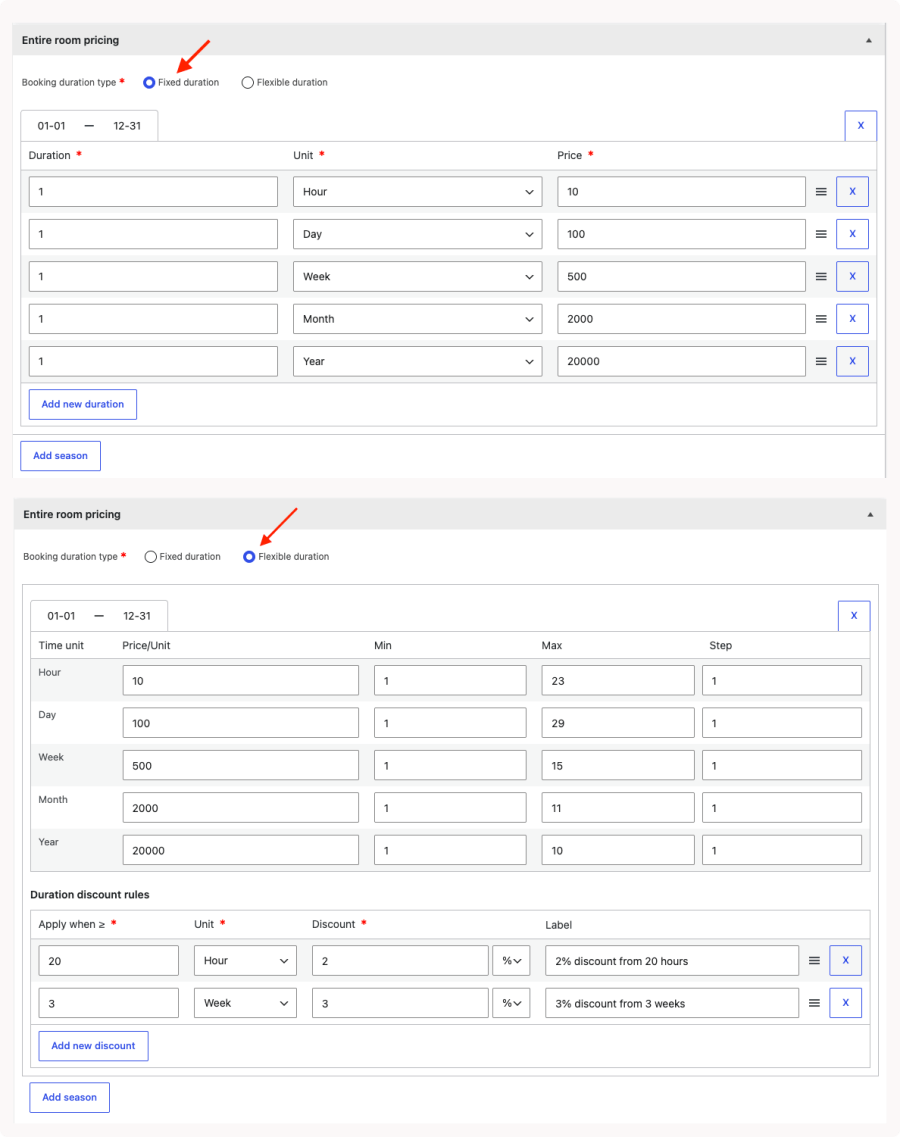
Fixed and flexible durations

6.3. Hourly-to-yearly pricing

Charge by hour, day, week, month, or year, with seasonal rates and discounts for longer bookings.
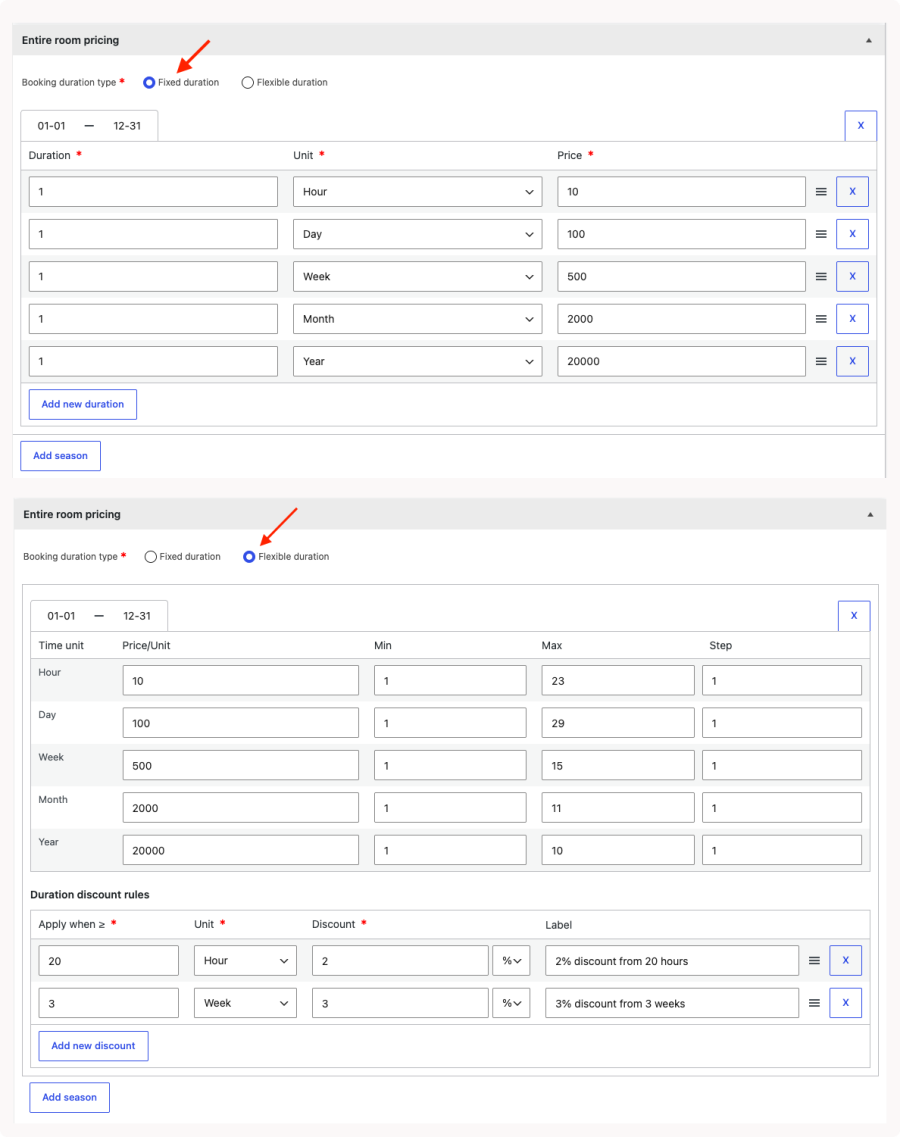
Hourly-to-yearly pricing

6.4. Real-time availability with soft-lock

Spaces are held at add-to-cart and released automatically if payment stalls.
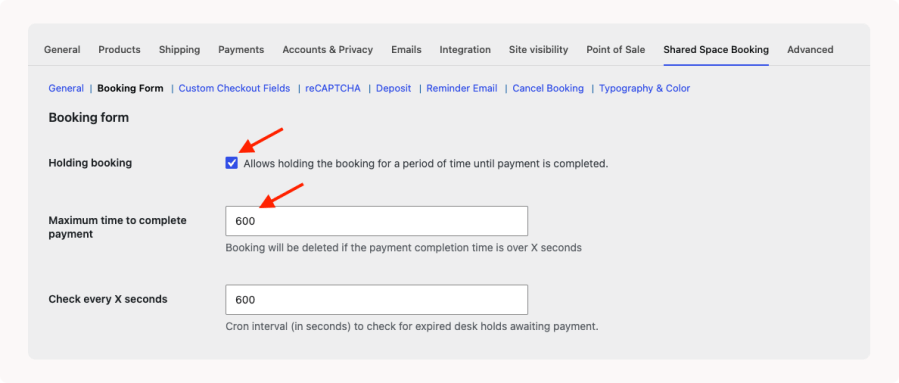
Real-time availability with soft-lock

6.5. Deposits and automatic balance

Take a deposit now and invoice the rest before check-in.
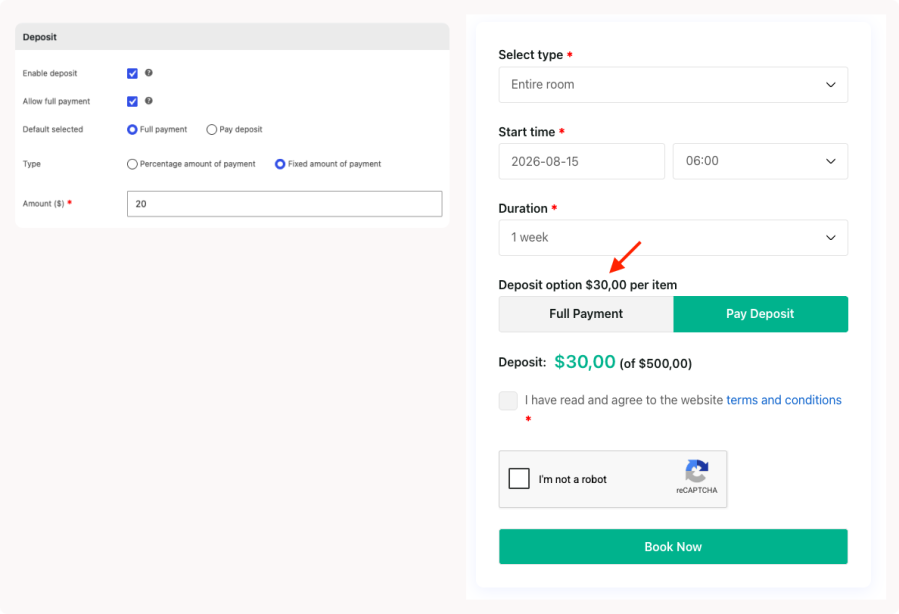
Deposits and automatic balance

6.6. Custom checkout fields

Add text, select, radio, checkbox, or file-upload fields to the booking form.
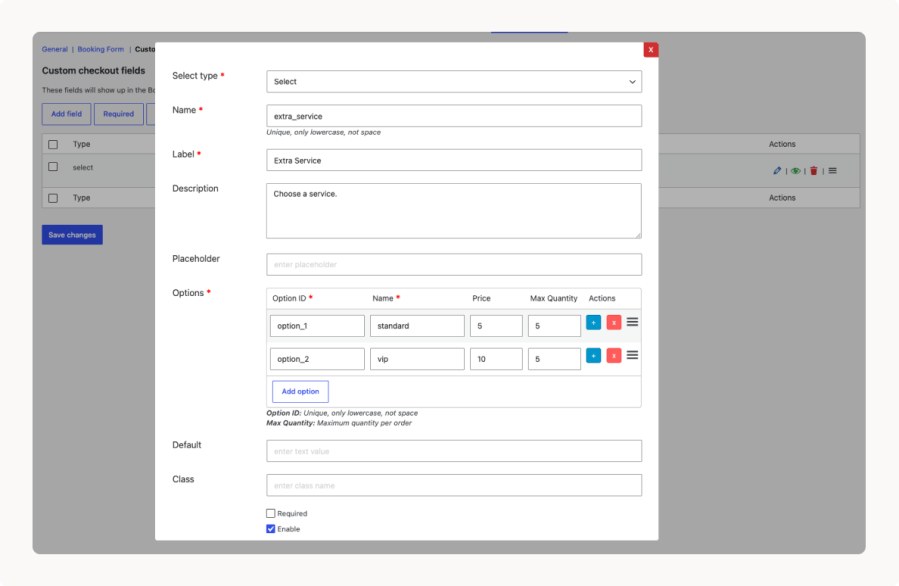
Custom checkout fields

6.7. Reminders and cancellation

Automatic reminder emails and self-service cancellation within your rules.
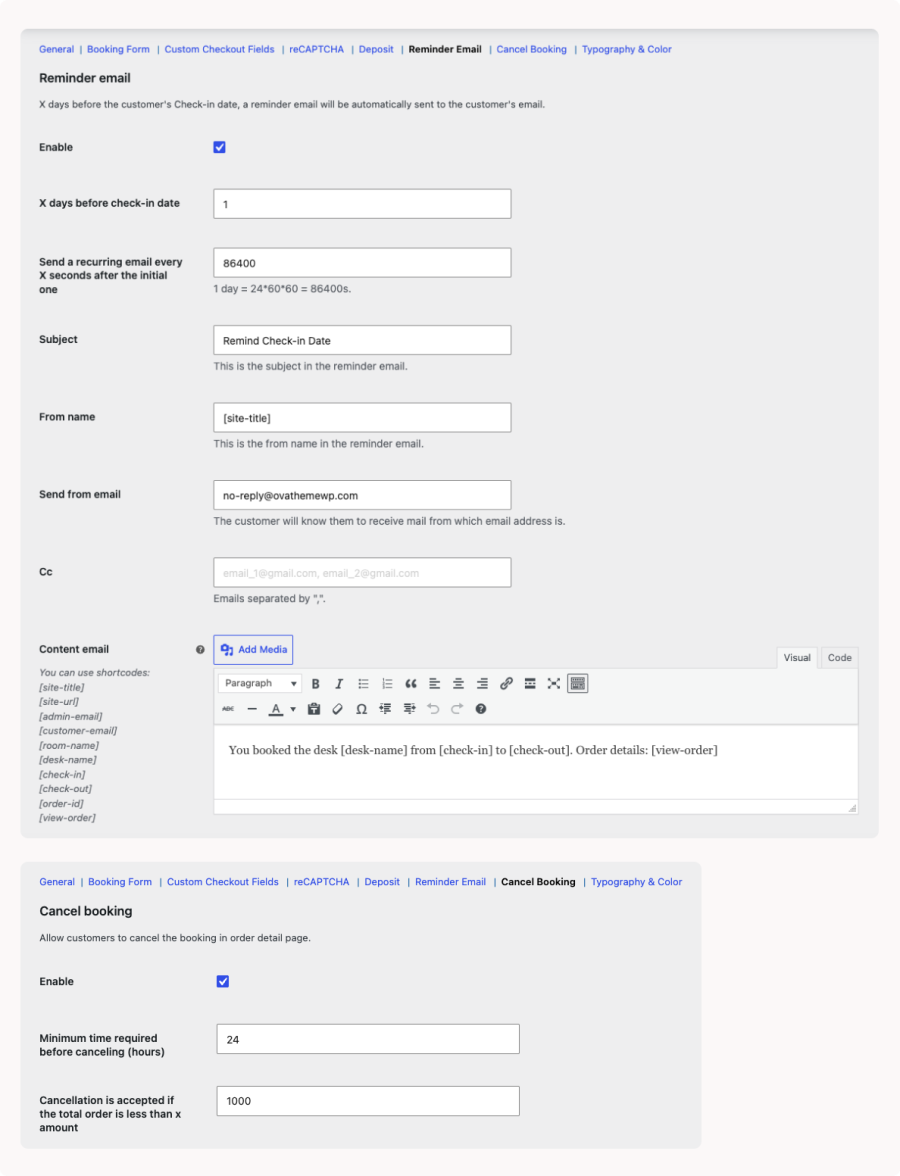
Reminders and cancellation

6.8. Booking rules

Opening hours, minimum notice, maximum advance days, and closed weekdays.
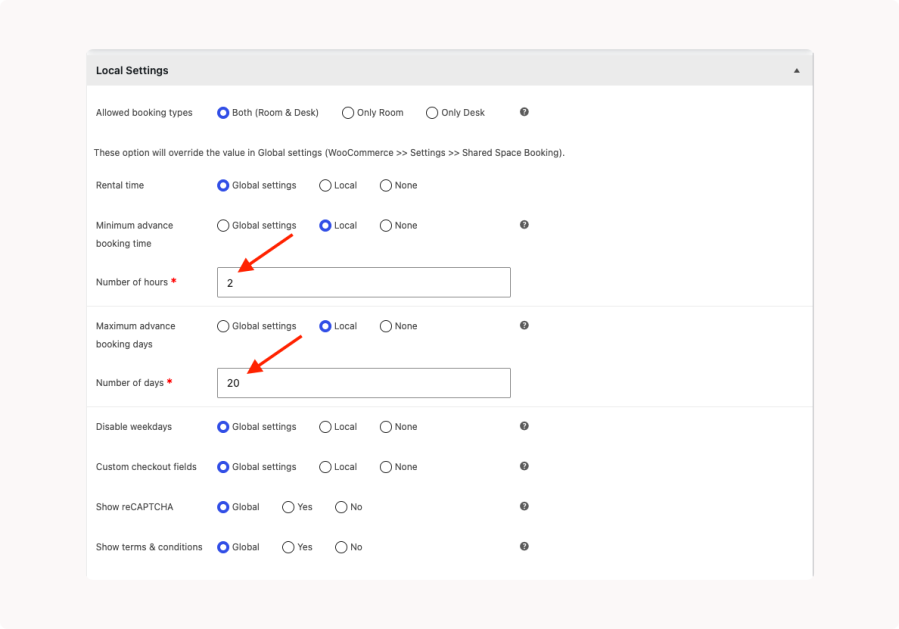
Booking rules

6.9. Admin calendar and manual bookings

A staff calendar filtered by desk, with manual booking for phone or walk-in guests.

This slideshow requires JavaScript.

6.10. reCAPTCHA and modern checkout

Google reCAPTCHA v2/v3, plus Cart and Checkout Blocks with Apple Pay and Google Pay.
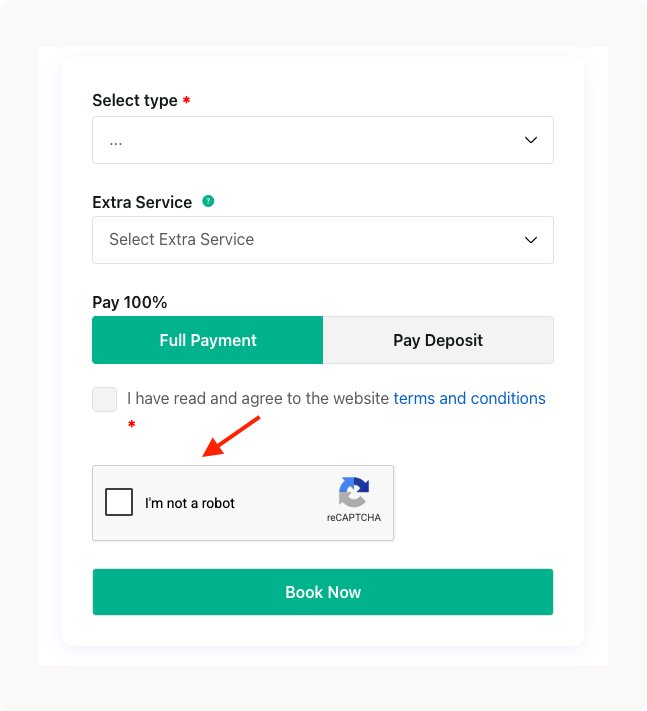
reCAPTCHA and modern checkout

6.11. Typography and color customizer

Match the form, calendar, and buttons to your brand without code.
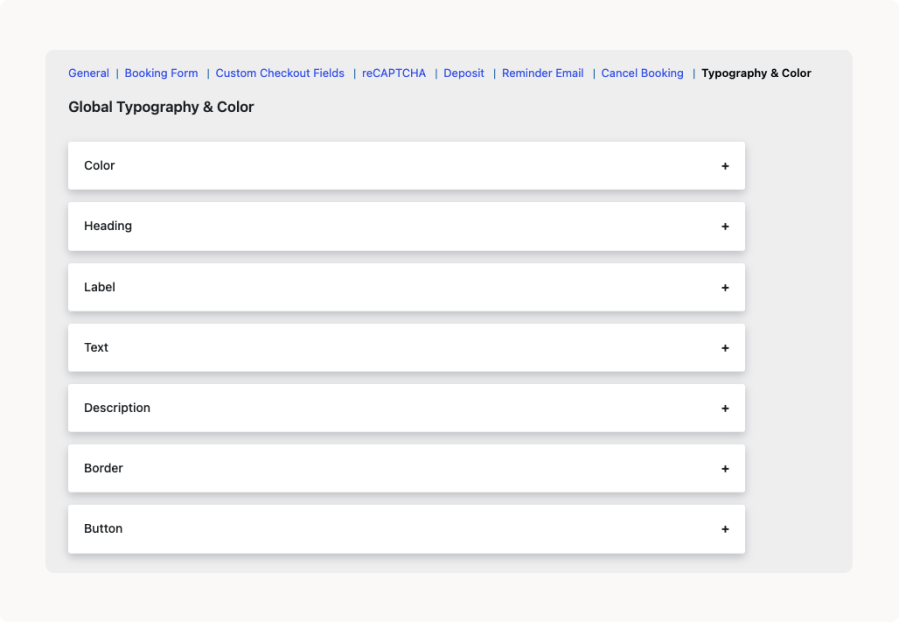
Typography and color customizer

7. Use Cases

  • Coworking hub — private rooms by the day and hot desks by the hour and month, with discounted memberships.
  • Meeting room — hourly slots, 2-hour minimum notice, deposit to confirm, reminder the day before.
  • Photography studio — hourly and daily rental, weekend surcharge, 30% deposit, signed-agreement upload.
  • Serviced office — yearly and monthly dedicated desks alongside pay-as-you-go seats.
  • Event venue — full private hire, closed weekdays, cancellation up to 48 hours ahead.

8. Why Choose Shared Space Booking?

  • Native WooCommerce, not a bolt-on. Works with your theme, gateways, taxes, and Cart/Checkout Blocks.
  • No commissions, no lock-in. You own your bookings, payments, and data.
  • Built for real complexity. Room-or-desk booking, flexible pricing, deposits, and double-booking protection.
  • Actively maintained. Regular releases, translation-ready, marketplace support.

9. Create a Sandbox

Want to try Shared Space Booking before you buy? Create your own sandbox site and explore the full plugin — set up spaces, configure pricing, and take a test booking from both the customer and admin sides.

Create a sandbox


Frequently asked questions

What kinds of businesses is Shared Space Booking for?

It's designed for coworking spaces, hot-desk offices, studios, and meeting or event venues — any business that rents the same physical space to different people over time.

Can customers book an entire room and a single desk from the same site?

Yes. For each space you decide whether it can be booked as a whole room, as individual desks, or both, and customers choose the option that fits them.

How does the plugin prevent two people from booking the same space?

Availability updates in real time, and a soft-lock reserves the space while a customer is completing payment. If payment isn't finished within the time you set, the hold is released automatically so the space becomes available again.

What pricing options are supported?

You can charge by the hour, day, week, month, or year, and add seasonal rates and discounts based on how long a customer books.

Can I take a deposit instead of the full amount?

Yes. You can collect a deposit at checkout and have the remaining balance invoiced automatically a set number of days before the booking begins.

Does it work with my existing WooCommerce setup?

Each space is a native WooCommerce product, so it uses your existing theme, payment gateways, taxes, and the WooCommerce Cart and Checkout Blocks, including Apple Pay and Google Pay where available.

Can customers cancel their own bookings?

Yes, when you enable it. You can require a minimum amount of notice before check-in and set conditions for when a cancellation is accepted.

Is it available in languages other than English?

The plugin is translation-ready and includes a translation template, so it can be localized for your store.

Where can I get help?

Support is available through the WooCommerce Marketplace once you purchase, and documentation is provided for setup and configuration.

Use of your personal data
We and our partners process your personal data (such as browsing data, IP Addresses, cookie information, and other unique identifiers) based on your consent and/or our legitimate interest to optimize our website, marketing activities, and your user experience.




