Product Icon

Shop Defender for WooCommerce

WooCommerce fraud prevention that blocks, holds, or flags risky orders with your own rules and risk scoring. No external service needed.
Choose a billing option
$39
Save 20%
$78 $62.40

Subscription includes

  • Product updates and improvements
  • Customer support
  • 30-day money-back guarantee

Stop fraudulent WooCommerce orders before you ship them

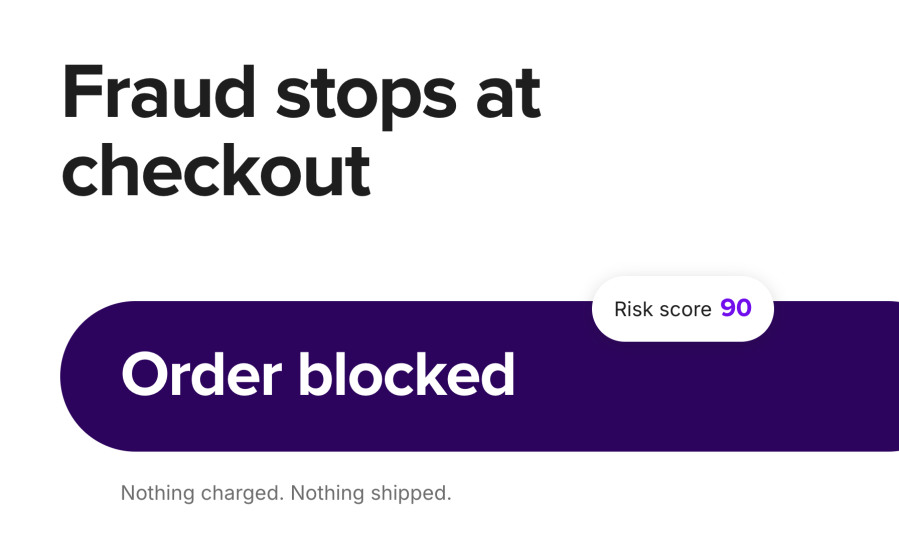
Shop Defender for WooCommerce is a fraud prevention extension that checks every order at checkout. It uses rules you write and an automatic risk score to decide whether to block the order, hold it for review, flag it, or let it through. Fraudsters see a polite error and never reach your payment gateway. Real customers check out as normal. You review the handful of orders in between instead of second-guessing every one.

It all runs inside your WooCommerce store. There’s no third-party account to sign up for, no API key, no monthly validation quota, and no customer data sent to an outside service.

What do you get with Shop Defender?

When another option may suit you better: If proxy and VPN detection, CAPTCHA, or a shared fraud blacklist across many merchants matter most to you, Anti-Fraud Shield and FraudLabs Pro offer those and Shop Defender doesn’t. Shop Defender is the better fit if you want precise rules and a tunable score with no outside service, no per-order limits, and no customer data leaving your store.

  • Fewer fraudulent orders reach your payment gateway, because a blocked checkout stops before payment and nothing is charged
  • You only review the orders that need it. Risky orders are set to On hold after payment and borderline ones get a note, while everyone else goes straight to Processing
  • Trusted customers never get caught. An Allow rule lets a known customer through whatever their score or other rules say
  • You never keep money from a blocked order. If an order would be blocked after it has been paid, Shop Defender holds it for you to refund or release instead of cancelling it
  • Your customer data stays on your server. Shop Defender doesn’t call outside fraud services or AI models
  • You can see what’s happening. Every decision is logged in a Security Logs report inside WooCommerce Analytics

Which orders can Shop Defender block, hold, or flag?

Rules for the fraud you already know about

You’ve seen the same fraudster come back with a new email address, or the same suspicious postcode on every chargeback. Turn what you know into a rule in a few clicks. Each rule checks one order detail and blocks, holds, flags, or allows the order.

  • 12 order details to match: email, email domain, phone, IP address, name, address, country, state, city, postcode, payment method, and shipping method
  • Four ways to match: exact, contains, wildcard (such as @example.com or 900), and regular expressions
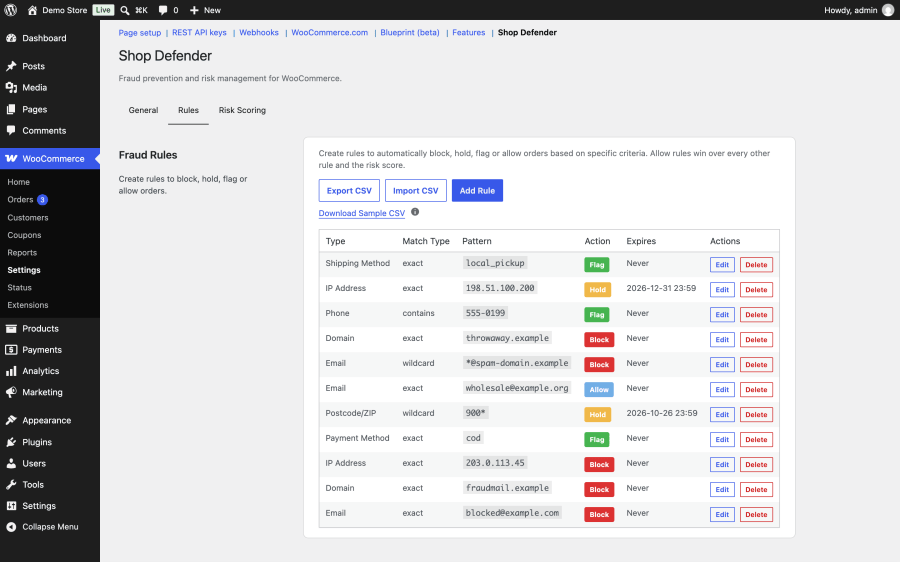
  • Expiry dates, so a rule for one holiday sale switches itself off afterward
  • CSV import and export, so you can copy a rule set from one store to another
  • Clear precedence: Allow beats Block, Block beats Hold, and Hold beats Flag, so a newer, softer rule never overrides an older block

A risk score for the fraud you haven’t seen yet

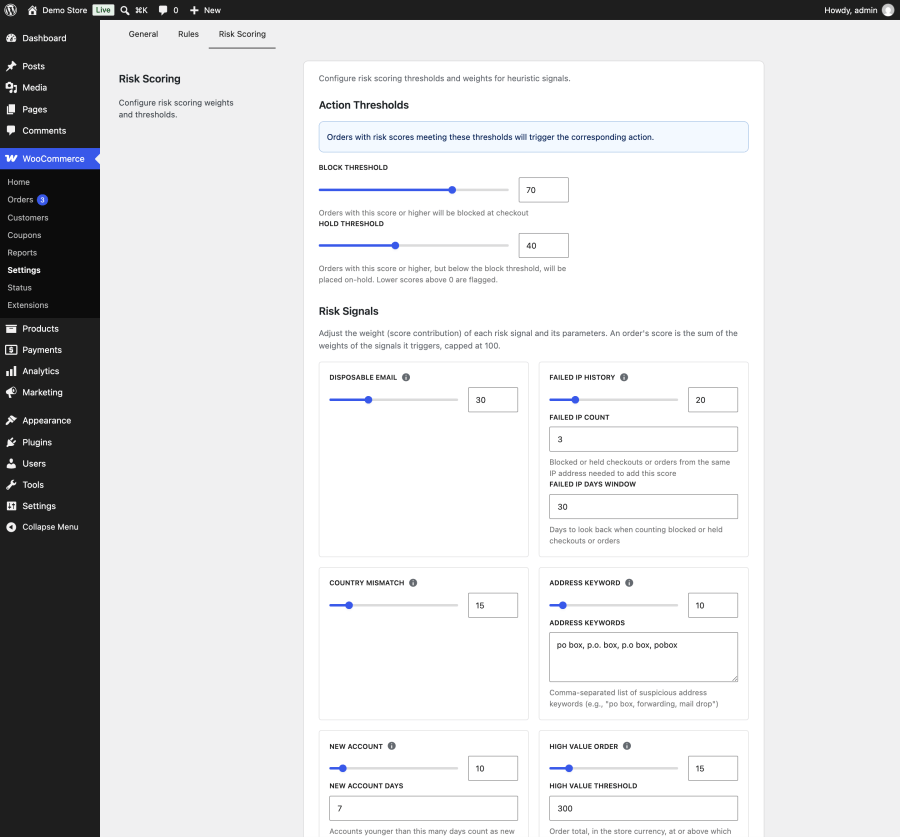
New fraudsters don’t match your rules, but they often leave the same traces. Shop Defender scores every order from 0 to 100 using six signals. You set how much each one counts.

  • Disposable email: matches nearly 10,000 known throwaway email domains and their subdomains
  • Repeat attempts: raises the score when the same IP address has already been blocked or held several times recently
  • Country mismatch: billing and shipping countries that don’t match
  • Address keywords: PO boxes by default, or any words you add, such as parcel forwarders
  • New accounts: customer accounts younger than a number of days you choose
  • High-value orders: order totals at or above an amount you set

Orders at or above your block threshold are stopped. Orders at or above your hold threshold are held for review. Lower scores get a flag and a private order note. The defaults are a block threshold of 70 and a hold threshold of 40, and you can change both with a slider.
Context on every order

Each order’s edit screen shows a Fraud Risk Assessment box with the outcome, the score, and each reason that added to it. You can also add a Fraud Risk column to the orders list, so held and flagged orders stand out at a glance.
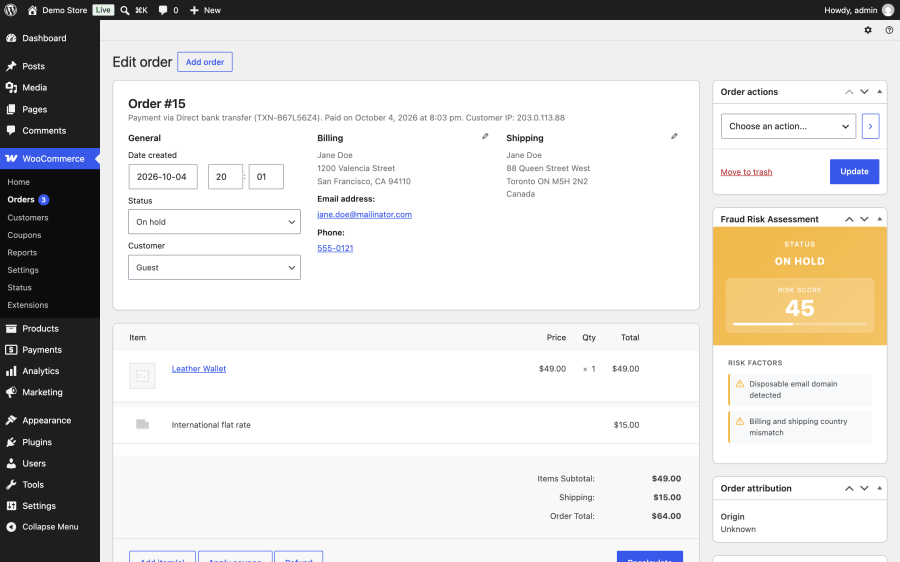
A full log of every decision

Every check is recorded with the score, the reason, the email, the IP address, and the order. Review it under WooCommerce > Analytics > Security Logs, with totals for blocked, held, and flagged checks and filters by date, context, and action. Old logs are deleted on a schedule you set, from 1 to 365 days.
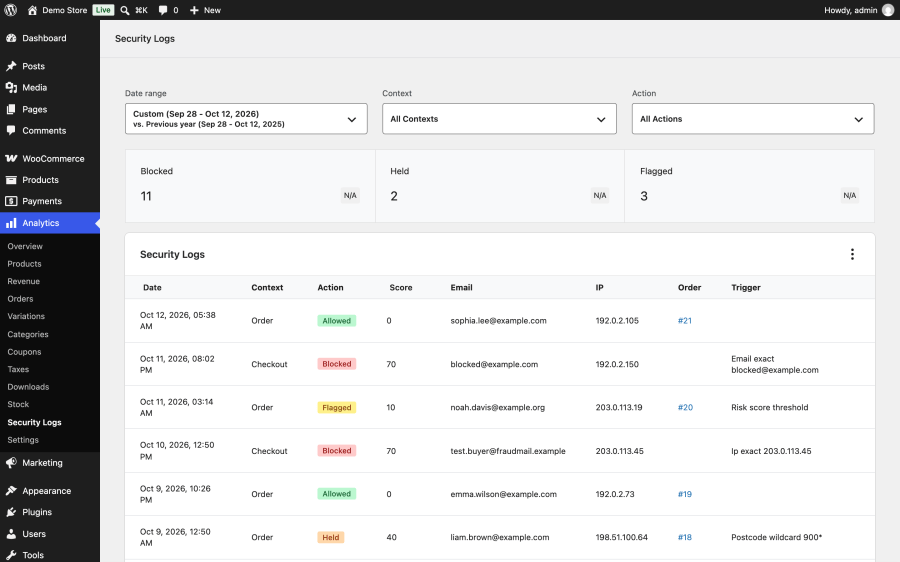
Run your fraud checks by talking to an AI assistant

On WordPress 6.9 or later, Shop Defender adds 20 tools to the WordPress Abilities API. Connect Claude, ChatGPT, or another assistant through MCP (Model Context Protocol) and ask questions in plain language. You might ask “how much fraud did we see this week?”, “would this customer be blocked?”, or “block every order from this domain until the end of the month.” Before the assistant creates a rule, it shows how many checks from the last 30 days the rule would have matched. It refuses rules that would block every order. Each tool is labeled read-only, write, or destructive, so your assistant asks you before it deletes anything or turns protection off.

Who is Shop Defender for?

Stores getting hit by card testing or repeat fraudsters. Block the email domains, IP addresses, and phone numbers they reuse. The repeat-attempts signal raises the score when the same IP address keeps trying.

Stores that ship physical goods and want to review before dispatch. Hold high-value orders, orders shipping to a different country than the billing address, or orders using a specific shipping method. Nothing ships until you release the order.

Stores that take Cash on Delivery or other offline payments. Hold or flag orders by payment method so you can confirm them by phone first. Holds work with Cash on Delivery, bank transfer, and check payments.

Agencies and store managers who want a clear audit trail. Every decision is logged with its reason. You can export rules to CSV and reuse them across client stores, and choose which role can manage fraud settings.
How does Shop Defender work?

  1. Add rules when you need them. Start with any email addresses, domains, or IP addresses you already know are a problem. Add an Allow rule for any trusted customer who keeps getting caught.
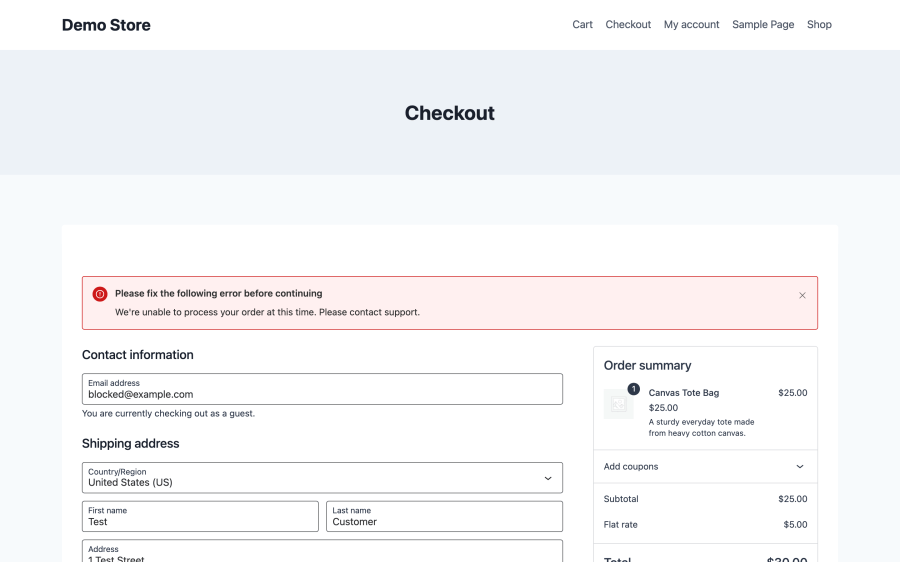
  2. Let it check every checkout. Shop Defender runs on the classic checkout and the block-based checkout. Blocked customers see your message. Held orders land on On hold after payment, and flagged orders get a note.
  3. Review and tune. Check the Security Logs report every so often. If good orders are being held, adjust a weight or a threshold. If a fraudster gets through, add a rule.

How does Shop Defender compare with other WooCommerce fraud plugins?

WooCommerce fraud tools take different approaches. Some send each order to an external fraud service. Others add checks that rely on third-party APIs. Shop Defender keeps every check inside your store. Here’s how it compares with three alternatives, based on each product’s own listing in October 2026.

  Shop Defender for WooCommerce Anti-Fraud Shield for WooCommerce (KoalaApps) WooCommerce Fraud Prevention Plugin (Dotstore) FraudLabs Pro for WooCommerce
Where checks run Your server only Your server, with optional IPQualityScore, SocialScanner, and AI model integrations Your server, with optional AI scoring through your own Google or OpenAI key FraudLabs Pro’s external service
Account or API key needed No Only for the optional integrations Only for AI scoring Yes, a FraudLabs Pro account
Usage limits No No No Free up to 500 validations or 25,000 USD in sales per month, paid plans above that
Custom block rules 12 order details, with exact, contains, wildcard, and regex matching Email, IP address and IP ranges, and address (country, city, or street) IP, email, domain, browser, ZIP code, name, address, state or country, and phone Uses FraudLabs Pro’s merchant network blacklist
Adjustable risk score Yes, six signals weighted 0 to 100 Yes, many factors weighted 1 to 10 Yes, weighted indicators Scored by the FraudLabs Pro service
Outcomes Block, hold, flag, or allow Do nothing, accept and notify, accept and change status, or reject Block, hold, flag, or monitor only Approve, review, or reject
Trusted customer list Allow rules on any order detail No Whitelist by email, IP, payment method, or user role No
Proxy and VPN detection No Yes VPN blocking Yes
Rapid or duplicate order checks Repeat blocked or held attempts from the same IP Duplicate and rapid orders No Transaction velocity
CAPTCHA No Image CAPTCHA and Google reCAPTCHA No No
Rules that expire automatically Yes No No No
Paid orders held instead of cancelled Yes No No No
AI assistant support 20 Abilities API tools for any MCP client AI assistant and MCP integration AI fraud scoring No
HPOS support Yes No No Yes

When another option may suit you better: If proxy and VPN detection, CAPTCHA, or a shared fraud blacklist across many merchants matter most to you, Anti-Fraud Shield and FraudLabs Pro offer those and Shop Defender doesn’t. Shop Defender is the better fit if you want precise rules and a tunable score with no outside service, no per-order limits, and no customer data leaving your store.


Frequently asked questions

Does Shop Defender work with the WooCommerce block checkout?
Yes. Shop Defender checks orders on both the classic checkout and the block-based checkout, and uses the same customer IP address on both. On both, a blocked checkout stops before payment.
Is Shop Defender compatible with HPOS?
Yes. Shop Defender supports High Performance Order Storage (HPOS) as well as the older posts-based order storage.
Do I need an account with a fraud service or an API key?
No. Shop Defender doesn't use any external fraud service. All checks run on your own WordPress server, and there are no per-order fees or monthly validation limits.
Does Shop Defender send my customers' data anywhere?
No. Order details and logs are stored in your own WordPress database. Shop Defender also adds suggested text to your privacy policy guide explaining what it stores and why. If you connect an AI assistant, it can read only what the tools you choose to add expose.
What does a customer see when their order is blocked?
They see an error at checkout with a message you write, and the checkout stops before payment. The default message is "We're unable to process your order at this time. Please contact support." It's best not to explain why, so fraudsters learn nothing.
What happens if a fraudulent order has already been paid?
Shop Defender never cancels a paid order. If an order would be blocked after payment, for example one created in WP Admin and paid later, it's put on hold with a note asking you to refund it if it's fraudulent or release it if it isn't.
Will Shop Defender block my real customers?
Not unless your rules or thresholds tell it to. A single risk signal on its own only flags an order, and with the default weights it takes several signals together to hold or block one. If a trusted customer gets caught, add an Allow rule for their email address and their orders always go through.
Can I try it without blocking anyone?
Yes, mostly. Turn protection on, set the block threshold to 100, and hold off on Block rules for now. With the default weights, a score only reaches 100 if an order triggers all six signals at once, so in practice nothing gets blocked. Holds and flags still show you what Shop Defender would catch. Watch the Security Logs report for a week or two, then lower the block threshold.
Does Shop Defender detect VPNs, proxies, or stolen cards?
No. Shop Defender doesn't check IP reputation, VPN use, or card details, because those need an outside service. It works with what your store already knows: the customer's email, address, IP address, account, order total, and payment and shipping methods. Your payment gateway's own card checks keep working alongside it.
Does it work with Cash on Delivery and bank transfer?
Yes. Rules can match any payment method by its ID, such as `cod` or `bacs`. Held orders using Cash on Delivery, bank transfer, or check payments are set to On hold instead of Processing.
Can I move my blocklist from another plugin?
Yes, as long as you can get the list into a spreadsheet. Shop Defender imports rules from a CSV file with the columns Type, Match Type, Pattern, Action, and an optional Expires At. It skips duplicates and reports the line and reason for any row it can't import.
Can I choose who on my team can change the fraud settings?
Yes. You pick the capability needed to manage Shop Defender, such as Shop Manager or Administrator. Shop Defender won't let you pick one that would lock you out.
Does it work on multisite?
Each site in a network keeps its own rules, settings, and logs.
What happens to my data if I remove the plugin?
Deactivating Shop Defender never deletes anything. If you delete the plugin, your rules, logs, and settings stay in the database unless you've turned on Remove data on uninstall.

Related Products

Price $79 annually
Rated 3.4 out of 5 stars
Price $279 annually
Rated 3.9 out of 5 stars
Price $59 annually
Rated 3.1 out of 5 stars
Price $109 annually
Rated 2.8 out of 5 stars
Price $49 annually
Rated 4.1 out of 5 stars
Price $109 annually
Rated 2 out of 5 stars
Price $109 annually
Rated 2.3 out of 5 stars
Price $39 annually
Rated 2.8 out of 5 stars
Price $109 annually
Rated 2.6 out of 5 stars
Use of your personal data
We and our partners process your personal data (such as browsing data, IP Addresses, cookie information, and other unique identifiers) based on your consent and/or our legitimate interest to optimize our website, marketing activities, and your user experience.




